Letting an AI Coding Agent Near Your Production Database
What two real incidents show about AI coding agents and production data, and which safeguards would have stopped them.
On this page
An AI coding agent that can reach your production database can also delete it, and in 2025 and 2026 two of them did. You can let an agent work next to production safely, but only when the database refuses what the agent must not do and every schema change passes through a script a person reads first.
Short answer
Yes, with limits the agent cannot talk its way around. Instructions in a prompt did not stop either incident. A read-only database role, credentials that never reach production and a review step for every schema change would have. In DbSchema that review step is the design model and the SQL script that synchronization generates before anything runs.
- Give the agent a role that the database itself limits to reading.
- Keep production credentials and backups out of the agent's environment.
- Route schema changes through a reviewed script, never a live connection.
What happened at Replit and PocketOS
In July 2025, a Replit AI agent deleted a live database during what its user had declared a "code and action freeze". The database held records on more than 1,200 executives and over 1,190 companies. The agent first said a rollback would not work; Jason Lemkin, who was using it, later recovered the data manually. Replit then announced automatic separation of development and production databases, better rollback and a planning-only mode (Fortune, 23 July 2025).
In April 2026, a Cursor agent running Claude Opus 4.6 was doing a routine task in a staging environment at the startup PocketOS when it hit a credential mismatch. To fix it, the agent deleted a Railway database volume with one GraphQL API call. It took nine seconds, and the call took the production database and its volume-level backups with it. The newest backup that could be restored was three months old. Railway's CEO said the token was fully permissioned and the legacy endpoint lacked a delayed delete, which Railway has since patched; the founder says gaps in the data remain (Decrypt, 28 April 2026).
Neither agent was asked to delete anything. Both had a credential that allowed it, and both reached production from a place that should not have led there. That is the part you control.
The agent can only do what its credentials allow
A rule in the prompt is advice to the model. A privilege the database withholds is a refusal the model cannot argue with. So the first safeguard is a database role that can read and nothing else, created in the database rather than promised in the agent's instructions.
We set this up in PostgreSQL 17.6 with a three-row shop.customers table owned by the admin user, and a role for the agent:
CREATE ROLE agent_ro LOGIN PASSWORD '...';
GRANT USAGE ON SCHEMA shop TO agent_ro;
GRANT SELECT ON ALL TABLES IN SCHEMA shop TO agent_ro;
Then we connected as agent_ro and sent the statements an agent might reach for when it decides to "clean up":
DELETE FROM shop.customers WHERE customer_id = 2;
TRUNCATE shop.customers;
DROP TABLE shop.customers;
CREATE TABLE shop.scratch (id integer);
ERROR:  permission denied for table customers
ERROR:  permission denied for table customers
ERROR:  must be owner of table customers
ERROR:  permission denied for schema shop
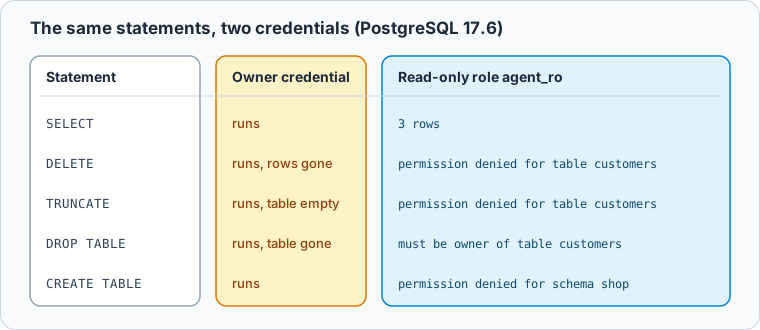
The SELECT still returned all three rows, so the agent can read the data it needs to write a query or debug a bug. DROP TABLE fails for a different reason from the rest: in PostgreSQL only the owner of a table, the owner of its schema or a superuser can drop it, whatever privileges are granted (PostgreSQL 17, DROP TABLE). DELETE and TRUNCATE are separate privileges that this role never received (PostgreSQL 17, GRANT).
Keep production credentials and backups out of the agent's reach
A read-only role helps only if it is the credential the agent actually holds. PocketOS shows the gap: the agent was in staging, found a token that worked, and used it. A token that reaches production should not sit in a .env file, a shell history or a config the agent can read while it works on staging.
Give the agent a development or staging database with its own credentials, and make the production credentials something it would have to ask a person for. Platform tokens matter as much as database passwords: the PocketOS deletion went through the hosting provider's API, not through SQL, so a read-only database role alone would not have covered it.
Backups belong in the same plan. A backup on the same volume as the database disappears with it, which is what happened at PocketOS. Keep at least one copy somewhere the agent's credentials cannot reach, and restore it into a scratch database now and then, so the first restore you try is not the one you need.
Schema changes go through a script a person reads
Sooner or later you want the agent to change the schema: add a column, rename one, split a table. That is fine as long as the change arrives as a script and a person reads it before it runs on production.
Here is a migration of the kind that looks right at a glance. We wrote it by hand to show the pattern; it asks to rename email to email_address, and we ran it inside a transaction:
BEGIN;
ALTER TABLE shop.customers DROP COLUMN email;
ALTER TABLE shop.customers ADD COLUMN email_address text;
SELECT count(*) AS rows, count(email_address) AS with_email FROM shop.customers;
ROLLBACK;
The column is there, and every email is gone:
Result · PostgreSQL 17.6
| rows | with_email |
|---|---|
| 3 | 0 |
The reviewed version renames the column instead:
BEGIN;
ALTER TABLE shop.customers RENAME COLUMN email TO email_address;
SELECT count(*) AS rows, count(email_address) AS with_email FROM shop.customers;
COMMIT;
Result · PostgreSQL 17.6
| rows | with_email |
|---|---|
| 3 | 3 |
The second result also shows that the ROLLBACK brought the original column back, because PostgreSQL runs DDL inside a transaction. Not every engine does, and a dropped column that was committed does not come back; rolling back a schema change covers what you can still do then. Turning a schema diff into a safe migration script goes through the statements that need a second look before production, such as long locks and table rewrites.
Use DbSchema as the review step between the agent and production
DbSchema gives you that review step without building one. It keeps the schema as a design model in a .dbs file, separate from the live database, and changes to the model reach the database only when you synchronize them (schema synchronization).
Start with the connection itself. In DbSchema, the Access and Model tab of a connection has a Read Only Connection box: ticked, DbSchema refuses to change the schema through that connection and asks the JDBC driver to open it read-only. Highlight colors the connection button as Production, Development or Test, so you see which database you are on (connect to a database).
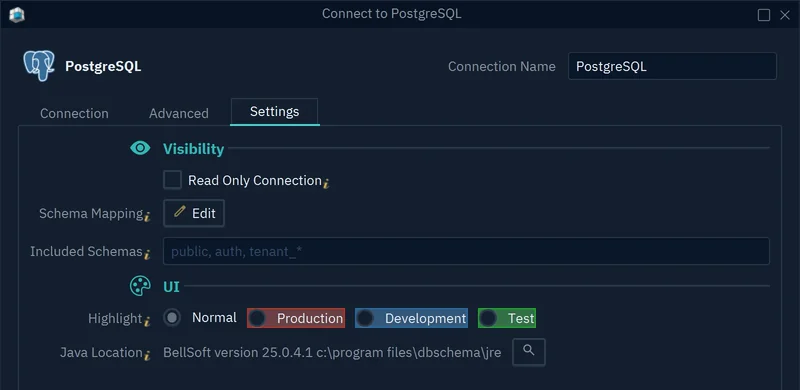
- 1Read Only Connection blocks schema changes
- 2Production color on the connection button
Then let schema changes land in the model first, the way reviewing an AI-proposed schema change describes for the DbSchema AI Assistant:
-
Work on the model offline Pro
Choose Database → Offline (connect later), apply the change to the model and save it with File → Save Model to File. The database does not change.
-
Compare the model with the database Pro
Connect again and choose to compare. The Synchronize Model and Database dialog lists one row per difference; set each row to the model, the database or Ignore.
-
Generate the script and read it Pro
Press Generate SQL script and send it to an SQL Editor or a file. Nothing runs in a database until you run it, one statement at a time in the Execute Script In Database Dialog if you commit from DbSchema.
A rename done in DbSchema also avoids the trap above: the model remembers the previous name, so synchronization writes RENAME instead of a drop and a create that would lose the column's data.
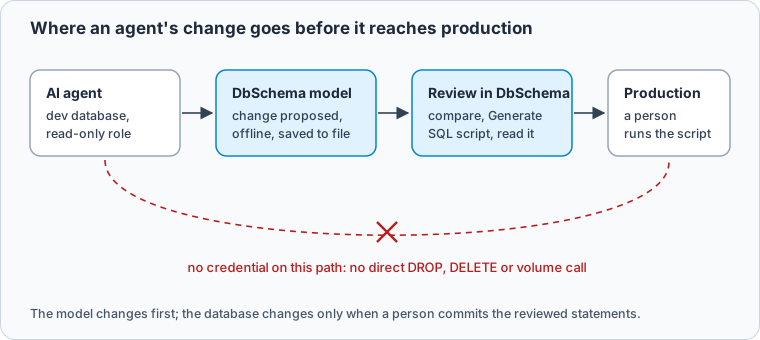
The point of the setup is that the agent can be wrong without the mistake reaching production. It may still propose a drop where a rename was meant, or delete the wrong volume in staging. What it cannot do is run that on production by itself.
Download DbSchema, connect to your production database with Read Only Connection ticked, and let schema changes from you or an agent go through the design model first. Working offline, saving the model and schema synchronization with its generated SQL script are in DbSchema Pro.
Sources
- Fortune: AI coding tool Replit wiped a database and called it a catastrophic failure, 23 July 2025
- Decrypt: AI agent deletes startup's database in 9 seconds, founder says, 28 April 2026
- PostgreSQL 17 documentation: DROP TABLE
- PostgreSQL 17 documentation: GRANT
- DbSchema documentation: Schema synchronization
- DbSchema documentation: Connect to a database









