Why AI Projects Need a Documented Database
What a model needs to know about your tables before its answers can be trusted, and where that knowledge should live.
On this page
A team connects an AI model to the billing database, asks how much customers still owe, and gets a number back in seconds. Whether the number is right depends less on the model than on the database: a column called amt_2 or a status of 9 means nothing to a model unless someone wrote down what it means.
Short answer
AI projects need a documented database because a model only knows what the schema tells it. Table and column comments, declared relationships and one current version of the schema turn guesses into answers. In DbSchema that documentation lives in the model, is written to the database, travels with every question to the AI Assistant and is exported as HTML5 documentation for people.
- A model reads names, types, keys and comments, and guesses everything else.
- Missing meaning produces queries that run and return the wrong number.
- Comments and foreign keys kept in one model reach the database, the AI and people alike.
Most AI projects stall on the data, not the model
Gartner predicts that through 2026, organizations will abandon 60% of AI projects that are not supported by AI-ready data. In the same release it reports that 63% of organizations either do not have the right data management practices for AI or are not sure they have them (Gartner). The 60% is a prediction rather than a measurement, but it points at where the work is.
Research on text-to-SQL shows the same thing at the scale of one database. Spider 2.0 tests models on real enterprise databases that often contain over 1,000 columns. An agent based on o1-preview solved 21.3% of its tasks there, against 91.2% on the older Spider 1.0 and 73.0% on BIRD, whose databases are much smaller (Spider 2.0, ICLR 2025). The questions were no harder to phrase. The databases were harder to understand.
A model sees what a new colleague sees on day one: table names, column names, data types and whatever keys are declared. A colleague can ask what sts = 9 means. A model fills the gap with the most likely guess and moves on.
The same question with and without comments
We built a small billing schema in PostgreSQL 17.6 with the kind of names that grow in real systems:
CREATE TABLE billing.acct (
  id      integer PRIMARY KEY,
  nm      text    NOT NULL,
  sts     char(1) NOT NULL,
  tier_cd smallint
);
CREATE TABLE billing.inv (
  id      integer PRIMARY KEY,
  acct_id integer NOT NULL REFERENCES billing.acct(id),
  amt_1   integer NOT NULL,
  amt_2   integer NOT NULL DEFAULT 0,
  iss_dt  date,
  sts     smallint NOT NULL
);
Then we asked a model, three times each in a fresh context, "How much money do our active customers still owe us on issued invoices, in euros?" The first prompt held the CREATE TABLE statements above. The second held the same statements plus six comments:
COMMENT ON TABLE  billing.acct     IS 'Customer accounts';
COMMENT ON COLUMN billing.acct.sts IS 'Account status: A = active, S = suspended, C = closed';
COMMENT ON TABLE  billing.inv       IS 'Invoices sent to customer accounts';
COMMENT ON COLUMN billing.inv.amt_1 IS 'Invoice total including VAT, in euro cents';
COMMENT ON COLUMN billing.inv.amt_2 IS 'Amount paid so far, in euro cents';
COMMENT ON COLUMN billing.inv.sts   IS 'Invoice status: 0 = draft, 1 = issued, 2 = paid, 9 = void';
Without the comments, two of the three answers looked like this, with the model's assumptions written into the query:
-- Assumes: amt_1 = invoice total, amt_2 = amount already paid, amounts in EUR,
-- active accounts have sts = 'A', issued invoices have a non-null iss_dt.
SELECT COALESCE(SUM(i.amt_1 - i.amt_2), 0) AS outstanding_eur
FROM billing.inv AS i
JOIN billing.acct AS a ON a.id = i.acct_id
WHERE a.sts = 'A'
  AND i.iss_dt IS NOT NULL;
Result · PostgreSQL 17.6, no comments
| outstanding_eur |
|---|
| 44500 |
With the comments, all three answers converted cents to euros and filtered on the issued status:
SELECT SUM(i.amt_1 - i.amt_2) / 100.0 AS owed_eur
FROM billing.inv i
JOIN billing.acct a ON a.id = i.acct_id
WHERE a.sts = 'A' AND i.sts = 1;
Result · PostgreSQL 17.6, with comments
| owed_eur |
|---|
| 400.0000000000000000 |
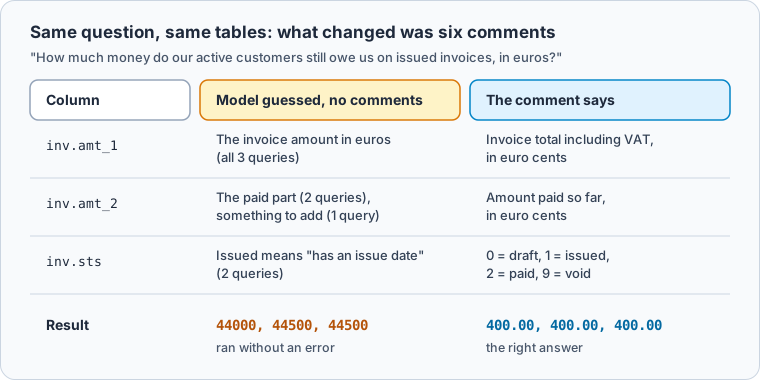
Six runs say nothing about accuracy rates, and a larger schema gives a model more columns to misread. The run shows the mechanism: the model guessed 'A' for active correctly, because that convention is common, and missed the two facts that were particular to this database.
What documentation a model actually uses
A model uses the same things a careful reader of the schema uses.
Comments carry the facts no name can: units, the meaning of codes, what a row stands for and what a column does not include. A good comment answers the question a newcomer would ask, such as "in euro cents" or "9 = void", rather than restating the name.
Foreign keys tell the model which tables belong together and in which direction a join fans out. Many databases lack some of them, because the application enforces the link or the tables came from different systems. A model given those tables sees two unrelated lists.
Names matter too, but renaming columns in a running system is expensive. Comments and declared relationships improve what the model reads without touching a single query that already works.
Vendors who measure this report large effects, and they measure their own products. Collate reports execution accuracy rising from 10.8% to 76.5% on a Spider 2.0 subset when its semantic layer added this context, with Sonnet 4.5 in both setups (Collate). AtScale reported 92.5% against 20% on 40 business questions with and without its semantic layer (AtScale, BusinessWire). Neither result has been replicated independently, so read them as a direction rather than a forecast.
Keep the documentation in DbSchema
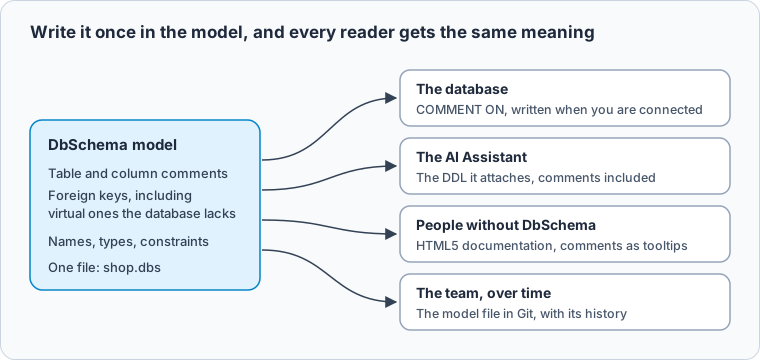
Documentation helps only while it is current and reaches every reader. In DbSchema it is part of the design: you write a comment once on the model, and the same text reaches the database, the AI Assistant and the people who read the schema.
-
Comment the tables and columns Community
Double-click the table header on the diagram and type the description in the Comment tab; each column has its own Comment box (Schema Documentation). When you are connected, DbSchema writes the comment to the database as a
COMMENT ONstatement when you press OK. -
Add the relationships the database lacks Pro
Create a foreign key between the two columns and tick Virtual (Foreign Keys). DbSchema keeps it in the model only and never creates it in the database. Model → Find Virtual Foreign Keys suggests them between columns with matching names.
-
Attach the documented tables to a question Community
Select the tables on the diagram, right-click and choose Attach to AI (AI Assistant). The Ask AI dialog shows the attachment: the
CREATE TABLEstatements with theirCOMMENT ONlines, never the rows. -
Export it for people who do not run DbSchema Pro
Choose File → Export As... → HTML5/PDF Documentation. The HTML5 page shows each comment under its table and as a tooltip when you point at a column on the diagram.
-
Keep the model file in Git Pro
Save the model with File → Save Model to File and commit the
.dbsfile (Git Collaboration). The team shares one design, and the history shows when each comment and relationship changed.
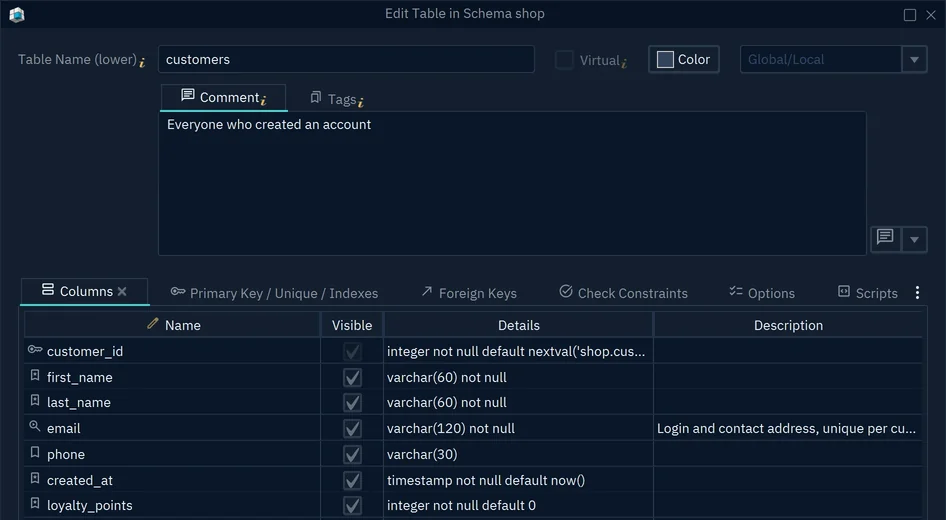
- 1The table comment, written to the database as COMMENT ON TABLE
- 2A column description, written as COMMENT ON COLUMN
The AI Assistant works in every edition with a DbSchema AI credits subscription; DbSchema Pro can use your own OpenAI, Claude or Gemini key, or a local Ollama model, instead. What an AI assistant sees of your database shows exactly what goes out with a question, and interactive database documentation walks through the HTML5 export.
Download DbSchema, connect it to your database, comment the five tables your team asks about most, and attach them to the AI Assistant to compare the answers, in the free Community Edition. Virtual foreign keys, saving the model for Git and HTML5 documentation of any diagram size are in DbSchema Pro.
Sources
- Gartner: Lack of AI-Ready Data Puts AI Projects at Risk (26 February 2025)
- Spider 2.0: Evaluating Language Models on Real-World Enterprise Text-to-SQL Workflows (ICLR 2025)
- Collate: Your text-to-SQL problem is not the LLM
- AtScale semantic layer text-to-SQL results, BusinessWire (8 August 2024)
- DbSchema documentation: Schema Documentation
- DbSchema documentation: Foreign Keys
- DbSchema documentation: AI Assistant
- DbSchema documentation: Git Collaboration









