Cardinality and Many-to-Many Relationships in a Logical Model
What the marks at the end of a relationship line mean, how much of that SQL can enforce, and what a many-to-many relationship turns into.
On this page
Two people read the line between orders and shipments differently: one sees several shipments per order, the other exactly one. Cardinality settles it by stating, on each end of a relationship, the minimum and the maximum number of rows that take part. In a DbSchema Architect logical design you set it on the relationship itself, so the diagram records what was agreed before any DDL exists, and Resolve Many-To-Many turns a many-to-many relationship into the entity between the two, which becomes the junction table in the database.
Short answer
Cardinality is the pair of numbers on each end of a relationship: how many rows must take part, and how many can. The four combinations are Zero or One, One, Zero or More and One or More. In the database, a many-to-many relationship is stored as a junction table that holds one row per related pair.
- Each line end carries a minimum (zero or one) and a maximum (one or many).
- NOT NULL, UNIQUE and a junction table enforce most of it; a minimum of one child needs a trigger.
- A many-to-many relationship becomes a junction table whose primary key is the pair of foreign keys.
Minimum and maximum on every line end
Every end of a relationship answers two questions about the entity at that end. The maximum says whether one row or many rows of it can relate to a single row on the other side. The minimum says whether a row on the other side may have none of them at all. Chen's original paper on the entity-relationship model wrote the maximum as a ratio, 1:N or M:N (Chen, 1976); crow's foot notation draws both numbers as marks at the line end.
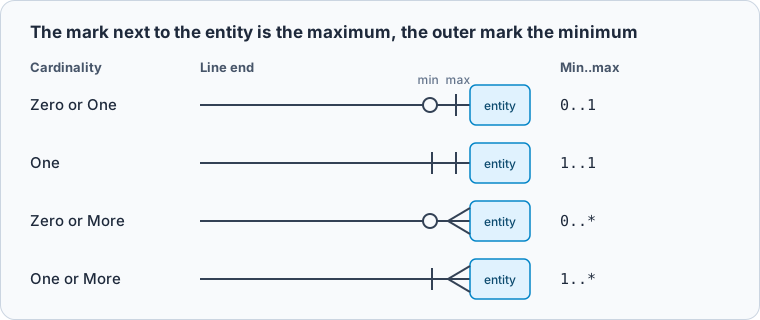
Read each line end on its own. Between orders and shipments, the end at shipments says how many shipments one order has, and the end at orders says how many orders one shipment belongs to. The two ends are independent, so "one-to-many" names only the maximums and leaves both minimums open. Choosing an ER notation your team can read compares crow's foot with Chen, Barker, IDEF1X and UML, and the ER diagram guide covers the remaining symbols.
How each cardinality becomes SQL
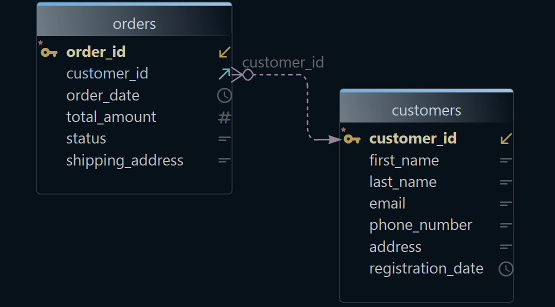
PostgreSQL has no cardinality setting. It enforces a relationship through the columns of the child table, so each part of the cardinality has to be expressed as a constraint there. Two tables are enough to show the first two:
CREATE TABLE customers (
    customer_id integer PRIMARY KEY,
    name        varchar(80) NOT NULL
);

CREATE TABLE orders (
    order_id    integer PRIMARY KEY,
    customer_id integer NOT NULL REFERENCES customers (customer_id),
    ordered_on  date NOT NULL
);

INSERT INTO customers VALUES (1, 'Ada');
INSERT INTO orders VALUES (10, 1, '2026-11-02'), (11, 1, '2026-11-05');
INSERT INTO orders VALUES (12, NULL, '2026-11-06');
INSERT INTO orders VALUES (13, 2, '2026-11-06');
The third insert breaks the minimum on the customers end, and the fourth points at a customer that doesn't exist:
ERROR:  null value in column "customer_id" of relation "orders" violates not-null constraint
DETAIL:  Failing row contains (12, null, 2026-11-06).
ERROR:  insert or update on table "orders" violates foreign key constraint "orders_customer_id_fkey"
DETAIL:  Key (customer_id)=(2) is not present in table "customers".
NOT NULL on the foreign key column makes the parent mandatory; leave it out and an order may exist with no customer. The maximum on the orders end needs nothing: a plain foreign key already lets one customer have any number of orders.
To bring that maximum down to one, put a unique constraint on the foreign key column. Here each order gets at most one shipment:
CREATE TABLE shipments (
    shipment_id integer PRIMARY KEY,
    order_id    integer NOT NULL UNIQUE REFERENCES orders (order_id),
    carrier     varchar(40) NOT NULL
);

INSERT INTO shipments VALUES (100, 10, 'DHL');
INSERT INTO shipments VALUES (101, 10, 'UPS');
ERROR:  duplicate key value violates unique constraint "shipments_order_id_key"
DETAIL:  Key (order_id)=(10) already exists.
| What the model says | What enforces it in PostgreSQL 17 |
|---|---|
| A child must have a parent | NOT NULL on the foreign key column |
| A child may have no parent | the foreign key column accepts NULL |
| Zero or More children | a plain foreign key |
| Zero or One child | UNIQUE on the foreign key column |
| One or More children | no column constraint; a deferred constraint trigger |
| Exactly One child | UNIQUE, plus the same trigger |
| Many to Many | a junction table with a composite primary key |
The PostgreSQL 17 documentation on constraints covers NOT NULL, UNIQUE and foreign keys in detail.
Requiring at least one child row
The rows in the table that need a trigger are the ones whose minimum sits on the child side. A foreign key lives in the child row, so it can require that a child has a parent. It can't require that a parent has children, because a parent row with no children has nothing to check. An identifying relationship shows the gap clearly: an order line can't exist without its order, but an order can still exist without a single line.
CREATE TABLE order_items (
    order_id   integer NOT NULL REFERENCES orders (order_id),
    line_no    integer NOT NULL,
    product    varchar(80) NOT NULL,
    quantity   integer NOT NULL CHECK (quantity > 0),
    PRIMARY KEY (order_id, line_no)
);

INSERT INTO order_items VALUES (10, 1, 'Desk lamp', 2);

SELECT o.order_id
FROM orders o
WHERE NOT EXISTS (SELECT 1 FROM order_items i WHERE i.order_id = o.order_id);
Order 11 has no lines, and nothing stopped it:
Result · PostgreSQL 17.6
| order_id |
|---|
| 11 |
A DbSchema logical design can record this rule as One or More on the relation, but it doesn't create it in the database: the generated physical model keeps only the Not Null that Mandatory and Identifying set, so the "at least one" rule needs the trigger below.
PostgreSQL can enforce the minimum with a constraint trigger. Declared DEFERRABLE INITIALLY DEFERRED, it fires at the end of the transaction instead of at the end of the statement (CREATE TRIGGER), which gives the transaction a chance to insert the order and its first line before the check:
CREATE FUNCTION order_needs_item() RETURNS trigger
LANGUAGE plpgsql AS $$
BEGIN
    IF NOT EXISTS (SELECT 1 FROM order_items WHERE order_id = NEW.order_id) THEN
        RAISE EXCEPTION 'order % has no items', NEW.order_id;
    END IF;
    RETURN NULL;
END;
$$;

CREATE CONSTRAINT TRIGGER order_has_items
AFTER INSERT ON orders
DEFERRABLE INITIALLY DEFERRED
FOR EACH ROW EXECUTE FUNCTION order_needs_item();

BEGIN;
INSERT INTO orders VALUES (14, 1, '2026-11-07');
INSERT INTO order_items VALUES (14, 1, 'Desk lamp', 1);
COMMIT;

BEGIN;
INSERT INTO orders VALUES (15, 1, '2026-11-07');
COMMIT;
Whether that second trigger is worth it depends on how the rows get written. When one service creates orders and lines in a single transaction, the insert trigger covers it; when lines are edited later, add the delete check too.
Resolving a many-to-many relationship into a junction table
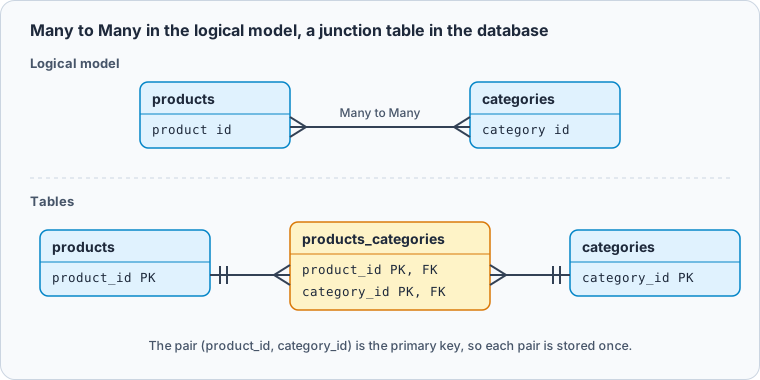
A product can sit in several categories, and a category holds many products. Neither table can hold the other's key, because a single column holds one value. The relationship gets a table of its own, which holds one row per related pair:
CREATE TABLE products (
    product_id integer PRIMARY KEY,
    name       varchar(80) NOT NULL
);

CREATE TABLE categories (
    category_id integer PRIMARY KEY,
    name        varchar(40) NOT NULL
);

CREATE TABLE products_categories (
    product_id  integer NOT NULL REFERENCES products (product_id),
    category_id integer NOT NULL REFERENCES categories (category_id),
    PRIMARY KEY (product_id, category_id)
);

INSERT INTO products VALUES (1, 'Desk lamp'), (2, 'Reading light');
INSERT INTO categories VALUES (1, 'Lighting'), (2, 'Office'), (3, 'Garden');
INSERT INTO products_categories VALUES (1, 1), (1, 2), (2, 1);
INSERT INTO products_categories VALUES (1, 2);
The composite primary key turns the repeated pair away: duplicate key value violates unique constraint "products_categories_pkey". Without it, the Desk lamp could be filed under Office twice, and Office would count two products where it has one. In a DbSchema logical design you draw this as one Many to Many relation, and Generate Physical Model creates the entity between the two, named after both, products_categories, with a relation to each.
Reading the relationship back takes two joins, from either side:
SELECT p.name AS product, string_agg(c.name, ', ' ORDER BY c.name) AS categories
FROM products p
JOIN products_categories pc USING (product_id)
JOIN categories c USING (category_id)
GROUP BY p.name
ORDER BY p.name;
Result · PostgreSQL 17.6
| product | categories |
|---|---|
| Desk lamp | Lighting, Office |
| Reading light | Lighting |
The other direction, with a left join so that empty categories show up:
SELECT c.name AS category, count(pc.product_id) AS products
FROM categories c
LEFT JOIN products_categories pc USING (category_id)
GROUP BY c.name
ORDER BY c.name;
Result · PostgreSQL 17.6
| category | products |
|---|---|
| Garden | 0 |
| Lighting | 2 |
| Office | 1 |
A fact that belongs to the pair, such as the position of a product within one category, goes in the junction table as an extra column. Once the junction table holds several such facts, it has become an entity in its own right, the way an order line sits between orders and products, and the model should give it its own name.
Setting cardinality in a DbSchema logical design
In a physical model, DbSchema draws the cardinality from the child columns: NOT NULL and the unique keys decide which marks appear. In a logical design you set it yourself, before there are any columns to read it from. Logical design needs DbSchema Architect, and it changes the model file only until you generate the physical model.
-
Start a logical model Architect
Choose
File → New Model, then Design without Database, then Logical Design, and press Start Design. -
Draw the relation Architect
Drag the attribute of the child entity onto the key attribute of the parent, such as
order idof shipments ontoorder idof orders. The New Relationship dialog opens. -
Set the type and the cardinality Architect
Choose Identifying, Non-Identifying or Many to Many, then Mandatory or Optional, then Zero or More, One or More, Zero or One or One. Range takes a from and a to count between 0 and 255.
-
Resolve the many-to-many relations Architect
Right-click a Many to Many relation and choose Resolve Many-To-Many to add the junction entity in the logical design, or leave it to the next step.
-
Generate the tables Architect
Choose
Model → Generate Physical Model, set Target DBMS, such as PostgreSQL, check the Model Conversion Rules and press Convert. A Many to Many relation becomes an entity named after both sides, such asproducts_categories.
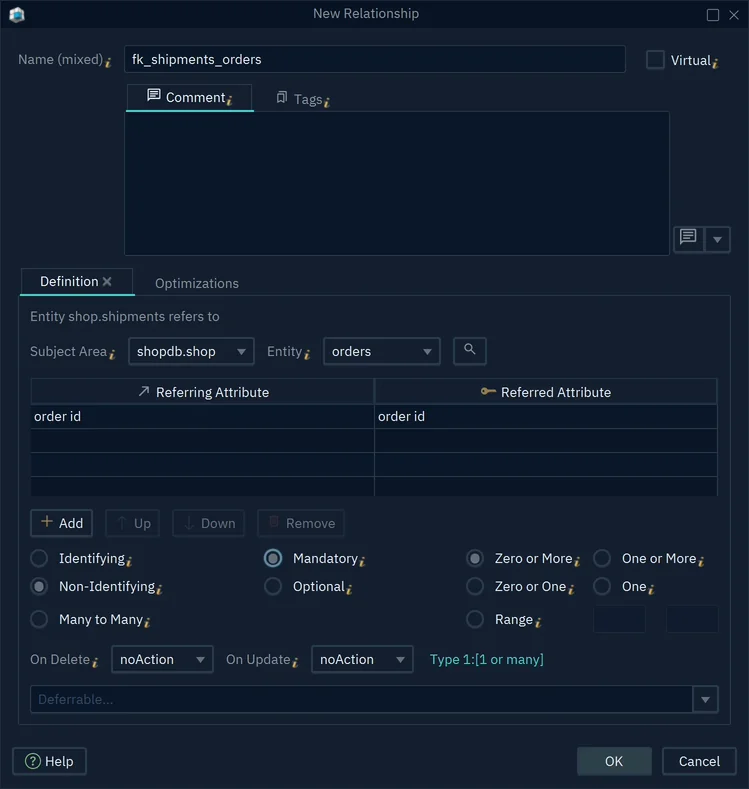
- 1Type: Identifying, Non-Identifying or Many to Many
- 2Mandatory makes the child attributes Not Null
- 3How many children a parent has
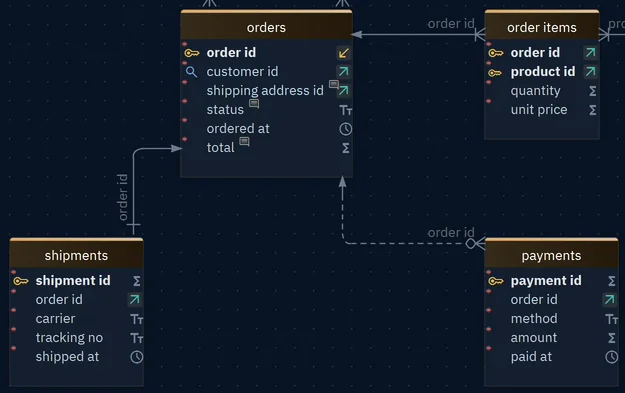
The generated physical model keeps the NOT NULL that Mandatory and Identifying set. The maximums and the child-side minimums stay in the logical design, because a table has no place for them: a relation set to One gets no unique key. Add the unique key on the child column in the physical model, as Foreign Keys shows, and the trigger from the section above for One or More. The logical design then remains the one place that records what every relationship is meant to be.
Download DbSchema, start a logical design for the part of your schema where the relationships are still being argued about, set the cardinality on each relation and generate the physical model for PostgreSQL. Logical design is in DbSchema Architect, and every new installation starts with a 15-day Architect trial.
Sources
Set the cardinality before the tables exist
In a DbSchema logical design you choose Mandatory or Optional and Zero or More, One or More, Zero or One or One on each relation, resolve many-to-many relations into junction entities, and generate the physical model for PostgreSQL, MySQL, SQL Server or another database. Logical design is in DbSchema Architect, and every new installation starts with a 15-day Architect trial.