Primary Key in SQL – Definition, Examples, and Best Practices | DbSchema
Table of Contents
- What a primary key is
- Primary key rules
- Why primary keys matter
- Single-column primary key example
- Composite primary key example
- Primary key vs unique key vs foreign key
- Natural vs surrogate keys
- How to create or add a primary key
- Primary key syntax in MySQL, PostgreSQL, and SQL Server
- How to choose a good primary key
- Common mistakes
- Work with primary keys in DbSchema
- FAQ
- Conclusion
A primary key in SQL is the constraint that uniquely identifies each row in a table. Every relational table should have one clear way to identify a row reliably, whether that key is a single column such as customer_id or a combination of columns such as (country_code, invoice_number).
Primary keys matter for far more than uniqueness. They shape indexes, support joins, power foreign keys, and make entity relationship diagrams easier to read. If the primary key is weak, the whole data model becomes harder to maintain, document, and evolve.
What a primary key is
Think of a primary key as the row's official identity.
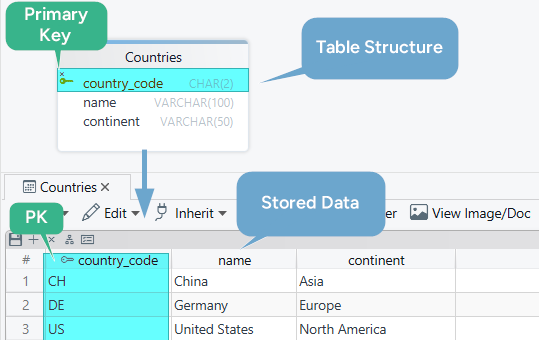
In the countries table below, country_code is the primary key because every country has one unique code:
CREATE TABLE Countries (
  country_code CHAR(2) PRIMARY KEY,
  name VARCHAR(100),
  continent VARCHAR(50)
);
That means:
- no two rows can share the same
country_code country_codecannot beNULL- other tables can reference that value through a foreign key
Primary key rules
Top-ranking tutorials almost always explain these rules explicitly:
- A primary key must be unique.
- A primary key cannot be NULL.
- A table has one primary key constraint.
- That one primary key can contain one column or several columns.
That last point is important. People often say "a table can have only one primary key" and assume that means one column. In reality, the primary key constraint can be composite.
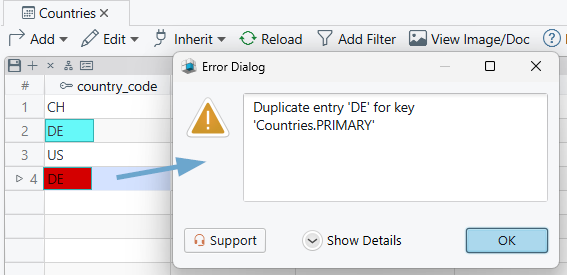
If you try to insert a duplicate key value, the database returns an error because it would break row identity.
Why primary keys matter
Primary keys sit at the center of relational design:
- they guarantee one stable identifier per row
- they usually create or back a useful index
- they give foreign keys something reliable to reference
- they make joins and updates safer because every row has a clear target
Consider an orders table without a dependable key. Updating one order, linking payments, or deduplicating rows quickly becomes fragile. That is why schema tools such as DbSchema surface primary keys prominently in diagrams and table editors.
Single-column primary key example
Here is a simple parent-child design using countries and cities:
CREATE TABLE Countries (
  country_code CHAR(2) PRIMARY KEY,
  name VARCHAR(100),
  continent VARCHAR(50)
);

CREATE TABLE Cities (
  city_id INT PRIMARY KEY,
  name VARCHAR(100),
  population INT,
  country_code CHAR(2)
);
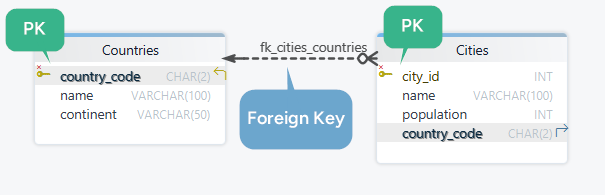
The Countries table uses country_code as its primary key. The Cities table uses city_id.
In a later step, Cities.country_code can become a foreign key that points back to Countries.country_code, which is why choosing a stable primary key matters so much.
If you want to continue from primary keys into table relationships, read What Is a Foreign Key?.
Composite primary key example
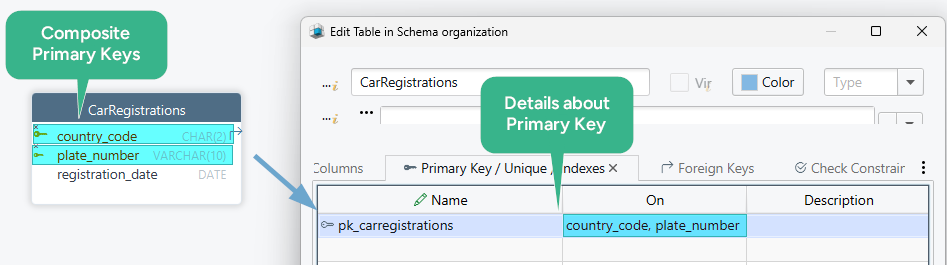
Sometimes one column is not enough to identify a row uniquely. That is where a composite primary key helps.
CREATE TABLE CarRegistrations (
  country_code CHAR(2),
  plate_number VARCHAR(10),
  registration_date DATE,
  PRIMARY KEY (country_code, plate_number)
);
Here:
plate_numberalone may repeat across countriescountry_codealone is not unique either- together they form a reliable row identifier
Composite keys are common in bridge tables, time-bound records, and domain models where the business identity already uses multiple fields.
Primary key vs unique key vs foreign key
This comparison is missing from many thin articles, but users search for it constantly.
| Constraint | Main purpose | Allows NULL? | Can other tables reference it? |
|---|---|---|---|
| Primary key | Row identity | No | Yes |
| Unique key | Prevent duplicate values | Depends on database | Yes, if referenced columns are valid for it |
| Foreign key | Link child rows to parent rows | Usually yes, unless also NOT NULL | It references another key |
Use a primary key for the main identity of the table, a unique key for alternate candidate identifiers such as email or username, and a foreign key when one table depends on another.
Natural vs surrogate keys
When choosing a primary key, you usually decide between:
- Natural key: a business value that already exists, like
country_codeorisbn - Surrogate key: an artificial identifier such as
customer_id, often numeric
Natural keys are useful when:
- the value is truly stable
- it is short and easy to validate
- it already exists in the domain naturally
Surrogate keys are useful when:
- business values might change
- the natural identifier is long or awkward
- you want a simple, consistent join column
In practice, many production systems use a surrogate primary key plus a separate UNIQUE constraint on the business identifier.
How to create or add a primary key
Create a primary key during table creation
CREATE TABLE Employees (
  employee_id INT PRIMARY KEY,
  full_name VARCHAR(200),
  department VARCHAR(100)
);
Create a named primary key constraint
CREATE TABLE Orders (
  order_id INT,
  customer_id INT,
  CONSTRAINT pk_orders PRIMARY KEY (order_id)
);
Named constraints make future maintenance easier, especially in larger schemas.
Add a primary key later
ALTER TABLE Countries
ADD CONSTRAINT pk_countries
PRIMARY KEY (country_code);
Before adding a primary key to an existing table, first verify that:
- no duplicate values exist
- no
NULLvalues exist - the chosen column is stable enough to be the table's identity
Primary key syntax in MySQL, PostgreSQL, and SQL Server
The primary-key constraint is portable, but auto-generated key columns use database-specific syntax.
MySQL
CREATE TABLE customers (
    customer_id INT AUTO_INCREMENT PRIMARY KEY,
    full_name VARCHAR(200) NOT NULL
);
PostgreSQL
CREATE TABLE customers (
    customer_id INT GENERATED ALWAYS AS IDENTITY PRIMARY KEY,
    full_name VARCHAR(200) NOT NULL
);
SQL Server
CREATE TABLE customers (
    customer_id INT IDENTITY(1,1) PRIMARY KEY,
    full_name NVARCHAR(200) NOT NULL
);
That distinction matters when you move from theory into implementation. The constraint idea is the same, but the DDL you generate depends on the target engine.
How to choose a good primary key
These best practices appear again and again in competitor pages because they matter:
- Prefer stable values. Do not choose columns that change often.
- Keep keys small when possible. Smaller keys make joins and indexes easier to manage.
- Avoid smart keys unless the domain truly needs them. Encoded business meaning often becomes a maintenance problem later.
- Use composite keys only when the business identity really is composite.
- Think about relationships early. Your primary key will likely be referenced by foreign keys elsewhere.
If you want a bigger-picture view of how keys shape the model, see What Is an ER Diagram? and How to Design a Relational Database Schema.
Common mistakes
- Choosing a value that changes often — email addresses, phone numbers, and status codes are usually poor primary keys.
- Using a wide composite key without a business reason — joins and foreign keys become harder to maintain.
- Skipping a unique business constraint — if you use a surrogate key, still add
UNIQUEon natural identifiers that must stay unique. - Adding a primary key after bad data already exists — always clean duplicates and
NULLrows first. - Forgetting downstream references — changing a primary key impacts foreign keys, APIs, ETL, and documentation.
Work with primary keys in DbSchema
DbSchema is useful when you want to model keys visually instead of reading raw DDL all day.
- connect through a driver such as the PostgreSQL JDBC driver or MySQL JDBC driver
- import or create your tables
- mark the primary-key column in the table editor
- inspect relationships visually in the diagram
- generate the SQL or synchronize the model with the live database
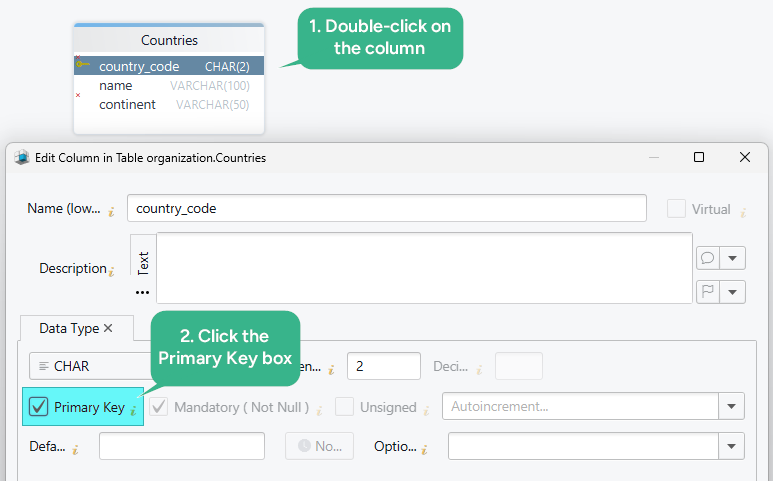
This is especially helpful when you are also defining foreign keys, checking naming consistency, or exporting schema documentation for teammates. You can learn more in the diagram documentation, the page about foreign keys in DbSchema, and the schema documentation guide.
FAQ
Can a table have two primary keys?
No. A table can have only one primary key constraint, but that constraint can include multiple columns.
Can a primary key be NULL?
No. Primary-key columns must always contain a value.
What is the difference between a primary key and a unique key?
A primary key is the main row identifier. A unique key is an alternate constraint that also prevents duplicates.
Should I use a natural key or a surrogate key?
Use a natural key only when the business value is short, stable, and truly unique. Otherwise, a surrogate key is often safer.
Does a primary key automatically create an index?
In most relational databases, yes. The exact implementation varies by database engine, but primary keys are usually backed by an index.
How do I remove or change a primary key?
You usually drop the existing constraint and then create the new one. The exact ALTER TABLE syntax depends on the database, so test carefully before changing keys that other tables reference.
Conclusion
A primary key in SQL is more than a uniqueness rule. It is the core identity of a table, the anchor for foreign keys, and one of the first things to validate in a database design.
Choose a key that is stable, unique, and easy to reference. Then use DbSchema to visualize how that primary key connects to the rest of the schema before you push the model into production.






