SQL SELECT DISTINCT Statement Explained with Examples
For SQL beginners whose query returns the same value on several rows and who want one row per value instead.
On this page
Your query lists the same product once for every order that contains it, and you want each product once. Put DISTINCT straight after SELECT, and the database keeps one row from every group of rows whose selected columns are all equal:
SELECT DISTINCT column1, column2
FROM table_name;
The word all is where the surprises come from: DISTINCT compares the whole select list, never just the first column. Every statement below ran on PostgreSQL 17.9, MySQL 9.1 and SQLite 3.50, and the article says where the three disagree.
What SELECT DISTINCT does
One table of five orders serves every example in this article:
CREATE TABLE Orders (
    OrderID  INT PRIMARY KEY,
    Product  VARCHAR(20),
    Color    VARCHAR(20),
    Quantity INT
);

INSERT INTO Orders VALUES
    (1, 'Apple',  'Red',   2),
    (2, 'Apple',  'Green', 4),
    (3, 'Orange', NULL,    1),
    (4, 'Apple',  'Red',   3),
    (5, 'Orange', NULL,    2);
A plain SELECT returns one row per order, so Apple appears three times and Orange twice. Add the keyword and each product comes back once:
SELECT DISTINCT Product FROM Orders;
| Product |
|---|
| Apple |
| Orange |
DISTINCT only shapes the result; the five rows stay in the table. Without ORDER BY, the row order is up to the engine: PostgreSQL returned Orange first, MySQL and SQLite returned Apple first. The result tables here follow MySQL's order.
If the repeats appeared only after a join, fix the join condition rather than adding DISTINCT, which hides the extra matches.
Practice this: Lesson 2 of the SQL tutorial runs SELECT, AS and DISTINCT on a shop database in your browser, with exercises.
SQL DISTINCT on multiple columns
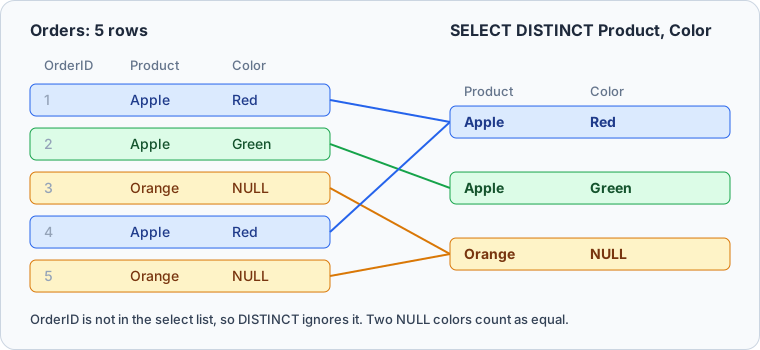
Name two columns and DISTINCT compares pairs. Two rows collapse into one only when both values match:
SELECT DISTINCT Product, Color FROM Orders;
| Product | Color |
|---|---|
| Apple | Red |
| Apple | Green |
| Orange | NULL |
Apple comes back twice, because Apple with Red and Apple with Green are different pairs. Orders 1 and 4 share both values, and so do orders 3 and 5:
SQL DISTINCT and NULL values
Orders 3 and 5 have no color, and the result above shows one Orange row, not two. In a WHERE clause NULL = NULL is not true, yet DISTINCT treats two NULLs as duplicates:
SELECT DISTINCT Color FROM Orders;
| Color |
|---|
| Red |
| Green |
| NULL |
The manuals of PostgreSQL, MySQL, SQLite and SQL Server all state this rule: for DISTINCT, NULL values count as equal. So one NULL row stands for every row whose value is missing. SQL NULL values covers where NULL behaves differently.
Sorting a DISTINCT result with ORDER BY
Sorting by a selected column, as in ORDER BY Product, works everywhere. Sorting by a column you did not select is where the engines split. Apple has three orders with three quantities, so there is no single quantity to place the Apple row by:
SELECT DISTINCT Product FROM Orders ORDER BY Quantity;
PostgreSQL rejects it:
ERROR: for SELECT DISTINCT, ORDER BY expressions must appear in select list
MySQL rejects it too:
ERROR 3065 (HY000): Expression #1 of ORDER BY clause is not in SELECT list, references column 't.Orders.Quantity' which is not in SELECT list; this is incompatible with DISTINCT
SQLite runs it and returns Orange before Apple, without saying which Apple quantity decided the place. To sort by a value per product, say which value you mean, such as MAX(Quantity) with GROUP BY, which the next section introduces.
SQL DISTINCT vs GROUP BY
GROUP BY on the same columns returns the same three pairs:
SELECT Product, Color FROM Orders GROUP BY Product, Color;
| Product | Color |
|---|---|
| Apple | Red |
| Apple | Green |
| Orange | NULL |
The difference is that GROUP BY keeps the group, so an aggregate function can read the rows behind each pair. Orders 1 and 4 are behind Apple, Red, and only GROUP BY can add up their quantities:
SELECT Product, Color, SUM(Quantity) AS TotalQuantity
FROM Orders
GROUP BY Product, Color;
| Product | Color | TotalQuantity |
|---|---|---|
| Apple | Red | 5 |
| Apple | Green | 4 |
| Orange | NULL | 3 |
Use DISTINCT when the list of values is the whole answer, and GROUP BY as soon as you need a count, a sum or an average per group.
COUNT(DISTINCT column)
Inside COUNT, DISTINCT counts the different values instead of listing them:
SELECT COUNT(DISTINCT Product) AS Products,
       COUNT(DISTINCT Color)   AS Colors
FROM Orders;
| Products | Colors |
|---|---|
| 2 | 2 |
COUNT(DISTINCT) skips NULL. SELECT DISTINCT Color returned three rows, one of them NULL, but COUNT(DISTINCT Color) returns 2. MySQL's manual describes it as "a count of the number of rows with different non-NULL expr values". If the missing value should count as one more, count the rows of the DISTINCT query instead, as below.
Counting distinct pairs is not portable. COUNT(DISTINCT Product, Color) returns 2 on MySQL, which skips any pair that contains a NULL. PostgreSQL fails with function count(character varying, character varying) does not exist, and SQLite with wrong number of arguments to function COUNT(). Wrapping the DISTINCT query in a subquery works on all three and counts the Orange, NULL pair:
SELECT COUNT(*) AS Pairs
FROM (SELECT DISTINCT Product, Color FROM Orders) AS p;
| Pairs |
|---|
| 3 |



See how many rows DISTINCT removed, in DbSchema
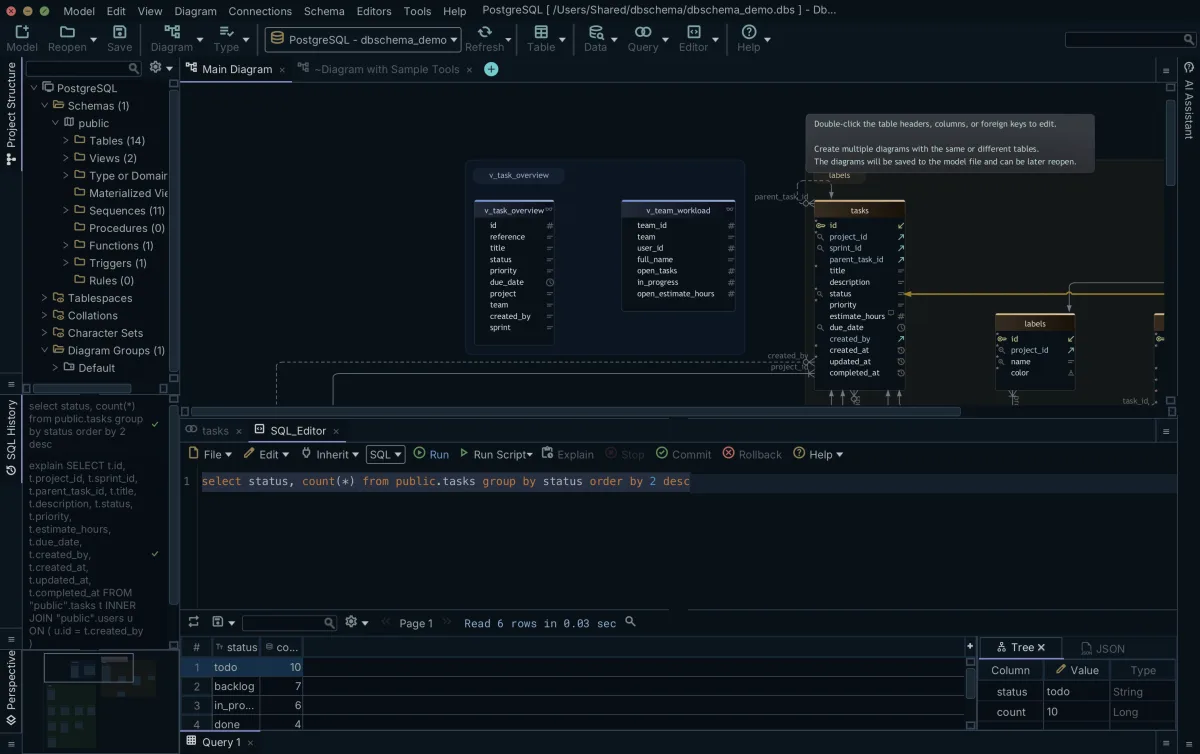
In DbSchema, open the SQL Editor with Editor → SQL Editor in the toolbar, or Ctrl+E. Run the query once without DISTINCT and once with it, using Run or Ctrl+Enter, and compare the rows in the result grid under the editor.
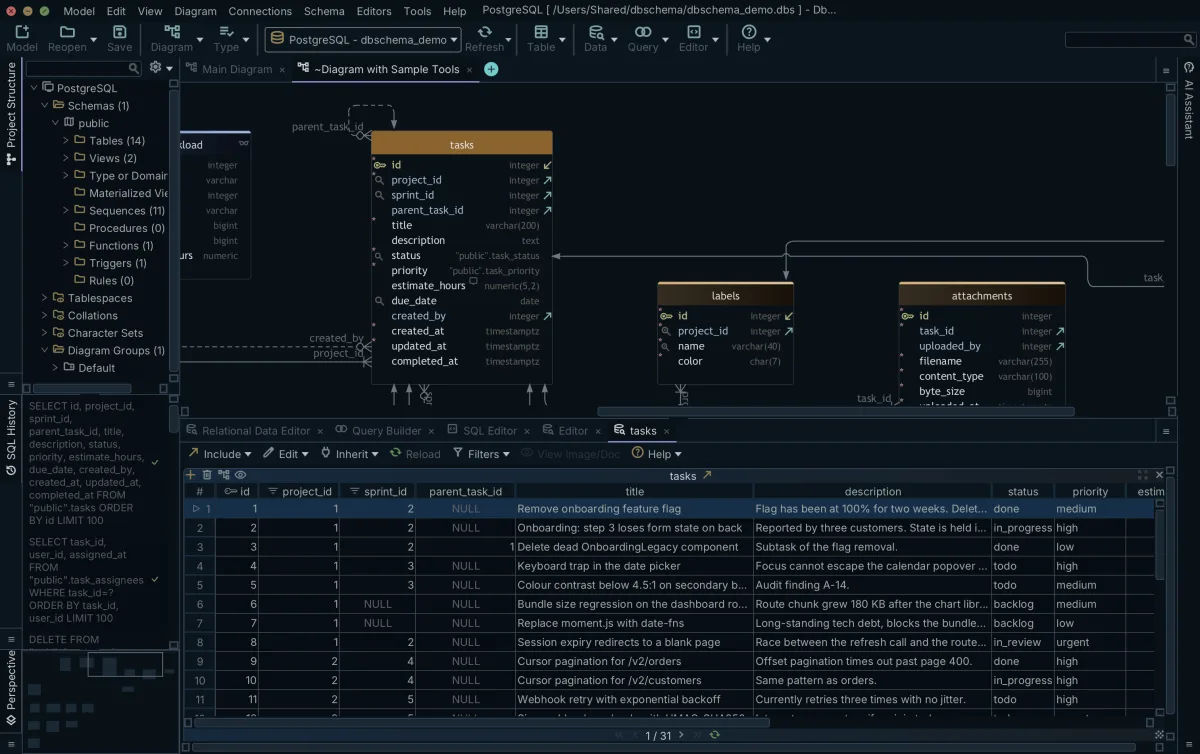
To see the rows behind one value, right-click the table on the diagram, choose Data Explorer, and type Product = 'Apple' in its filter box.
Common mistakes
Parentheses do not make DISTINCT apply to one column. All three engines accept this query and return the same three pairs as SELECT DISTINCT Product, Color, because DISTINCT is a keyword for the whole row, not a function:
SELECT DISTINCT(Product), Color FROM Orders;
A unique column in the select list turns DISTINCT into a no-op. SELECT DISTINCT OrderID, Product, Color FROM Orders returns all five rows, because no two orders share an OrderID. Take out every column you do not want compared.
If you want one row per product and other columns from that row, such as the order with the largest quantity, plain DISTINCT cannot do it. PostgreSQL has DISTINCT ON, which keeps the first row of each group in ORDER BY order:
SELECT DISTINCT ON (Product) Product, OrderID, Quantity
FROM Orders
ORDER BY Product, Quantity DESC;
| product | orderid | quantity |
|---|---|---|
| Apple | 2 | 4 |
| Orange | 5 | 2 |
The manual calls DISTINCT ON "an extension of the SQL standard", and MySQL and SQLite reject it with a syntax error near ON.
Practice questions
- List each color ordered at least once, with no color repeated and no NULL.
- Count the different products ordered in a color other than Red.
- List the colors of the Apple orders, sorted alphabetically.
- Return each product and color pair with the number of orders behind it.
Download DbSchema at https://dbschema.com/download.html, connect to your database, and run one of your own queries with and without DISTINCT in the SQL Editor to see how many rows the repeats account for. The SQL Editor is part of the free Community Edition, and so is opening one table in the Data Explorer; following foreign keys from there needs Pro.
Run your DISTINCT queries against a real schema
DbSchema reverse-engineers your database into an interactive ER diagram and runs your queries in the SQL Editor, where Run shows the rows in the result grid under the editor. The SQL Editor is part of the free Community Edition.









