pgAdmin ER Diagrams Compared With a Modelling Tool
How DbSchema's free Community Edition opens the PostgreSQL database behind pgAdmin's ERD tool, what that ERD does, and where a modelling tool goes further.
On this page
What pgAdmin's ERD tool does in pgAdmin 4
For a developer who works on PostgreSQL in pgAdmin every day and wants a diagram that goes past the keys PostgreSQL has declared: DbSchema Community Edition reverse-engineers the same database into interactive diagrams for free, on PostgreSQL and on every other engine you add, while pgAdmin's ERD draws the FOREIGN KEY constraints the catalog holds.
Start with what pgAdmin gives you. pgAdmin is free in full under the PostgreSQL licence, it is the PostgreSQL project's reference client, listed among the open-source GUI clients on the PostgreSQL wiki,[1] it runs as a desktop runtime or as a multi-user web server, and its ERD ships in the tool you already have open when you connect to the database.
The ERD tool itself has been part of pgAdmin 4 for years, and a walkthrough by a pgAdmin developer on the EDB blog (February 2023) covers the workflow end to end. You open a blank canvas from the Tools menu with the ERD Tool entry, or you right-click a database and choose ERD for database to generate a diagram from what the database already contains. Right-clicking a table and choosing ERD for table generates a diagram for that table plus the tables related to it, and how far that traversal reaches is set by the Table Relation Depth preference under File, Preferences, ERD Tool, Options.
On the canvas you add tables and relationships, both one-to-many and many-to-many, and the toolbar buttons for them are labelled 1M and MM. Generate SQL opens the DDL for the diagram in the Query Tool, where you can run it against the database. You can save the ERD project to a file and reopen it later to continue the design. The same walkthrough lists notes on table nodes, background colours for grouping tables, and image export among the other features.[2]
- Open a blank canvas from Tools, ERD Tool, or right-click a database for ERD for database
- Right-click a table for ERD for table, with related tables pulled in to a configurable depth
- Add tables and one-to-many or many-to-many relationships on the canvas
- Generate SQL to open the DDL in the Query Tool
- Save the ERD file and reopen it, add notes, colour backgrounds, export an image
An independent walkthrough on SQLShack (2022) adds two details that matter once a diagram grows. When tens or hundreds of tables land on the canvas, you can hide the data types from the table boxes to reduce the clutter, and you can switch the cardinality marker on a relationship between 1M and MM as the model changes.[3] The same walkthrough notes that the ERD project is a handy feature inside the administration console rather than a replacement for a dedicated modelling product.
Why a generated diagram can show unconnected tables
A generated diagram is only as complete as the constraints the database declares. PostgreSQL knows about a relationship between two tables when a FOREIGN KEY constraint exists in the catalog, and the PostgreSQL documentation describes foreign keys as the constraint that links a column in one table to the primary key or a unique column of another.[4] Any tool that generates a diagram from the catalog, pgAdmin's ERD included, draws a line for each of those declared constraints and has nothing to draw for a relationship the schema never declared.
The difference is easy to produce. Two tables can hold the same logical relationship, one declared and one not:
CREATE TABLE customers (
 customer_id INT PRIMARY KEY,
 name TEXT NOT NULL
);

CREATE TABLE orders (
 order_id INT PRIMARY KEY,
 customer_id INT NOT NULL REFERENCES customers (customer_id)
);

CREATE TABLE order_notes (
 note_id INT PRIMARY KEY,
 order_id INT NOT NULL,
 note TEXT NOT NULL
);
orders.customer_id carries a REFERENCES clause, so the catalog holds a FOREIGN KEY constraint and a generated diagram draws the line to customers. order_notes.order_id holds the same kind of value, but no constraint was declared, so the catalog has no relationship to report and the generated diagram shows order_notes as an island. Nothing in the generated picture tells you the two tables belong together, and the same happens on every canvas that reads the catalog, not only in pgAdmin.
Legacy schemas hit this constantly, because keys were often left undeclared for load performance years ago and the joins live only in application code. When that is your schema, the generated diagram is a picture of the constraints rather than of the data model, and you need a place to record the relationships the database does not know about. That is the first concrete case where a modelling tool next to pgAdmin starts paying for itself.
What a modelling tool adds on the same database
DbSchema Community Edition connects to the same PostgreSQL database over JDBC and reverse-engineers the schema into an interactive ER diagram, in the free edition, with no time limit. The step-by-step for that connection is in the guide on how to create an ER diagram for PostgreSQL, so here it is enough to say what the diagram does once it exists.
The diagram is interactive in a specific sense. Selecting a foreign key highlights the relation end to end, from the referencing column to the column it points at, and an inline toolbar opens with actions for the data, a query and the SQL. In a hands-on check of version 10.4.1 against PostgreSQL 16, that selection and toolbar worked as described. Reverse-engineering also reads inside jsonb columns: the sub-fields it infers from the stored documents are recorded as virtual columns, so a document column stops being one opaque word on the diagram.
A data architect of roughly thirty years, Bernie Pruss, wrote on LinkedIn in August 2026 that the tool gave him a visual model of his database, and that right-clicking a table to see its data, examine its profile and query it at once showed him relationships that needed work.
The practical difference from the pgAdmin ERD is where the work is stored. In pgAdmin, the diagram is an ERD project file you reopen inside pgAdmin. In the modelling tool, the reverse-engineered schema lands in a design model, a local .dbs file in XML that holds the schemas, the diagrams and the editor state, and the diagram is a view of that model. What you can record in that model, and what it lets you do to a schema that never declared its keys, is the next section.
Relationships, virtual keys and layouts compared
The undeclared-key problem from the SQL example above has a direct answer in the modelling tool: the virtual foreign keys documented for it. A virtual foreign key is a relationship that exists only in the design model. You create it by dragging from one column to another on the diagram, the connector line is drawn immediately, and no constraint is created in the database. The line is not decoration: virtual foreign keys are recognised by the query building and the data exploration in the same way declared keys are, so the missing relationship becomes usable without altering a schema you may not be allowed to alter.
So yes, you can create foreign keys in a diagram without creating them in the database, and the mechanism is the model file rather than the catalog. A real foreign key, by contrast, is a schema change, and a connected instance executes it against the database when you ask for it. The choice between the two is offered at drag time.
Layouts work differently too. One model holds several named diagrams over the same schema, each with its own layout and selection of tables, and the same table can sit in more than one diagram, which is how a large schema stays readable as one view per subsystem. The notation is a switch, not a fixed style: View > Foreign Key Notation moves the diagram between crow's foot, Barker and other notations such as IDEF1X.
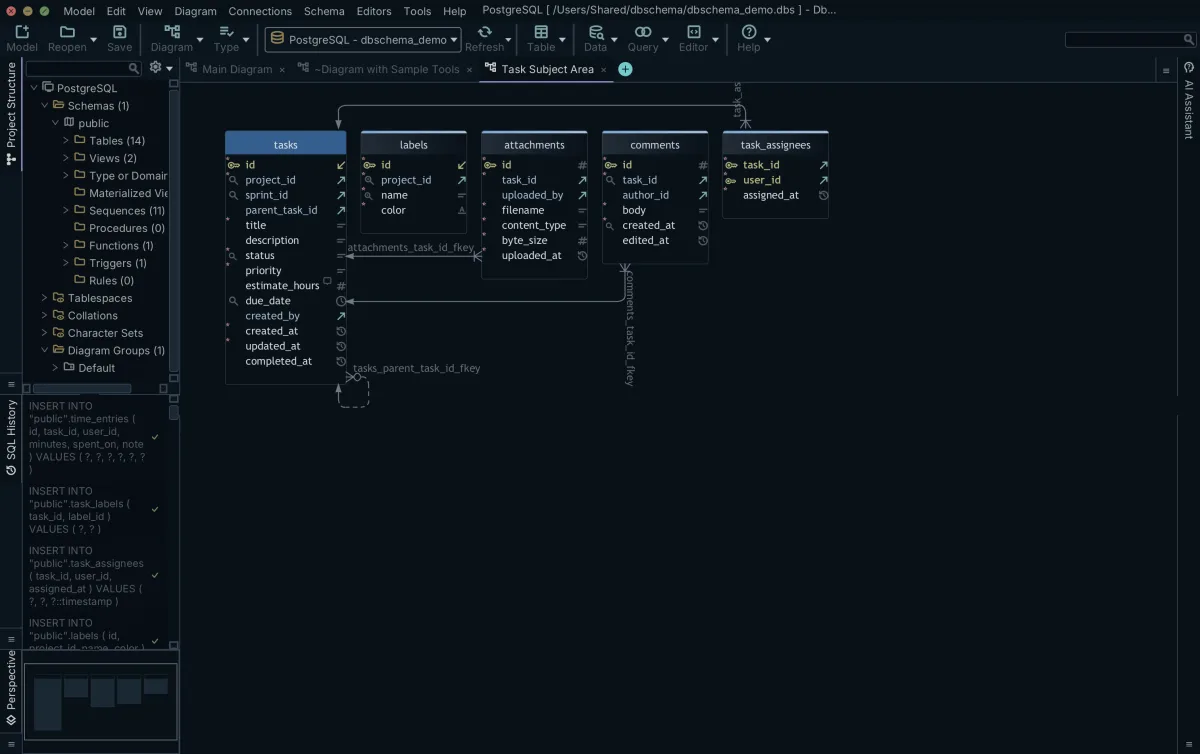
pgAdmin's ERD works from one ERD project file per diagram on a single canvas, with the cardinality markers and the data-type display the SQLShack walkthrough describes. For a schema that fits on one canvas and declares its keys, pgAdmin's ERD draws every relationship; DbSchema Community Edition draws the same diagram, and with several diagrams per model, a Pro feature, DbSchema keeps working when the schema outgrows one canvas. The difference shows when the relationships live outside the catalog, when one picture is not enough, or when the diagram has to be read by people who do not have pgAdmin open.
Engines, documentation and schema synchronization
pgAdmin is PostgreSQL-only by design. It supports PostgreSQL and EDB Postgres Advanced Server and no other engine. The moment a MySQL database, a MongoDB collection or an Oracle instance joins the project, the diagram work starts over in a second tool, and the second tool has its own file format and its own way of drawing relationships.
The modelling tool connects to more than 100 SQL and NoSQL databases, and every licence includes all of them, Community Edition included. The same reverse-engineering, the same interactive diagrams and the same SQL editor apply to each engine, so a model that starts on PostgreSQL extends to the rest of the stack without a new tool or a new licence.
pgModeler is a PostgreSQL-only modeller. Its source is open under the GPL while its ready-made installers are sold as pgModeler Plus, and the current stable release is 1.2.3 from February 2026.[5] The wider field, including what each free tier covers, is in the free PostgreSQL ER diagram tools compared roundup. The same question for other tools is answered in DBeaver's ER diagrams and where they fall short and in the erwin, ER/Studio and PowerDesigner comparison.
A diagram that only you can open solves half the problem. The other half is the colleague, the auditor or the new analyst who needs the schema without installing anything. The Pro edition exports the model as interactive HTML5 documentation: the diagram ships as a vector image, the table list is searchable, and hovering a column shows its description as a tooltip. PDF and Markdown exports come from the same documentation dialog.
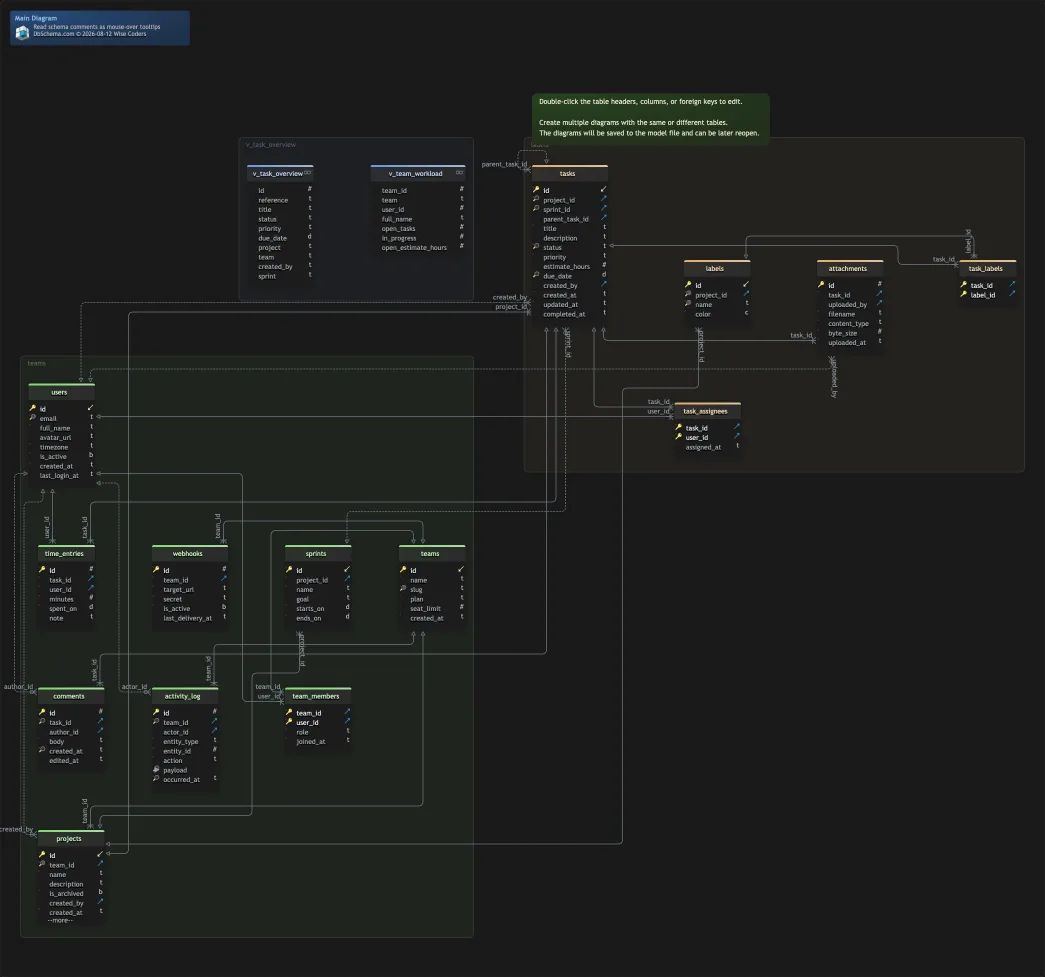
The other Pro capability is schema synchronization. The design model is compared with a live database and every added, removed and modified table, column, index and foreign key is listed, and for each difference you choose to update the model, push the change to the database, or skip it. Instead of executing anything, you can generate an SQL migration script from the same list of differences and review it before it runs anywhere.
pgAdmin's documentation lists a Schema Diff tool for managing the differences between two PostgreSQL schemas. What it does not have is the model-to-database comparison described above, because pgAdmin keeps no offline model to compare against. The comparison is between two different mechanisms, not between a feature and an absence. What the interactive documentation contains in detail is on the database diagram tool page.
Free editions and where each one stops
Both tools are free at entry, and the honest comparison is between the two free tiers, not between free and paid. pgAdmin is free in full for PostgreSQL only, as covered above; DbSchema Community Edition is free for every supported engine.
DbSchema Community Edition is free with no cost and no time limit, and it is not a trial that expires. What it includes, per the edition comparison on the DbSchema purchase page:
- Connect and reverse-engineer for all supported databases, over 100 SQL and NoSQL engines
- Interactive diagrams, including editing tables and columns on them
- The SQL editor in the same window
The features that sit above Community are the ones this article has described as Pro: HTML5, PDF and Markdown documentation, the visual query builder, design offline and save to file, schema synchronization, relational data browse and the data generator. A new installation includes the Architect trial, which unlocks every Pro feature for 15 days without a credit card.
| pgAdmin 4 | DbSchema Community Edition | |
|---|---|---|
| Price | Free in full | Free, no time limit |
| Engines | PostgreSQL and EDB Postgres Advanced Server | 100+ SQL and NoSQL databases |
| Diagram from a live database | Yes, ERD for database or table | Yes, reverse-engineering |
| Undeclared keys on the diagram | No line to draw | Virtual foreign keys, kept in the model file (save to file is Pro) |
| Diagrams per schema | One ERD project file | Pro: several diagrams per model |
| Save the design as a model file | ERD project file, reopened in pgAdmin | Pro: .dbs file, offline design |
| Documentation export | Image export | Pro: HTML5, PDF, Markdown |
| Schema synchronization | Not applicable, no offline model | Pro: model-to-database diff and migration scripts |
Read the table by the row that matches your schema. The rows where the pgAdmin column has no answer are the ones DbSchema covers, and the table marks which of them need Pro.
Choosing between pgAdmin's ERD and DbSchema
The decision comes down to three questions about the database in front of you. Are its keys declared, so a generated diagram draws every relationship? Is PostgreSQL the only engine the design has to cover? And is the diagram a picture you regenerate when you need it, or a design model that has to be kept, shared and versioned? DbSchema Community Edition reverse-engineers the same database into an interactive diagram for free whatever the answers, and Pro keeps it as a design model you can version and share.
The free step when any of those answers flips is the Community Edition: the keys are undeclared and the relationships live only in application code, or several engines are in play. Community covers the reverse-engineering, the interactive diagrams and the SQL editor for all supported databases. Keeping the diagram as a design model with virtual foreign keys, several layouts and a place in Git needs Pro's save to file, and so does anything that leaves your machine as documentation or as a migration script. How the wider field lines up is in the PostgreSQL GUI tools compared article.
The next step costs nothing: the free Community Edition at the DbSchema download page connects to the same PostgreSQL database you already manage in pgAdmin and reverse-engineers it into the interactive diagram this article has described.
Frequently asked questions
Does pgAdmin have an ER diagram tool?
Yes. pgAdmin 4 ships an ERD tool that designs and visualizes tables and their relationships. You open a blank canvas from the Tools menu, or right-click a database for ERD for database or a table for ERD for table, which also pulls in related tables. A pgAdmin developer documented the workflow on the EDB blog in February 2023.
How do I generate an ER diagram from an existing database in pgAdmin 4?
Right-click the database and choose ERD for database. To start from one table, right-click it and choose ERD for table; pgAdmin includes the tables it depends on and the tables that depend on it. The traversal depth is configurable under File, Preferences, ERD Tool, Options, Table Relation Depth.
Can pgAdmin export an ER diagram?
Yes. The ERD tool exports the diagram to an image file, and Generate SQL opens the DDL for the diagram in the Query Tool so you can run it against a database. The ERD itself is saved as a file you can reopen and continue later.
Is pgAdmin's ERD tool free?
Yes. pgAdmin is free and open source in full, with no paid tier, and it works only with PostgreSQL. It runs as a desktop app or as a multi-user web server, and the ERD tool ships inside the client a PostgreSQL user already has open.
When do I need a separate database modelling tool?
When your schema never declared its foreign keys, so any generated diagram shows unconnected tables; when several database engines are in play and you want one model across them; or when the diagram must be kept as a design model that survives offline, in Git, and across environments.
Sources
Open your PostgreSQL schema as a diagram
DbSchema reverse-engineers the database you already manage in pgAdmin into an interactive diagram, and the free Community Edition connects to all 100+ supported databases.









