Dataedo Alternatives for Schema Documentation
For the architect who has to get one schema documented, versioned and handed to the rest of the team, and has Dataedo at the top of the shortlist.
On this page
Your team's schema documentation lives on an internal wiki page that nobody has updated since the last release, and Dataedo sits at the top of the shortlist to replace it. DbSchema is the alternative to reach for when the job is documenting and versioning a schema rather than cataloguing an organization's data: it reverse-engineers a live database over JDBC, keeps the design in a .dbs model file you commit next to the application code, and exports interactive HTML5, PDF and Markdown documentation from the desktop, with no server to host.
Dataedo, dbdocs.io, Liquibase and Lucidchart turn up on the same shortlist, and each puts the description of your schema somewhere different: in a central repository, in a text file in your Git repository, in a chain of changesets, or on a drawing canvas.
The shortlist and why each is on it
DbSchema reverse-engineers SQL and NoSQL engines into a diagram you edit, stores the whole design in a plain indented XML .dbs file, and generates the documentation from that file. Dataedo imports metadata into a central repository and publishes it to a web catalog, with a business glossary, data lineage and data profiling around it. dbdocs.io renders hosted web documentation from Database Markup Language (DBML) files that sit in your repository. Liquibase replays changesets you wrote by hand. Lucidchart draws shapes on a canvas.
| Tool | Primary job | Where the schema description lives | Documentation output |
|---|---|---|---|
| DbSchema | Visual schema design and documentation | Local .dbs XML model file | Interactive HTML5, PDF, Markdown |
| Dataedo | Data catalog and governance | Central repository, self-hosted or Dataedo-hosted | Web catalog and exports |
| dbdocs.io | Code-first documentation | DBML file in the Git repository | Hosted web pages |
| Liquibase | Database change management | Changelog files in the Git repository | Execution reports |
| Lucidchart | General-purpose diagramming | Cloud document | Web share, PNG, PDF |
The choice comes down to one question: does the description of the schema have to be a file you own, or a service somebody else runs? For the longer version of that question, see how to choose a database documentation tool.
How each handles the job in question
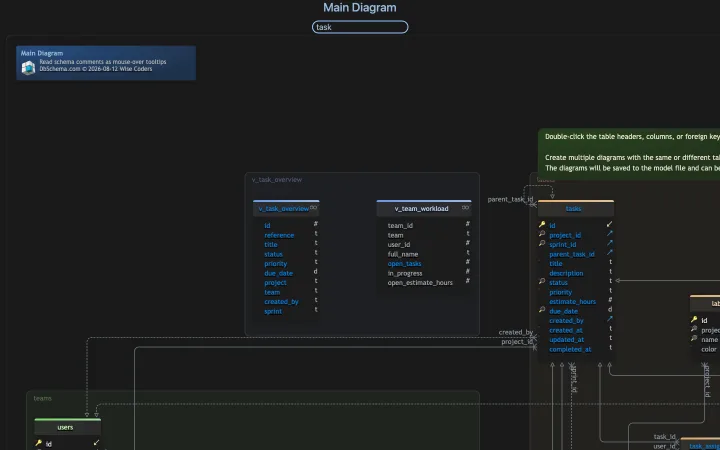
Offline-first interactive HTML5 documentation
DbSchema connects over a JDBC driver and reverse-engineers tables, views, foreign keys, triggers and column comments into its design model. That model is a plain, indented, human-readable XML file. Set the connection to Disconnected and you keep editing the design with no database reachable, because nothing you do on the diagram is sent anywhere until you say so. Connecting and reverse-engineering are in the free Community Edition; saving the model to a file is Pro.
The export runs in the desktop application. Diagram → Export HTML5 or PDF Documentation writes HTML5, PDF or Markdown, and the dialog lets you choose which diagrams and which schema elements go in. The HTML5 output opens in any browser with no server behind it: a vector diagram, a searchable table list, and the description you typed on a table or a column shown as a mouse-over tooltip. Virtual foreign keys, which exist only in the model file, are drawn on that diagram next to the physical constraints, so they reach the database documentation too. The documentation export is Pro.
How Dataedo and dbdocs.io publish documentation
Dataedo keeps imported metadata in a repository you deploy on-premises, self-host on AWS, Azure or Google Cloud, or have Dataedo host for you[1]. Editors annotate tables, build a business glossary and map lineage, and the result is published to a web catalog that viewers browse. Viewer accounts are unlimited on every tier; editor seats are what the licence counts, and each tier includes three[1].
dbdocs.io works the other way round, from code. You write the schema in DBML, or convert existing DDL to it, and a build command pushes the file to dbdocs.io, which renders a searchable web page with an ER diagram and field descriptions. The documentation is a page dbdocs.io hosts, so sharing it means giving somebody a link into that service.
DbSchema produces a file instead. The HTML5, Markdown or PDF that comes out of the export is self-contained, so you can commit it, attach it to a release, or drop it on an internal web server, and the schema metadata never leaves your machine to get there.
What is the alternative to Liquibase?
Liquibase is a change management engine rather than a documentation tool. Schema modifications go into sequential XML, YAML, JSON or SQL changesets, and Liquibase tracks which ones a target database has already run. Liquibase Secure is sold by quote in four tiers, and each tier states how many applications and how many database types it covers: Starter up to five applications and one database type, Growth up to ten applications and three database types, Business up to twenty-five applications and four database types, and only Enterprise unlimited on both[2].
Visual schema diff and script generation
DbSchema replaces the hand-written changeset with a comparison. You edit the table on the diagram, which changes the model file and nothing else, then open Schema → Create or Upgrade Schema in Database to bring a database in line with that model for the first time, or Schema → Compare Model with Database to see what has drifted since. The diff lists added, removed and modified objects, table by table and column by column, and for each difference you choose to update the model, push the change to the database, or skip it.
The Synchronization Dialog then generates the SQL that would bring the database in line with the model. You can read those statements and edit them in place before anything runs; clicking Execute is the single step that changes the live database. Where you need to compare two versions of a design rather than a design against a server, DbSchema opens two .dbs files at once and synchronizes between them. Schema synchronization is a Pro feature.
Liquibase and DbSchema also sit together perfectly well: DbSchema generates the DDL from the visual diff, and Liquibase deploys it, which is the pattern the schema migration tools follow.
What is the alternative to Lucidchart?
Lucidchart is a drawing tool used for flowcharts, network maps and high-level ER diagrams. Its free plan covers three editable documents with up to seventy-five shapes each[3], which is enough for a diagram in a slide deck. What it draws is a picture: the canvas has no connection to a database, so a schema change in production reaches the drawing only when somebody redraws it.
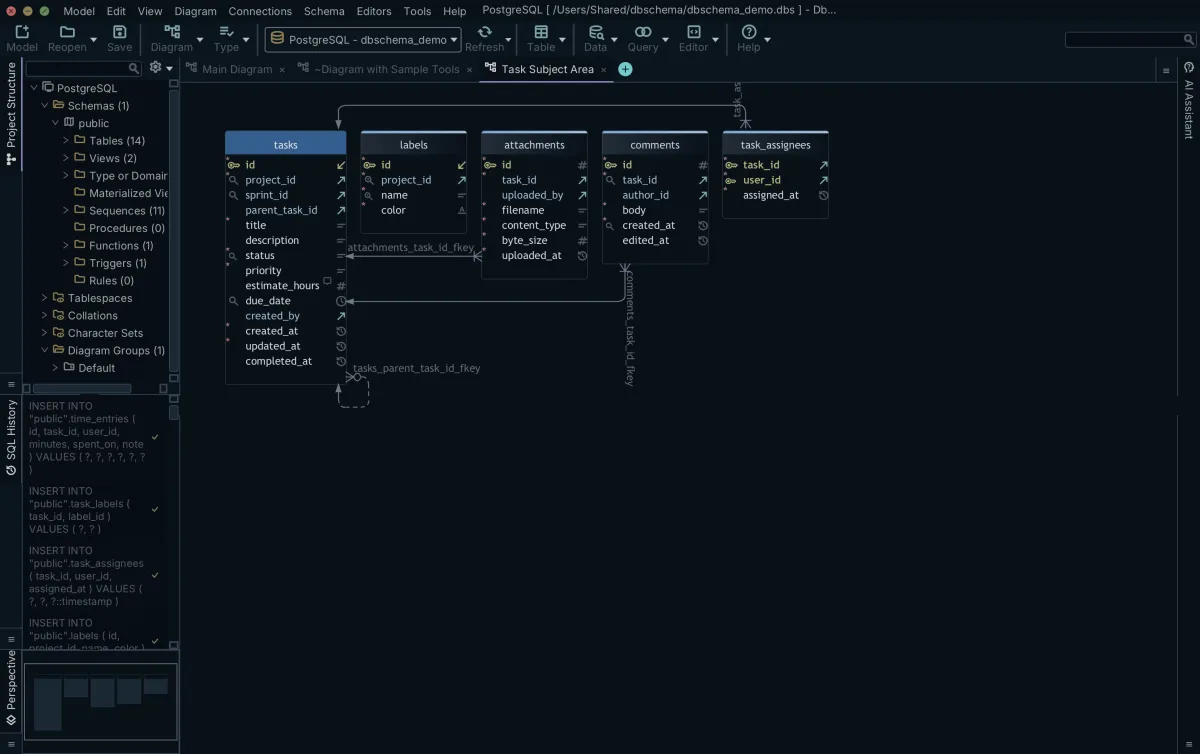
What a drawing tool cannot read back from the database
DbSchema reads the schema itself. It connects to relational and NoSQL engines over JDBC and draws tables, primary keys, foreign keys and indexes with the target engine's own data types, and Schema → Refresh Schema from Database re-reads the database when a colleague has deployed a migration. Large schemas split across several diagrams in the same model file, each one holding the tables of one subject area, and a table can appear on more than one of them.
Reading and diagramming the schema is in the free Community Edition, and saving that physical model to a file is Pro. Database-independent logical and conceptual design, where you draw entities before an engine has been chosen and generate the physical schema afterwards, is Architect.
What DbSchema keeps on your own machine
Dataedo is bought for a job DbSchema is not built for: cataloguing many systems at once for people who do not write SQL. Its tiers add automatic and manual data lineage, data profiling and data quality checks on top of the catalog, with unlimited connectors and up to a hundred custom fields per asset[1]. If a compliance function needs one searchable inventory across every warehouse and lake in the company, that is the shape of tool it is asking for.
Documenting and evolving the schemas your own team owns is a different job, and it is the one DbSchema is built around.
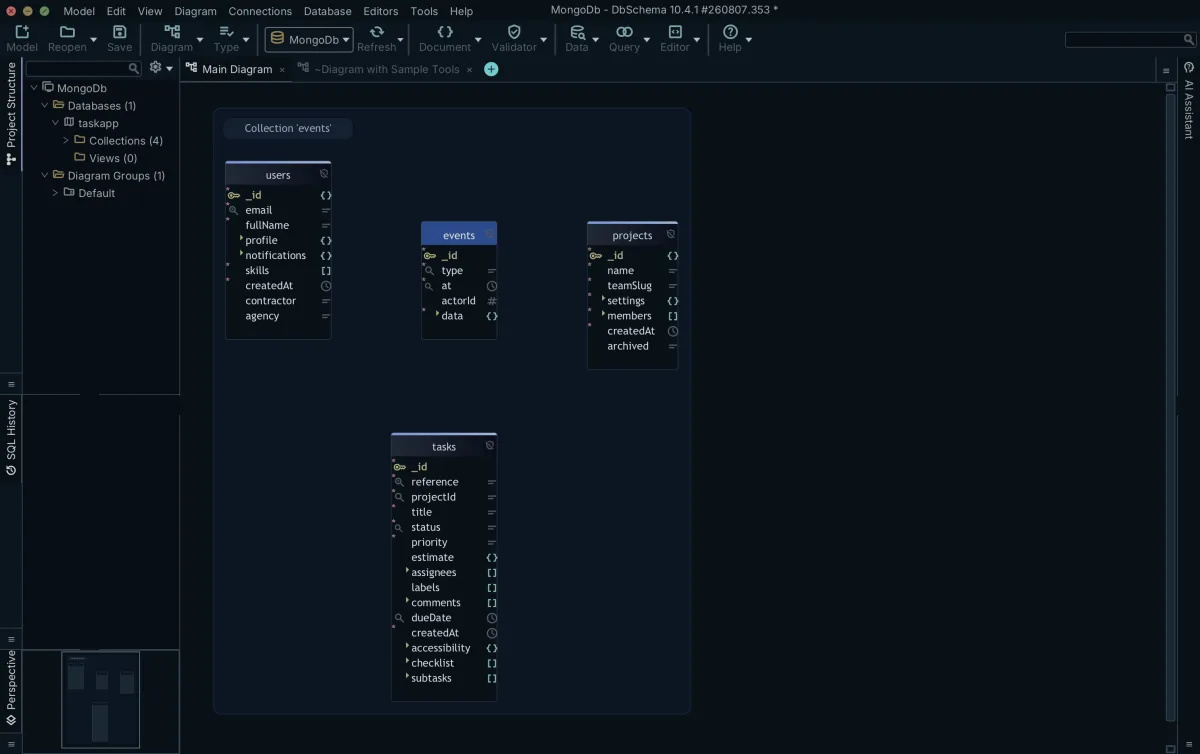
DbSchema runs on macOS, Windows and Linux, and the model file and the saved connections stay on your workstation. We build DbSchema under an ISO/IEC 27001:2022 certified information security management system. The .dbs file is plain indented XML, holding the schema plus every diagram, layout, colour and virtual foreign key. A schema change therefore shows up as readable text in a pull request. Git — Collaborative Design opens a Git dialog inside DbSchema with clone, pull, stage, commit and push.
For schemaless engines, DbSchema introspects a configurable sample of documents per collection and infers field names, BSON types, nested objects and arrays, so what you get is an approximation of what those documents contain rather than a structure MongoDB enforces. Where a collection carries a validation rule, DbSchema reverse-engineers that rule as the authoritative structure instead, and creating or editing a collection in DbSchema writes the validation rule back to both the database and the model file.
Relations that the database never declares are drawn as virtual foreign keys: drag one field onto another in the diagram and DbSchema saves the link in the model file, leaving the database untouched. The Relational Data Editor then opens parent and child collections side by side over those links, and selecting a record in the parent refilters every child pane to the documents whose values match, cascading as many levels deep as the schema goes. Relational data browse is Pro.
Pricing and licensing of each
The five tools sit at very different points on the price scale, and the licensing model matters as much as the figure.
| Tool | Licensing model | Price |
|---|---|---|
| DbSchema Community | Free | Free |
| DbSchema Pro | Perpetual, or monthly subscription | 294.00 USD one time, or 29.40 USD a month |
| DbSchema Architect | Perpetual, or monthly subscription | 470.40 USD one time, or 47.04 USD a month |
| Dataedo Essentials | Annual subscription, 3 editors | 18,000 USD a year |
| Dataedo Data Lineage | Annual subscription, 3 editors | 24,000 USD a year |
| Dataedo Data Quality | Annual subscription, 3 editors | 32,000 USD a year |
| dbdocs.io Free | Free | Free, 10 projects, one user |
| dbdocs.io Personal Pro | Monthly subscription | 8 USD a month billed annually |
| dbdocs.io Team | Monthly subscription, 3 users | 75 USD a month billed annually |
| Liquibase Secure | Annual contract, quoted | Quoted per tier |
Dataedo publishes its list prices: Essentials at 18,000 USD a year, Data Lineage at 24,000 USD a year, and Data Quality at 32,000 USD a year, each with three editor seats, unlimited viewers and a fourteen-day trial[1]. The pricing page has a currency selector, so the figures above are the ones it shows in US dollars.
DbSchema Pro is 294.00 USD plus taxes, paid once, with the first year of updates included and 75.00 USD a year afterwards to keep receiving them; the licence itself does not expire, so the version you bought keeps working if you stop renewing. Architect, which adds logical and conceptual design and own-key AI, is 470.40 USD one time with 120.00 USD a year to renew. Both are also sold monthly, at 29.40 USD and 47.04 USD, and a floating licence is available for teams that share seats[4]. Every DbSchema figure here, in the table above and in this paragraph, is a Business tab price in US dollars. The purchase page shows the same amount in your own currency, and its Personal and Universities & Students tabs price the same editions lower.
The dbdocs.io plans are shared with dbdiagram.io and move with the billing toggle: Personal Pro is 8 USD a month billed annually and 14 USD billed monthly, and the Team plan with three users is 75 USD a month billed annually and 100 USD billed monthly, with extra users charged per seat[5]. The free plan covers ten projects for a single user with public sharing[5].
Who each one is actually for
Decide by what you need to hold in your hands at the end. If it is a diagram, an interactive HTML5 data dictionary and a migration script, all generated from one file you can branch and review, DbSchema is the one to install, and it covers relational and document engines from the same model. If it is a company-wide catalog with lineage and profiling that non-technical stewards curate, Dataedo is built for that. dbdocs.io suits a team that would rather write DBML than open a modeler. Liquibase belongs in the deployment pipeline. Lucidchart belongs in the slide deck.
Download DbSchema at https://dbschema.com/download.html, point it at the database whose documentation has gone stale, and let it reverse-engineer the schema into a diagram. Connecting, reverse-engineering, the diagrams and the SQL editor are in the free Community Edition; saving the model to a file, the HTML5, PDF and Markdown documentation, relational data browse and schema synchronization are Pro; logical and conceptual design is Architect.
Frequently asked questions
What is the main difference between Dataedo and DbSchema?
Dataedo counts editor seats against a central repository and gives unlimited viewers a web catalog to read[1]. DbSchema counts per developer and produces a file: the model as XML you commit, and the documentation as HTML5, PDF or Markdown you can hand over without an account.
Can I document a MongoDB database with DbSchema?
DbSchema reads a configurable sample of documents per collection and infers field names, BSON types, nested objects and arrays from them, which is what the diagram and the HTML5 export are built from. Where a collection has a validation rule, DbSchema uses that rule as the authoritative structure instead of the sample.
Is there a free alternative to Dataedo?
The DbSchema Community Edition is free for any use and covers every supported database, reverse-engineering, interactive diagrams, creating tables and columns, and the SQL editor; the documentation export is in Pro. The dbdocs.io free plan is capped at ten projects for one user with public sharing[5].
How does Lucidchart compare for database documentation?
Lucidchart's free plan allows three editable documents of up to seventy-five shapes[3], and what it produces is a drawing rather than a model read from a database. DbSchema reverse-engineers the schema over JDBC, redraws it from what is actually there, and generates the migration script when the design and the database differ.
How is Liquibase different from Dataedo and DbSchema?
Liquibase deploys schema changes from changesets and is licensed by how many applications and database types a tier covers[2]. DbSchema is where the change is designed and the DDL is generated, and Dataedo is where a finished schema is catalogued for the wider organization, so the three sit at different points of the same lifecycle.
Sources
Document your schema without a server
DbSchema reverse-engineers your database over JDBC, keeps the model in a versionable .dbs file, and exports interactive HTML5, PDF and Markdown documentation. The Community Edition connects and diagrams for free.









