SQLite Functions Explained with Examples
For someone who writes SQL against a SQLite file and wants the totals, the strings, and the timestamps computed by the database instead of the application.
On this page
A total computed in application code costs you a round trip for every row it adds up, and SQLite will do the same job in the query. SQLite ships with built-in functions that you call inside any SELECT, in these families:
| Family | Built-in functions | Returns |
|---|---|---|
| Aggregate | COUNT, SUM, TOTAL, AVG, MIN, MAX, GROUP_CONCAT | one value for a group of rows |
| String | UPPER, LOWER, LENGTH, SUBSTR, REPLACE, TRIM, INSTR | one value per row |
| Numeric | ABS, ROUND, RANDOM | one value per row |
| Date and time | date, time, datetime, julianday, unixepoch, strftime, timediff | one value per row |
| NULL and conditions | COALESCE, IFNULL, NULLIF, IIF | one value per row |
| Type and version | TYPEOF, SQLITE_VERSION | one value per row |
| Window | ROW_NUMBER, RANK, LAG | one value per row, computed over related rows |
The examples were run on SQLite 3.50.4, and you can run them in the sqlite3 shell. If you have no database yet, create one first. Open the file and create the table that every example reads; the CREATE TABLE article explains the statement itself.
sqlite3 testDB.db
CREATE TABLE Students (
    id    INTEGER PRIMARY KEY,
    name  TEXT NOT NULL,
    score INTEGER NOT NULL
);

INSERT INTO Students(name, score) VALUES
    ('Adam', 85), ('Bob', 95), ('Charlie', 90), ('David', 92);
What a function is in SQLite
A function takes arguments and returns a value, and where you write it decides what it sees. A scalar function such as UPPER runs once per row and returns one value per row. An aggregate function such as AVG reads a group of rows and returns one value for the group, so it collapses the result set unless a GROUP BY says which groups to keep.
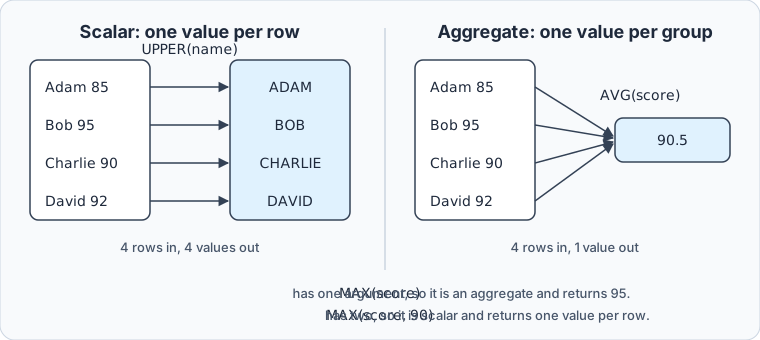
The reason to use them is that the work stays next to the data. Summing four hundred scores in the query sends one number over the connection instead of four hundred rows. Formatting a timestamp with strftime keeps the format in one place instead of in every client, and a condition written on LENGTH(name) is filtered by SQLite rather than by a loop in your code. The SQL aggregate functions tutorial covers GROUP BY and HAVING in general terms.
SQLite functions explained
The examples below run these functions:
| Function | Kind | Returns |
|---|---|---|
COUNT | aggregate | the number of rows in the group, or of non-NULL values of the argument |
MAX | aggregate | the largest value in the group |
MIN | aggregate | the smallest non-NULL value in the group |
AVG | aggregate | the average of the non-NULL values, always as a float |
SUM | aggregate | the total of the values, NULL when every input is NULL |
TOTAL | aggregate | the same total as a float, 0.0 when every input is NULL |
GROUP_CONCAT | aggregate | the non-NULL values joined into one string |
RANDOM | scalar | a pseudo-random integer |
ABS | scalar | the absolute value of a number |
UPPER | scalar | the string with its ASCII letters in upper case |
LOWER | scalar | the string with its ASCII letters in lower case |
LENGTH | scalar | the number of characters in a string, or of bytes in a blob |
TYPEOF | scalar | the datatype of the value, as text |
SQLITE_VERSION | scalar | the version string of the SQLite library |
For MAX and MIN, the number of arguments decides the kind. The core function reference says that max() "is a simple function when it has 2 or more arguments but operates as an aggregate function if given only a single argument". With one argument, MAX(score) returns the highest score in the table, 95. With two, it compares its arguments within each row:
SELECT name, score, MAX(score, 90) FROM Students;
| name | score | MAX(score, 90) |
|---|---|---|
| Adam | 85 | 90 |
| Bob | 95 | 95 |
| Charlie | 90 | 90 |
| David | 92 | 92 |
Adam's 85 is raised to 90 and the other scores pass through, which clamps a value to a floor without a CASE expression.
Implementing functions in SQLite3
Run the five aggregate functions in one statement, since they all read the same group of rows:
SELECT COUNT(*), MAX(score), MIN(score), AVG(score), SUM(score)
FROM Students;
| COUNT(*) | MAX(score) | MIN(score) | AVG(score) | SUM(score) |
|---|---|---|---|---|
| 4 | 95 | 85 | 90.5 | 362 |
AVG returns 90.5 rather than 90 because, as the aggregate function reference puts it, the result "is always a floating point value whenever there is at least one non-NULL input even if all inputs are integers". SUM stays an integer while every input is one.
Scalar functions run per row, so they go in the column list or in a WHERE clause:
SELECT UPPER(name), LOWER(name), LENGTH(name)
FROM Students
WHERE id IN (1, 2, 3);
| UPPER(name) | LOWER(name) | LENGTH(name) |
|---|---|---|
| ADAM | adam | 4 |
| BOB | bob | 3 |
| CHARLIE | charlie | 7 |
Three functions need no table at all:
SELECT ABS(-85), RANDOM(), SQLITE_VERSION();
Your random number and your version will differ:
| ABS(-85) | RANDOM() | SQLITE_VERSION() |
|---|---|---|
| 85 | 6203657643444326644 | 3.50.4 |
RANDOM() returns a different integer between -9223372036854775807 and +9223372036854775807 on every call, so ORDER BY RANDOM() LIMIT 1 picks one row at random. Check SQLITE_VERSION() before you rely on a newer function: window functions, for one, arrived in 3.25.0.
GROUP_CONCAT joins the values of a group into one string, with a comma between them unless you name another separator. Their order is arbitrary unless an ORDER BY follows the last argument, which SQLite accepts from 3.44.0 on:
SELECT GROUP_CONCAT(name), GROUP_CONCAT(name, ' > ' ORDER BY score DESC)
FROM Students;
| GROUP_CONCAT(name) | GROUP_CONCAT(name, ' > ' ORDER BY score DESC) |
|---|---|
| Adam,Bob,Charlie,David | Bob > David > Charlie > Adam |
Dates without a date type
A date column in SQLite holds whatever you store in it. The date and time functions page says SQLite "does not have a dedicated date/time datatype", so a moment is stored as ISO-8601 text, as a Julian day number, or as a Unix timestamp, and the seven date and time functions read all three:
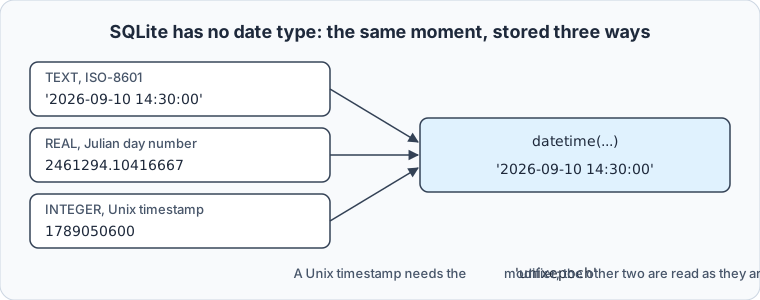
The functions shift, format and subtract dates:
SELECT date('2026-09-10 14:30:00', '+30 days') AS in_30_days,
       strftime('%d/%m/%Y', '2026-09-10 14:30:00') AS day_first,
       julianday('2026-12-25') - julianday('2026-09-10') AS days_left,
       datetime(1789050600, 'unixepoch') AS from_unix;
| in_30_days | day_first | days_left | from_unix |
|---|---|---|---|
| 2026-10-10 | 10/09/2026 | 106.0 | 2026-09-10 14:30:00 |
Subtracting two julianday values gives the number of days between them. The string 'now' gives the current moment in UTC, since for 'now' the page says "Universal Coordinated Time (UTC) is used". So datetime('now') returns UTC time, and datetime('now', 'localtime') returns the time on your machine's clock.
Function behavior that differs from other engines
A column declared INTEGER still accepts text. Add two rows the way a careless import would, and ask TYPEOF what was stored:
INSERT INTO Students(name, score) VALUES ('Eve', '92'), ('Frank', 'absent');

SELECT name, score, TYPEOF(score) FROM Students WHERE id > 4;
| name | score | TYPEOF(score) |
|---|---|---|
| Eve | 92 | integer |
| Frank | absent | text |
SQLite's datatype rules convert text stored in a numeric column when it is "a well-formed integer or real literal", so '92' became the integer 92 and 'absent' stayed text. TYPEOF returns null, integer, real, text or blob, and a WHERE TYPEOF(score) <> 'integer' scan finds such rows before they reach a report. Here is what they do to one:
SELECT AVG(score), SUM(score), TOTAL(score) FROM Students;
| AVG(score) | SUM(score) | TOTAL(score) |
|---|---|---|
| 75.6666666666667 | 454.0 | 454.0 |
The aggregate reference says "String and BLOB values that do not look like numbers are interpreted as 0", so 'absent' counted as a zero. The five numeric scores average 90.8, and the zero pulled the average of six rows down to 75.67. SUM turned into a float as soon as one input was not an integer. ABS treats text the same way and returns 0.0 for a string that cannot be converted to a number. Remove the two rows before going on:
DELETE FROM Students WHERE id > 4;
SUM and TOTAL part ways on an empty group:
SELECT SUM(score), TOTAL(score), AVG(score), COUNT(score)
FROM Students
WHERE name = 'Nobody';
| SUM(score) | TOTAL(score) | AVG(score) | COUNT(score) |
|---|---|---|---|
| NULL | 0.0 | NULL | 0 |
They part ways on overflow too. Over integers that leave the 64-bit range, SUM throws an "integer overflow" error and TOTAL returns a float, which is the argument for TOTAL in a report that must not fail.
UPPER and LOWER convert ASCII letters only: the core reference says "the default built-in lower() function works for ASCII characters only" and sends you to the ICU extension for other letters. LENGTH counts characters in a string and bytes in a blob:
SELECT UPPER('élan'), LENGTH('élan'), LENGTH(CAST('élan' AS BLOB));
| UPPER('élan') | LENGTH('élan') | LENGTH(CAST('élan' AS BLOB)) |
|---|---|---|
| éLAN | 4 | 5 |
The é keeps its lower case, and it takes two bytes in UTF-8, so the blob is one byte longer than the string has characters.
What SQLite will not let a function do
SQLite has no CREATE FUNCTION statement, and no stored functions or procedures. A function that is not built in is registered by the program that opened the database, through the sqlite3_create_function() family of interfaces in C, or through whatever your language's binding offers. Python's sqlite3 module offers create_function:
import sqlite3

first = sqlite3.connect("testDB.db")
first.create_function("grade", 1, lambda score: "A" if score >= 90 else "B")
print(first.execute("SELECT name, grade(score) FROM Students").fetchall())

second = sqlite3.connect("testDB.db")
print(second.execute("SELECT name, grade(score) FROM Students").fetchall())
The script prints the grades from the first connection, then stops with this error on the second:
[('Adam', 'B'), ('Bob', 'A'), ('Charlie', 'A'), ('David', 'A')]
sqlite3.OperationalError: no such function: grade
The application-defined functions page gives the reason: "Custom SQL functions are created separately for each database connection." A function that your program registers is missing from the sqlite3 shell, from a colleague's script, and from the next connection your own program opens. A view that calls it fails with the same error on every such connection, so keep custom functions out of views and triggers that other clients read. The built-in functions are available to every connection.
Implementing functions in DbSchema



DbSchema runs the same queries against the same file. DbSchema opens on the Welcome Screen, where Connect to Database is the first option:

- Click Connect to Database.
- Choose SQLite from the list of databases.
- In the Connection Dialog, give the path to
testDB.dband click Connect. DbSchema downloads the JDBC driver itself, reverse-engineers the file, and listsStudentsin the Project Structure panel. - Open a SQL Editor from the Editors menu, paste the aggregate query, and click Execute Query, which runs the statement at the cursor and shows the result as a table.
In the DbSchema SQL Editor, press Ctrl+Space for auto-complete, which suggests the table names, column names, keywords and functions of the connected schema, so a half-remembered function name is one keystroke away. DbSchema's SQL History pane records every statement executed in the session, and clicking an entry loads it back into the editor. That history is how you recover the version of a query that gave the right number after you have edited it four times.
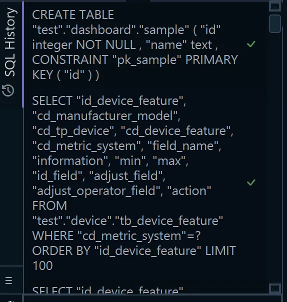
The statements go to the SQLite file: an INSERT or a DELETE run in the editor changes testDB.db once you click Commit. The editor tab belongs to the design model instead. DbSchema keeps it in the .dbs model file, so the query is still there when you reopen a saved project.
Let SQLite compute what it can, and read the two function reference pages for what it returns when the input is empty, textual or NULL. Download DbSchema, connect it to testDB.db, and keep the aggregate query in a SQL Editor tab. Connecting, reverse-engineering, the interactive diagrams and the SQL Editor are in the free Community Edition; saving the model to a file, which keeps the tab for next time, is in Pro.









