How to Document a Postgres Database
For the developer or DBA who owns a Postgres database and has to explain it to people who never open psql.
On this page
A column went in six months ago, and now nobody can say what its values mean or why it may be empty. Document a Postgres database by storing that answer on the object itself: the COMMENT command attaches a description to a table, a column or any other object, and every client that reads the catalog shows it.
- Write
COMMENT ON TABLEandCOMMENT ON COLUMNstatements in a.sqlfile that lives next to your migrations. - Apply the file with
psql -v ON_ERROR_STOP=1 --single-transaction -f, so that either every comment lands or none does. - Read the comments back with
\dt+and\d+, and query the catalog for the columns that still have none. - For readers without database access, connect DbSchema and export the diagram and the comments as one HTML5 file, a PDF or Markdown.
Write the comments in a file and apply them with psql
Postgres stores each comment in the pg_description catalog, one string per object, and every client reads it from there.
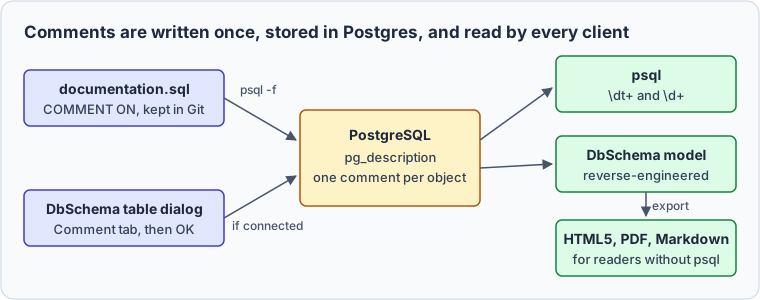
The examples ran on PostgreSQL 18.6, against a small league database:
CREATE TABLE teams (
  id           int GENERATED BY DEFAULT AS IDENTITY PRIMARY KEY,
  name         text NOT NULL,
  city         text,
  founded_year int
);

CREATE TABLE players (
  id            int GENERATED BY DEFAULT AS IDENTITY PRIMARY KEY,
  team_id       int NOT NULL REFERENCES teams,
  name          text NOT NULL,
  position      text,
  jersey_number int
);

CREATE TABLE matches (
  id           int GENERATED BY DEFAULT AS IDENTITY PRIMARY KEY,
  home_team_id int NOT NULL REFERENCES teams,
  away_team_id int NOT NULL REFERENCES teams,
  match_date   date,
  home_score   int,
  away_score   int
);
The comments go into documentation.sql, versioned with the migrations. A first pass describes each table and the least obvious column:
COMMENT ON TABLE teams   IS 'Clubs registered in the league';
COMMENT ON TABLE players IS 'Players under contract with a club';
COMMENT ON TABLE matches IS 'Fixtures, with the score once the match is played';

COMMENT ON COLUMN players.position IS 'Field role: goalkeeper, defender, midfielder or forward';
Apply it from a terminal:
psql -d sports -v ON_ERROR_STOP=1 --single-transaction -f documentation.sql
psql prints the tag of each statement it ran:
COMMENT
COMMENT
COMMENT
COMMENT
--single-transaction wraps the file in BEGIN and COMMIT, which psql doesn't print, and with ON_ERROR_STOP=1 an error sends ROLLBACK instead[1]. Here the third statement has a typo:
COMMENT ON COLUMN teams.city         IS 'City the club plays its home matches in';
COMMENT ON COLUMN matches.home_score IS 'Goals by the home team; NULL until the match is played';
COMMENT ON COLUMN matches.home_scor  IS 'typo in the column name';
COMMENT
COMMENT
psql:broken.sql:3: ERROR:  column "home_scor" of relation "matches" does not exist
psql exits with status 3. teams.city has no comment, although psql printed COMMENT for it, because the rollback undid both statements. Without --single-transaction, those two comments would stay.
Running the file again is safe. Postgres keeps one comment per object, so a second COMMENT on the same object replaces the first, IS NULL or IS '' removes it, and dropping an object drops its comment[2].
Read the comments back with psql
\dt+ lists the tables with their persistence, their size on disk and their description:
psql -d sports -c '\dt+'
                                                           List of tables
 Schema |  Name   | Type  |  Owner   | Persistence | Access method |    Size    |                    Description
--------+---------+-------+----------+-------------+---------------+------------+---------------------------------------------------
 public | matches | table | postgres | permanent   | heap          | 0 bytes    | Fixtures, with the score once the match is played
 public | players | table | postgres | permanent   | heap          | 8192 bytes | Players under contract with a club
 public | teams   | table | postgres | permanent   | heap          | 8192 bytes | Clubs registered in the league
(3 rows)
\d+ on one table adds a Description column to its column list:
psql -d sports -c '\d+ players'
                                                                               Table "public.players"
    Column     |  Type   | Collation | Nullable |             Default              | Storage  | Compression | Stats target |                       Description
---------------+---------+-----------+----------+----------------------------------+----------+-------------+--------------+---------------------------------------------------------
 id            | integer |           | not null | generated by default as identity | plain    |             |              |
 team_id       | integer |           | not null |                                  | plain    |             |              |
 name          | text    |           | not null |                                  | extended |             |              |
 position      | text    |           |          |                                  | extended |             |              | Field role: goalkeeper, defender, midfielder or forward
 jersey_number | integer |           |          |                                  | plain    |             |              |
The rest of the output lists the indexes and constraints. Each -c takes one backslash command, hence the two calls.
Privileges don't protect comments: any user connected to the database reads them all[2]. A role with no access to players still gets its description, and only the row count fails:
CREATE ROLE analyst LOGIN;
SET ROLE analyst;
SELECT obj_description('players'::regclass, 'pg_class') AS seen_by_analyst;
SELECT count(*) FROM players;
| seen_by_analyst |
|---|
| Players under contract with a club |
ERROR: permission denied for table players
Keep passwords and internal host names out of comments.
Find the columns nobody described
col_description returns a column's comment from its table's OID and its column number[3], so one catalog query lists what the first pass left out:
SELECT c.relname AS table_name,
       string_agg(a.attname, ', ' ORDER BY a.attnum) AS columns_without_a_comment
FROM pg_class c
JOIN pg_namespace n ON n.oid = c.relnamespace
JOIN pg_attribute a ON a.attrelid = c.oid
WHERE n.nspname = 'public'
  AND c.relkind = 'r'
  AND a.attnum > 0
  AND NOT a.attisdropped
  AND col_description(c.oid, a.attnum) IS NULL
GROUP BY c.relname
ORDER BY c.relname;
| table_name | columns_without_a_comment |
|---|---|
| matches | id, home_team_id, away_team_id, match_date, home_score, away_score |
| players | id, team_id, name, jersey_number |
| teams | id, name, city, founded_year |
a.attnum > 0 skips system columns such as ctid, and NOT a.attisdropped skips dropped ones. Run the query in your migration pipeline and fail on any row, and a new column can't pass review without a description.
Connect DbSchema and write comments on the diagram
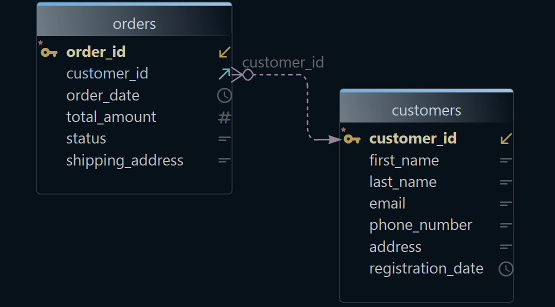
psql serves the people who have a login. For everyone else, and to see how the tables connect, DbSchema reverse-engineers the database, comments included, and draws it.
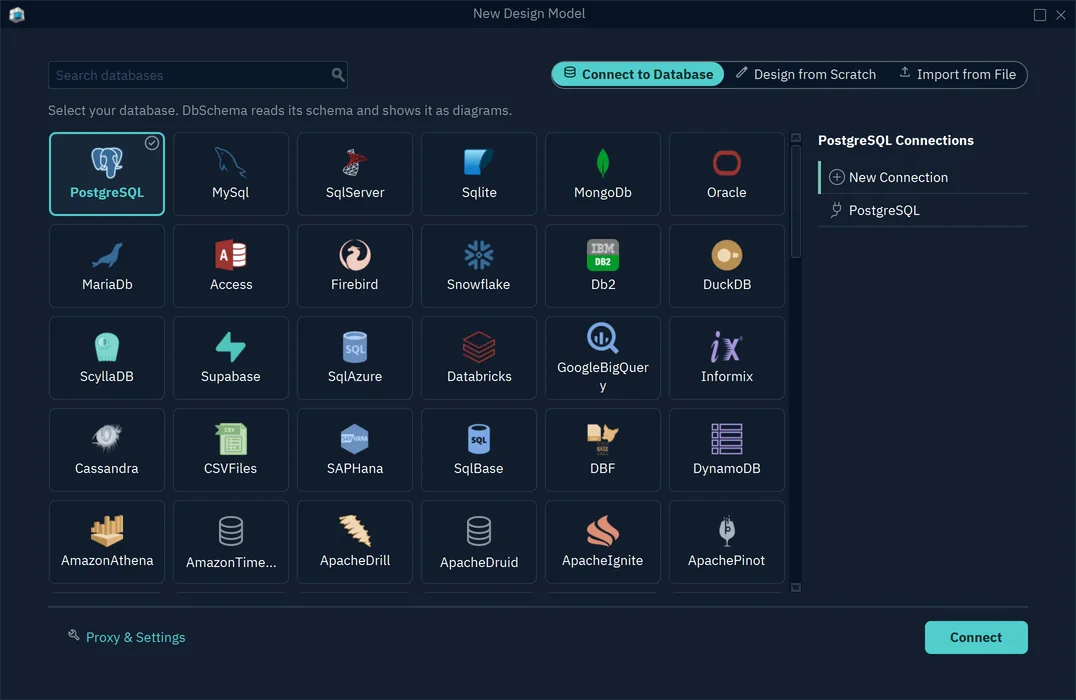
To connect, choose File → New Model, keep Connect to Database selected, click PostgreSQL, and press Connect to PostgreSQL.
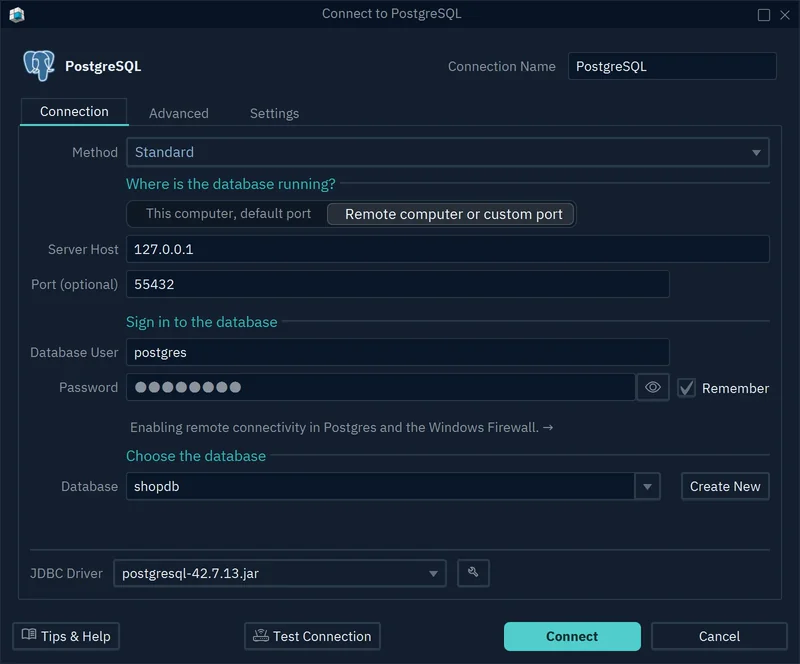
In the connection dialog, choose the Standard method, then fill in where the database runs, the user and password, and the database. DbSchema downloads the JDBC driver on the first connection.
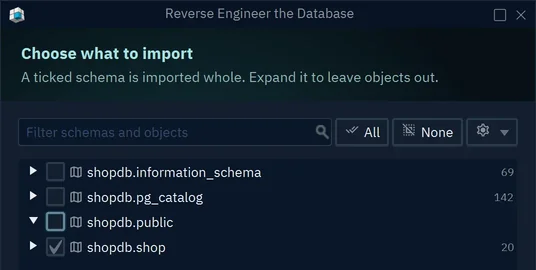
Press Connect, then tick the schema in Reverse Engineer the Database and press Import. Connecting and importing only read from the database, and both are in the free Community Edition.
On the diagram, a speech bubble after a column name marks a column with a comment, here players.position.
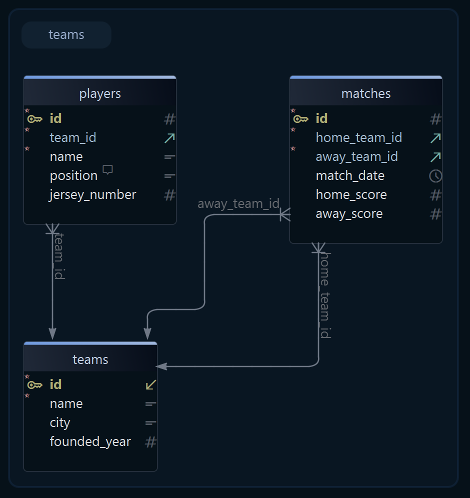
To write a comment without SQL, double-click a table header on the diagram, type the text in the Comment tab of the Edit Table dialog, and press OK. A column has its own Comment box in the column dialog. DbSchema keeps the comment in its model, and while connected, OK also writes it to the database as a COMMENT ON statement.
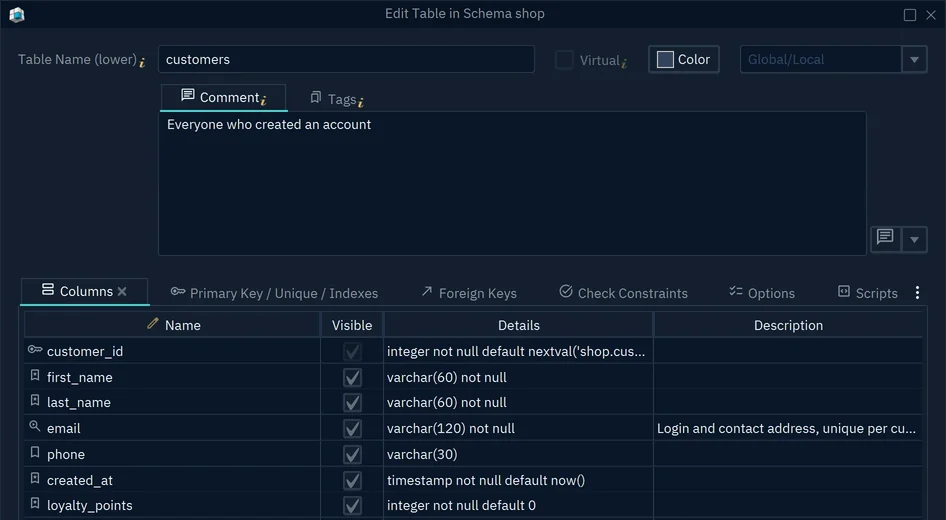
Pick one place to write comments: a rerun of documentation.sql overwrites any text typed in DbSchema for the same object.
Export the comments as HTML5, PDF or Markdown
In DbSchema, choose File → Export As... → HTML5/PDF Documentation, or press Ctrl+D. Type a Title, pick the Format and the File Path, and press Generate. The export changes neither the model nor the database.
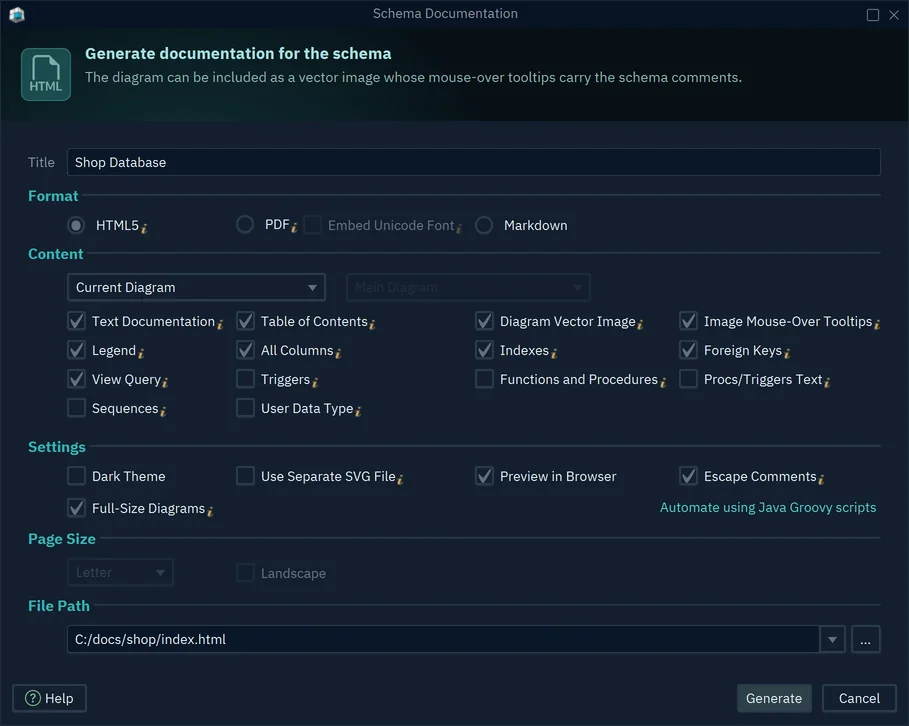
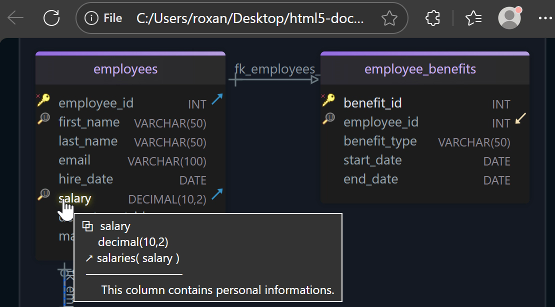
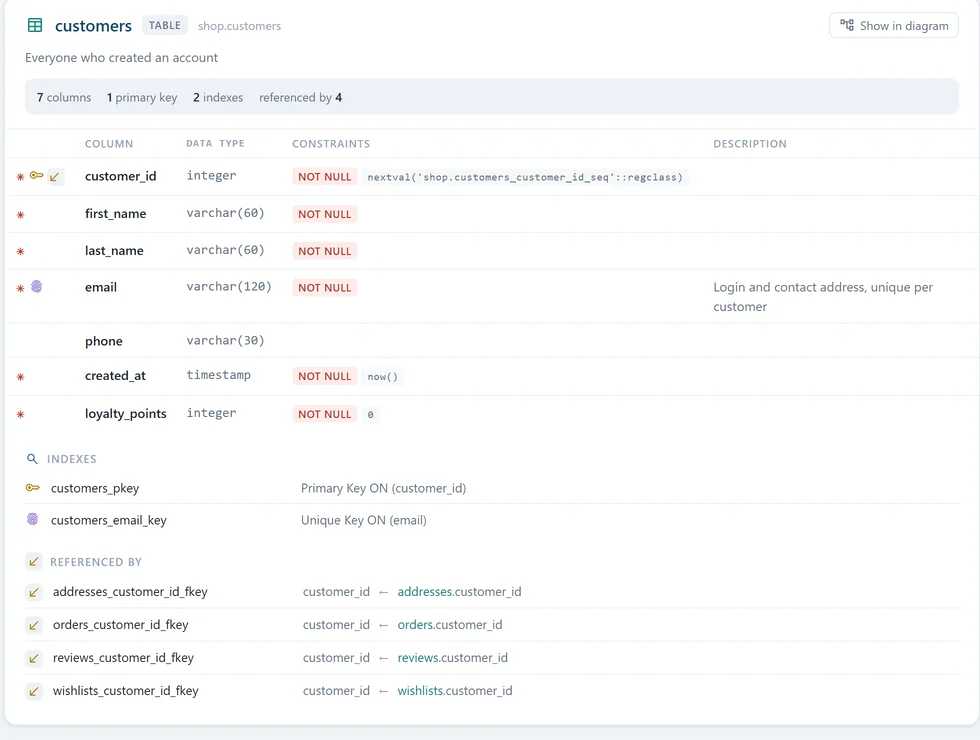
HTML5 gives one .html file that opens in any browser, offline. Pointing at a column in the diagram shows its comment, and each table's card below the diagram lists the column comments under Description.
The PDF gives each diagram a page of its own, followed by the table pages. For comments in Cyrillic, Chinese or other non-Latin letters, tick Embed Unicode Font.
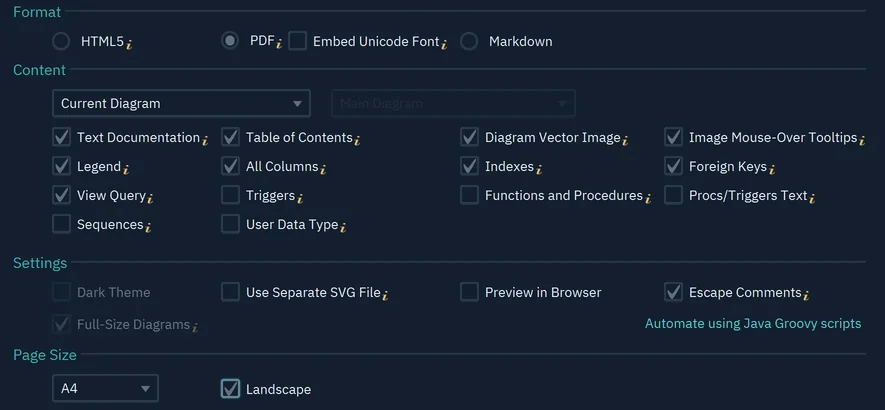
Markdown writes a .md file and an .svg image of each diagram, to commit next to the code or paste into a wiki.
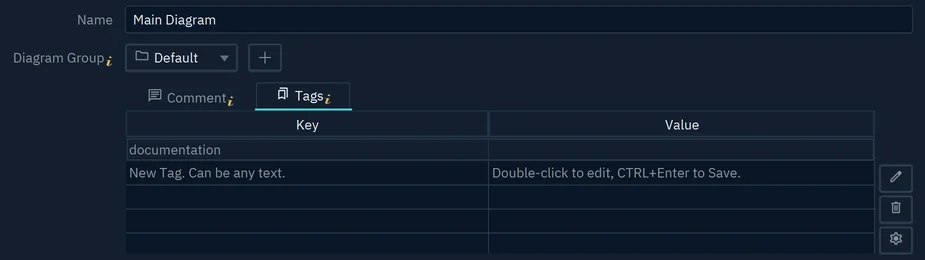
Split a large schema into several diagrams, and each becomes a section of the documentation. Under Content, Diagrams with 'documentation' tag exports every diagram that carries the key documentation in Diagram → Diagram Properties → Tags, ordered by the tag's value.
Download DbSchema, connect it to the Postgres database you commented, and export the HTML5 file for the people who never open psql. Connecting, reverse-engineering and the diagram are in the free Community Edition; the HTML5, PDF and Markdown documentation is in DbSchema Pro.
Sources
Turn your Postgres comments into shareable documentation
DbSchema reverse-engineers your PostgreSQL database, picks up the COMMENT descriptions already stored in it, and exports the diagram and every description as one interactive HTML5 file, a PDF or a Markdown file. Documentation export is in the Pro edition, and the Architect trial runs 15 days.