MySQL CREATE TABLE Guide with Examples
For someone with an empty MySQL database who needs their first tables in it; each statement is shown with the output MySQL returned.
On this page
A MySQL database with no tables in it holds nothing. CREATE TABLE gives it one: you name the table, then list its columns, each with a data type and the rules its values must follow.
CREATE TABLE customers (
    customer_id INT AUTO_INCREMENT PRIMARY KEY,
    email VARCHAR(100) NOT NULL UNIQUE,
    full_name VARCHAR(100) NOT NULL,
    created_at DATETIME DEFAULT CURRENT_TIMESTAMP
);
That table numbers each customer by itself, refuses a row without an email or a name, refuses a second row with the same email, and records when each row arrived. The statements below were run on MySQL 8.0.29 and 9.1.0 with the same output, and the manual links go to MySQL 8.4, the long-term release between them. If the database does not exist yet, start with MySQL CREATE DATABASE.
The CREATE TABLE syntax
CREATE TABLE table_name (
    column1 data_type constraints,
    column2 data_type constraints,
    ...
    columnN data_type constraints
);
Each column is a name, a type such as INT, VARCHAR(n) or DATE, and optional constraints such as NOT NULL, UNIQUE or DEFAULT, which say which values the column accepts. Commas go between the columns; a comma after the last one fails with ERROR 1064, a syntax error reported near the closing parenthesis.
The MySQL manual sets two defaults worth knowing. Tables use the InnoDB storage engine, so transactions and foreign keys work without asking for them. And a column that says neither NULL nor NOT NULL "is treated as though NULL had been specified": it accepts a missing value until you say otherwise. SHOW CREATE TABLE customers prints the statement as MySQL stored it, and its last line names the engine and character set that the statement left out: ENGINE=InnoDB DEFAULT CHARSET=utf8mb4 COLLATE=utf8mb4_0900_ai_ci.
Running the same CREATE TABLE twice fails with ERROR 1050 (42S01): Table 'customers' already exists. CREATE TABLE IF NOT EXISTS turns that error into a note and leaves the existing table alone, which suits a setup script that may run more than once. IF NOT EXISTS compares names only: the manual warns that "there is no verification that the existing table has a structure identical to that indicated by the CREATE TABLE statement", so a table left by an older version of the script keeps its old columns.
Create the table from the mysql client
The account you log in with needs the CREATE privilege. Root has it; a new account does not until someone grants it, as MySQL CREATE USER and GRANT shows. Log in, then select the database, because CREATE TABLE writes into whichever database is selected:
mysql -u username -p
USE shop;
Then run the CREATE TABLE customers statement from the top of this page. Without the USE, MySQL has nowhere to put the table:
ERROR 1046 (3D000): No database selected
Check what the server now has:
SHOW TABLES;
DESCRIBE customers;
| Tables_in_shop |
|---|
| customers |
| Field | Type | Null | Key | Default | Extra |
|---|---|---|---|---|---|
| customer_id | int | NO | PRI | NULL | auto_increment |
| varchar(100) | NO | UNI | NULL | ||
| full_name | varchar(100) | NO | NULL | ||
| created_at | datetime | YES | CURRENT_TIMESTAMP | DEFAULT_GENERATED |
The SHOW TABLES heading carries the database name, which catches a table created in the wrong database.
Primary key and AUTO_INCREMENT
A primary key identifies each row: no two rows share a value, and the value is never NULL. With AUTO_INCREMENT, MySQL fills it in when an insert leaves it out:
INSERT INTO customers (email, full_name)
VALUES ('[email protected]', 'Ana Lima'), ('[email protected]', 'Ben Cole');

SELECT customer_id, email, full_name FROM customers;
| customer_id | full_name | |
|---|---|---|
| 1 | [email protected] | Ana Lima |
| 2 | [email protected] | Ben Cole |
The manual allows one AUTO_INCREMENT column per table, with no DEFAULT, and it must be indexed. It need not be the primary key, but a column with no index is refused:
CREATE TABLE bad_counter (n INT AUTO_INCREMENT, label VARCHAR(20));
ERROR 1075 (42000): Incorrect table definition; there can be only one auto column and it must be defined as a key
NOT NULL, DEFAULT and UNIQUE
NOT NULL says a value has to be there on every insert. DEFAULT says which value the column takes when an insert leaves it out:
CREATE TABLE products (
    product_id INT NOT NULL,
    product_name VARCHAR(100) NOT NULL,
    status VARCHAR(20) DEFAULT 'Active'
);

INSERT INTO products (product_id, product_name) VALUES (1, 'Desk lamp');
SELECT * FROM products;
| product_id | product_name | status |
|---|---|---|
| 1 | Desk lamp | Active |
Leave out product_name and MySQL rejects the insert, because that column is NOT NULL with no default to fall back on:
INSERT INTO products (product_id) VALUES (2);
ERROR 1364 (HY000): Field 'product_name' doesn't have a default value
The rejection comes from strict SQL mode, on by default in MySQL 8.4. With strict mode off, the insert passes with a warning and stores the implicit default, an empty string.
UNIQUE rejects a second row with the same value. The email column of customers already holds [email protected]:
INSERT INTO customers (email, full_name) VALUES ('[email protected]', 'Ana Silva');
ERROR 1062 (23000): Duplicate entry '[email protected]' for key 'customers.email'
Link two tables with a foreign key
A foreign key makes a column point at the primary key of another table. Here every order must belong to an existing customer:
CREATE TABLE orders (
    order_id INT AUTO_INCREMENT PRIMARY KEY,
    customer_id INT NOT NULL,
    ordered_on DATE NOT NULL,
    FOREIGN KEY (customer_id) REFERENCES customers (customer_id)
);
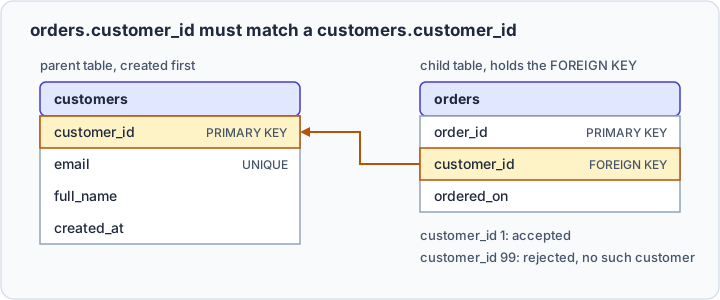
An order for customer 1 goes in. An order for customer 99, who does not exist, is refused:
INSERT INTO orders (customer_id, ordered_on) VALUES (99, '2026-10-17');
ERROR 1452 (23000): Cannot add or update a child row: a foreign key constraint fails (`shop`.`orders`, CONSTRAINT `orders_ibfk_1` FOREIGN KEY (`customer_id`) REFERENCES `customers` (`customer_id`))
Create the parent table first: in a database without customers, the orders statement fails with ERROR 1824 (HY000): Failed to open the referenced table 'customers'. What is a foreign key covers ON DELETE and the other options.
Copy the structure of an existing table
CREATE TABLE ... LIKE copies the structure without the rows. CREATE TABLE ... AS SELECT copies the rows, with columns built from the query result:
CREATE TABLE customers_empty LIKE customers;
CREATE TABLE customers_copy AS SELECT * FROM customers;
SHOW CREATE TABLE on these copies, and on the same two copies of orders, shows what each kept:
| Copied | LIKE | AS SELECT |
|---|---|---|
| Rows | no | yes |
| Columns, types, NOT NULL | yes | yes |
| Primary key and AUTO_INCREMENT | yes | no |
| UNIQUE keys and other indexes | yes | no |
| Foreign keys | no | no |
The manual's LIKE page says that LIKE keeps no foreign key definitions, and its page on copying with SELECT that "the AUTO_INCREMENT attribute is not preserved".



Create the same table in DbSchema
DbSchema is a MySQL client and visual designer that builds the table from dialogs instead of a statement. Connect DbSchema to the MySQL database, click an empty spot on the diagram, and choose Table → Create Table in the toolbar, or right-click the diagram and choose Create Table. Type the table name, then press Add in the Columns tab for each column, as Tables, Columns and Indexes shows.
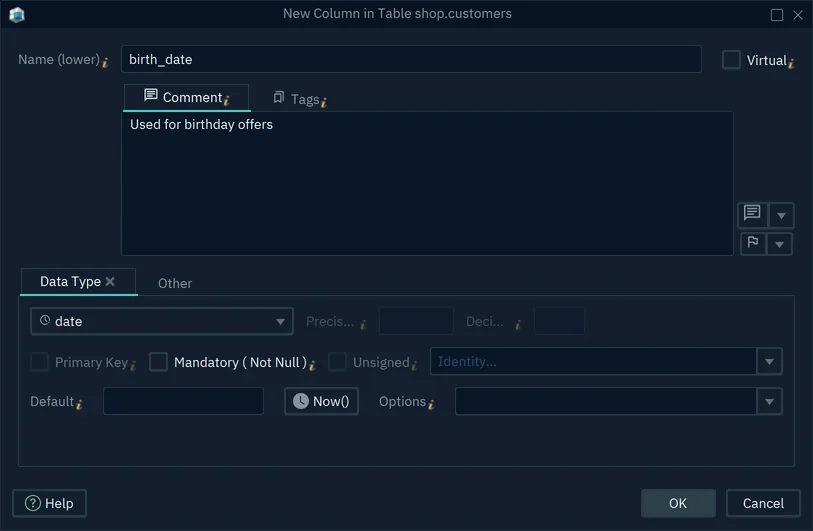
The column dialog holds what this page typed by hand: the data type and length, Primary Key, Mandatory ( Not Null ), Unsigned, Default, and Identity, which DbSchema writes as MySQL's AUTO_INCREMENT. DbSchema's Edit Table dialog has tabs for the rest: Primary Key / Unique / Indexes, Foreign Keys, and Options, which holds MySQL's own settings such as the storage engine and character set.
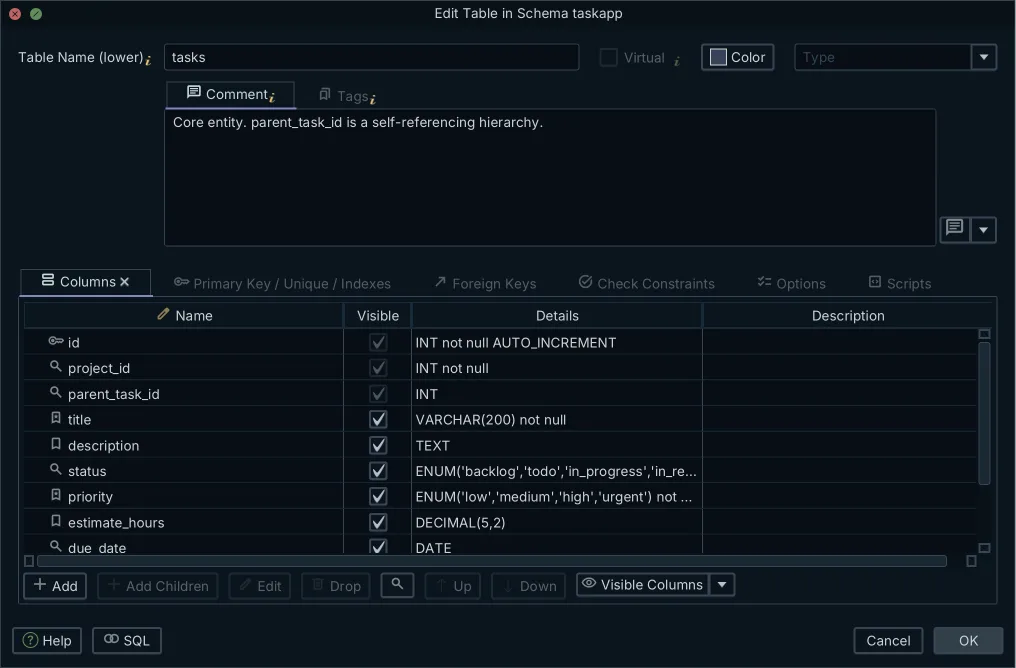
While DbSchema is connected, each change you confirm with OK runs in MySQL at once, and SQL at the bottom of the table dialog shows the CREATE TABLE statement first. Offline, the changes stay in DbSchema's model until you synchronize it with the database.
Get DbSchema from https://dbschema.com/download.html, connect it to your MySQL database, and add your next table from the diagram. Connecting, diagrams, creating tables and the SQL editor are in the free Community Edition; saving the model to a file and synchronizing it need DbSchema Pro.
Create MySQL tables without hand-writing the DDL
DbSchema reverse-engineers your MySQL database, lets you add tables and columns visually, and shows you the SQL it generates before anything runs. The Community Edition is free.









