One Data Model, Several Databases: Generate PostgreSQL, MySQL and SQL Server From One Design
How one logical design becomes a correct schema on three databases, and which columns need a second look on each.
On this page
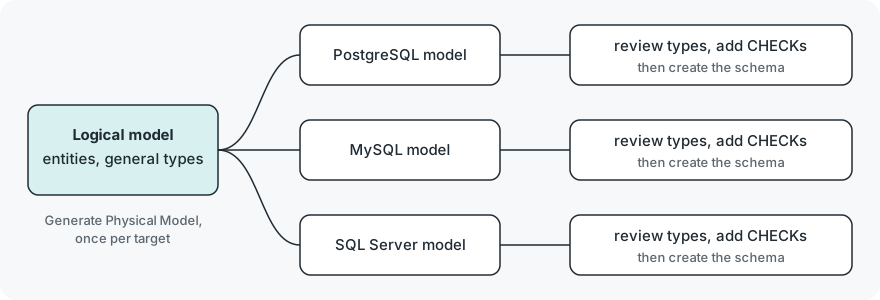
Your product ships on PostgreSQL for the cloud, on MySQL for customers who host it themselves, and one large customer wants SQL Server. Three hand-maintained CREATE TABLE scripts drift apart within a release or two. The way out is to keep the design once, as a logical data model with general types, and generate a physical model per database from it. In DbSchema Architect that is a logical design plus Model → Generate Physical Model, run once for each target.
Short answer
Model the data once as a logical design, then generate one physical model per database: in DbSchema, Model → Generate Physical Model with Target DBMS set to PostgreSQL, then MySQL, then SQL Server. Check the Model Conversion Rules before each conversion, review the columns where the engines differ, and create each schema from its own physical model.
- A logical model holds entities, attributes and general types, and no engine syntax.
- Each engine gets its own generated physical model, reviewed before it touches a database.
- Some types stop enforcing what the design meant on one engine, so add the CHECK back there.
Why one script can't serve three databases
The same table definition is not portable SQL. We wrote the customers and orders tables the way PostgreSQL wants them and ran that script on MySQL 8.4.11, then did the reverse:
CREATE TYPE order_status AS ENUM ('open','paid','shipped');
CREATE TABLE customers (
  customer_id uuid PRIMARY KEY,
  email varchar(320) NOT NULL UNIQUE,
  is_active boolean NOT NULL DEFAULT true
);
CREATE TABLE orders (
  order_id bigint PRIMARY KEY,
  customer_id uuid NOT NULL REFERENCES customers(customer_id),
  status order_status NOT NULL DEFAULT 'open',
  total_amount numeric(12,2) NOT NULL,
  placed_at timestamp NOT NULL
);
MySQL stops at the first statement with ERROR 1064 (42000) near TYPE order_status AS ENUM, and at both uuid columns after it. The MySQL version of the script, with an inline enum('open','paid','shipped') column, fails on PostgreSQL 17.6 with ERROR: type "enum" does not exist. Neither engine is wrong. Each one has its own types, and an enum is a type of its own in PostgreSQL (PostgreSQL enumerated types) but a column definition in MySQL (MySQL ENUM).
So the design can't live in any one engine's DDL. It needs a level above the engines, where status is "one of open, paid, shipped" and customer id is "a UUID", and each engine's script is produced from that.
What a logical model keeps, and what it leaves to each engine
A logical design in DbSchema holds entities, attributes and relations, with no database connected. Its types are general: BIGINT, BOOLEAN, CHAR, DATE, DATETIME, DECIMAL, DOUBLE, ENUM, INT, MONEY, NUMERIC, NVARCHAR, TEXT, UUID and VARCHAR. Names are written in plain words, so the attribute is customer id, not customer_id. If you want the basics of logical against physical models first, Logical Design for Databases covers them.
What the logical model can't decide is how each engine stores a type. These are the columns the same attributes need on the three databases, from each engine's documentation (uniqueidentifier, datetime2):
| Logical type | PostgreSQL 17 | MySQL 8.4 | SQL Server |
|---|---|---|---|
UUID | uuid | char(36) or binary(16) | uniqueidentifier |
BOOLEAN | boolean | boolean, stored as tinyint(1) | bit |
ENUM | CREATE TYPE … AS ENUM | enum(…) on the column | varchar with a CHECK |
DATETIME | timestamp | datetime | datetime2 |
NUMERIC(12,2) | numeric(12,2) | decimal(12,2) | decimal(12,2) |
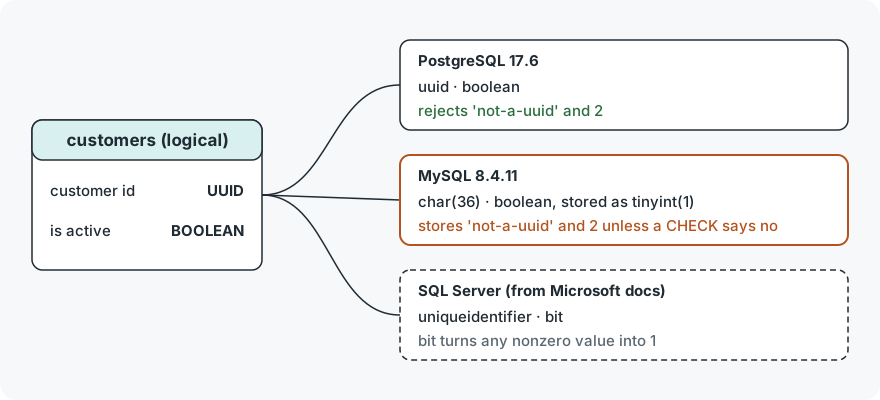
The table is the easy part. The harder part is that a column with the right name and a working insert can still accept values the design never allowed.
Where a type stops meaning the same thing
We created the MySQL tables above with char(36) for the UUID and boolean for the flag, then sent the same three inserts to both engines. MySQL 8.4.11 ran with its default sql_mode, which includes STRICT_TRANS_TABLES:
INSERT INTO customers VALUES ('not-a-uuid','[email protected]',true);
INSERT INTO customers VALUES ('7c9e6679-7425-40de-944b-e07fc1f90ae7','[email protected]',2);
SELECT customer_id, is_active FROM customers;
PostgreSQL 17.6 rejects both inserts, because uuid accepts only the UUID formats its documentation lists (PostgreSQL UUID type), with invalid input syntax for type uuid: "not-a-uuid" and column "is_active" is of type boolean but expression is of type integer. MySQL stores both rows:
Result · MySQL 8.4.11
| customer_id | is_active |
|---|---|
| 7c9e6679-7425-40de-944b-e07fc1f90ae7 | 2 |
| not-a-uuid | 1 |
The MySQL column is tinyint(1), because MySQL treats BOOLEAN as a synonym for TINYINT(1) (MySQL numeric types), so a "boolean" holds 2, and char(36) holds any 36 characters or fewer. On SQL Server, bit behaves differently again: Microsoft's documentation says converting to bit promotes any nonzero value to 1 (bit (Transact-SQL)), so the 2 would be stored as 1 without an error. We did not run SQL Server; that line comes from the vendor documentation.
The enum held on both engines we ran. 'refunded' failed on PostgreSQL with invalid input value for enum order_status and on MySQL with ERROR 1265 (01000): Data truncated for column 'status'. The MySQL error depends on strict mode. With sql_mode set to an empty string, the same insert went through with only warning 1265, and the row came back with an empty status, index 0 of the enum.
The fix is to put the rule back where the engine dropped it. On MySQL 8.4, CHECK constraints are enforced (MySQL CHECK constraints):
ALTER TABLE customers
  ADD CONSTRAINT ck_customers_id CHECK (customer_id REGEXP '^[0-9a-f]{8}-[0-9a-f]{4}-[0-9a-f]{4}-[0-9a-f]{4}-[0-9a-f]{12}$'),
  ADD CONSTRAINT ck_customers_active CHECK (is_active IN (0,1));
After this, the same two inserts fail with ERROR 3819 (HY000): Check constraint 'ck_customers_id' is violated and Check constraint 'ck_customers_active' is violated, and a row with a real UUID and true goes in as 1.
These checks belong in the MySQL physical model only. PostgreSQL enforces the same rules through its types, so the logical design stays clean and each physical model carries what its engine needs.
Names and letter case differ too
Unquoted names fold to lower case in PostgreSQL (PostgreSQL identifiers), so SELECT count(*) FROM Customers finds the customers table, while "Customers" in quotes fails with relation "Customers" does not exist. The MySQL 8.4 Docker image we ran on Linux reports lower_case_table_names = 0 (MySQL identifier case sensitivity), where shop.Customers fails with ERROR 1146 (42S02): Table 'shop.Customers' doesn't exist. A model that uses mixed-case names works on one engine and breaks queries on the other.
DbSchema handles this in the Naming Dictionary, under Model → Dictionaries. Separators turns the spaces of the logical names into underscores, and Convert Cases writes the names in the letter case the target database prefers. Tick View → Diagram Display → Show Physical Name to see customer_id on the diagram before you generate anything.
Generate one physical model per database in DbSchema
The logical design is a model file and connects to no database. Generating a physical model makes a second model, also a file, and only the last step below writes to a database.
-
Start or convert the logical design Architect
Choose
File → New Model, then Design without Database and Logical Design. To start from a database you already have, open its model and chooseModel → Convert Modelwith Target DBMS set to LogicalDesign. -
Check the conversion rules Architect
Open the Conversion Dictionary under
Model → Dictionaries. It maps each logical type to a type of the target database, and the Model Conversion Rules dialog shows the rules again before every conversion. -
Generate the physical model Architect
Choose
Model → Generate Physical Model, set Target DBMS to PostgreSQL, choose the Inheritance Model, press OK, check the rules and press Convert. The physical model opens in a new window, and the logical design stays as it is. -
Repeat for each target Architect
Run Generate Physical Model again from the same logical design with Target DBMS set to MySQL, then SQL Server. In each physical model, add what that engine needs, such as the
CHECKconstraints on MySQL. -
Create the schema in the database Pro
Connect each physical model to its database and create the schema there.
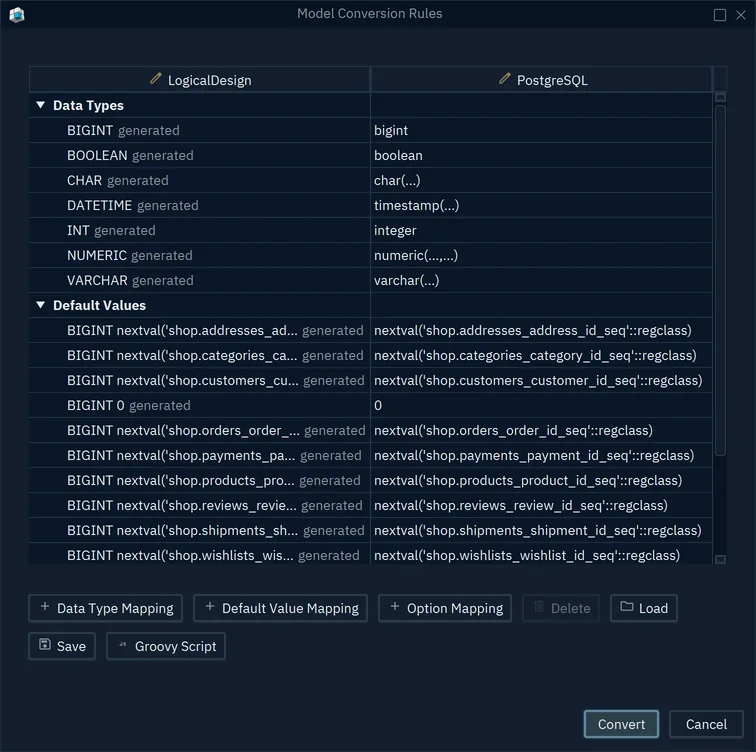
- 1Logical types of the design
- 2What each becomes in PostgreSQL
- 3Convert writes the physical model
One detail from the DbSchema documentation matters on a round trip: the rules from PostgreSQL to the logical design map integer to BIGINT, so a PostgreSQL model converted to logical and back gets bigint where it had integer. Change that rule to INT before you press Convert if you want to keep integer.
What stays behind in each engine
Generate Physical Model turns entities, attributes and relations into tables, columns and foreign keys. Triggers, functions and procedures are written in one database's language, so the documentation tells you to check them after a conversion. The cardinality you set on a relation in the logical design also stays behind: a relation set to One gets no unique key, and the physical model reads the cardinality from the columns again. Add the unique key in the physical model where the design needs it.
If your team already runs several engines and the question is how to keep track of all of them, Working Across a Mixed Database Estate covers that side. This article is about the step before: one design, written once, that each engine receives in its own dialect.
To try it, download DbSchema: a new installation starts with a 15-day DbSchema Architect trial, so you can draw the logical design, generate the PostgreSQL, MySQL and SQL Server models, and compare them before you buy. Logical design and Generate Physical Model are in the Architect edition.
Sources
- PostgreSQL 17: UUID type
- PostgreSQL 17: Enumerated types
- PostgreSQL 17: Lexical structure, identifiers and key words
- MySQL 8.4: Numeric data type syntax (BOOL and BOOLEAN)
- MySQL 8.4: The ENUM type
- MySQL 8.4: CHECK constraints
- MySQL 8.4: Identifier case sensitivity
- Microsoft Learn: bit (Transact-SQL)
- Microsoft Learn: uniqueidentifier (Transact-SQL)
- Microsoft Learn: datetime2 (Transact-SQL)
- DbSchema documentation: Logical Design
Design once, generate for every database
In DbSchema Architect you keep one logical design, map its types per target in the Conversion Dictionary, and run Generate Physical Model for PostgreSQL, MySQL and SQL Server from the same design. Logical design is in DbSchema Architect, and every new installation starts with a 15-day Architect trial.