Generating Realistic Test Data That Keeps Foreign Keys Valid
Why random test data breaks on the first foreign key, how a generator fills parent tables first, and when a paid generator is worth it.
On this page
DbSchema fills your test database with realistic rows and keeps every foreign key valid. Its Data Generator fills the parent tables first. Then it picks each child key from rows that already exist. Names, emails and dates come from patterns, so the data looks like real use. The Data Generator is part of DbSchema Pro, which costs 294 USD once.
Short answer
Test data keeps its foreign keys valid when the parent tables get their rows first and every child key is picked from those rows. DbSchema's Data Generator works in that order and gives each column a realistic pattern. It runs on your machine and writes into your database or into an SQL or CSV file.
- Random numbers in a foreign key column fail as soon as one value has no parent row.
- A generator that fills parents first and picks child keys from them inserts every row.
- DbSchema Pro includes the Data Generator for 294 USD once, next to schema compare and documentation.
Random values break on the first foreign key
A foreign key column may only hold values that appear in the table it points to, as the PostgreSQL documentation defines it. A script that fills each column with random numbers ignores that rule. It works on a single table and fails as soon as two tables are linked.
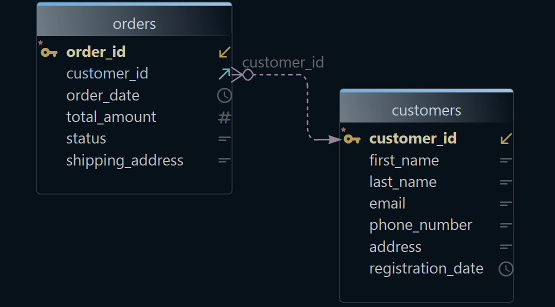
We tried it on PostgreSQL 17.6 with a customers table and an orders table. First we filled orders before customers had any rows:
INSERT INTO orders
SELECT g, 1 + floor(random()*100)::int, round((random()*500)::numeric, 2),
       date '2026-01-01' + (random()*300)::int
FROM generate_series(1, 500) g;
ERROR:  insert or update on table "orders" violates foreign key constraint "orders_customer_id_fkey"
DETAIL:  Key (customer_id)=(17) is not present in table "customers".
Order alone is not enough. We then gave customers 100 rows and let the random customer_id run from 1 to 150. The first value above 100 stopped the insert, and PostgreSQL rolled back all 500 rows. MySQL 8.4.11 rejects the same mistake with error 1452, "Cannot add or update a child row: a foreign key constraint fails".
Fill the parents first, then pick child keys from them
Two rules make linked test data work. The parent table gets its rows first. Every child key is then picked from the keys the parent already holds.
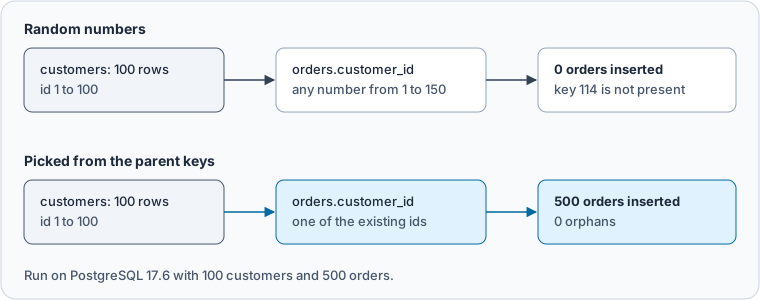
We ran the second rule on the same tables. Each order took its customer_id from the existing customers.id values:
SELECT count(*) AS orders, count(DISTINCT customer_id) AS customers_used FROM orders;
SELECT count(*) AS orphans
FROM orders o LEFT JOIN customers c ON c.id = o.customer_id
WHERE c.id IS NULL;
Result · PostgreSQL 17.6
| orders | customers_used | orphans |
|---|---|---|
| 500 | 99 | 0 |
All 500 orders went in, spread over 99 of the 100 customers. No order points to a missing customer. DbSchema's Data Generator does this for you. A foreign key column gets the generator load_values_from_pk, which picks values from the primary key of the parent table. The list of tables runs from top to bottom, and Reorder puts the parents first.
Give each column a pattern that looks real
Valid keys are half the job. The other half is values that behave like real data. A unique column is where a short list of values fails next.
We drew ten customer emails from a list of three addresses. The second duplicate stopped the insert:
ERROR:  duplicate key value violates unique constraint "customers_email_key"
DETAIL:  Key (email)=([email protected]) already exists.
A pattern with more room makes duplicates rare. DbSchema picks a pattern for each column from its name and data type, and you can change it. Its documentation shows these for a customers table:
| Column | Pattern | Sample value |
|---|---|---|
| first_name | list:file=NamesFirst.txt | Abel |
| phone | [0-9]{3}(-)[0-9]{3}(-)[0-9]{4}, 10% empty | 886-067-8707 |
| created_at | timestamp:from='01.01.2008 00:00:00 000';… | 2008-09-24 09:53:10.784 |
| orders.customer_id | load_values_from_pk | a customer id that exists |
What to see: the phone pattern is a regular expression, and only the last row looks at another table.
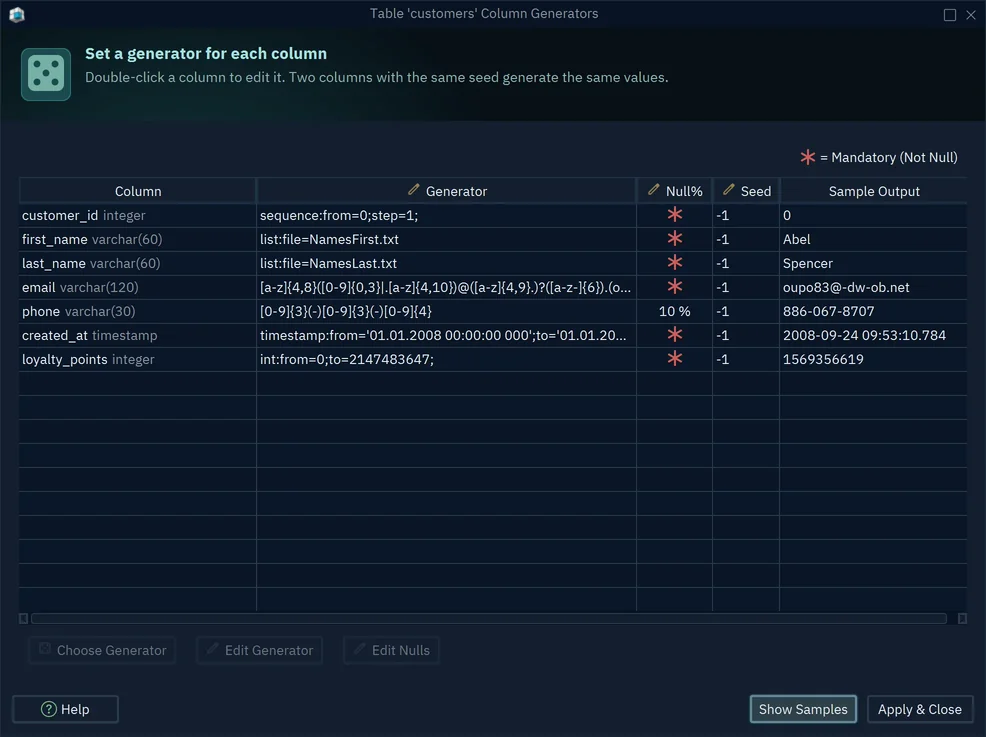
Null% leaves a share of a column empty, and a red star marks a column that can't be empty. Seed makes the values repeat from one run to the next, so a failing test can be run again on the same data. DbSchema keeps the patterns in the model file, so they come back the next time you open it.
Generate the rows in DbSchema
The Data Generator includes the tables of the diagram that is open. To fill other tables, open a diagram that holds them.
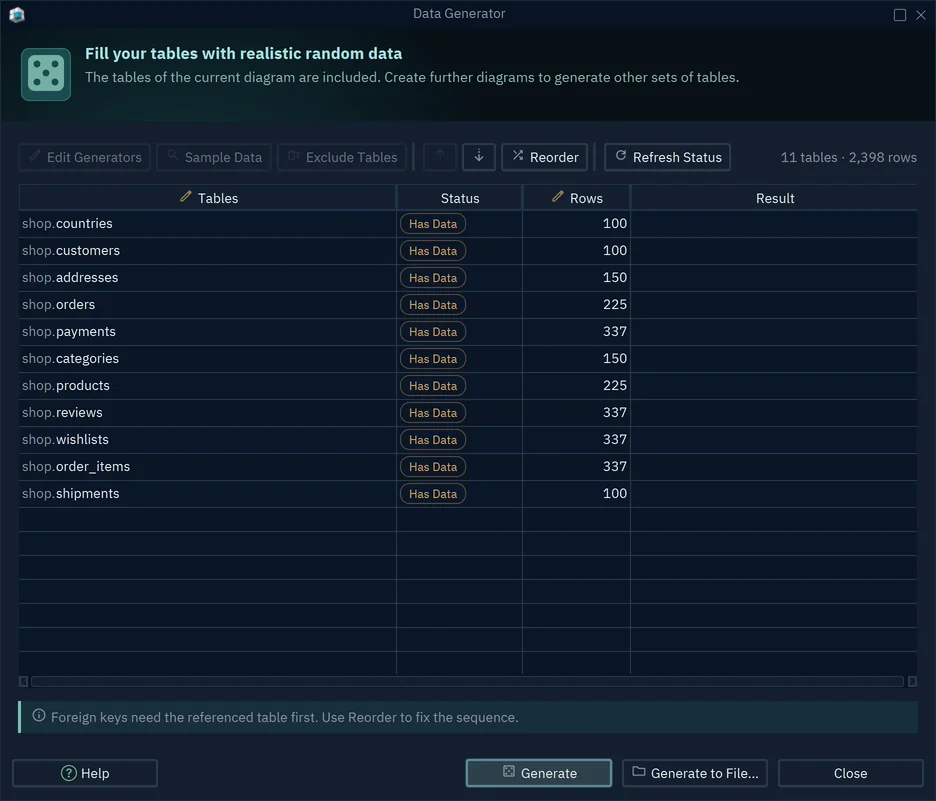
- 1Reorder puts parent tables first
- 2Rows to generate per table
- 3Write SQL or CSV instead
-
Open the Data Generator Pro
Choose
Database → Data Generator, or press Data in the toolbar and choose Data Generator. -
Set the rows and the order Pro
Double-click the Rows cell of each table and type how many rows to make. Press Reorder if a child table sits above its parent.
-
Check the patterns Pro
Select a table and press Edit Generators. Look at Sample Output before you generate.
-
Generate Pro
Press Generate to insert the rows, or Generate to File to get them as SQL or CSV.
If a table already holds rows, DbSchema asks whether to keep them. Leave Current Data adds the new rows. Drop Current Data deletes the existing rows first, so never choose it on a database whose data you need.
Pay for a generator when your tables are linked
A script is fine for one table. Once your schema has foreign keys, you need the fill order, valid keys and unique values handled for you. That is where a paid generator saves time on every test run.
The Data Generator is not sold alone. It comes with DbSchema Pro, together with schema compare, the visual query builder and HTML5 documentation. Here is how that compares with other ways to get test data, from the vendors' own pages as checked on 25 October 2026:
| Option | Test data generator | What it costs |
|---|---|---|
| DbSchema Pro | Included, runs on Windows, macOS and Linux | 294 USD once, or 444 USD over three years with updates |
| DBeaver | Mock data only in Enterprise and Ultimate | From 255 USD a year |
| Navicat Premium | Data generator from the Standard edition | 1,499 USD |
| Mockaroo | Hosted on mockaroo.com below Enterprise | Self-hosting needs Enterprise, 7,500 USD a year |
What to see: over three years, DbSchema Pro costs less than the DBeaver and Navicat options, and it keeps the data on your machine.
Your test data also stays on your machine. DbSchema generates the rows locally and writes them straight into your database. Nothing goes through a website. For a team, that matters as soon as a schema itself is confidential.
What a free database design tool can actually do shows what the free Community Edition covers before you upgrade. Perpetual or subscription works out when the one-time price pays off. To browse the rows you generated, use the relational data explorer. Before you fill a copy of a live database, compare it with your model using a visual schema compare.
Keep generated data away from production
Generate into a database that exists only for tests. A local container is enough. Point the connection at it, not at a shared server.
If the rows have to travel, press Generate to File and keep the SQL or CSV next to your test code. A fixed seed makes the values repeat, so every developer can load the same data.
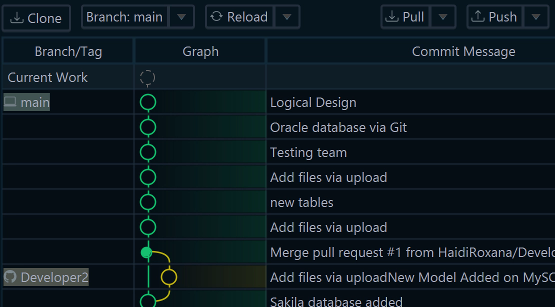
Keep the patterns with the design. DbSchema saves them in the model file, so they travel with the schema in Git. When the schema changes, open the Data Generator again: new columns get a pattern from their name and type, and you only check the ones that matter.
Never point the generator at a database whose rows you need. Drop Current Data deletes them first, and generated rows mixed into real ones are hard to find again.
Download DbSchema and try the Data Generator during the 15-day trial of all features. After the trial, the Data Generator needs DbSchema Pro.
Sources
Fill your test database without breaking a foreign key
Every DbSchema download starts with a 15-day trial of all features. The Data Generator, schema compare and HTML5 documentation are in DbSchema Pro.