How to Design a Relational Database Schema – Step-by-Step Guide for 2026 | DbSchema
Designing a strong relational database schema is still one of the highest-leverage tasks in software projects in 2026. A clean schema makes reporting easier, reduces duplicate data, and saves you from painful migrations later.
This guide shows a practical workflow you can reuse for real projects: gather requirements, define entities, normalize the model, choose keys, and turn the result into a working schema. If you want to follow visually, you can download DbSchema and open the design side by side with the diagram view and logical design tools.
Table of Contents
- Understand what a relational database schema is
- Analyze the requirements first
- Define entities and attributes
- Use a reusable schema template
- Normalize the model
- Add primary keys and relationships
- Move from logical to physical design
- Insert, validate, and document the schema
- FAQ
- Final thoughts
Step 1: Understand what a relational database schema is
A relational schema describes:
- the tables in the database
- the columns inside each table
- the primary keys that uniquely identify rows
- the foreign keys that connect tables
- the rules that protect integrity, such as
NOT NULL,UNIQUE, andCHECK
Common relational databases include MySQL, PostgreSQL, Oracle, and SQL Server. No matter which engine you choose, the modeling questions are similar: what data exists, how does it relate, and what rules should the database enforce?
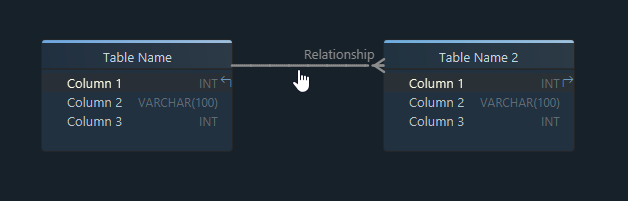
If you want the visual side first, also read Entity Relationship Diagram and Logical Design for Databases.
Step 2: Analyze your purpose and business requirements
Before creating any tables, answer one question:
What data must the application store, and what questions must the database answer later?
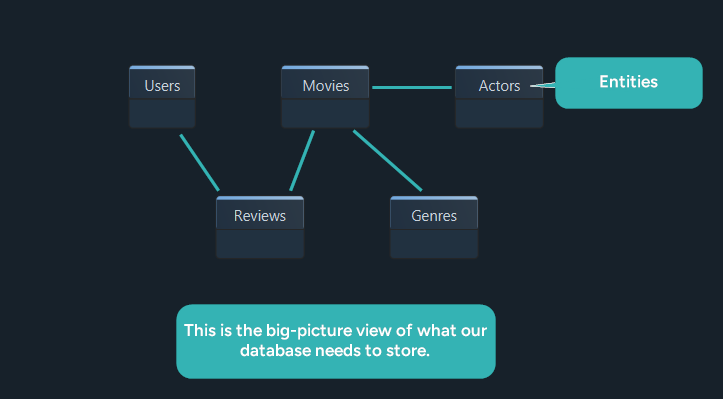
For our example project, StreamFlix, the goal is to build a movie streaming platform. We need to store:
- Users and their profiles
- Movies and release details
- Reviews written by users
- Actors who appear in movies
- Genres used to classify titles
Now translate those business requirements into schema decisions:
| Business question | StreamFlix answer | Schema impact |
|---|---|---|
| Who uses the system? | viewers and admins | Users table, role-related attributes |
| What is the core catalog? | movies | Movies table |
| Can one movie have multiple genres? | yes | MovieGenres junction table |
| Can one actor appear in many movies? | yes | MovieActors junction table |
| Can users review more than one movie? | yes | Reviews table with foreign keys |
This is the part many teams rush. They jump straight to SQL and only later discover that they missed lookup tables, optional relationships, or reporting requirements. A better workflow is to build a requirements-to-schema worksheet first, then move into the model. DbSchema is useful here because you can sketch the model visually before deployment and later publish it as schema documentation.
Step 3: Define the entities and attributes
Now list the entities that become tables and the attributes that become columns.
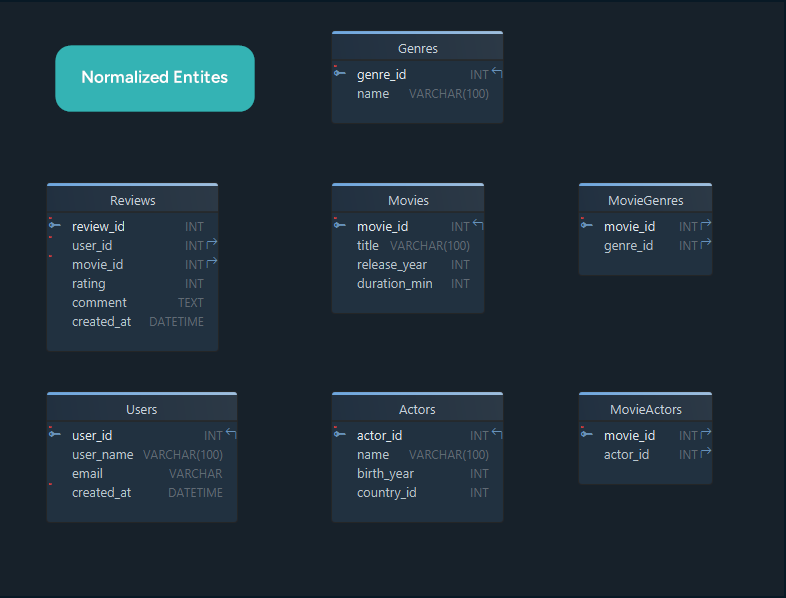
| Entity | Attributes |
|---|---|
| Users | user_id, username, email, created_at |
| Movies | movie_id, title, release_year, duration_minutes |
| Reviews | review_id, user_id, movie_id, rating, comment |
| Genres | genre_id, name |
| Actors | actor_id, name, birth_year, country |
| MovieGenres | movie_id, genre_id |
| MovieActors | movie_id, actor_id |
At this stage, keep two rules in mind:
- each entity should represent one business concept
- each attribute should store one clear fact
If you are unsure whether something belongs in the same table, ask whether it will always change together. If not, it often belongs in a different table. That design habit is one reason logical modeling stays valuable even for teams that eventually generate the DDL automatically.
Step 4: Use a reusable schema template
High-authority design guides usually include a reusable pattern, not only examples. Before you draw the final schema, copy a small planning template like this one:
Project / domain:
Main business objects:
Reference tables:
Transactions / events:
Many-to-many relationships:
Audit or history needs:
Reports the system must answer:
Data quality rules:
Optional relationships:
For StreamFlix, that template becomes:
Project / domain: movie streaming platform
Main business objects: users, movies, reviews
Reference tables: genres
Transactions / events: reviews submitted by users
Many-to-many relationships: movies-genres, movies-actors
Audit or history needs: review timestamps, user creation dates
Reports the system must answer: top-rated movies, reviews by user, movies by genre
Data quality rules: email unique, rating range 1-5
Optional relationships: some movies may have no reviews yet
You can save this workflow as your own starter model inside DbSchema, begin with one of the sample models in the Welcome Pane, or review the older sample schema when you want a concrete reference point.
Step 5: Normalize the data
Once the first draft exists, refine it with normalization. Normalization reduces duplication and makes updates safer.
First Normal Form (1NF): keep values atomic
Each column should store one value, not comma-separated lists.
Not in 1NF
| movie_id | title | genres | actors |
|---|---|---|---|
| 1 | The Matrix | Action, Sci-Fi | Keanu Reeves, Carrie-Anne Moss |
This structure is hard to query and nearly impossible to maintain consistently.
In 1NF
Movies
| movie_id | title |
|---|---|
| 1 | The Matrix |
MovieGenres
| movie_id | genre |
|---|---|
| 1 | Action |
| 1 | Sci-Fi |
MovieActors
| movie_id | actor |
|---|---|
| 1 | Keanu Reeves |
| 1 | Carrie-Anne Moss |
Second Normal Form (2NF): remove partial dependencies
If a table uses a composite primary key, every non-key column should depend on the whole key.
Not in 2NF
| movie_id | genre_id | genre_name |
|---|---|---|
| 1 | 2 | Sci-Fi |
| 1 | 3 | Action |
genre_name depends only on genre_id, not on the entire composite key.
In 2NF
MovieGenres
| movie_id | genre_id |
|---|---|
| 1 | 2 |
| 1 | 3 |
| 2 | 2 |
Genres
| genre_id | genre_name |
|---|---|
| 2 | Sci-Fi |
| 3 | Action |
Third Normal Form (3NF): remove transitive dependencies
Non-key columns should depend directly on the primary key, not on another non-key column.
Not in 3NF
| review_id | user_id | user_name | phone_number | movie_id | rating | comment |
|---|---|---|---|---|---|---|
| 501 | U001 | Alice Martin | 555-342-9752 | 101 | 5 | Loved it! |
| 502 | U002 | Ben Carter | 222-865-9876 | 102 | 4 | Well written. |
If a user changes name or phone number, every review row must be updated.
In 3NF
Reviews
| review_id | user_id | movie_id | rating | comment |
|---|---|---|---|---|
| 501 | U001 | 101 | 5 | Loved it! |
| 502 | U002 | 102 | 4 | Well written. |
Users
| user_id | user_name | phone_number |
|---|---|---|
| U001 | Alice Martin | 555-342-9752 |
| U002 | Ben Carter | 222-865-9876 |
Normalization summary
| Normal form | What it fixes | StreamFlix example |
|---|---|---|
| 1NF | repeating groups | split genres into MovieGenres |
| 2NF | partial dependencies | move genre_name into Genres |
| 3NF | transitive dependencies | move user details out of Reviews |
Normalization is not about blindly splitting tables forever. It is about reaching a design that is clear, maintainable, and aligned with your queries. If you want a deeper walkthrough of this phase, the full logical design guide expands the 1NF → 3NF workflow.
Step 6: Add primary keys and relationships
Now connect the tables using primary keys and foreign keys.
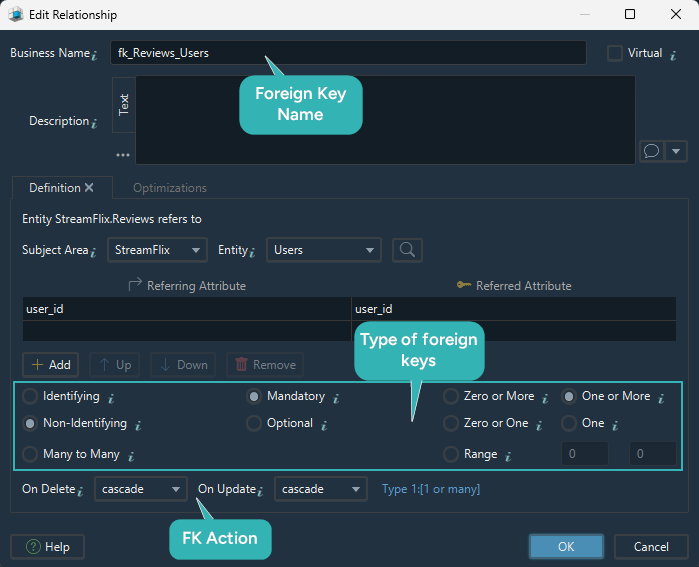
In DbSchema, when you define a relationship, you can also model:
- identifying vs non-identifying relationships
- mandatory vs optional relationships
- cardinality
- delete and update actions
Relationship decisions for StreamFlix
| Relationship | Type | Recommended rule | Why |
|---|---|---|---|
MovieGenres.movie_id → Movies.movie_id | one-to-many from Movies into junction table | identifying, mandatory, CASCADE on delete | junction rows should not outlive the movie |
MovieGenres.genre_id → Genres.genre_id | one-to-many from Genres into junction table | identifying, mandatory, CASCADE or NO ACTION based on policy | protects category integrity |
MovieActors.movie_id → Movies.movie_id | one-to-many from Movies into junction table | identifying, mandatory | preserves movie-cast links |
MovieActors.actor_id → Actors.actor_id | one-to-many from Actors into junction table | identifying, mandatory | preserves casting integrity |
Reviews.user_id → Users.user_id | one-to-many | non-identifying, mandatory | every review belongs to a user |
Reviews.movie_id → Movies.movie_id | one-to-many | non-identifying, mandatory | every review belongs to a movie |
Why junction tables matter
Both MovieGenres and MovieActors exist because many-to-many relationships cannot be stored directly in a relational schema. They are resolved through an extra table that contains the two keys.
This is also the moment to decide whether the junction table needs its own business columns. For example, if MovieActors later stores role_name or billing_order, it stops being a "pure" link table and becomes an important business entity in its own right.
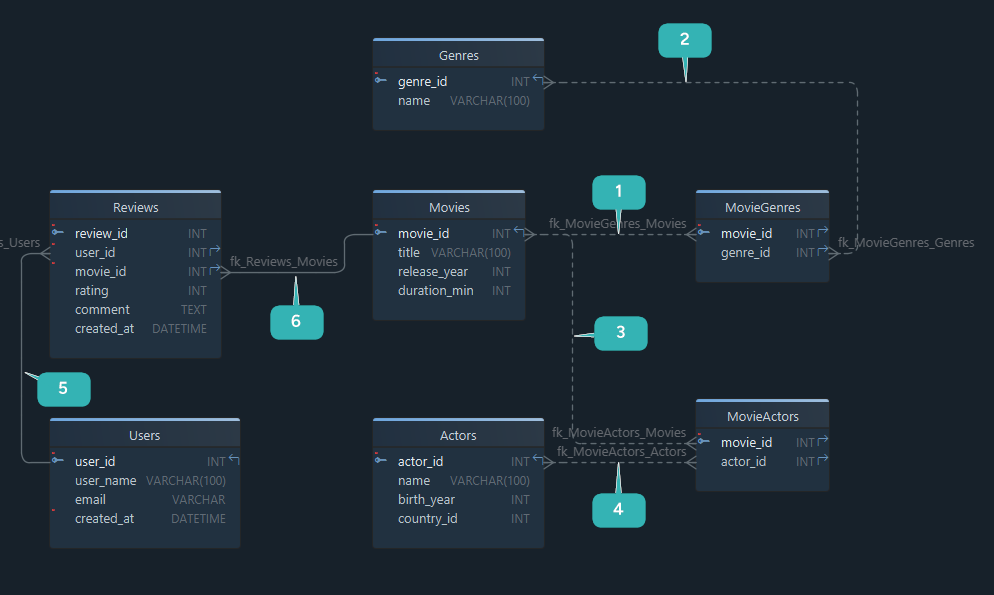
If you want a visual refresher on keys and line notation, the DbSchema docs for foreign keys and the blog guide to ER diagrams fit well here.
Step 7: Move from logical to physical design
What we created so far is a logical design. It explains how the data should be organized, but it is still database-neutral.
| Logical design | Physical design |
|---|---|
| entities | tables |
| attributes | columns |
| relationships | foreign keys |
| naming rules | actual SQL object names |
| data concepts | engine-specific data types and constraints |
Once you convert the model into a physical design, you choose real data types, indexes, defaults, and deployment rules. In DbSchema, this transition is straightforward because the same model can lead into schema synchronization, model validation, and exported schema documentation.
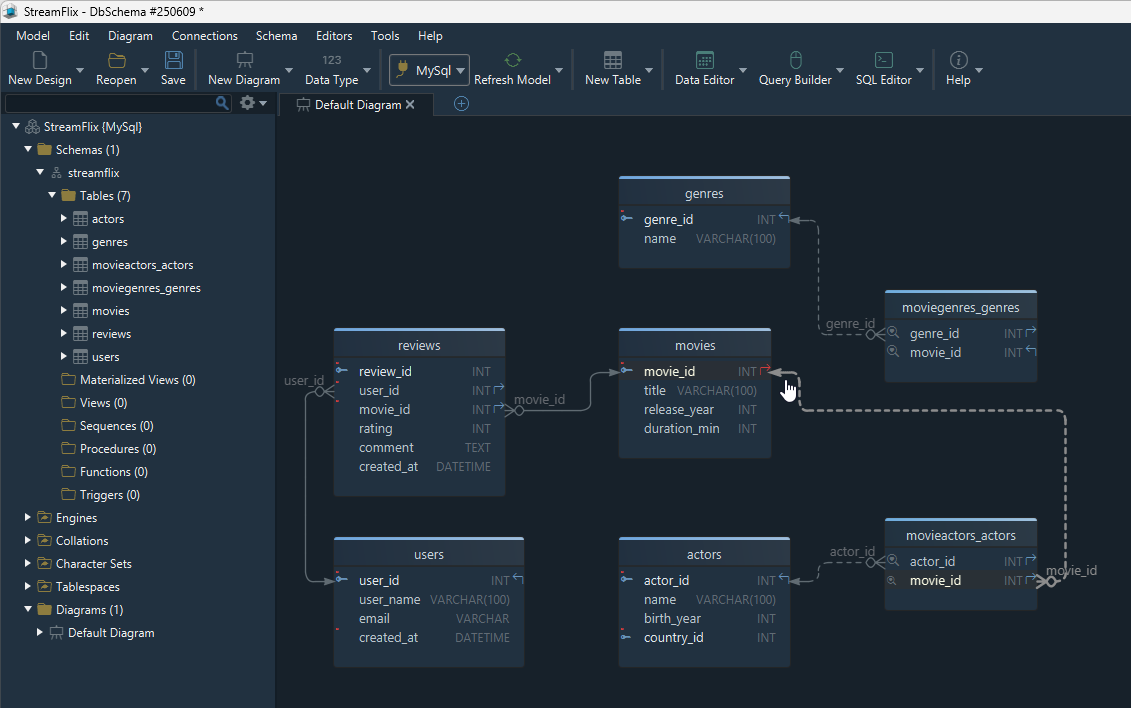
If you want the detailed next step, read Logical Design for Databases.
Step 8: Insert, validate, and document the schema
After the physical schema exists, you can insert real or sample data.
INSERT INTO Movies (movie_id, title, release_year, duration_minutes)
VALUES (1, 'Inception', 2010, 148);
An easier way: use DbSchema's Relational Data Editor
Instead of writing every insert manually, you can work with the Relational Data Editor:
- open a table like a spreadsheet
- edit related rows visually
- use foreign-key-aware navigation
- combine it with the Random Data Generator for test data
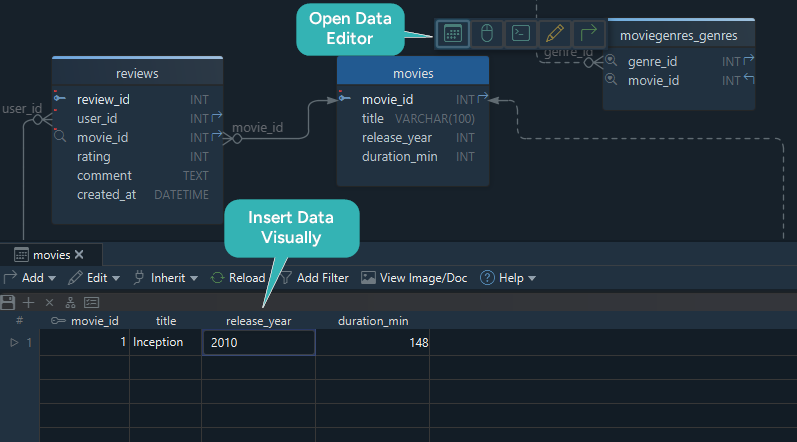
Final review checklist before publishing the schema
Before you call the schema done, verify:
- every table has a clear primary key
- every foreign key reflects a real business rule
- many-to-many relationships use a junction table
- repeated values have been normalized where needed
- naming is consistent across tables and columns
- the model passes validation checks
- the team can browse the schema through exported documentation
FAQ
What are the main steps to design a relational database schema?
Start with requirements, define entities and attributes, normalize the draft, add primary and foreign keys, then convert the logical model into a physical schema.
How do I know whether I need a separate table?
Create a separate table when a value repeats across many rows, when the data changes independently, or when a many-to-many relationship appears.
Should every schema be normalized to 3NF?
3NF is a strong default for transactional systems, but some analytics or performance-heavy workloads may intentionally denormalize later. Start clean first, then optimize with evidence.
What is the difference between logical and physical database design?
Logical design defines the structure at a business level. Physical design adds engine-specific tables, column types, indexes, and constraints for deployment.
Can I design a database schema before the database exists?
Yes. That is often the best approach. Tools like DbSchema let you build the model offline, review it with the team, and generate the physical schema later.
What is the best tool for designing a relational database schema visually?
If you want design-first modeling, multiple diagrams, schema synchronization, and shareable documentation in the same workflow, DbSchema is one of the strongest options.
Final thoughts
To design a relational database schema well, think in stages: requirements, entities, normalization, keys, and validation. That workflow works much better than starting with random CREATE TABLE statements and fixing the model later.
DbSchema is especially useful when you want to keep the diagram, the deployable schema, and the documentation connected instead of treating them as separate deliverables.






