DbSchema vs DbVisualizer (2026): Diagrams, Queries, Documentation and Price
The two tools side by side, with the decision table up front and the edition and price behind every feature.
On this page
You have a schema nobody drew, foreign keys that live only in the application code, and a request for documentation by Friday. For that job, choose DbSchema: it reverse-engineers the database into a diagram you edit, keeps the design in a model file you version in Git and compare with the live database, and exports HTML5 documentation from the same file. DbVisualizer is a SQL client built around the query and the live connection. Both run on Windows, macOS and Linux.
Short answer
DbSchema is the choice when the schema itself is the deliverable: a model file, a compare that writes the ALTER script, virtual foreign keys and HTML5 documentation. DbVisualizer works from the live connection: an object tree, the SQL Commander, a data grid and a References graph drawn from the declared foreign keys.
- Schema design, migration scripts and documentation: DbSchema.
- Both have a free edition; DbSchema's covers diagrams and the SQL editor for any use.
- DbSchema Pro is a one-time licence that keeps working; DbVisualizer Pro is billed every year.
DbSchema owns the design, DbVisualizer works from the connection
Both vendors' pages were read on 3 November 2026. Prices are per user and exclude tax.
Design and documentation
The design rows are where the two tools part: DbSchema keeps an editable model, DbVisualizer draws what the database declares:
| DbSchema | DbVisualizer | |
|---|---|---|
| Engines | 100+ SQL and NoSQL | Popular databases with extended support, any JDBC database with basic support |
| Diagram | Editable model, several diagrams per model | References graph from foreign keys |
| Compare and migration SQL | Model against database, per-difference SQL (Pro) | Object by object (Pro) |
| Schema documentation | HTML5, PDF, Markdown (Pro) | Result-set export |
Queries, data and licence
The query and data rows are close, so the licence row decides between them:
| DbSchema | DbVisualizer | |
|---|---|---|
| Visual query builder | Pro | Pro |
| Related data side by side | Data Explorer (Pro) | Navigator (Pro) |
| Free edition | Community, for any use | Free, standard feature set |
| Paid licence | Pro 294 USD one-time, 75 USD a year optional | Pro 199 USD first year, 89 USD a year after |
Three rows carry most of the decision: whether a design exists apart from the server, whether a schema document comes out of the tool, and whether you pay once or every year. The sections below take each row in turn.
Both connect over JDBC, and DbSchema infers MongoDB structure too
Both connect over JDBC. DbSchema's databases page lists 100+ SQL, NoSQL and cloud databases, downloads the right driver the first time you connect, and for MongoDB infers each collection's fields and types from a sample of its documents. DbVisualizer's supported-databases page, read on 3 November 2026, gives its named databases, MongoDB and Cassandra among them, extended support with database-specific object types, and treats any other database with a JDBC driver as generic, where "some advanced features may not be available".
DbSchema starts from a diagram, DbVisualizer from an object list
DbSchema is built around a picture of the schema. One model holds several diagrams of the same database, each with its own layout, and you edit tables, columns and keys on the canvas. DbVisualizer is built around a list: an object tree on the left, objects opened as tabbed Object Views, and SQL Commander tabs for queries.
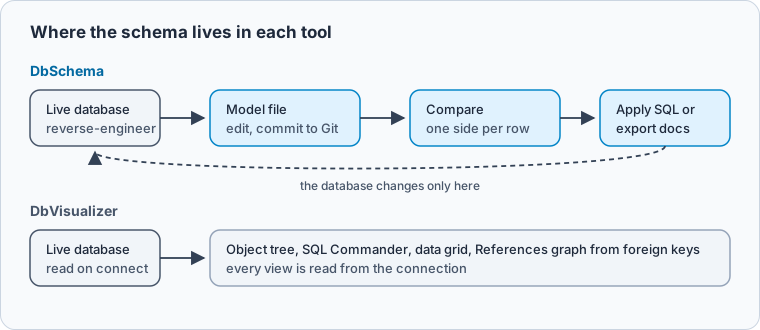
The difference shows on the first schema with a link nobody declared. DbVisualizer's user guide says its References graph shows how tables relate "through Foreign Keys", so it draws what the catalog reports. On a PostgreSQL schema where orders.customer_id has a foreign key and invoices.order_id has none, the catalog knows one link:
SELECT tc.table_name, kcu.column_name, ccu.table_name AS references_table
FROM information_schema.table_constraints tc
JOIN information_schema.key_column_usage kcu ON kcu.constraint_name = tc.constraint_name
JOIN information_schema.constraint_column_usage ccu ON ccu.constraint_name = tc.constraint_name
WHERE tc.constraint_type = 'FOREIGN KEY';
Result · PostgreSQL 17.6
| table_name | column_name | references_table |
|---|---|---|
| orders | customer_id | customers |
In DbSchema you draw the second link as a virtual foreign key. It exists only in the model, DbSchema never creates it in the database, and the Query Builder and Data Explorer follow it like a real one. Keeping it means saving the model file, which is Pro.
Both keep the visual query builder in the paid edition
Both have a SQL editor in the free edition and a visual query builder in the paid one. DbSchema's Query Builder builds the joins from the foreign keys in the model, virtual ones included. DbVisualizer's SQL Commander adds an explain plan and charts in Pro, and its features page describes version control for SQL scripts, with branches, history and change tracking.
DbSchema compares a saved design with the database and writes the SQL
This is the widest gap. In DbSchema, editing a diagram changes the model file; the database changes when you apply differences from the synchronization dialog, which lists each difference between the model and the database with the statement it would run. Database → Offline (connect later) lets you design with no database attached and review the differences when you reconnect. The model file goes into Git from File → Git Collaboration, so a schema change is a pull request (DbSchema Git). Saving the model, synchronization and Git are Pro. The diagram features themselves are covered in the DbSchema database diagrams tool.
DbVisualizer's References graph exports as JPG, PNG, SVG, PDF or a GML file for the yEd editor. Its schema comparison is Pro and works object list by object list; its user guide says it "does not provide a way to fully show the differences between two schemas".
Both browse related rows, and both keep that in Pro
DbSchema's Data Explorer opens a table's rows and, beside them, the related rows of other tables over the foreign keys, so you follow a customer to its orders without writing the join. The Data Generator fills child tables with keys that exist in their parent tables. Both are Pro.
DbVisualizer Pro adds the table data viewer and editor, table import and export, and the Navigator, which its user guide describes as showing related tables with a data grid for each step.
DbSchema turns the model into HTML5 documentation for the team
DbSchema exports the model as interactive HTML5, PDF or Markdown from File → Export As... → HTML5/PDF Documentation. The HTML5 page has the diagram as a vector image, a page per table with its columns, constraints, indexes and the foreign keys that reference it, and column descriptions as mouse-over tooltips (schema documentation).
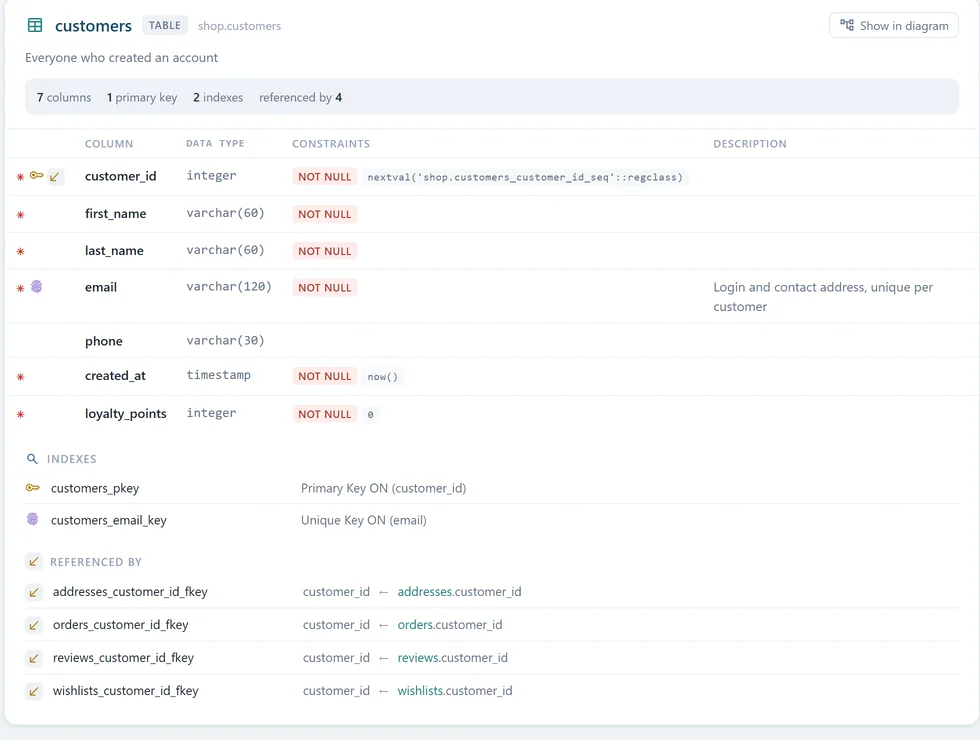
- 1Jumps to the table on the vector diagram
- 2Column description from the model
- 3Every foreign key that points to this table
DbVisualizer's features page lists the export of result sets in several file formats; schema documentation is not among the features it names.
DbSchema Pro can be paid once, DbVisualizer Pro is paid every year
DbSchema sells a perpetual licence with the first year of updates: Pro is 294 USD once, then 75 USD a year if you want later releases, and the version you bought keeps working either way. Pro also runs 29.40 USD a month, and Architect, which adds logical and conceptual design, is 470.40 USD once (DbSchema purchase page). Community Edition is free for any use and covers connecting, reverse-engineering, diagrams and the SQL editor. A new installation starts a 15-day trial of every feature.
DbVisualizer Pro is 199 USD per user for the first year and 89 USD a year after, with 60-day support; with premium support it is 229 and 119 USD. Its pricing page says every subscription includes a perpetual usage licence for the versions released during the term, and volume prices start at four users. The trial runs 21 days.
Buy DbSchema when the schema is what you deliver
Buy DbSchema when the schema is the thing you deliver: design offline in the model file, keep it in Git so each change is reviewed, generate the migration from the compare, and hand the team HTML5 documentation. The diagram is also the quickest way into a database nobody on the team wrote, and it puts document stores such as MongoDB on the same canvas as relational tables.
DbVisualizer is built for typed SQL against a live connection, with extended object support on its named databases and version control over scripts. A team that owns its schema gets that daily SQL work from DbSchema's SQL editor too, so DbSchema is the seat to buy.
Download DbSchema and reverse-engineer your own database: the diagrams and the SQL editor are in the free Community Edition. The model file, synchronization, HTML5 documentation, the Query Builder and the Data Explorer are in DbSchema Pro.
Sources
Compare the two on your own database
DbSchema reverse-engineers your schema into interactive diagrams, keeps the model in a file you version in Git, and compares it with the live database. Diagrams and the SQL editor are in the free Community Edition.









