Database Naming Conventions You Can Check and Enforce
For tables, columns, keys and indexes, the naming rules every engine accepts, and how to check a schema against them.
On this page
The wiki page says lowercase with underscores, and a few months later the schema has a table in camel case, two spellings of the same column, and foreign keys named by whatever the engine generated. In DbSchema Architect the convention lives in the Naming Dictionary instead of the wiki: you set it once, and every physical model DbSchema generates from a logical design takes its names from it.
Short answer
Use lowercase snake_case, full words, singular table names, <table>_id for foreign key columns, explicit names for constraints and indexes, no reserved words, and nothing longer than 63 characters. Those rules hold on PostgreSQL, MySQL, SQL Server and Oracle alike. Then check them on every change, with a query against the catalog and with a rule in the design model.
| Object | Convention | Example |
|---|---|---|
| Table | singular noun, lowercase, words joined by _ | order_item |
| Column | lowercase snake_case, full words | unit_price |
| Primary key column | id | id |
| Foreign key column | referenced table + _id | customer_id |
| Primary key constraint | pk_ + table | pk_sales_order |
| Foreign key constraint | fk_ + table + referenced table | fk_sales_order_customer |
| Unique constraint | uq_ + table + column | uq_customer_email |
| Index | ix_ + table + columns | ix_sales_order_customer_id |
| Any name | at most 63 characters, never a reserved word |
What the engines do with the case of a name
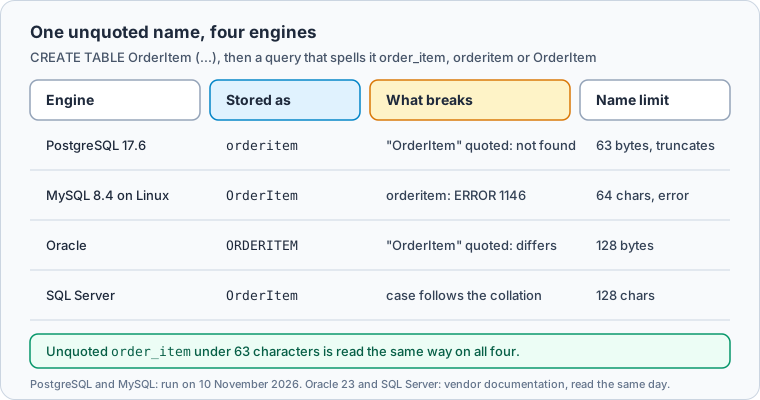
Each engine handles an unquoted name differently. We ran this on PostgreSQL 17.6:
CREATE TABLE OrderItem (OrderItemID integer PRIMARY KEY, Quantity integer);

SELECT table_name, column_name
FROM information_schema.columns
WHERE table_schema = 'public' AND table_name = 'orderitem'
ORDER BY ordinal_position;
Result · PostgreSQL 17.6
| table_name | column_name |
|---|---|
| orderitem | orderitemid |
| orderitem | quantity |
PostgreSQL stored orderitem and orderitemid. Unquoted names are "always folded to lower case" (PostgreSQL 17 lexical structure), so the camel case is gone and with it the boundary between the words. Quoting keeps the case, but then the name only matches when it is quoted: SELECT * FROM "OrderItem" fails with relation "OrderItem" does not exist, and on a table created as "CustomerOrder" the unquoted SELECT * FROM CustomerOrder fails with relation "customerorder" does not exist.
MySQL 8.4.11 on Linux did the opposite with the same CREATE TABLE. It kept OrderItem and OrderItemID as written, and then refused the lowercase spelling of the table:
SELECT * FROM orderitem;
ERROR 1146 (42S02) at line 2: Table 'shop.orderitem' doesn't exist
Column names stayed case-insensitive, so SELECT orderitemid, QUANTITY FROM OrderItem ran. MySQL table names follow the operating system: they "are not case-sensitive in Windows, but are case-sensitive in most varieties of Unix", with macOS as the exception because its default file system is not case-sensitive, and lower_case_table_names "can only be configured when initializing the server" (MySQL 8.4 identifier case sensitivity). A query with the wrong case passes on a developer's Mac and fails on the Linux server.
Oracle goes the other way again and interprets nonquoted identifiers as uppercase (Oracle 23 object names), and SQL Server decides by the database collation (SQL Server identifiers).
PostgreSQL truncates long names, MySQL refuses them
On PostgreSQL 17.6, two long names:
CREATE TABLE customer_subscription_renewal_reminder_notification_delivery_attempt (id integer);
CREATE TABLE customer_subscription_renewal_reminder_notification_delivery_attempt_log (id integer);
NOTICE:  identifier "customer_subscription_renewal_reminder_notification_delivery_attempt" will be truncated to "customer_subscription_renewal_reminder_notification_delivery_at"
CREATE TABLE
NOTICE:  identifier "customer_subscription_renewal_reminder_notification_delivery_attempt_log" will be truncated to "customer_subscription_renewal_reminder_notification_delivery_at"
ERROR:  relation "customer_subscription_renewal_reminder_notification_delivery_at" already exists
The first table was created under a name nobody typed, 63 characters long, and the second collided with it because both names share their first 63 characters. PostgreSQL's limit is 63 bytes by default, so a name with non-ASCII letters reaches it sooner (PostgreSQL 17 lexical structure). MySQL 8.4.11 refused the first statement outright with ERROR 1059 (42000), "Identifier name '…' is too long", since tables, columns, indexes and constraints are limited to 64 characters (MySQL 8.4 identifier length). SQL Server allows 128 characters and Oracle 128 bytes from compatibility 12.2 on, so 63 is the limit that fits all four.
For the names DbSchema Architect generates, the Naming Dictionary settles the case question: Separators puts Underscore between the words, and Convert Cases writes the letter case the target database prefers. Its table of your own pairs maps a long word to its short form, but the documentation lists no length check or constraint naming among its settings, so you check constraint names with the table_constraints query below and table name lengths with the {0,62} limit in the validation rule at the end.
Singular table names and the reserved words they run into
Singular names match the entity a row stands for (customer, order_item) and the entity names of a logical model. Plural names win when the application that queries the schema already maps its classes to plural tables: renaming then costs more than it gains. Whichever you choose, choose it once.
The real cost of singular names is reserved words, because the most obvious entity names are keywords. PostgreSQL 17.6 rejected both CREATE TABLE user (id integer) and CREATE TABLE order (id integer) with a syntax error. MySQL 8.4.11 rejected order, accepted user, and rejected a column called rank. The catalogs explain why:
SELECT word, catcode, catdesc
FROM pg_get_keywords()
WHERE word IN ('user', 'order', 'rank', 'name', 'type')
ORDER BY word;
Result · PostgreSQL 17.6
| word | catcode | catdesc |
|---|---|---|
| name | U | unreserved |
| order | R | reserved |
| type | U | unreserved |
| user | R | reserved |
SELECT word, reserved
FROM information_schema.keywords
WHERE word IN ('USER', 'ORDER', 'RANK', 'NAME', 'TYPE')
ORDER BY word;
Result · MySQL 8.4.11
| WORD | RESERVED |
|---|---|
| NAME | 0 |
| ORDER | 1 |
| RANK | 1 |
| TYPE | 0 |
| USER | 0 |
rank is not a PostgreSQL keyword at all, and user is not reserved in MySQL, so a name that passes on one engine can fail on the other. Give such entities a qualifier instead of quoting them: sales_order, app_user, sort_rank.
Name constraints and indexes yourself
Constraints you don't name get the engine's default name, and the defaults differ. With the same two tables, customer with a unique email and sales_order with a foreign key to it, PostgreSQL 17.6 generated customer_pkey, customer_email_key and sales_order_customer_id_fkey. MySQL 8.4.11 named the unique index email and the foreign key sales_order_ibfk_1, and SQL Server generates primary key names like PK__TableX__D7CB9CCCEEF0806C (SQL Server identifiers). A migration that drops a constraint by name then works on one engine only.
Name them in the DDL:
CREATE TABLE customer (
  id    integer PRIMARY KEY,
  email varchar(200) NOT NULL,
  CONSTRAINT uq_customer_email UNIQUE (email)
);
CREATE TABLE sales_order (
  id          integer NOT NULL,
  customer_id integer NOT NULL,
  CONSTRAINT pk_sales_order PRIMARY KEY (id),
  CONSTRAINT fk_sales_order_customer FOREIGN KEY (customer_id) REFERENCES customer (id)
);
CREATE INDEX ix_sales_order_customer_id ON sales_order (customer_id);

SELECT table_name, constraint_name, constraint_type
FROM information_schema.table_constraints
WHERE table_name IN ('customer', 'sales_order') AND constraint_type <> 'CHECK'
ORDER BY table_name, constraint_name;
Result · PostgreSQL 17.6
| table_name | constraint_name | constraint_type |
|---|---|---|
| customer | customer_pkey | PRIMARY KEY |
| customer | uq_customer_email | UNIQUE |
| sales_order | fk_sales_order_customer | FOREIGN KEY |
| sales_order | pk_sales_order | PRIMARY KEY |
Every named constraint kept its name. The primary key of customer, declared inline without a name, still got the default customer_pkey, so the inline shorthand is exactly where a convention leaks.
Check an existing database against the convention
The catalog lists every name, so one query finds the ones that break the case rule. The PostgreSQL 17.6 database from the runs above also holds these two tables:
CREATE TABLE "CustomerOrder" (id integer PRIMARY KEY);
CREATE TABLE orders (id integer PRIMARY KEY, "user" integer);
A pattern on information_schema.columns finds the names that are not lowercase snake_case:
SELECT table_name, column_name
FROM information_schema.columns
WHERE table_schema = 'public'
  AND (table_name !~ '^[a-z][a-z0-9_]*$' OR column_name !~ '^[a-z][a-z0-9_]*$')
ORDER BY 1, 2;
Result · PostgreSQL 17.6
| table_name | column_name |
|---|---|
| CustomerOrder | id |
The quoted "CustomerOrder" was caught. orderitem with its column orderitemid was not, because folding turned the camel case into a lowercase name that matches the pattern. No regular expression can see a missing word boundary, which is why the rule has to apply where the name is typed, not only after it reached the database.
Reserved words need a second query, a join against the keyword list:
SELECT c.relname AS table_name, a.attname AS column_name
FROM pg_attribute a
JOIN pg_class c ON c.oid = a.attrelid
JOIN pg_namespace n ON n.oid = c.relnamespace
JOIN pg_get_keywords() k ON k.word = a.attname
WHERE n.nspname = 'public' AND a.attnum > 0 AND k.catcode IN ('R', 'T');
Result · PostgreSQL 17.6
| table_name | column_name |
|---|---|
| orders | user |
On MySQL 8.4.11 the same pattern works with REGEXP_LIKE(table_name, '^[a-z][a-z0-9_]*$', 'c'), where the c flag makes the match case-sensitive; it returned OrderItem with both of its columns.
Enforce the convention in DbSchema
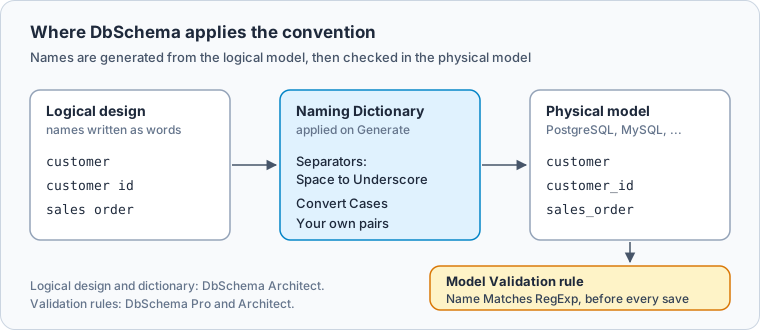
DbSchema applies a convention in two places of the design model: when names are generated from a logical model, and when the model is validated. Both work on the model file; the live database changes only when you deploy the model to it.
In a logical design, you write entity and attribute names as words, such as customer id, and nobody types the physical name. The Naming Dictionary turns them into physical names each time DbSchema generates the physical model, for PostgreSQL, MySQL or another target.
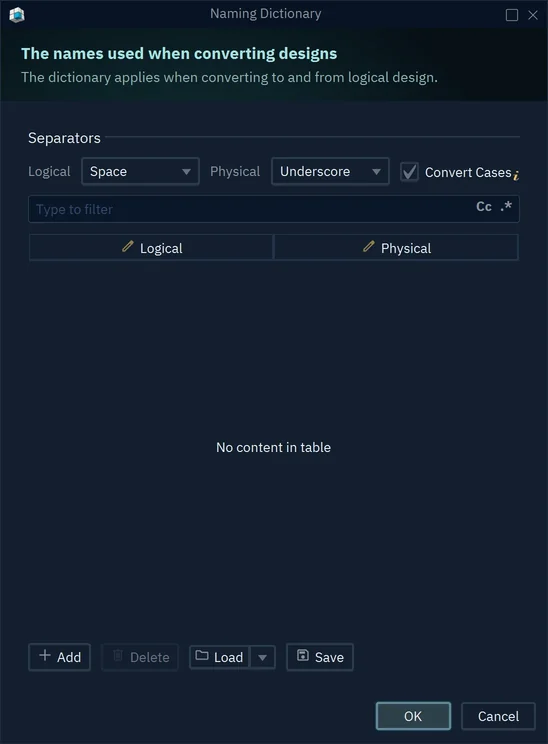
- 1Space in the logical design, Underscore in the physical model
- 2Convert Cases: the case the target database prefers
- 3Your own pairs, such as a long word and its short form
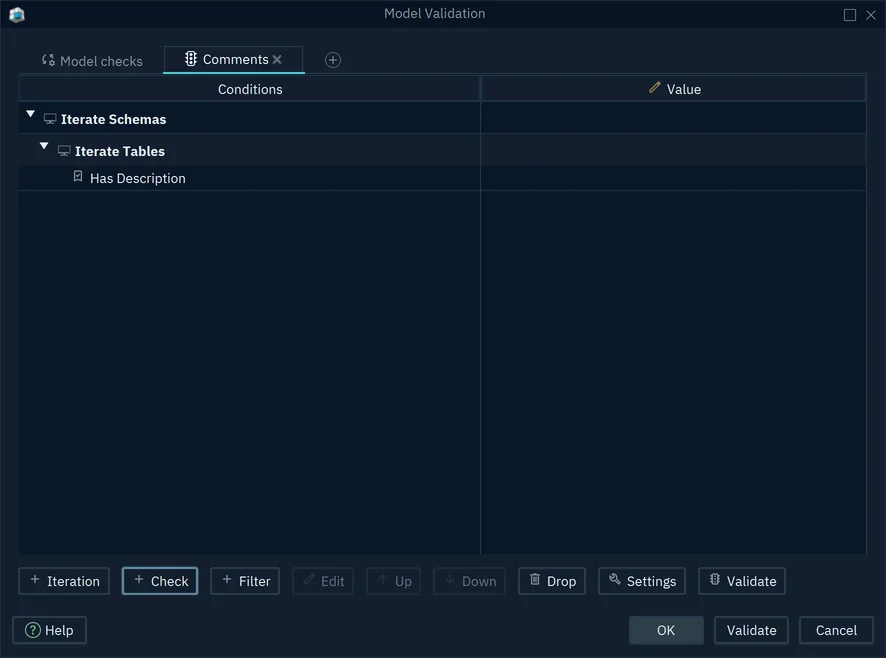
Model Validation checks the result after every change. Its built-in checks include a reserved-name warning, and a rule of your own can test every table and column name against a pattern with the Name Matches RegExp check.
-
Set the Naming Dictionary Architect
Choose
Model → Dictionariesand open the Naming Dictionary. Keep Space for Logical and Underscore for Physical, tick Convert Cases, and add your pairs with Add (Logical Design). TickView → Diagram Display → Show Physical Nameto see the generated names on the diagram before you generate them. -
Generate the physical model Architect
Choose
Model → Generate Physical Model, set Target DBMS, press OK, check the Model Conversion Rules and press Convert. Every table and column gets its name from the dictionary. -
Add a naming rule Pro
Choose
Model → Model Validation, click the + tab and name the rule. Select Iterate Schemas, press Iteration and choose Iterate Tables, then press Check and choose Name Matches RegExp with a pattern such as^[a-z][a-z0-9_]{0,62}$(Model Validation). Press Validate to see every name that fails. -
Validate before every save Pro
Choose
Edit → Settings, select Project File on the General tab and tick Validate Before Save. When a rule fails, the Validation Result window opens before the model is saved.
Logical design for databases covers the logical model the dictionary works on.
Download DbSchema: every new installation starts with a 15-day Architect trial. Set the Naming Dictionary to your convention, generate the physical model for your database from one logical entity and look at the names. The logical design and the Naming Dictionary are in DbSchema Architect, which also includes the Model Validation rules of DbSchema Pro.
Sources
- PostgreSQL 17: Lexical Structure, Identifiers and Key Words
- MySQL 8.4: Identifier Case Sensitivity
- MySQL 8.4: Identifier Length Limits
- Microsoft Learn: Database Identifiers (SQL Server)
- Oracle Database 23: Database Object Names and Qualifiers
- DbSchema documentation: Logical Design
- DbSchema documentation: Model Validation
Put the naming convention in the model
In DbSchema Architect the Naming Dictionary sets separators and letter case once, and every physical model generated from the logical design takes its names from it. Logical design is in DbSchema Architect, and every new installation starts with a 15-day Architect trial.