Cassandra CREATE TABLE Guide in cqlsh and DbSchema
For developers who write SQL DDL and are creating their first Cassandra tables; partition keys, clustering columns and static columns are explained where they appear.
On this page
You have a keyspace and need a table in it. In Cassandra you create it with CREATE TABLE in cqlsh, and the column list is the easy part: you can add a column next week, but you can never change the primary key. This statement creates a table of employees keyed by id:
CREATE TABLE employees (
    id int PRIMARY KEY,
    name text,
    email text,
    age int
);
A table that you read another way needs a key of several columns, and choosing them is the decision that stays with the table.
Create a table in cqlsh
The steps need a running Cassandra node, cqlsh, and a keyspace. How to Create a Keyspace in Cassandra covers the replication choices behind one. The examples use a keyspace named ecommerce, and every output below comes from Cassandra 5.0.7.
-
Start cqlsh from a terminal. With no arguments it connects to the node on your machine; to reach another node, pass its host and port:
cqlsh 10.0.0.5 9042 -
Make the keyspace current. You can skip this step and write the table name as
ecommerce.employeesinstead.USE ecommerce; -
Run the
CREATE TABLEstatement above. A statement that succeeds prints nothing, and the prompt returns. -
Check the table with DESCRIBE.
DESCRIBE TABLESlists the tables of the current keyspace, andDESCRIBE TABLE employeesprints the statement that would recreate the table, with every option Cassandra filled in:CREATE TABLE ecommerce.employees ( id int PRIMARY KEY, age int, email text, name text ) WITH additional_write_policy = '99p' AND allow_auto_snapshot = true …
The columns come back key first, then in alphabetical order. Running the same statement a second time fails:
AlreadyExists: Table 'ecommerce.employees' already exists
CREATE TABLE IF NOT EXISTS makes the second run a no-op. It checks the name only: an existing table with different columns stays as it is.
Names and data types
A table lives in a keyspace, which plays the part of a schema in a relational database and also decides how the data is replicated. The CQL data types page lists every column type, collections and user-defined types among them. An unquoted name starts with a letter, holds letters, digits and underscores, and is case-insensitive: Cassandra reads it in lowercase. Double quotes keep the case, and from then on every reference needs the quotes:
CREATE TABLE "Employees" (id int PRIMARY KEY, "Name" text);
SELECT Name FROM "Employees";
InvalidRequest: Error from server: code=2200 [Invalid query] message="Undefined column name name in table ecommerce."Employees""
Cassandra 5.0 allows a table name of up to 222 characters and a keyspace name of up to 48.
Choose the primary key for your queries
A key of one column, like employees.id, lets you read one row at a time. Most tables are read another way, such as "all orders a customer placed on one day, newest first", and that query belongs in the key. The Cassandra 5.0 documentation says that data modeling which "assigns primary keys based on the queries will have the lowest latency in fetching data". Two different queries over the same facts often mean two tables.
This table serves the orders query:
CREATE TABLE IF NOT EXISTS orders_by_customer_day (
    customer_id int,
    order_day date,
    order_time timestamp,
    order_id int,
    total decimal,
    sales_rep text STATIC,
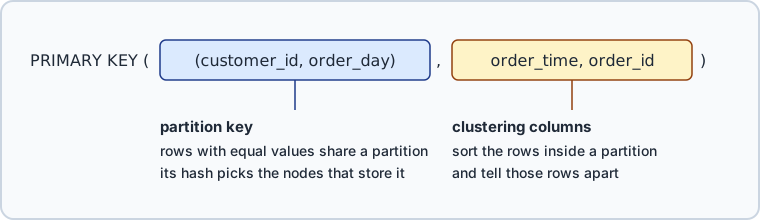
    PRIMARY KEY ((customer_id, order_day), order_time, order_id)
) WITH CLUSTERING ORDER BY (order_time DESC)
  AND comment = 'Orders grouped by customer and day';
The inner parentheses split the primary key in two parts:
What the partition key decides
A partition is the set of rows that share the same partition key, here one customer on one day. Cassandra computes a hash from customer_id and order_day, and the hash decides where the partition lives, so every order that a customer places on one day is stored on the same set of replica nodes. Reading that partition is cheap.
A query that names only half of the key is refused, unless you add ALLOW FILTERING and accept the performance that the error warns about:
SELECT * FROM orders_by_customer_day WHERE customer_id = 7;
InvalidRequest: Error from server: code=2200 [Invalid query] message="Cannot execute this query as it might involve data filtering and thus may have unpredictable performance. …"
A key of customer_id alone would answer that query, but it would also keep every order of a customer in one partition that grows forever. The documentation asks for partitions sized "just right, not too big nor too small", and warns that a key value taking most of the traffic becomes a hotspot for both reading and writing. order_day caps each partition at one day of orders.
What clustering columns decide
order_time and order_id follow the partition key, which makes them clustering columns. Inside a partition, rows are sorted by them, ascending unless CLUSTERING ORDER BY says otherwise. They also tell rows apart, so two orders placed in the same millisecond stay two rows. Insert two orders for one customer and day, then read the partition:
INSERT INTO orders_by_customer_day (customer_id, order_day, order_time, order_id, total, sales_rep)
VALUES (7, '2026-09-10', '2026-09-10 09:15:00+0000', 1, 40.00, 'Ana');
INSERT INTO orders_by_customer_day (customer_id, order_day, order_time, order_id, total, sales_rep)
VALUES (7, '2026-09-10', '2026-09-10 16:40:00+0000', 2, 12.50, 'Ben');
SELECT * FROM orders_by_customer_day WHERE customer_id = 7 AND order_day = '2026-09-10';
The later order comes first:
| customer_id | order_day | order_time | order_id | sales_rep | total |
|---|---|---|---|---|---|
| 7 | 2026-09-10 | 2026-09-10 16:40:00.000000+0000 | 2 | Ben | 12.50 |
| 7 | 2026-09-10 | 2026-09-10 09:15:00.000000+0000 | 1 | Ben | 40.00 |
ORDER BY order_time ASC reverses them. Cassandra 5.0 allows only the declared order or its exact reverse, reads in reverse order are slower, and CLUSTERING ORDER BY cannot be changed once the table exists. Declare the order that the application reads most.
Static columns are shared by the partition
Both rows report Ben, though the first insert wrote Ana. sales_rep is a static column: the partition holds one value of it for all its rows, and the second insert overwrote that value.
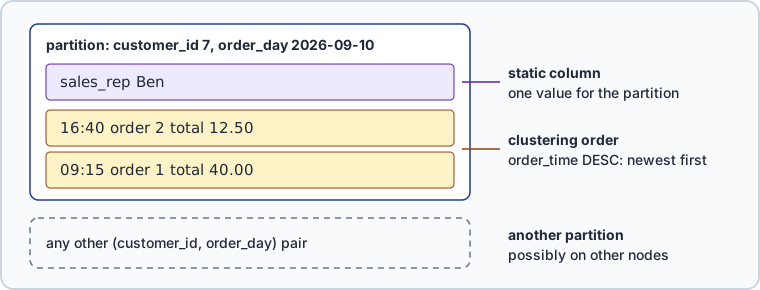
Only a column outside the primary key can be static, and only in a table with clustering columns. Without them each partition holds a single row, so every column is static already.
Table options worth setting at creation
Options follow WITH, joined by AND, and most of them can be altered later. These are the defaults that Cassandra 5.0.7 prints in DESCRIBE for a table created without options:
| Option | Default | What it sets |
|---|---|---|
comment | empty | A free-form, human-readable comment |
default_time_to_live | 0 | Default expiration time in seconds, 0 for none |
gc_grace_seconds | 864000 | Time to wait before garbage collecting tombstones |
compaction | SizeTieredCompactionStrategy | Compaction strategy class and its sub-options |
compression | LZ4Compressor | SSTable compression class and its sub-options |
caching | keys: ALL, rows_per_partition: NONE | Key cache and row cache for the table |
speculative_retry | 99p | When a read also queries an extra replica |
additional_write_policy | 99p | When a write also goes to transient replicas |
read_repair | BLOCKING | How a read repairs replicas that disagree |
cdc | false | A Change Data Capture log for the table |
The cdc flag alone writes no log: Cassandra 5.0.7 accepts it on any node, but CDC runs only where cassandra.yaml sets cdc_enabled: true, false by default.
compaction, compression and caching are maps. Setting any compaction sub-option erases all previous compaction sub-options, and compression behaves the same way. How to Alter a Table in Cassandra shows what that costs.



Create a table in DbSchema
DbSchema reaches Cassandra through its own open-source JDBC driver, described on the Cassandra connection page. The connection also needs the datacenter name that nodetool status prints on its first line.
- In DbSchema, choose Connect to Database and pick Cassandra, and DbSchema opens the Connection Dialog for that database type.
- Give the connection a Connection Name, enter the Server Host and Port with the Database User and Password, and add
dcunder SSL & Parameters on the Advanced tab. Click Test Connection, then Connect.
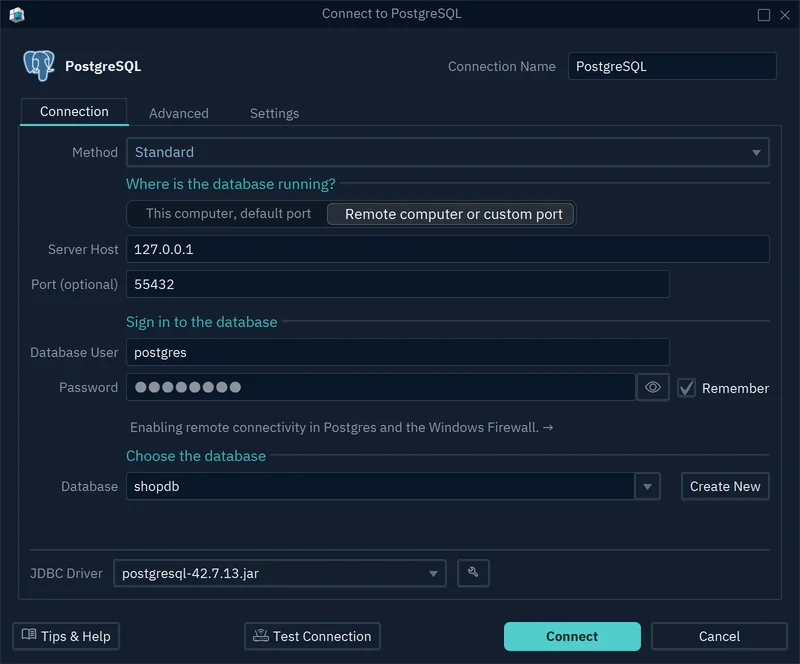
DbSchema reads the keyspace and draws its tables as a diagram. To run a statement as written, open the DbSchema SQL Editor from the Editors menu, paste the CREATE TABLE and click Execute Query.
To build a table with the mouse instead, right-click the diagram canvas and choose New Table, give it a name, and add its columns in the Columns tab of the Table Dialog.

While DbSchema is connected, both paths change the live keyspace: schema changes are immediately executed against the live database and logged in the SQL History pane. A table created in cqlsh reaches the diagram when DbSchema reads the keyspace again, with Refresh in the toolbar.
Common mistakes when creating a Cassandra table
A mistake in the key costs a new table and a data copy, since the key and the clustering order are fixed. Cassandra 5.0.7 answers each mistake like this:
| Mistake | What Cassandra 5.0.7 returns |
|---|---|
| No primary key | No PRIMARY KEY specifed for table '…' (exactly one required) |
STATIC on a table without clustering columns | Static columns are only useful (and thus allowed) if the table has at least one clustering column |
Changing CLUSTERING ORDER BY with ALTER TABLE | a SyntaxException, because ALTER TABLE has no such clause |
| Dropping a primary key column | Cannot drop PRIMARY KEY column customer_id |
Every statement above runs as written in the SQL Editor of the free DbSchema Community Edition, which also covers connecting, the diagram and creating tables in the Table Dialog. Download DbSchema at https://dbschema.com/download.html, connect to your cluster, and create orders_by_customer_day in your own keyspace; the diagram then shows the new table with its columns.









