Cassandra ALTER TABLE Guide: What You Can and Cannot Change
For developers changing a Cassandra table that already holds data, coming from SQL where more of this is allowed.
On this page
You have a Cassandra table full of rows and a change to make. In Cassandra 5.0, ALTER TABLE can add and drop regular columns, rename primary key columns and set table options, all without recreating the table. A new type for a column, a new name for a regular column or for the table, and a new primary key all need a new column or a new table.
| Change | ALTER TABLE in Cassandra 5.0 | Use instead |
|---|---|---|
| Add a regular column | ADD | |
| Drop a regular column | DROP | |
| Rename a primary key column | RENAME | |
| Change a table option | WITH, except CLUSTERING ORDER | |
| Rename a regular column | refused | a new column |
| Change a column's type | refused since Cassandra 3.0.11 and 3.10 | a new column |
| Change the primary key or the clustering order | refused | a new table |
| Rename the table | no statement | a new table |
The ALTER TABLE statement in Cassandra 5.0
CQL, the Cassandra Query Language, borrows ALTER TABLE from SQL. These are the forms of it that this article uses in Cassandra 5.0:
ALTER TABLE [IF EXISTS] table ADD [IF NOT EXISTS] column type
ALTER TABLE [IF EXISTS] table DROP [IF EXISTS] column
ALTER TABLE [IF EXISTS] table RENAME [IF EXISTS] key_column TO new_name [AND key_column TO new_name ...]
ALTER TABLE [IF EXISTS] table WITH option = value [AND option = value ...]
IF EXISTS and IF NOT EXISTS turn the error for a missing table or column, or for a column that already exists, into a no-op, which makes a migration script safe to run twice. The CQL DDL reference describes each form.
The examples run in cqlsh on a Cassandra 5.0 node, against this table in a keyspace named ecommerce:
CREATE TABLE ecommerce.orders_by_customer_day (
    customer_id uuid,
    order_day date,
    order_time timeuuid,
    order_id uuid,
    status text,
    legacy_status text,
    total decimal,
    PRIMARY KEY ((customer_id, order_day), order_time, order_id)
) WITH CLUSTERING ORDER BY (order_time DESC);
The primary key decides what can change
Every column of a Cassandra table is one of three kinds, and ALTER TABLE allows different things on each.
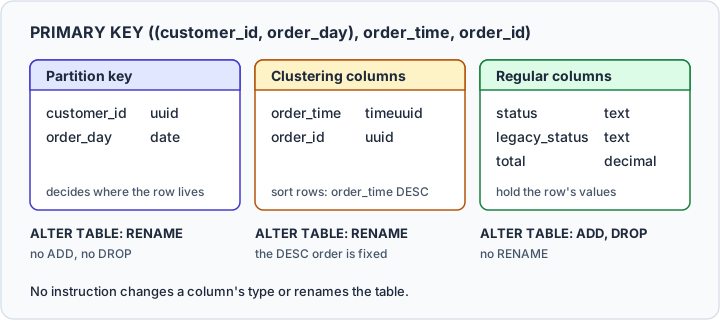
The partition key, (customer_id, order_day) here, decides where a row lives: Cassandra hashes its values, and the hash picks the partition and so the nodes that store it. The clustering columns, order_time and order_id, sort the rows inside a partition, newest first because of DESC. Every other column is a regular column that holds a value.
Changing the partition key would mean moving rows to other nodes, and changing the clustering order would mean sorting every partition again. ALTER TABLE does neither. Cassandra's documentation says that the primary key of a table "cannot ever be altered", a new column cannot join it, and WITH refuses CLUSTERING ORDER.
Add, drop and rename columns in cqlsh
Add a column
INSERT INTO ecommerce.orders_by_customer_day
    (customer_id, order_day, order_time, order_id, status, total)
VALUES (uuid(), '2026-09-11', now(), uuid(), 'shipped', 49.90);

ALTER TABLE ecommerce.orders_by_customer_day
ADD shipping_method text;

SELECT status, shipping_method FROM ecommerce.orders_by_customer_day;
The row written before the column existed reads it as null:
| status | shipping_method |
|---|---|
| shipped | null |
Adding a column is a constant-time operation, however much data the table holds, so a Cassandra table doesn't need every future attribute designed into it on day one. Repeating the statement returns an error unless it says IF NOT EXISTS, and several columns in one ADD or DROP go in parentheses:
ALTER TABLE ecommerce.orders_by_customer_day
ADD IF NOT EXISTS (gift_note text, tags set<text>);
A new column takes any CQL type. These are the ones used most often:
| Type | Holds |
|---|---|
text | a UTF-8 string |
ascii | an ASCII string |
int | a 32-bit signed integer |
bigint | a 64-bit signed integer |
decimal | a variable-precision decimal |
float | a 32-bit floating point number |
double | a 64-bit floating point number |
boolean | true or false |
date | a date without a time |
timestamp | a date and time, to the millisecond |
uuid | a UUID of any version |
timeuuid | a version 1 UUID, used as a conflict-free timestamp |
blob | arbitrary bytes |
set<text>, list<int>, map<text, int> | a collection |
frozen<...> is a modifier that wraps a collection or a user-defined type, not a type of its own. A counter column can't be added to this table, because a table that contains a counter can only contain counters outside its primary key.
Drop a column
ALTER TABLE ecommerce.orders_by_customer_day
DROP legacy_status;
The column and its values disappear from queries at once, and the values leave the disk lazily, during compaction, which also makes a drop constant-time. If you add the column again, the values written before the drop don't come back, and Cassandra 5.0 accepts the old name only with a type compatible with the dropped column's.
A drop also assumes the default write timestamps, real ones in microseconds. Where a client supplied timestamps in another convention, Cassandra's documentation warns that the drop doesn't execute correctly.
A primary key column can't be dropped, and Cassandra refuses DROP order_id with this message:
Cannot drop PRIMARY KEY column order_id
Rename a primary key column
ALTER TABLE ecommerce.orders_by_customer_day
RENAME order_time TO created_at;
RENAME works only on primary key columns, partition key columns included. Some reference pages say clustering columns only, but Cassandra 5.0's DDL reference and its code reject only the columns outside the primary key:
ALTER TABLE ecommerce.orders_by_customer_day
RENAME status TO order_status;
Cannot rename non PRIMARY KEY column status
The new name has to be free, and a column with a secondary index on it can't be renamed. Every query and application that names the column has to change in the same release.
Changes that need a new column or a new table
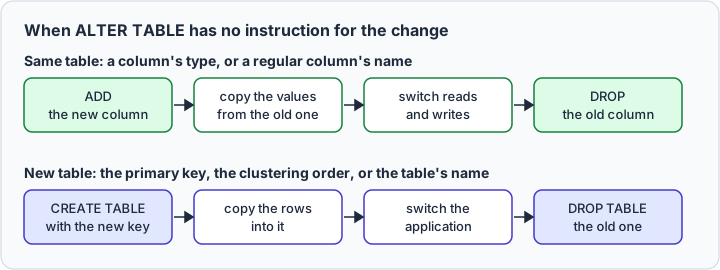
Four changes have no ALTER TABLE instruction: a regular column's name, a column's type, the primary key with its clustering order, and the table's name. The expensive mistake is discovering that during a release window. Each one has a way around it, in the same table or in a new one.
Change a column's type
Documentation written for Cassandra 3.0 still shows a type change:
ALTER TABLE ecommerce.orders_by_customer_day
ALTER total TYPE text;
Cassandra 3.0.11 and 3.10 disabled it, and Cassandra 5.0 rejects the statement:
Altering column types is no longer supported
Add a column with the new type under a new name, copy the values into it from your application or a batch job, move reads and writes to it, then drop the old column. The same four steps rename a regular column.
Rename a table or change its key
No CQL statement renames a table. A new name, like a new primary key or clustering order, means a new table:
- Create the new table, say
ecommerce.customer_orders, with the name, key and clustering order you want. - Copy the rows into it.
- Point the application at the new table.
- Drop the old table once nothing reads it.
For the table as the CREATE TABLE above defines it, cqlsh can do step 2 through a CSV file with its COPY commands, which belong to cqlsh rather than to CQL:
COPY ecommerce.orders_by_customer_day (customer_id, order_day, order_time, order_id, status, legacy_status, total)
TO 'orders.csv' WITH HEADER = true;

COPY ecommerce.customer_orders (customer_id, order_day, order_time, order_id, status, legacy_status, total)
FROM 'orders.csv' WITH HEADER = true;
Change table options
WITH changes the options that CREATE TABLE accepts, except CLUSTERING ORDER. The table's name and keyspace are not options.
ALTER TABLE ecommerce.orders_by_customer_day
WITH comment = 'Orders per customer and day';
Compression and compaction are maps of sub-options. Take a table set to 4 KB chunks:
ALTER TABLE ecommerce.orders_by_customer_day
WITH compression = {'class': 'LZ4Compressor', 'chunk_length_in_kb': 4};
Later, someone changes only the algorithm:
ALTER TABLE ecommerce.orders_by_customer_day
WITH compression = {'class': 'ZstdCompressor'};
Setting any compression sub-option erases all the previous ones, so the 4 KB chunk length is gone and the table is back on the default:
compression sub-option | After the first statement | After the second |
|---|---|---|
class | LZ4Compressor | ZstdCompressor |
chunk_length_in_kb | 4 | 16 |
The default has been 16 since Cassandra 4.0, as the release notes record, although the options table in Cassandra 5.0's DDL documentation still lists 64. Compaction maps behave the same way, so write out every sub-option you want to keep each time you touch either map, and check the result with DESCRIBE TABLE ecommerce.orders_by_customer_day.



Altering a table in DbSchema
DbSchema keeps its own copy of the schema, the design model, drawn as a diagram, and reads the keyspace into it when you connect. A change can then land in the model, in the cluster, or in both.
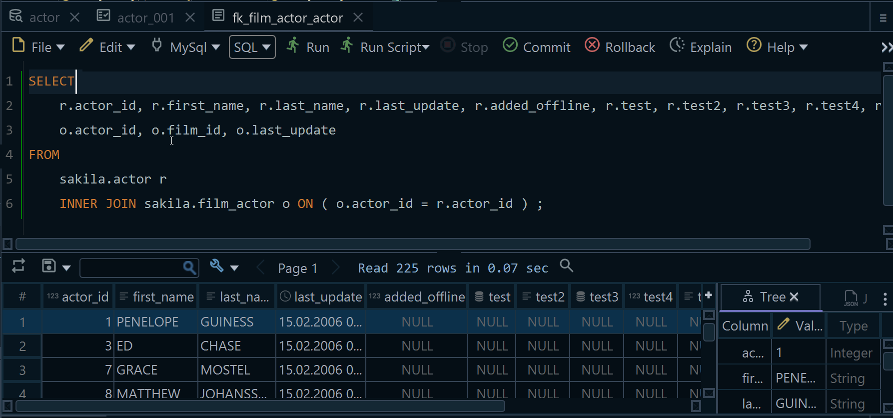
Open the SQL Editor from DbSchema's Editors menu, paste the ALTER TABLE and run it. That changes the cluster and leaves the model as it was.
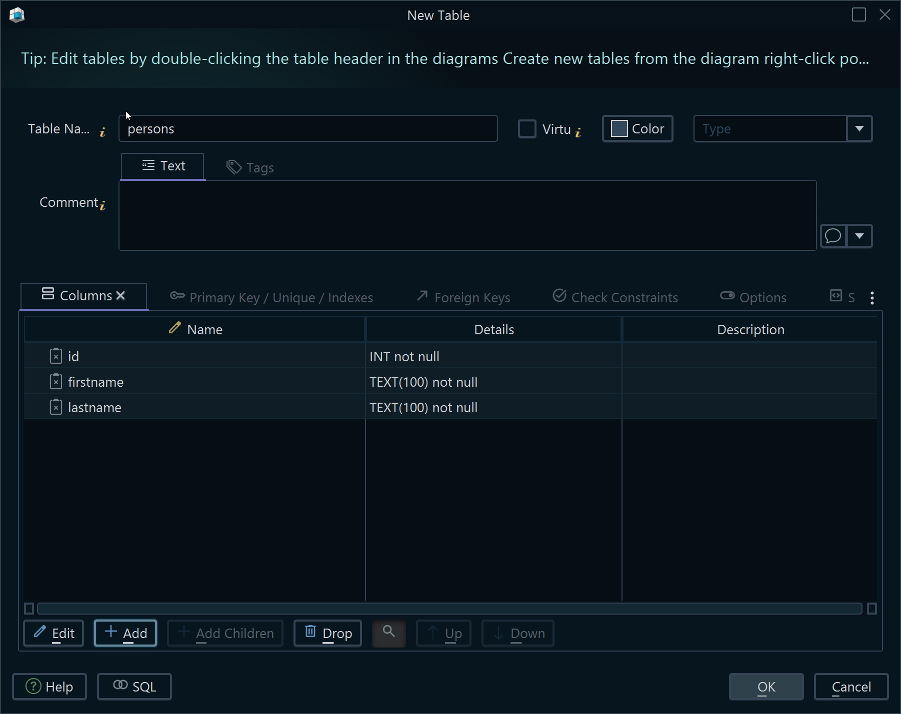
To change a table without writing CQL, double-click its header on the diagram. DbSchema opens the Table Dialog, whose Columns tab adds and drops columns. While DbSchema is connected, it applies each change to the database at once and lists the statement it ran in the SQL History pane.
When the cluster changed outside DbSchema, bring the change into the model with Schema → Refresh Schema from Database, or open Schema → Compare Model with Database to review each difference and choose whether the model or the database takes it.
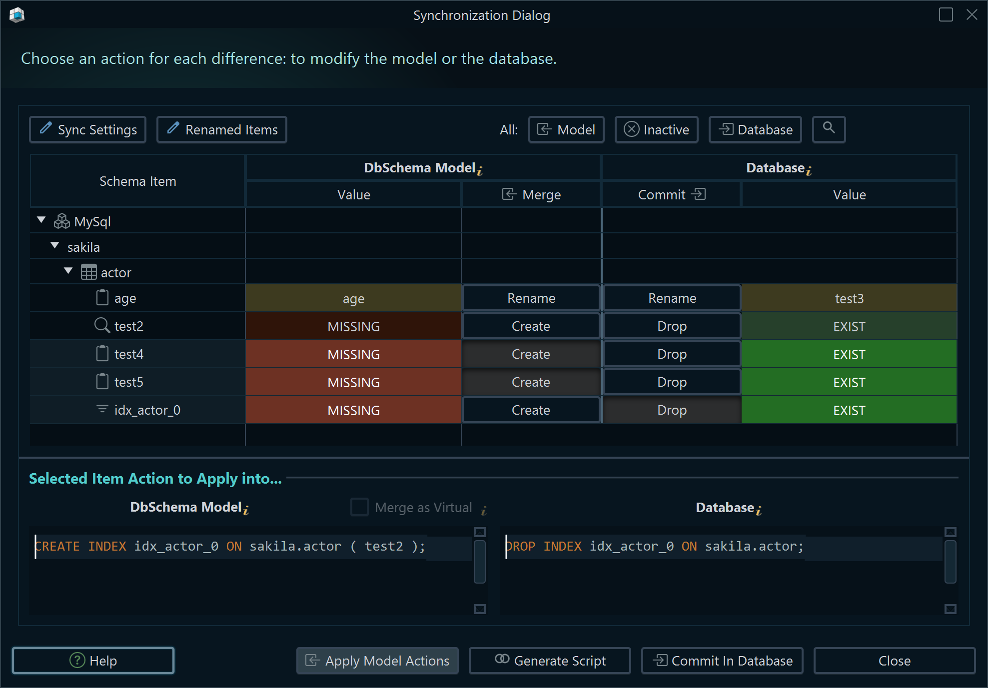
Connecting, the diagram with its Table Dialog and the SQL Editor are in the free DbSchema Community Edition; refreshing the model and comparing it with the database are schema synchronization, in DbSchema Pro. Download DbSchema at https://dbschema.com/download.html, connect to your keyspace and run your next ALTER TABLE in the SQL Editor, then compare the model with the database before the next change goes out.









