SQL CASE Expression Explained with Practical Examples
For SQL beginners who can write a SELECT and now need the query itself to turn a stored number into a word.
On this page
A report has to print a word where the table stores a number, and SQL has no if statement to drop into the SELECT list. CASE is the expression that does it. You write the conditions in order, each with the value to return when it holds, and one value for everything left over. CASE goes wherever a value goes, so the same construct labels a column, sorts rows, groups them, and computes what an UPDATE assigns.
What the SQL CASE expression returns
CASE reads its conditions from the top and stops at the first one that holds, returning the value written after that THEN. When none of them holds, the ELSE value comes back. The expression has two forms. The simple form compares one expression against a list of values:
CASE expression
    WHEN value1 THEN result1
    WHEN value2 THEN result2
    ELSE resultN
END
The searched form leaves out the expression after CASE and takes a full condition in each WHEN, so every branch can test something different:
CASE
    WHEN condition1 THEN result1
    WHEN condition2 THEN result2
    ELSE resultN
END
Both forms finish with END, and both return one value per row. The examples below run against a single table:
CREATE TABLE Students (
    StudentID INT PRIMARY KEY,
    Name      VARCHAR(20),
    Grade     INT
);

INSERT INTO Students VALUES
    (1, 'Alice', 85),
    (2, 'Bob',   60),
    (3, 'Carol', 77),
    (4, 'Dave',  90);
Turning the Grade column into a word takes one searched CASE in the SELECT list:
SELECT Name, Grade,
    CASE
        WHEN Grade >= 85 THEN 'Excellent'
        WHEN Grade >= 75 THEN 'Good'
        ELSE 'Average'
    END AS Performance
FROM Students;
| Name | Grade | Performance |
|---|---|---|
| Alice | 85 | Excellent |
| Bob | 60 | Average |
| Carol | 77 | Good |
| Dave | 90 | Excellent |
The order of the conditions decides the answer. Alice's 85 satisfies the second condition as well as the first, and she comes back as Excellent because the first one is tested first.
CASE in a SELECT list with comparison operators
The simple form tests one thing only, whether the expression after CASE equals the value after WHEN. Labeling the row whose Grade is exactly 85 fits that form:
SELECT Name,
    CASE Grade
        WHEN 85 THEN 'Perfect'
        ELSE 'Other'
    END AS Label
FROM Students;
| Name | Label |
|---|---|
| Alice | Perfect |
| Bob | Other |
| Carol | Other |
| Dave | Other |
A comparison operator has nowhere to go in that form, because everything after WHEN is a value the column has to equal. A range, a comparison against another column, or a test for NULL therefore belongs in the searched form, which is why the Performance labels above needed it. Reach for the simple form when the column holds a fixed set of values, such as a status code, and for the searched form everywhere else.
CASE in ORDER BY and in GROUP BY
Sorting by the Performance label itself would put Average before Excellent and Excellent before Good, since those are the words in alphabetical order. A CASE that returns numbers gives the ranking you actually want:
SELECT Name, Grade,
    CASE
        WHEN Grade >= 85 THEN 'Excellent'
        WHEN Grade >= 75 THEN 'Good'
        ELSE 'Average'
    END AS Performance
FROM Students
ORDER BY
    CASE
        WHEN Grade >= 85 THEN 1
        WHEN Grade >= 75 THEN 2
        ELSE 3
    END, Name;
| Name | Grade | Performance |
|---|---|---|
| Alice | 85 | Excellent |
| Dave | 90 | Excellent |
| Carol | 77 | Good |
| Bob | 60 | Average |
Alice and Dave share rank 1, so the Name at the end of the ORDER BY decides which of the two comes first. Drop it and either row can come back on top, because nothing left in the query separates them.
The same expression groups rows when it goes into GROUP BY, and every row that produces the same label counts as one group. The GROUP BY clause then aggregates each of them:
SELECT
    CASE
        WHEN Grade >= 85 THEN 'Excellent'
        WHEN Grade >= 75 THEN 'Good'
        ELSE 'Average'
    END AS Performance,
    COUNT(*) AS NumberOfStudents
FROM Students
GROUP BY
    CASE
        WHEN Grade >= 85 THEN 'Excellent'
        WHEN Grade >= 75 THEN 'Good'
        ELSE 'Average'
    END;
| Performance | NumberOfStudents |
|---|---|
| Excellent | 2 |
| Good | 1 |
| Average | 1 |
The expression is written twice, once in the SELECT list and once in GROUP BY, so that the label and the grouping come out of the same conditions.
CASE in UPDATE, INSERT and DELETE
CASE produces a value, so it fits anywhere a value fits: the right-hand side of a SET clause, the column list an INSERT selects, and the condition of a DELETE. Each of the three statements below starts from the four rows declared above.
In an UPDATE, CASE computes the number that SET assigns:
UPDATE Students
SET Grade = Grade +
    CASE
        WHEN Grade < 75 THEN 5
        ELSE 0
    END;
SELECT StudentID, Name, Grade FROM Students;
| StudentID | Name | Grade |
|---|---|---|
| 1 | Alice | 85 |
| 2 | Bob | 65 |
| 3 | Carol | 77 |
| 4 | Dave | 90 |
Bob is the only student under 75, so his is the only grade that moves. The ELSE 0 is what leaves the other three where they are: without it, CASE returns NULL for them, and a number plus NULL is NULL, so the statement would empty three grades instead of keeping them.
An INSERT can compute a column the same way. A second table holds one label per student:
CREATE TABLE StudentLabels (
    StudentID   INT PRIMARY KEY,
    Name        VARCHAR(20),
    Performance VARCHAR(10)
);
INSERT INTO StudentLabels (StudentID, Name, Performance)
SELECT StudentID, Name,
    CASE
        WHEN Grade >= 85 THEN 'Excellent'
        WHEN Grade >= 75 THEN 'Good'
        ELSE 'Average'
    END
FROM Students;
SELECT * FROM StudentLabels;
| StudentID | Name | Performance |
|---|---|---|
| 1 | Alice | Excellent |
| 2 | Bob | Average |
| 3 | Carol | Good |
| 4 | Dave | Excellent |
In a DELETE, the WHERE clause compares a literal against what CASE returned, so the branches decide which rows go:
DELETE FROM Students
WHERE 'Average' =
    CASE
        WHEN Grade < 75 THEN 'Average'
        ELSE 'Not Average'
    END;
SELECT StudentID, Name, Grade FROM Students;
| StudentID | Name | Grade |
|---|---|---|
| 1 | Alice | 85 |
| 3 | Carol | 77 |
| 4 | Dave | 90 |
One comparison needs no CASE at all: WHERE Grade < 75 removes the same row in fewer words. The form above earns its place when the label comes from a list of conditions and you want the DELETE to use the same list the report uses.
CASE in aggregate functions
An aggregate function skips NULL, so a branch that returns NULL takes a row out of the calculation without a WHERE clause anywhere in the query:
SELECT AVG(
    CASE
        WHEN Grade >= 85 THEN Grade
        ELSE NULL
    END) AS AvgExcellent
FROM Students;
| AvgExcellent |
|---|
| 87.5 |
Two grades are 85 or more, so AVG adds 175 and divides by 2 rather than by 4. SQL Server answers a whole number here instead, because its AVG returns int when the column is int.
A WHERE clause filters the whole query, while a CASE inside an aggregate filters one column, which is what lets a single pass report several buckets side by side:
SELECT
    SUM(CASE WHEN Grade >= 85 THEN 1 ELSE 0 END) AS Excellents,
    SUM(CASE WHEN Grade <  75 THEN 1 ELSE 0 END) AS Averages
FROM Students;
| Excellents | Averages |
|---|---|
| 2 | 1 |
Each SUM counts the rows its own condition matched, and the two columns come out of one scan of the table. The same two numbers fetched with WHERE would take two queries.
Preventing divide-by-zero errors with CASE
A divisor that can be zero is the other place a branch returning NULL pays off:
CREATE TABLE Sales (
    SaleID               INT PRIMARY KEY,
    TotalSales           INT,
    NumberOfTransactions INT
);

INSERT INTO Sales VALUES
    (1, 500, 0),
    (2, 900, 3);
Sale 1 counted no transactions, so dividing its total by that count has no answer at all. The CASE decides what the row reports instead:
SELECT SaleID,
    TotalSales /
    CASE
        WHEN NumberOfTransactions = 0 THEN NULL
        ELSE NumberOfTransactions
    END AS AvgSale
FROM Sales;
| SaleID | AvgSale |
|---|---|
| 1 | NULL |
| 2 | 300 |
The division now has NULL underneath it rather than zero, so sale 1 comes back empty and sale 2 still reports its average. One row with nothing to divide by no longer costs you the whole report. SQL NULL values covers the rest of what NULL does to arithmetic, and NULLIF(NumberOfTransactions, 0) is the shorter spelling of the same guard.
What CASE returns when no condition matches
Leave out the ELSE branch and the rows that match nothing come back empty:
SELECT Name,
    CASE
        WHEN Grade >= 85 THEN 'Excellent'
    END AS Performance
FROM Students;
| Name | Performance |
|---|---|
| Alice | Excellent |
| Bob | NULL |
| Carol | NULL |
| Dave | Excellent |
The PostgreSQL 17 documentation states the rule as "If the ELSE clause is omitted and no condition is true, the result is null". Write an ELSE whenever a NULL in that column would be read as a missing value rather than as a category, and always when the result feeds arithmetic, as the UPDATE above showed.
Two other rules catch beginners. END closes every CASE, and a statement missing it does not parse. The values in the branches also have to fit together: the same page requires that "the data types of all the result expressions must be convertible to a single output type", so a CASE that returns 'Excellent' in one branch and 0 in another is rejected rather than coerced.
Nested CASE expressions
A CASE can sit inside the THEN or the ELSE of another one, which is how a branch gets a second, unrelated test. Here the outer expression separates the grades of 85 and above, and the inner one splits everything left over by whether the grade is even:
SELECT Name,
    CASE
        WHEN Grade = 85 THEN 'Perfect'
        WHEN Grade > 85 THEN 'Excellent'
        ELSE
            CASE
                WHEN Grade % 2 = 0 THEN 'Even Grade'
                ELSE 'Odd Grade'
            END
    END AS Label
FROM Students;
| Name | Label |
|---|---|
| Alice | Perfect |
| Bob | Even Grade |
| Carol | Odd Grade |
| Dave | Excellent |
The inner CASE sees only the rows the outer ELSE reached, which here are the two grades under 85. Oracle spells the same test MOD(Grade, 2) = 0, because MOD returns the remainder of one number divided by another. Keep the nesting to two levels: each further level adds a branch the next reader has to trace to the end before they know what a row returns.
Run a CASE expression in DbSchema before it reaches a report
Open the SQL Editor in DbSchema from the Editors menu, paste the labeling query, and click Execute Query. The rows come back as a table under the statement, which is the quickest way to read a CASE against the data it labels.
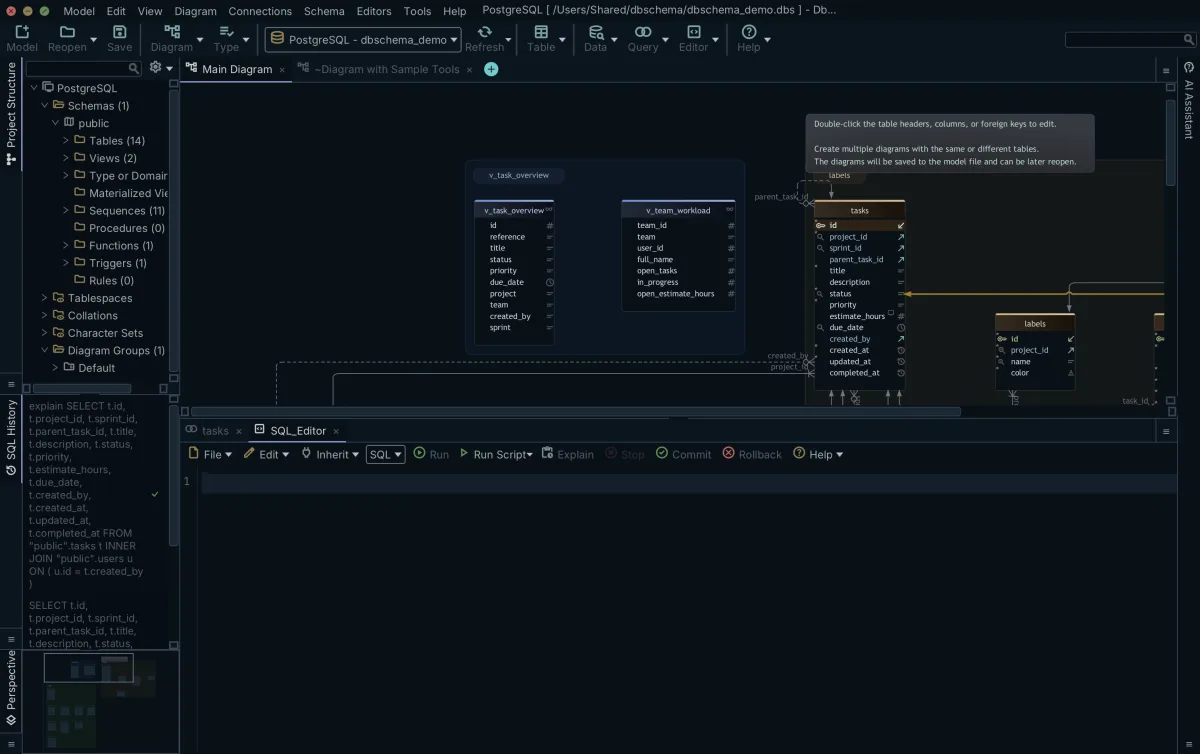
The Run Script button in the DbSchema SQL Editor executes the whole editor content in one go, so the CREATE TABLE and INSERT block above loads in a single click before you start on the expressions. DbSchema keeps every statement of the session in its SQL History pane, and clicking an entry loads that statement back into the editor, so you can change one branch and run it again.
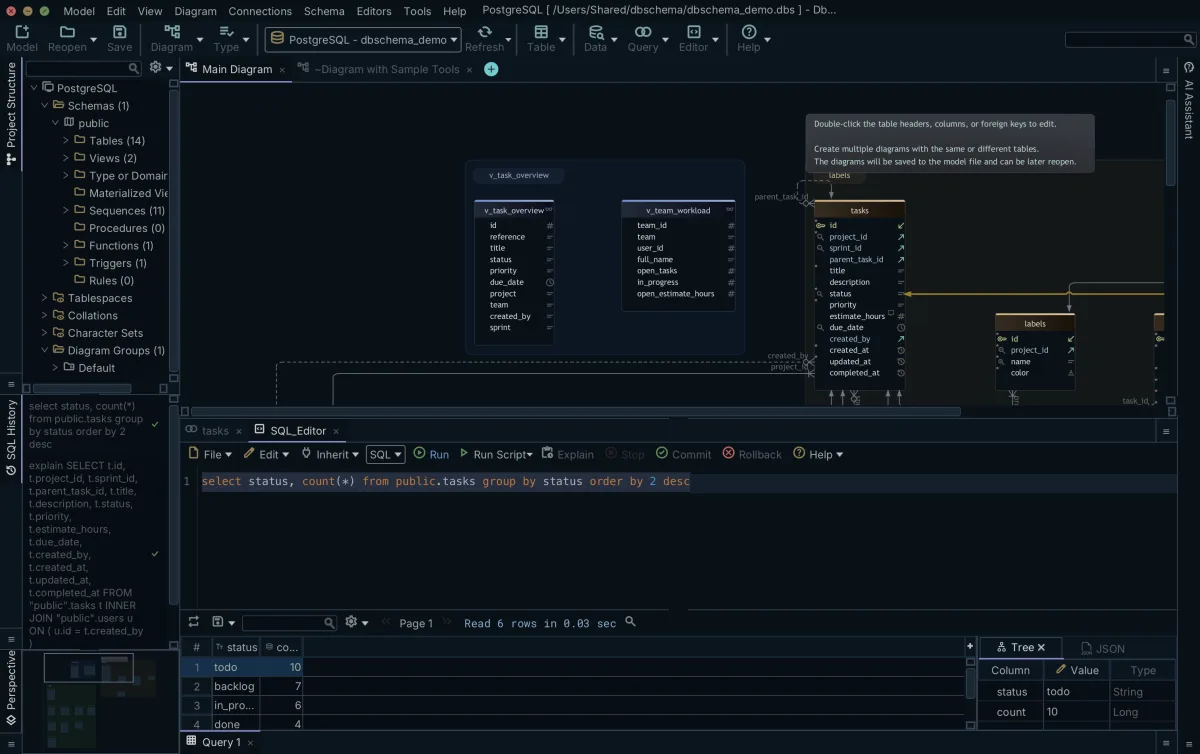
DbSchema runs the SQL Editor against the connected database, so the SELECT examples read the rows without touching them, while the UPDATE and the DELETE write to the database itself. The editors are kept in the DbSchema model file rather than in the database, which is why a query you wrote yesterday is still in its tab when you reopen the model.
Download DbSchema at https://dbschema.com/download.html, connect to your database, and paste the labeling query into the SQL Editor with one of your own columns in place of Grade. Connecting, the diagram DbSchema draws from your schema, and the SQL Editor are all in the free Community Edition.
Test a CASE expression before it ships
The DbSchema SQL Editor runs a CASE expression against your own tables and displays the rows it returns as a table, so you read the labels before they reach a report or an update.









