Data Modelling Tools for Databricks: What Reads Unity Catalog
Data modelling tools for Databricks compared: what Catalog Explorer draws free, and what DbSchema, erwin, ER/Studio, Hackolade and SqlDBM read.
On this page
For data architects choosing a modelling tool for a Databricks lakehouse: DbSchema is the pick when you want the whole Unity Catalog on one canvas, a model file in Git and documentation teammates open in any browser. erwin Data Modeler, ER/Studio Data Architect, Hackolade Studio and SqlDBM also state Databricks support on their own pages. Each is measured against a free baseline: Catalog Explorer already draws an Entity Relationship Diagram of declared primary and foreign keys. This comparison shows what each tool reads from Unity Catalog and which lakehouse team it fits.
Databricks ERD in Catalog Explorer: what it draws for free
Databricks has a built-in ER diagram: Catalog Explorer shows the primary key and foreign key relationships between tables as a graph, at no cost.[1] Any modelling tool an architect approves for a lakehouse therefore has to beat that baseline on something concrete.
The ERD opens from any table that contains a foreign key constraint: select the table in Catalog Explorer and click View relationships[1] above it on the Overview tab. For connections based on how data actually moves rather than on declared constraints, the interactive lineage graph in Catalog Explorer shows query data flow.[1]
The ERD rests on declared keys, and Databricks treats those declarations as informational only rather than enforced; the section on informational keys below states what that means, once, for every tool in the table. A diagram of declared keys therefore shows intent, not enforcement. A lakehouse where nobody wrote the constraints shows no relationships at all, which is where virtual foreign keys in a modelling tool come in (also below).
That is the bar. A dedicated modelling tool earns its place next to Catalog Explorer only by adding something the workspace does not give you. That can be a model you can edit offline and track in Git, forward engineering of DDL, documentation for people without workspace access, or the whole catalog on one canvas instead of a tree. Those are the jobs that land on an architect once modelling has moved into engineering teams that work in Git, and once people outside the team keep asking for current schema documentation. The sections below judge the candidates against that bar.
Data modelling tools that support Databricks Unity Catalog
The shortlist holds the tools that name Databricks support on their own pages: DbSchema, erwin Data Modeler, ER/Studio Data Architect, Hackolade Studio and SqlDBM. As background, Supergood's listing on SqlDBM[2] (read 10 October 2026) names ERwin Data Modeler, ER/Studio, SAP PowerDesigner, Vertabelo (Redgate Data Modeler), DbSchema and Hackolade as common alternatives to SqlDBM, and describes SqlDBM's use case as modelling schemas for a new Snowflake or Databricks deployment. It is a listing, not a review. DataGrip and DBeaver come up in the same searches; the table keeps to tools whose own pages state Databricks modelling support.
| Tool | How it connects | What it reads | Forward engineering | Model stored | Runs on | Page read |
|---|---|---|---|---|---|---|
| Catalog Explorer | In the workspace, no connection | Tables with declared foreign key constraints | None | In the workspace | Browser | 10 Oct 2026 |
| DbSchema | Databricks JDBC driver to a SQL warehouse | Catalogs, schemas, tables | DDL you review before it runs | .dbs model file, trackable in Git | Windows, macOS, Linux | 10 Oct 2026 |
| erwin Data Modeler | - | Catalogs, database, function, group, table, table column, table partition, user id, view, view column, CTAS | - | - | - | 10 Oct 2026 |
| ER/Studio Data Architect | Reverse engineering from the database | Databricks as a core platform | Forward engineering of DDL | Repository with Team Server (Data Architect Professional) | Windows 10 and 11, 64-bit | 10 Oct 2026 |
| Hackolade Studio | Reverse engineering | Delta Lake on Databricks, Unity Catalog catalog > schema > table, Hive complex and user-defined types | HiveQL scripts | - | - | 10 Oct 2026 |
| SqlDBM | Cluster direct connection | Schemas, views, partitions, primary and foreign keys, check constraints, properties, bloom filter indexes, table file formats | - | - | - | 10 Oct 2026 |
A dash means the vendor's Databricks page, read on the date in the last column, does not state that point; it does not mean the tool lacks it. No prices appear in the table, because none were verified against a vendor's current pricing page for this article; check each vendor's pricing page yourself before shortlisting. The next section states what each vendor's page actually says, so every cell above has a source you can open.
Databricks support on each vendor page
Each row of the table rests on the vendor's own documentation, read on 10 October 2026:
- erwin Data Modeler (Quest): the erwin Databricks Support Summary[3] lists CTAS (CREATE TABLE AS SELECT) with CTAS columns, catalogs, database, function, group, table with table columns and table partitions, user id, and views with view columns as supported objects, plus a short list of data types. How erwin compares with other enterprise modellers is covered in erwin compared with ER/Studio.
- ER/Studio Data Architect (IDERA): the ER/Studio technical specifications[4] list Databricks as a core platform, state that the core products reverse engineer from the database and forward engineer data definition language, and give the operating system as 64-bit Windows 10 and 11 (page updated 1 September 2026).
- Hackolade Studio: its Databricks data modeling page[5] describes modelling Delta Lake on Databricks, explains the Unity Catalog catalog > schema > table hierarchy, and lists Hive primitive and complex data types plus user-defined types, reverse engineering and forward engineering of HiveQL scripts. The same page names documentation generation, model comparison and command-line integration with CI/CD pipelines.
- SqlDBM: its SqlDBM plus Databricks page[6] lists schemas, views, partitions, primary and foreign keys, check constraints, properties, bloom filter indexes and table file formats, with a cluster direct connection that obtains lakehouse DDL and converts it to interactive diagrams. The page also describes concurrent work on parallel development branches, with live mentions on project objects.
Read the pages yourself before a purchase decision, because object support changes between releases. That matters most when erwin or ER/Studio seats come up for renewal and the Databricks rows decide whether the renewal is worth it.
How each tool connects, reads and stores the model
DbSchema connects to a Databricks SQL warehouse through the Databricks JDBC driver, as documented on the DbSchema for Databricks Unity Catalog page. The driver is the databricks-jdbc jar with driver class com.databricks.client.jdbc.Driver, and the URL starts with jdbc:databricks://:[7]
jdbc:databricks://HOST:443/default;ssl=1;httpPath=...;AuthMech=3;UID=token;PWD=...
The httpPath parameter identifies which warehouse or cluster the request goes to; host and port alone reach the workspace but not a compute resource. You authenticate with a personal access token, entering the literal word token as the user, or with your workspace's OAuth settings. Databricks recommends OAuth for production use. The connect DbSchema to a Databricks SQL warehouse page walks through the connection dialog step by step.
A missing httpPath fails without naming the parameter. We ran the open-source Databricks JDBC driver 3.4.2 on 10 October 2026 (Java 25, macOS on Apple Silicon, no live workspace): with httpPath left out of the URL, the connection attempt failed after 352 ms with "java.lang.NullPointerException: Cannot invoke "java.lang.CharSequence.length()" because "this.text" is null", before any network request. With httpPath=/sql/1.0/warehouses/<id> added, the driver sent its first request to https://\<host>:443//sql/1.0/warehouses/<id>, so the HTTP path is literally the address of the warehouse. A NullPointerException on connect with driver 3.4.2 is therefore worth checking against the httpPath first.
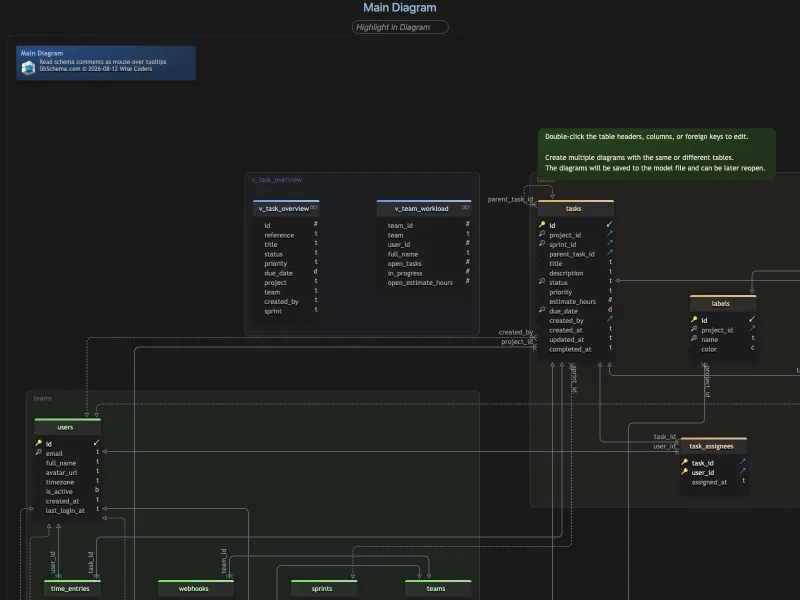
Once connected, the desktop modeller reads Unity Catalog through the SQL warehouse and lays catalogs, schemas and tables on one canvas instead of a tree, with focused diagrams per catalog or domain over the same model, as dbschema.com documents for Databricks.
The connection defaults are visible in the app itself. In version 10.5.2, checked on 10 October 2026, the Databricks connection profile defaults to port 443 and the schema default, writes catalog-qualified names, and the connection dialog points cloud databases to the Paste a JDBC URL method, where the copied JDBC URL is pasted.
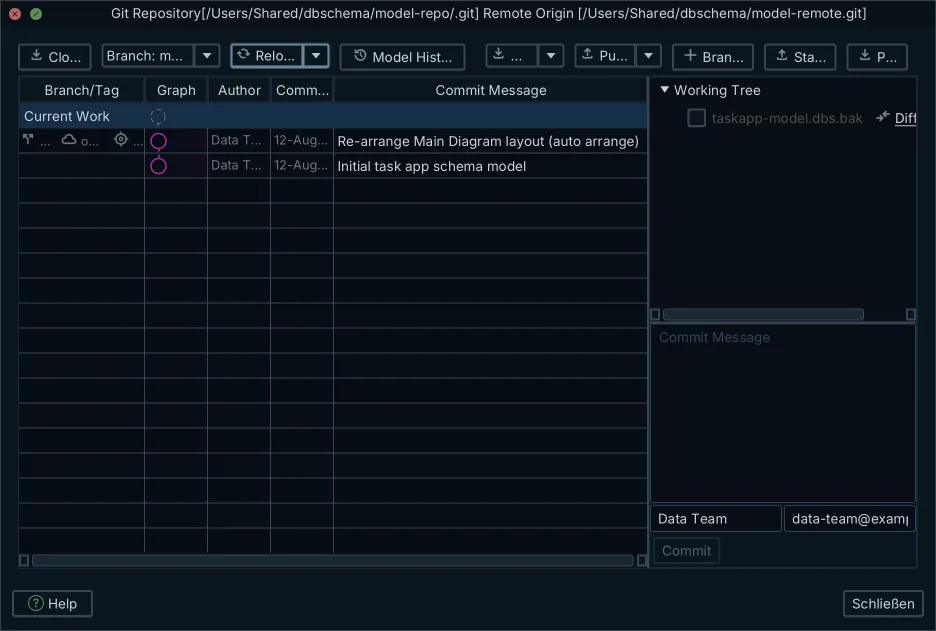
The schema design lives in its own model file, separate from the warehouse: the .dbs design model is XML, editable offline with no connection open, and diffable in Git so a reviewer sees a schema change as changed lines. Editing tables, columns and relations in the model changes the model file and nothing else. The warehouse changes only when you apply the model, and the generated DDL is shown first, so nothing reaches the warehouse unread. For schema migration between Databricks environments, the Schema Synchronization feature compares table definitions and generates the DDL diff; finding differences in general is covered in finding schema drift.
Databricks schema documentation without workspace credentials
HTML5 documentation gives analysts, product engineers and auditors schema answers without workspace credentials. One export from the model builds searchable diagrams, table definitions and column comments that open in any browser, with no Databricks access and no modelling-tool licence behind the reader. Comments written on tables and columns appear as mouse-over tooltips. The export is documented on dbschema.com's Databricks page.
The visual query builder turns table and column picks into Spark SQL that runs on the warehouse, so an analyst can join Delta tables without touching a notebook. Data browse covers Delta table contents: selecting a record in one table filters the related panes over the relations held in the model. Both are documented capabilities of the Pro Edition.
When the documentation job grows beyond one lakehouse into a company-wide dictionary, the split between a design tool that keeps definitions in a file and a catalog that crawls everything is covered in data dictionary tools compared.
Databricks primary and foreign keys are not enforced: limits and first-connection checks
Primary and foreign keys in Databricks are not enforced, and that limit applies to every tool in the table. Primary key, foreign key and unique constraints are informational and not enforced[8]; NOT NULL and CHECK constraints are enforced, and all constraints require Delta Lake. No tool can draw enforced relationships the platform does not enforce. A declared key in any tool's diagram is a statement of intent, and a table with no declared keys appears with none.
Keys drawn in the model become informational constraints when deployed. The Databricks profile in version 10.5.2 writes a primary key as ALTER TABLE … ADD CONSTRAINT … PRIMARY KEY ( … ) and a foreign key as ALTER TABLE … ADD CONSTRAINT … FOREIGN KEY ( … ) REFERENCES …, the ADD CONSTRAINT form Databricks uses for its informational keys; NOT NULL is set with ALTER COLUMN … SET NOT NULL.
- Download the Databricks driver zip, extract it, and load the .jar files in the Driver Manager before the first connection.
- A stopped SQL warehouse accepts the connection and then takes a while to answer while it starts, which can look like a hang. Start the warehouse in the workspace first, or allow a generous timeout on the first connection.
- Copy the httpPath from the SQL warehouse's Connection details tab rather than retyping it; it is the parameter most often lost.
Where the lakehouse declares no keys, the answer is virtual foreign keys: relations drawn in the diagram that are saved in the model file, not in the warehouse. The query builder and the relational data browse follow a virtual relation as they follow a declared one.
When a connected schema has no foreign keys at all, version 10.5.2 asks "Auto-detect virtual foreign keys?" with the choices Detect and Skip, and states that virtual foreign keys will be saved to the project file. Nothing is written to the warehouse.
Which Databricks data modelling tool fits which team
Each option fits a different team, and the fit below is a factual capability of the tool for that case, not a ranking of the others. Whether the model itself should live on a desktop or in a browser is its own decision, covered in desktop or browser modelling.
| What the team needs | Where that capability sits |
|---|---|
| A free quick look at declared keys | Catalog Explorer, already in the workspace |
| Partition-level object coverage in the model | erwin Data Modeler, which lists table partitions among its Databricks objects |
| Hive complex and user-defined types | Hackolade Studio, which lists them on its Databricks page |
| Lakehouse DDL turned into diagrams over a cluster direct connection, with concurrent work on branches | SqlDBM, per its Databricks page |
| The whole catalog on one canvas, a model file in Git, documentation teammates open in any browser, and Spark SQL built visually, on Windows, macOS or Linux | DbSchema |
Data modelling in Databricks follows from the constraint rules above. A lakehouse relaxes the enforcement a classic warehouse imposed: Delta tables carry no enforced primary or foreign keys, so the relationships a dimensional model takes for granted exist only where somebody declares them. The model, whether drawn in Catalog Explorer or in a dedicated tool, is where that intent is written down, reviewed and carried between environments.
Logical and conceptual design, where entities and relations precede any engine, is its own discipline with its own tool market; logical database design tools compared covers it separately.
How to open a Databricks SQL warehouse in DbSchema
Opening your own catalog as diagrams takes four steps:
- Download the desktop app for Windows, macOS or Linux; no account is needed.
- Download the Databricks JDBC driver zip, extract it, and load the .jar in the Driver Manager.
- Copy the JDBC URL from the SQL warehouse's Connection details tab, keep the httpPath, and authenticate with a personal access token or OAuth.
- Reverse-engineer the warehouse: Unity Catalog catalogs, schemas and tables appear as ER diagrams you can split per catalog or domain.
The editions, in one pass: the free Community Edition connects, reverse-engineers, draws interactive diagrams and runs the SQL editor, and every licence includes every database. DbSchema Pro Edition adds the saved .dbs model file, schema compare and synchronization, HTML5 documentation and the visual query builder, which are the workflow this article described. Architect adds logical and conceptual design on top. The download kit includes a 15-day Architect trial.
Download DbSchema, load the Databricks JDBC driver, connect to your SQL warehouse, and see your Unity Catalog as ER diagrams; the 15-day Architect trial covers the saved model, documentation and synchronization.
Frequently asked questions
Does Databricks have a built-in ER diagram?
Yes. Catalog Explorer shows an Entity Relationship Diagram of primary and foreign key relationships, opened via View relationships on any table that has a foreign key constraint. For data flow rather than declared keys, it also has a lineage graph.
Are primary and foreign keys enforced in Databricks?
No. Databricks treats primary keys, foreign keys and unique constraints as informational metadata only. Only NOT NULL and CHECK are checked on write, and every constraint needs a Delta Lake table.
Which data modeling tools support Databricks?
DbSchema, erwin Data Modeler, ER/Studio Data Architect, Hackolade Studio and SqlDBM all state Databricks support on their own pages, with different object coverage: erwin lists table partitions and CTAS, Hackolade Hive complex and user-defined types, SqlDBM partitions and keys. Catalog Explorer is the free baseline.
Can I model Unity Catalog offline and keep the model in Git?
Yes, with a tool that stores the design in its own file. DbSchema saves the schema design to a model file you can edit offline and track in Git, and you connect to the SQL warehouse only to read and apply the generated DDL. The saved model file is a Pro Edition feature.
Sources
Put Unity Catalog on one canvas
DbSchema connects to a Databricks SQL warehouse through the JDBC driver and draws catalogs, schemas and tables as ER diagrams. Connecting, reverse-engineering and the diagrams are in the free Community Edition.









