Data Modeling Tools That Cover Conceptual, Logical and Physical Models
What each modeling level holds, which tools generate one level from the next, and what a seat of each costs.
On this page
You need to agree on the data before anyone has picked PostgreSQL or MySQL, and you don't want to redraw the model once they do. A data modeling tool that covers all three levels keeps the conceptual picture, the database-independent logical model and the physical tables in one place, and generates each level from the one above. DbSchema Architect does that on Windows, macOS and Linux for 470.40 USD once. ER/Studio Data Architect and SAP PowerDesigner also name all three levels, erwin Data Modeler links logical and physical models, and Redgate Data Modeler Pro covers logical and physical design in the browser.
Short answer
A tool covers all three levels when it holds a model with no database attached and generates the physical tables for the database you choose. DbSchema Architect does this from one logical design, for PostgreSQL, MySQL, SQL Server or another supported database.
- DbSchema Architect: conceptual, logical and physical, Windows, macOS and Linux, 470.40 USD once.
- ER/Studio and PowerDesigner name all three levels too; erwin links logical and physical models.
- The work is in generating the physical model per database, not in drawing boxes.
What each level holds
The three levels describe the same data at three depths. Each one adds detail, and only the last one depends on the database:
| Level | What it holds | Depends on the database |
|---|---|---|
| Conceptual | The main things and how they connect: a customer places an order | No |
| Logical | Entities, attributes, keys, cardinality, general data types such as BOOLEAN | No |
| Physical | Tables, columns, the engine's own data types, indexes and constraints | Yes |
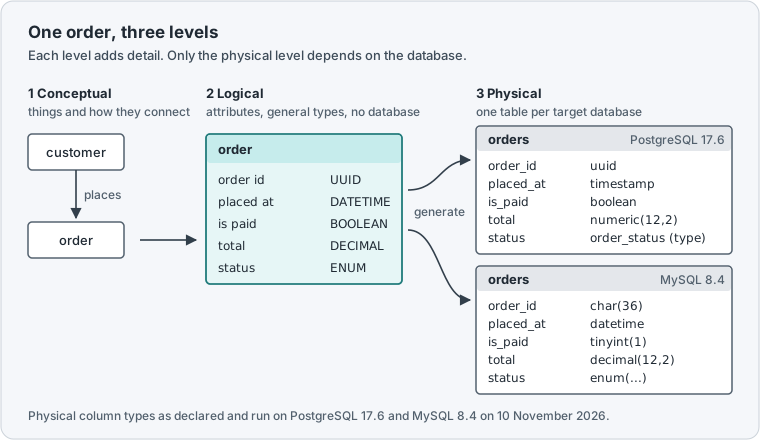
A drawing tool gets you the conceptual picture, and a database client gets you the physical one. The tools in this article hold the logical model in between and turn it into tables. If logical design is the only level you care about, Top 7 Logical Database Design Tools compares a wider field.
Why the physical model differs per database
The logical entity in Figure 1 says BOOLEAN, UUID and ENUM once. PostgreSQL 17.6 has a type for each, but an enum has to exist as its own type before the table can use it:
CREATE TYPE order_status AS ENUM ('open', 'paid', 'shipped');
CREATE TABLE orders (
  order_id  uuid PRIMARY KEY,
  placed_at timestamp NOT NULL,
  is_paid   boolean NOT NULL DEFAULT false,
  total     numeric(12,2) NOT NULL,
  status    order_status NOT NULL
);
INSERT INTO orders VALUES ('6f1c2d3e-0000-4000-8000-000000000001', '2026-11-10 09:30', true, 59.90, 'paid');
SELECT order_id, is_paid, status FROM orders;
Result · PostgreSQL 17.6
| order_id | is_paid | status |
|---|---|---|
| 6f1c2d3e-0000-4000-8000-000000000001 | t | paid |
MySQL 8.4 has no uuid column type, so the same entity needs char(36), and the enum is declared on the column itself:
CREATE TABLE orders (
  order_id  char(36) PRIMARY KEY,
  placed_at datetime NOT NULL,
  is_paid   boolean NOT NULL DEFAULT false,
  total     decimal(12,2) NOT NULL,
  status    enum('open', 'paid', 'shipped') NOT NULL
);
INSERT INTO orders VALUES ('6f1c2d3e-0000-4000-8000-000000000001', '2026-11-10 09:30', true, 59.90, 'paid');
SELECT column_name, column_type FROM information_schema.columns
WHERE table_schema = 'shop' AND table_name = 'orders' ORDER BY ordinal_position;
Result · MySQL 8.4.11
| COLUMN_NAME | COLUMN_TYPE |
|---|---|
| order_id | char(36) |
| placed_at | datetime |
| is_paid | tinyint(1) |
| total | decimal(12,2) |
| status | enum('open','paid','shipped') |
Two databases, one entity, two different scripts. Keep the scripts by hand and every change to the entity has to be made twice and kept in step. A tool that covers all three levels keeps the entity once and writes each script from it, with a rule per data type that you can read and change.
How DbSchema Architect carries a model between levels
In DbSchema, the logical model is a design that connects to no database: entities, attributes and relations, with names written in plain words such as order id. Logical design needs DbSchema Architect, and so does generating the physical model from it.
-
Start a logical model Architect
Choose
File → New Model, then Design without Database, then Logical Design, and press Start Design. Give the subject area a name in Model Properties. -
Add entities and relations Architect
Create each entity with
Table → Create Entity, add its attributes with a general data type, and drag a child attribute onto the parent key to create a relation. Set Identifying, Mandatory or Optional and the cardinality in the relation dialog. -
Set how names and types convert Architect
Open
Model → Dictionaries. The Naming Dictionary turnsorder idintoorder_id, and the Conversion Dictionary maps each logical type to a type of the target database. -
Generate the physical model Architect
Choose
Model → Generate Physical Model, set Target DBMS, pick an Inheritance Model if entities inherit from a super-entity, check the Model Conversion Rules and press Convert.
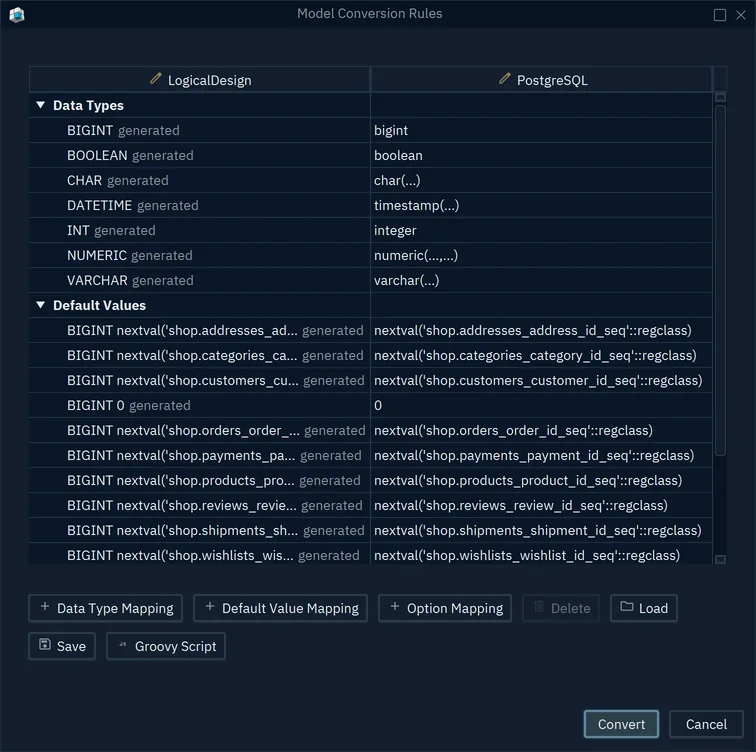
- 1The logical type, set once in the model
- 2The PostgreSQL type; double-click to change it
- 3Convert writes the physical model
The physical model opens in a new window and the logical design stays as it is, so you can generate a second physical model for another target from the same design. Inheritance gets its own choice at this step: SingleTable puts a super-entity and its sub-entities in one table, ClassTable gives each entity a table, and ConcreteTable gives each sub-entity a table with the inherited attributes added.
The way back works too. A model you reverse-engineered from a live database becomes a logical design with Model → Convert Model and Target DBMS set to LogicalDesign, which is how you recover a database-independent model from a schema that only exists as tables.
DbSchema model file what you change
- Logical design and every physical model generated from it
- Dictionaries for names and types
- Nothing reaches a database yet
Live database what runs
- Created from the physical model once you connect
- Changed later through schema synchronization in DbSchema Pro
- Never touched by the logical design
Generating a model changes the model file only. The database changes when you connect the physical model and create it there, and later changes reach it through schema synchronization, a DbSchema Pro feature that Architect includes.
Which tools cover which levels
These are the tools whose vendors describe logical and physical design together, with the levels, platforms and prices from each vendor's own page, checked on 10 November 2026:
| Tool and edition | Levels the vendor names | Runs on | Price per seat |
|---|---|---|---|
| DbSchema Architect | Logical and conceptual design, physical models | Windows, macOS, Linux | 470.40 USD once, updates 120 USD a year (optional) |
| erwin Data Modeler 15.0 Standard | Logical, physical and logical/physical models | Windows, macOS | 2,139.59 GBP for the first year of a term licence |
| ER/Studio Data Architect | Conceptual, logical and physical models | Windows 10 and 11 | 2,687 USD total subscription per user |
| Redgate Data Modeler Pro | Physical and logical design | Browser, cloud only | 303 USD per user per year |
The erwin price is Quest's per-seat Standard Edition line in its UK G-Cloud 15 price list, which includes the first year of support. erwin's Data Modeling Overview describes a logical/physical model type in which the logical and physical models are linked, and its installation guide covers Windows and macOS. ER/Studio describes conceptual, logical and physical models and logical-to-physical transformation; its pricing page lists the subscription without a term, and its technical specifications list Windows 10 and 11. Redgate Data Modeler runs in the cloud with no installation; its Standard edition, at 189 USD per user per year, covers physical design only and caps a model at 100 tables.
SAP PowerDesigner also provides conceptual, logical and physical data models, as its 16.1 documentation puts it.
Read across the rows and two differences stand out. DbSchema Architect is the only one paid once, and the only desktop tool in the table that runs on Linux. Over three years with both optional update renewals it costs 710.40 USD per seat, less than three years of Redgate Data Modeler Pro at 909 USD.
Which seat each person on the team needs
Not everyone who touches the schema works at every level. The person who owns the data model works at the conceptual and logical levels and generates the physical models: that seat is DbSchema Architect. Developers who change the physical model of a running database need DbSchema Pro, which saves the model to a file you commit to Git, compares it with the database, and writes HTML5 documentation. People who only read the diagram and run SQL can use the free Community Edition.
A Pro seat that later needs logical design upgrades to Architect for the price difference, 176.40 USD, from the Customer Area. Every new DbSchema installation starts with a 15-day Architect trial, so you can generate one of your own entities for each database you target before anyone buys a seat.
Download DbSchema, start a logical design with File → New Model, and generate the physical model for each database you target. Logical and conceptual design and Generate Physical Model need DbSchema Architect; the 15-day trial unlocks them from the first start.
Sources
- DbSchema: Logical Design
- DbSchema: Pricing
- DbSchema: Schema Synchronization
- PostgreSQL 17: Enumerated Types
- MySQL 8.4: Numeric Data Type Syntax
- erwin Data Modeler 15.0: Data Modeling Overview
- erwin Data Modeler 15.0: Installation Guide
- Quest: G-Cloud 15 pricing document
- ER/Studio
- ER/Studio: Pricing
- ER/Studio Data Architect: Technical Specifications
- Redgate Data Modeler
- Redgate Data Modeler: Editions
- SAP PowerDesigner 16.1: Building Data Models
Model once, generate for every database
Every new DbSchema installation starts with a 15-day Architect trial. Logical and conceptual design and Generate Physical Model are in DbSchema Architect.