Top 7 Logical Database Design Tools in 2026
For the data architect who has to agree a model before anyone picks a database engine, and needs to know which tool keeps that model where the team can reach it.
On this page
You have a data model to agree on before anyone picks a database engine, and the product you draw it in decides who can open it afterwards. DbSchema Architect is the pick when that model should live in a file your team versions in Git: you draw entities and relations with no database connected, then generate the tables for any of the 70+ SQL and NoSQL databases DbSchema supports. erwin Data Modeler, ER/Studio and SAP PowerDesigner keep the shared model on a repository server. Redgate Data Modeler keeps it online, in the browser. Oracle SQL Developer Data Modeler is free, and Visual Paradigm puts database design inside a general modeling suite.
All seven build a logical model and turn it into tables. They differ on where that model lives, what they run on, and whether logical design is in the edition you were about to buy: in DbSchema it is the Architect edition, and in Redgate Data Modeler the Pro edition. One of them has also changed owner and name since this article first appeared.
What a logical design tool does
A logical model holds entities, their attributes and the relations between them, and it names no database engine. Names are written for people, such as Country Name, and types stay general, such as VARCHAR(100).
The tables come later, once an engine is chosen. A logical design tool then turns the logical model into a physical model for that engine, in two moves. A naming standard rewrites each name to the database's convention, and a type mapping replaces each general type with one the engine has:
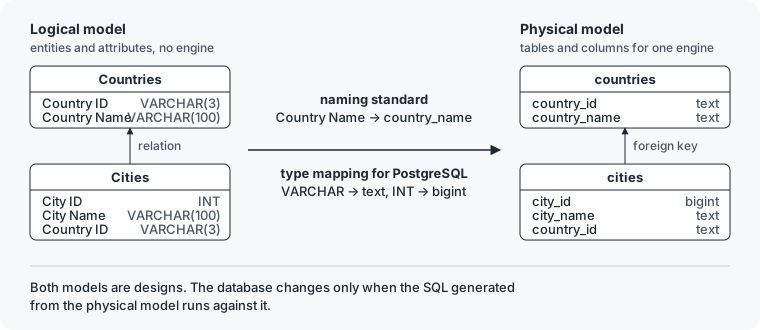
The tools give that move different names, and each tool's section below says how it makes it: naming standards in erwin Data Modeler, an automatic transformation in ER/Studio, derived ERDs in Visual Paradigm, and a naming dictionary and a conversion dictionary in DbSchema.
What separates the seven is what surrounds that move: where the shared model lives, which systems each one runs on, and what its vendor charges. Those are the columns of the table below. A price appears only where the vendor prints one on its own page, read on 11 September 2026.
Tools with no entity layer are out of scope. A product that draws tables straight onto one engine answers a different question, and the free end of that field is covered in free database design tools.
Logical database design tools compared
| Tool | Runs on | Where the shared model lives | Price the vendor publishes |
|---|---|---|---|
| DbSchema | Windows, macOS, Linux | a model file in your Git repository | per edition on the purchase page; logical design is Architect |
| erwin Data Modeler | Windows; macOS from release 14.1 | erwin Mart, a model repository server | none on the pages read |
| Redgate Data Modeler | a browser | online, in Redgate Data Modeler | Standard 189 USD, Pro 303 USD per user per year; logical design is Pro |
| ER/Studio | 64-bit Windows 10 and 11 | a repository with Team Server, in Data Architect Pro | Data Architect 2,687 USD, Pro 3,693 USD per user, as a subscription |
| Oracle SQL Developer Data Modeler | Windows, macOS, Linux | design files, with Subversion support built in | free |
| SAP PowerDesigner | 64-bit Windows 10 and later | a PowerDesigner repository | none on the pages read |
| Visual Paradigm | Windows, macOS, Linux | VPository, a cloud repository | Community Edition free for non-commercial use |
DbSchema
DbSchema keeps the logical model in a design file, and no database has to exist for it. The logical design documentation starts one in three steps:
- On the welcome screen, choose Design from Scratch, then Logical Design.
- Right-click the empty canvas to create the first entity, then add its attributes.
- Drag from an attribute in one entity to an attribute in another to create a relation.
Each relation then carries three settings:
| Setting | What it records |
|---|---|
| identifying or non-identifying | whether the parent's key is part of the child's key |
| mandatory or optional | whether every child must reference a parent |
| 1:1, 1:n or many-to-many | how many children one parent has |
The screenshot shows the example this article follows: Countries and Cities, with PhonePrefixes and CountryLanguages beside them, each linked to Countries by Country ID. A larger model splits into several diagrams, each with its own layout, over the same entities.
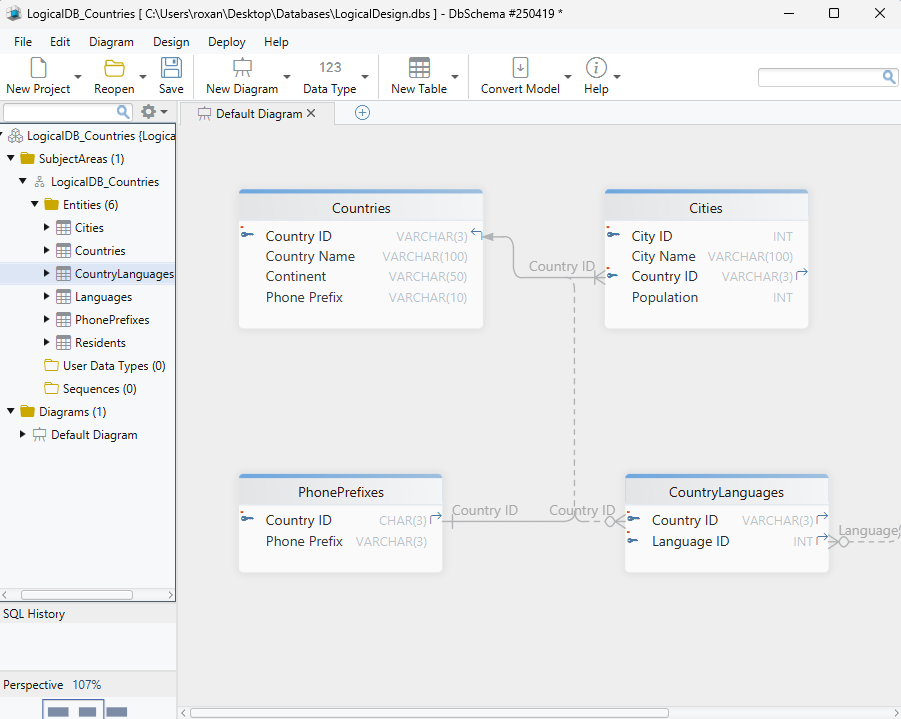
The design file is XML, with one line per attribute, so Git shows a change to the model the way it shows a change to code. DbSchema works with Git from inside the application: you commit, push and pull the file there, and compare what a pull brought in. A reviewer sees a new attribute as one added line:
 <table name="Cities" >
 	<column name="City ID" type="INT" mandatory="y" />
 	<column name="City Name" type="VARCHAR" length="100" />
 	<column name="Country ID" type="VARCHAR" length="3" mandatory="y" />
+	<column name="Population" type="INT" />
That diff adds Population to Cities, and nothing else in the file moves.
The Architect edition carries logical and conceptual design, on top of everything in Pro. Pro saves the design file and adds documentation export and schema synchronization. The free Community edition connects to databases, reverse-engineers them and draws interactive diagrams.
How DbSchema turns the logical model into tables
Two dictionaries decide what the tables look like. The naming dictionary turns logical names into physical ones. In the documentation's screenshot it replaces spaces with underscores, converts cases to the target database's preferred case, and shortens company to cmp and department to dep:
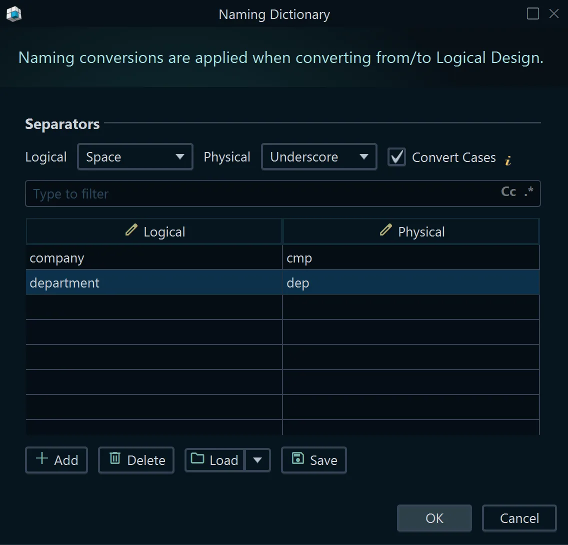
With those settings, Country Name becomes country_name on PostgreSQL, which prefers lower-case names.
The conversion dictionary maps each logical type to a type in each target database. These are the mappings in the documentation's screenshot:
| Logical type | MySQL | PostgreSQL |
|---|---|---|
| INT | INT | bigint |
| TEXT | TEXT(...) | text |
| VARCHAR | MEDIUMTEXT | text |
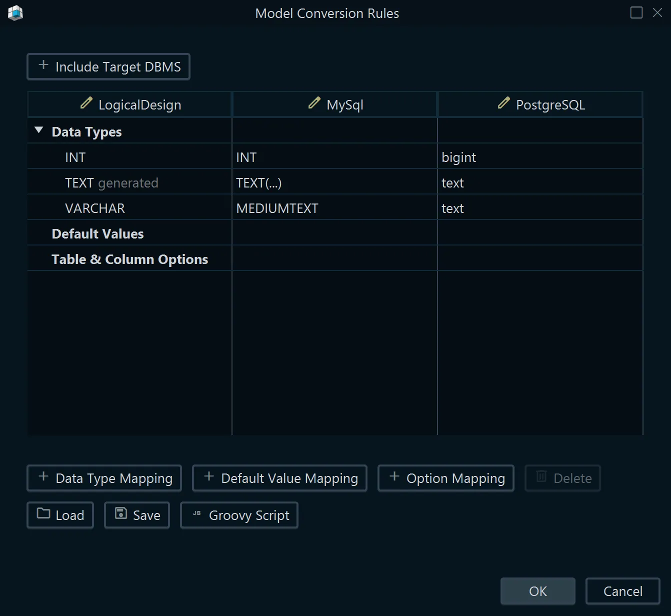
Each cell is a mapping you can change. The example drops the length of VARCHAR(100) on PostgreSQL, which also has varchar(n), so a team that prefers it edits one cell.
The Convert button on the toolbar starts the conversion. You pick the target database, DbSchema applies both dictionaries, and a physical model for that database opens, while the logical model stays as it was. A many-to-many relation becomes a junction table at this step.

Everything up to here changes model files and nothing else. The database changes when you connect and create or upgrade the schema in it: DbSchema generates the SQL, you review it, and it runs when you click Execute.
erwin Data Modeler
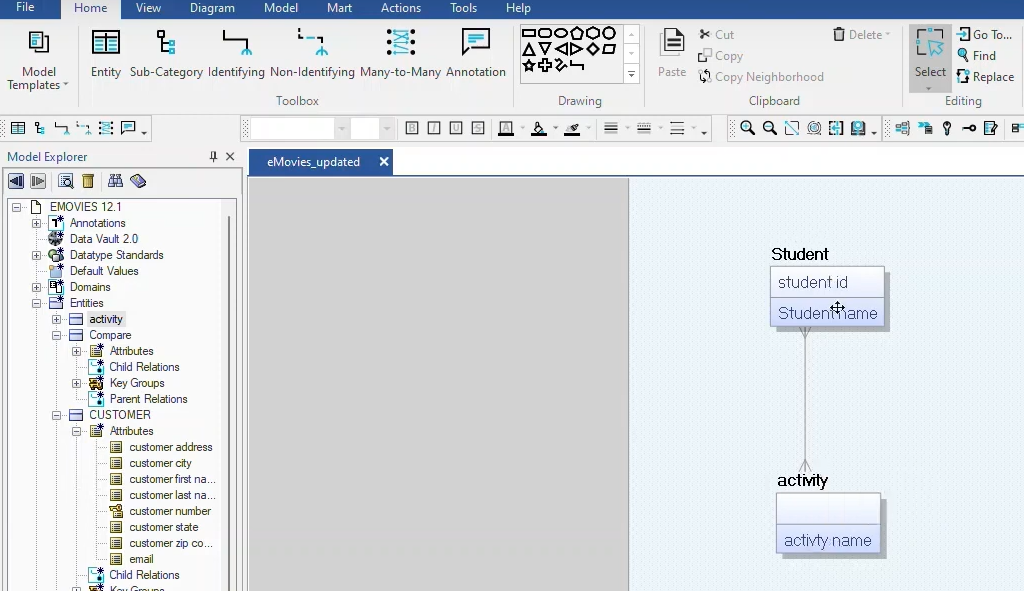
erwin Data Modeler, from Quest, keeps a logical and a physical mode of a model, and you set separate naming standards for each: how entity and attribute names are built in the logical mode, and how table and column names are built in the physical one[1]. Its toolbox, in the screenshot below, holds the relationship kinds a logical model uses (identifying, non-identifying and many-to-many) and sub-categories for inheritance.
Teams share models through erwin Mart, a model repository on a server, which they reach through erwin Mart Portal. Mart Portal stores the models, and it can push the forward-engineering scripts generated from them to a Git repository on GitHub, GitLab, Bitbucket or Azure DevOps[4].
erwin Data Modeler runs on Windows 10 and 11, and on macOS from release 14.1[5]. The erwin pages read for this article publish no price.
Redgate Data Modeler (formerly Vertabelo)
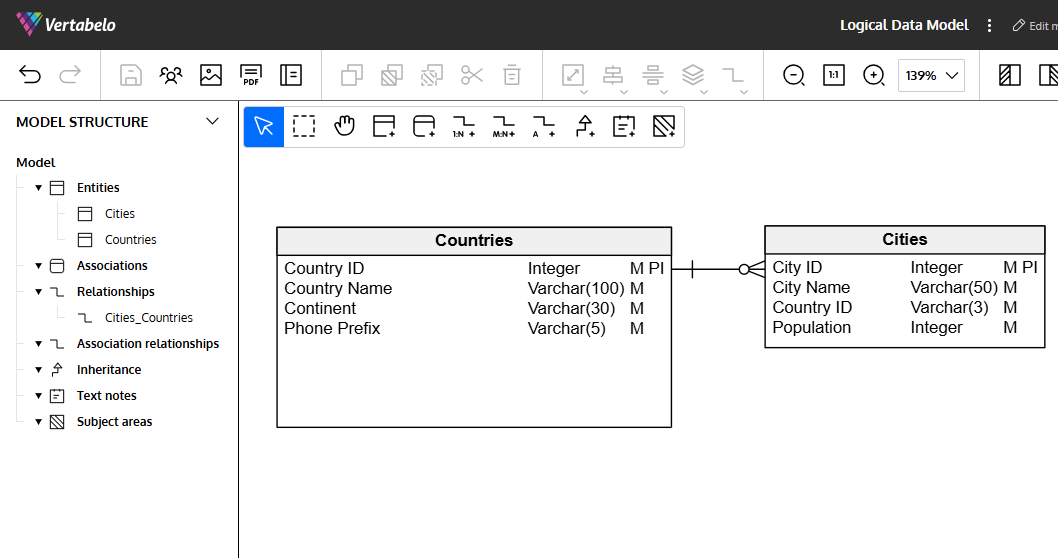
Vertabelo Data Modeler was acquired by Red Gate Software and now ships as Redgate Data Modeler[6]. If you shortlisted Vertabelo from an older comparison, it's the same product under a new name.
It runs in the browser, so nothing is installed, and a model is shared with other users or through a public link. Opening a model needs a connection, because the model lives online rather than in a file on your disk.
Check the edition before you buy, because logical design is not in the entry edition. Standard costs 189 USD per user per year and covers physical design only, with at most 20 database models and 100 tables per model. Pro costs 303 USD per user per year and adds logical design, unlimited models and tables, and API access. A 14-day free trial is available[7].
ER/Studio
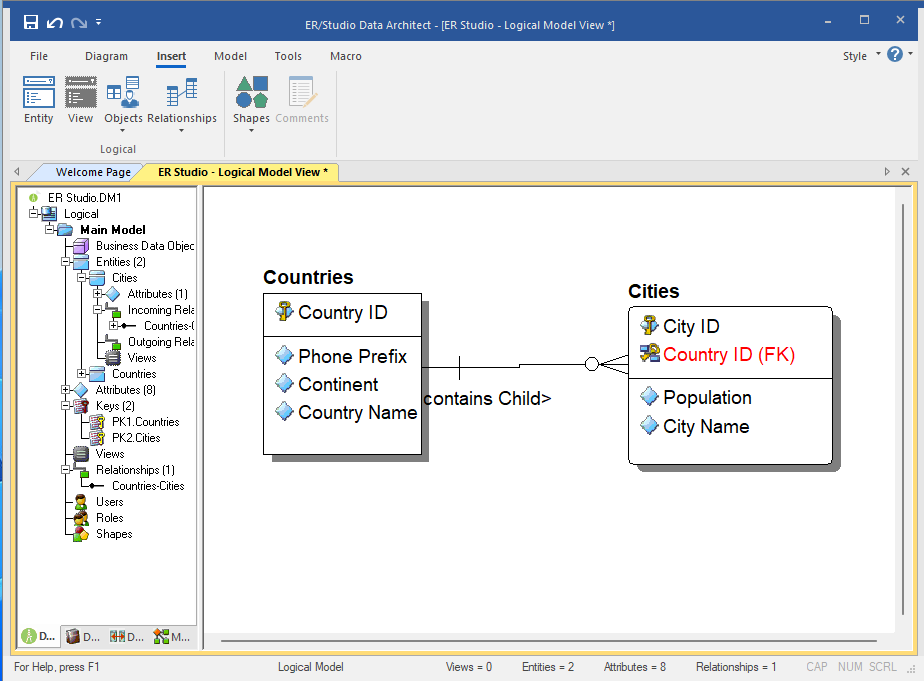
ER/Studio Data Architect builds logical and physical models, transforms a logical model into a physical one automatically, and applies business rules and naming standards across the model. It also connects the model to a business glossary[2].
In Data Architect Pro, a team shares models through a central repository with check-in and check-out[2]. That repository comes packaged with ER/Studio Team Server and runs on a separate server[8].
ER/Studio runs on 64-bit Windows 10 and 11. Its list of database platforms includes MongoDB and JSON files as well as SQL engines such as Snowflake and Databricks, and release 21.1 added the export of logical models in RDF Turtle format[8]. ER/Studio publishes its prices: the subscription price per user is 2,687 USD for Data Architect and 3,693 USD for Data Architect Pro, and Enterprise is quoted by sales[9].
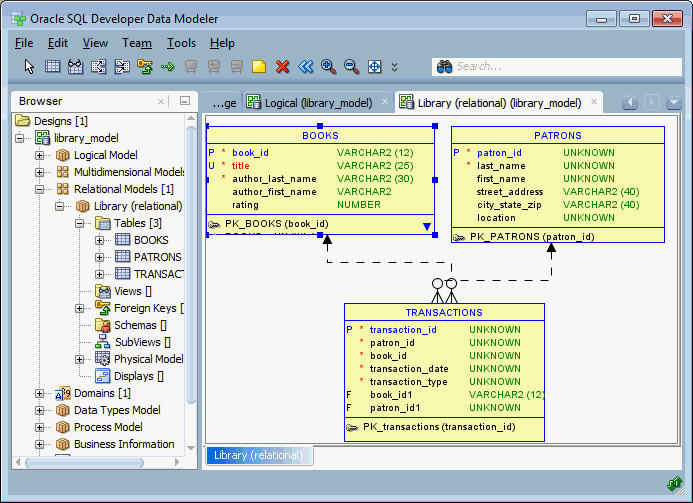
Oracle SQL Developer Data Modeler
Oracle SQL Developer Data Modeler is free. It builds logical, relational, physical, multidimensional and data type models, engineers a design forward into a database and back from one, and integrates source code control, with Subversion support built in. If you hold an Oracle Database license, Oracle Support takes your questions about it[10].
The current release is 24.3.1, with downloads for Windows, for macOS on Intel and on Apple Silicon, and for Linux. The 64-bit Windows download includes JDK 17, and the macOS downloads do not[11].
SAP PowerDesigner
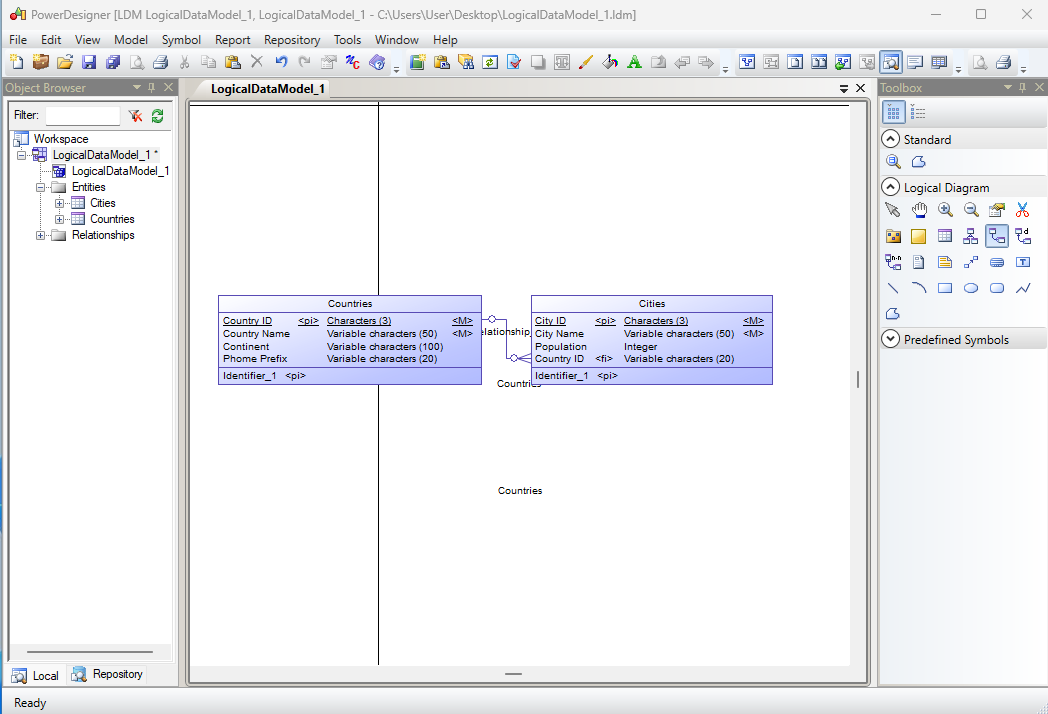
SAP PowerDesigner separates conceptual, logical and physical data models. The conceptual model is the most abstract of the three, and PowerDesigner generates a logical model from it.
What PowerDesigner adds is impact and lineage analysis. You select objects in a diagram and choose Tools, then Impact and Lineage Analysis, and PowerDesigner works out what a proposed change would affect. A shared data dictionary is checked into the PowerDesigner repository library, so the whole modeling team works from its latest version[12].
PowerDesigner runs on 64-bit Windows 10 and later, or on Windows Server 2016 and later[13]. No SAP page read for this article publishes a price.
Visual Paradigm
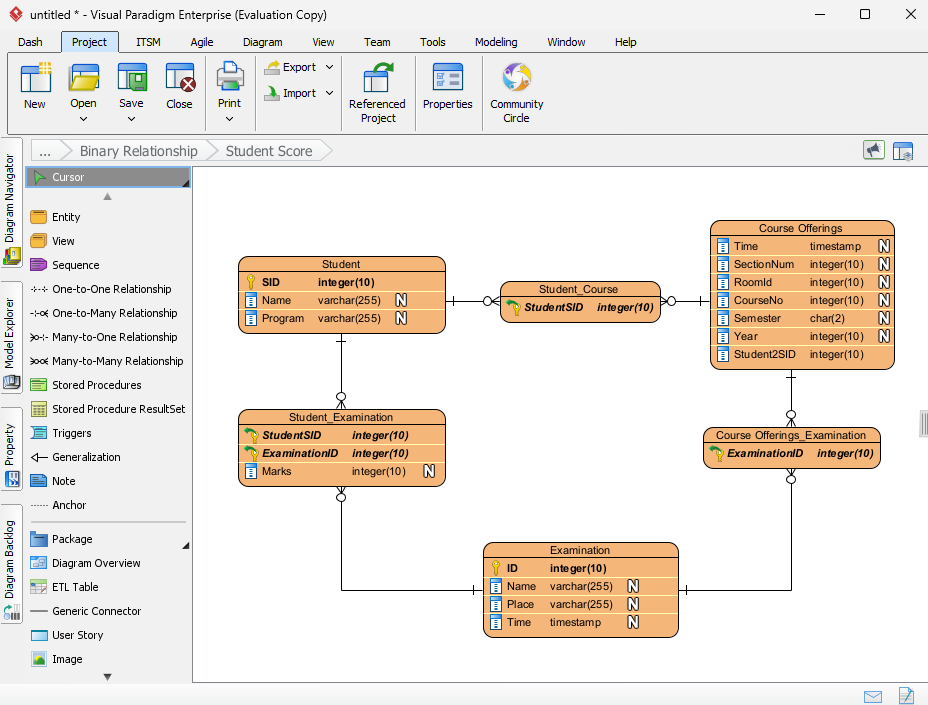
Visual Paradigm is a general modeling suite that includes database design, so one project can hold UML diagrams, flowcharts and ER diagrams together. It draws conceptual, logical and physical ERDs, derives the logical ERD from the conceptual one and the physical from the logical, and its Model Transitor keeps the trace between the levels[3]. The Model Transitor is in the Standard Edition and higher[14]. Teams share projects through VPository, Visual Paradigm's cloud-based repository[15].
The Community Edition, version 18.1, is free for non-commercial use only, so it fits a class or a personal project rather than paid work. It has downloads for Windows, Linux and macOS, and a 30-day evaluation version is available[16].
Which tool fits which team
The deciding question is where the model has to live, and who has to reach it. Each row names what a team needs and the tools in this article that offer it:
| What the team needs | Tools that offer it |
|---|---|
| the logical model in Git, reviewed next to the application code | DbSchema Architect |
| a desktop tool on Windows, macOS and Linux | DbSchema, Oracle SQL Developer Data Modeler, Visual Paradigm |
| a model repository on a server | erwin Data Modeler with Mart, ER/Studio Data Architect Pro, SAP PowerDesigner |
| nothing to install, only a browser | Redgate Data Modeler Pro |
| impact and lineage analysis | SAP PowerDesigner |
| UML and ER diagrams in one project | Visual Paradigm |
Whichever you choose, the documentation the model produces is what your colleagues will read, so decide early what it has to look like. DbSchema writes it as interactive HTML5, PDF or Markdown from the same design file, and in the HTML5 output each table's and column's comment appears when you hover over it.
Logical design is in the DbSchema Architect edition. Download DbSchema at https://dbschema.com/download.html, choose Design from Scratch and then Logical Design on the welcome screen, and put the first entities on the canvas before anyone has picked an engine. Nothing you draw there reaches a database until you convert the model and run the SQL.
Sources
- erwin Data Modeler 14.0: Define Naming Standards for a Logical Model
- ER/Studio
- Visual Paradigm: ER Diagram (ERD) Tool
- erwin Data Modeler 14.0: Connecting to Source Control Repositories
- erwin Data Modeler 14.0: Review the System Requirements
- Vertabelo
- Redgate Data Modeler features, editions and pricing
- ER/Studio Data Architect technical specifications
- ER/Studio pricing
- Oracle SQL Developer Data Modeler
- Oracle SQL Developer Data Modeler downloads
- SAP PowerDesigner 16.7 Data Modeling user guide
- SAP PowerDesigner 16.7 Installation Guide
- Visual Paradigm: Progressively develop conceptual, logical and physical ERDs
- Visual Paradigm: How to connect Visual Paradigm with multiple VPository
- Visual Paradigm Community Edition download
Design the logical model before the first table exists
DbSchema Architect adds logical and conceptual design on top of everything in Pro, across 70+ SQL and NoSQL databases. The model is a file you can commit and review like code, and the physical schema is generated from it. Interactive diagrams, reverse-engineering and the SQL editor are in the free Community edition.









