Logical Design Documentation for Database Development
For the architect who models entities and relations before the engine is chosen, and has to hand that model to people who will never open DbSchema.
On this page
A model that lives only on the screen of the person who drew it gets reviewed by nobody, because the analysts and business owners who should check it don't have DbSchema. DbSchema writes the logical model out as documentation they open in a browser, print as a PDF or read as Markdown, and it generates the physical schema for whichever engine you pick from the same model. Logical design is in the Architect edition.
What a logical design document holds
A logical design is the data model before a database engine is chosen, so it carries no SQL syntax, no engine data types and no physical tuning. What it does carry is the vocabulary of the business, and that's the part people outside the database team can check. A business user who can't read a CREATE TABLE script can still tell you that an order line belongs to one customer and not to several. Database administrators, developers and data analysts read the same document for the details they build and query against.
The document holds a definition of every entity, attribute and relation, and a data dictionary that gives each attribute's type, whether it's mandatory, and what it references. Each entry has a place in a DbSchema model, and the export carries it to the reader:
| the document needs | kept in DbSchema as | exported to |
|---|---|---|
| names of entities, attributes and relations | the model's names | HTML5, PDF, Markdown |
| type, mandatory or optional | attribute settings | HTML5, PDF, Markdown |
| keys and what each attribute references | primary keys and relations | HTML5, PDF, Markdown |
| what each one means, and the business rule | comments | HTML5, PDF, Markdown |
| owner, sensitivity, status | comment tags | HTML5, PDF |
The words change with the level of the model, which matters as soon as a reviewer and a developer describe one object in two ways. DbSchema's logical design documentation maps them:
| Physical design | Logical design |
|---|---|
| Schema | Subject Area |
| Table | Entity |
| Column | Attribute |
| Foreign Key | Relation |
One DbSchema model produces both the document and the database:
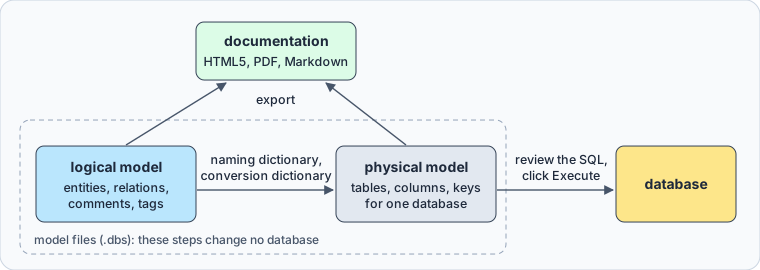
Everything inside the dashed frame changes model files only. The database changes at the last arrow, after you've read the SQL.
Draw the model and write its definitions

On the DbSchema welcome screen, choose Design from Scratch, then Logical Design. No database connection is needed.
A blank logical diagram opens, and a right-click on the canvas creates the first entity. Each entity gets its attributes, and you draw a relation by dragging from an attribute in one entity to an attribute in another. The relation's settings are the business rules a reviewer can argue with:
| relation setting | what it says about the data |
|---|---|
| Identifying | the parent's key is part of the child's key |
| Non-identifying | the child has a key of its own |
| Mandatory | every child references a parent |
| Optional | the reference may be empty |
| Cardinality | 1:1, 1:n or many-to-many |
An identifying relation means the child can't exist without its parent. Every entity, attribute and relation in DbSchema has a comment, and the comment is where its definition goes. DbSchema shows it on the diagram when you hover over the attribute:
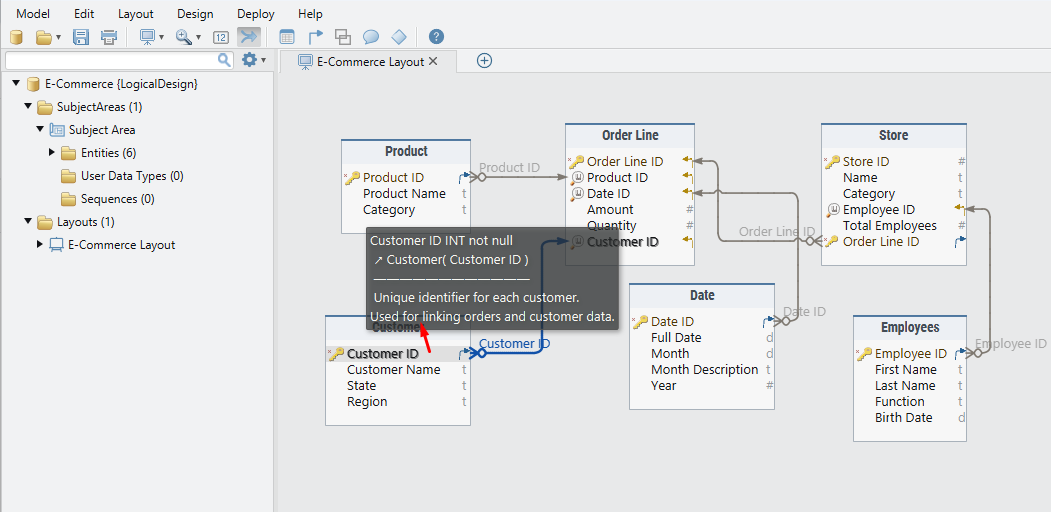
The comment on Customer ID in Order Line says what the attribute identifies and that orders link to customers through it, which is what a developer needs to know before writing the join. A relation's comment holds its rule as a sentence, such as "each order line belongs to exactly one customer".
Comment tags sit next to the comment as key and value pairs, on any entity, attribute, index or relation. The Tag Manager lists the tags a model uses and what each one applies to:
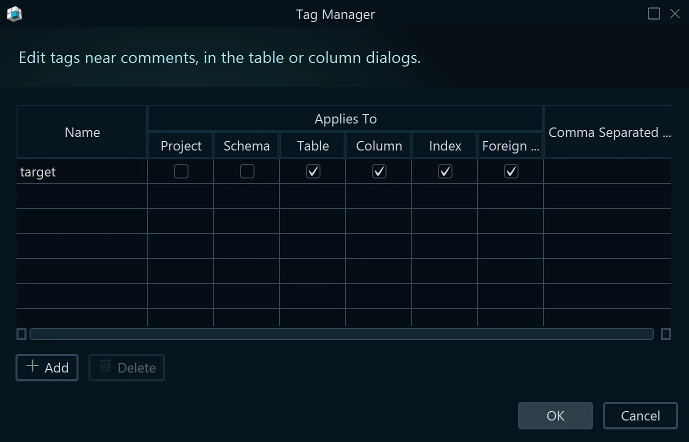
In the model file, the comment and the tags sit inside the attribute they describe:
<column name="Customer Name" type="VARCHAR" mandatory="y" >
    <comment><![CDATA[Name printed on invoices and delivery notes.]]></comment>
    <comment_tag name="sensitivity" value="personal" />
</column>
Customer Name carries its definition and a tag that marks it as personal data. A replaced attribute would carry status = deprecated instead, so nobody builds on it. A tag is a label: it creates no index and changes nothing in the database. The HTML5 and PDF documentation print the tags after the comment, and the Markdown documentation carries the comments alone.
Translate names and types with the two dictionaries
Logical names are written for people, and physical names follow your database's convention. The naming dictionary holds that translation:
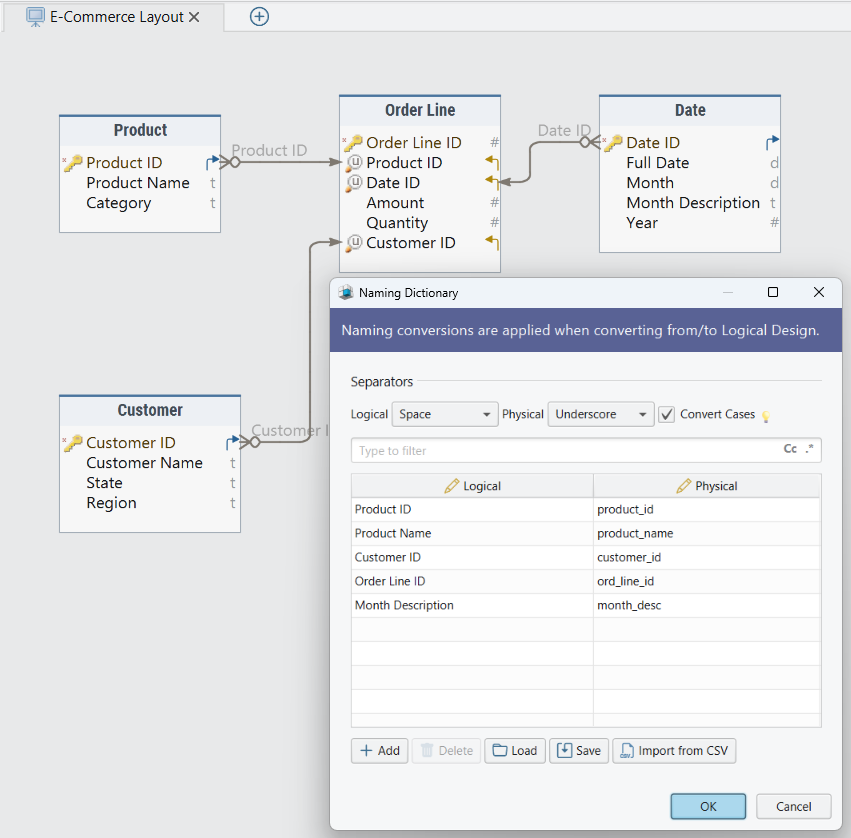
The settings at the top turn each space into an underscore and convert the case. The entries below them pin a name to your convention where the rule alone would miss it, so Month Description becomes month_desc and Order Line ID becomes ord_line_id.
The conversion dictionary does the same for data types, one column per target database. Here the logical DATE, INT and VARCHAR convert to PostgreSQL's date, integer and varchar:
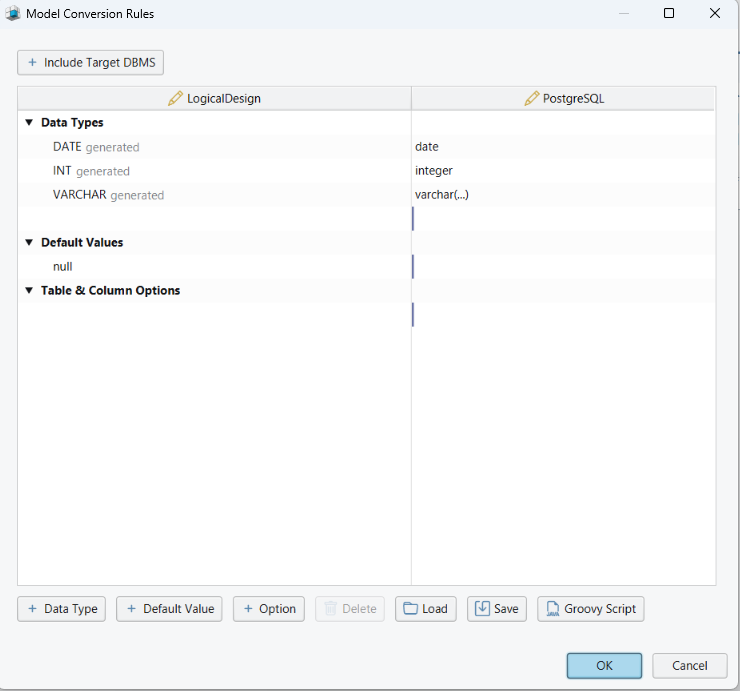
Change a mapping to match your conventions. If your PostgreSQL databases store strings as text, map the logical VARCHAR to text once, and every attribute follows it at the next conversion. Editing either dictionary writes nothing to any database. Fill both in before the first conversion, because they're what keeps the physical model from turning into a second design that you keep in step by hand.
Generate the physical design, then the database
When the logical model is ready, click Convert on the toolbar and pick the target database. DbSchema applies both dictionaries and opens the result as a new physical model for that database. The logical model stays as it was, so it remains the document the reviewers read.
A many-to-many relation becomes a junction table that holds the keys of both sides, with a foreign key to each, so that decision is made once, in the logical model. The physical schema stays editable: add the indexes, constraints and stored procedures that the logical model had no place for.
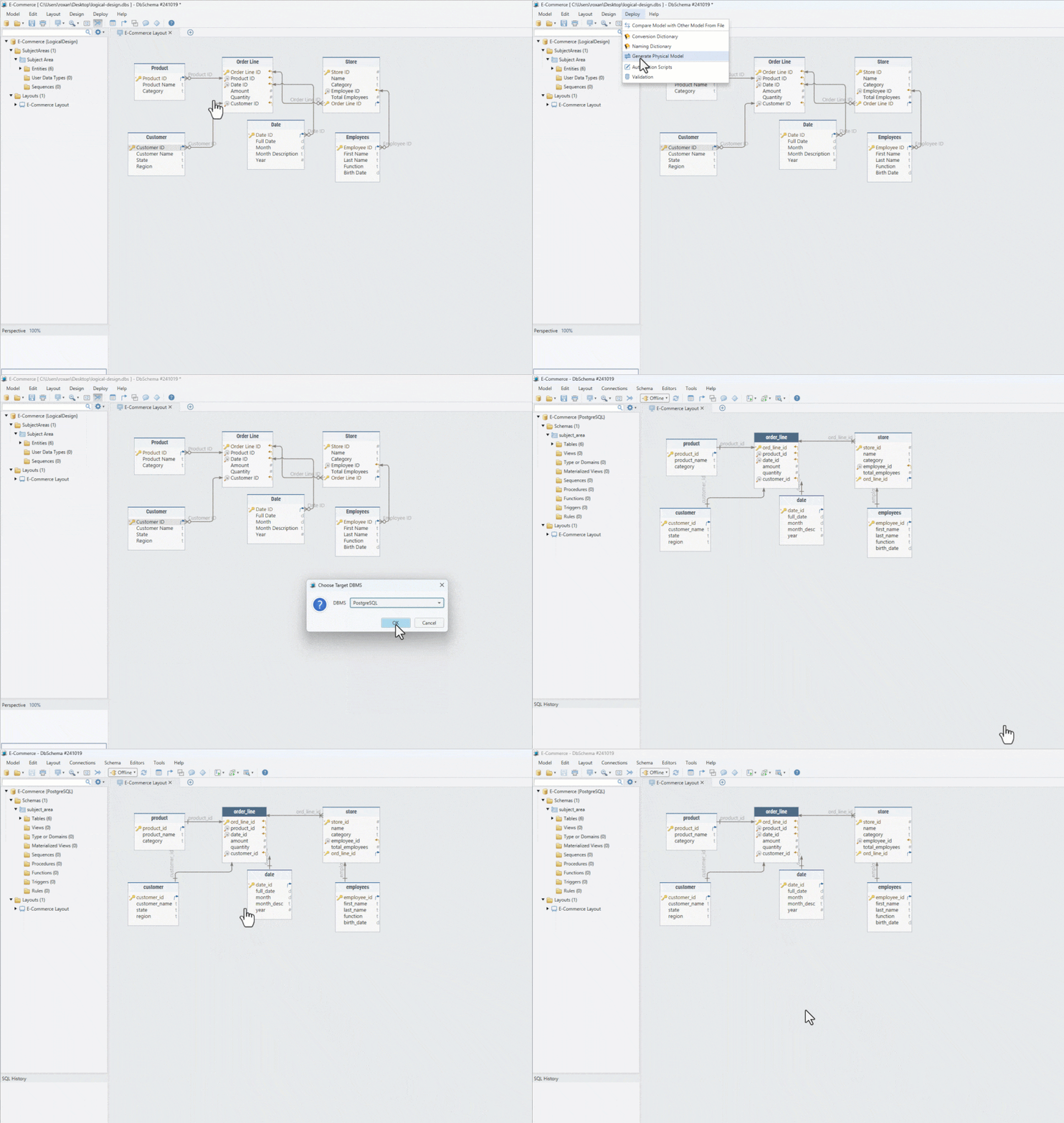
In the animation, converting the E-Commerce model to PostgreSQL renames Order Line ID to ord_line_id and Month Description to month_desc, and the comment on customer_id comes along, so the physical model carries the same definitions.
So far only model files have changed. The database changes when you connect and synchronize it with the model. DbSchema generates the SQL statements that bring the database in line with the model, shows them to you, and runs them when you click Execute. You can also save them as an SQL script for whoever deploys to that server.
Export the documentation as HTML5, PDF or Markdown

DbSchema's Schema Documentation dialog asks three questions. The first is the format. The second is which diagrams go in: the current one, all open ones, a selection, or every diagram tagged documentation, whose tag value sets the order. The third is the content, such as the diagram image, the text documentation, indexes and foreign keys.
The HTML5 output opens in a browser with no server behind it. It holds the diagram as a vector image, a searchable list of tables and the full column details. You drag the diagram to pan it and zoom with Ctrl and the mouse wheel. A click on a table jumps to its definition, and hovering over an attribute shows its comment.
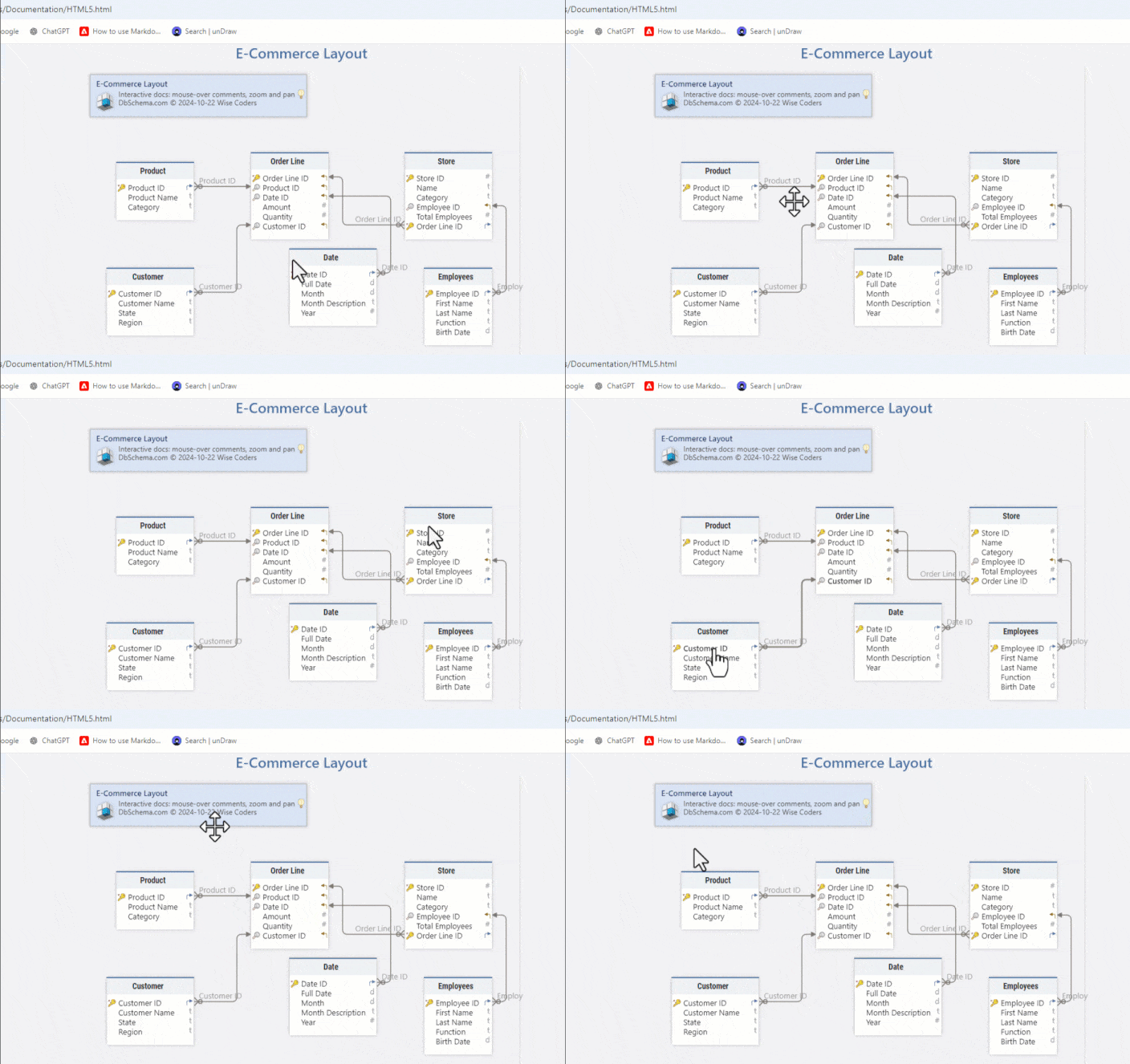
Attach the HTML5 file to the review, or put it on an internal web server, where the server's own sign-in decides who reads it. PDF suits a review that has to be printed or archived. If your comments use a non-Latin alphabet, tick Embed Unicode Font, which makes the PDF larger because it carries the font. Markdown writes each entity as a section with its attributes, types and comments, and it's the format to commit next to the code.
The export shows the model as it was when you ran it, so regenerate it after a change. DbSchema's Automation Scripts do that without the interface. This script, shortened from a sample that ships with DbSchema, writes the HTML5 documentation for a model file:
import com.wisecoders.dbschema.schema.Expose
import com.wisecoders.dbschema.schema.Project
import com.wisecoders.dbschema.schema.store.ProjectLoader

def input = new File('C:\\models\\e-commerce.dbs')
def output = new File('C:\\docs\\e-commerce.html')

ProjectLoader loader = new ProjectLoader()
try (FileInputStream fis = new FileInputStream(input)) {
    loader.parse(fis)
    Project project = loader.getProject()
    Expose expose = new Expose(output, project, project.diagrams)
    project.diagrams.get(0).generateHtmlDocumentation(expose)
}
Run it with DbSchema.exe -x path/to/script.groovy, and a build can regenerate the documentation on every commit.
Write the definitions while the model is still logical, because nothing is deployed yet and a name still costs nothing to change. Download DbSchema at https://dbschema.com/download.html, choose Design from Scratch, draw the first subject area with its comments and tags, and export it for the people who will review it. Logical design is in the Architect edition, which also covers the HTML5, PDF and Markdown documentation export and schema synchronization.









