Deploying SQL Server Schema Changes Safely
Deploy SQL Server schema changes safely. Learn how to manage Sch-M locks, set XACT_ABORT, and generate migration scripts without blocking your application.
On this page
For database administrators who manage SQL Server deployments and need to apply schema changes to production systems without application downtime.
How SQL Server locks a table during DDL
A schema deployment causes an application outage when a Data Definition Language (DDL) statement requests a schema modification (Sch-M) lock, waits behind long-running queries, and blocks all incoming application traffic. The outage is rarely caused by the execution time of the ALTER TABLE statement itself, but rather by the connection pile-up that accumulates behind the waiting DDL statement.
SQL Server uses two primary lock modes for metadata stability. Every normal read query takes a schema stability (Sch-S) lock on target tables to prevent the structure from changing while data is read; Microsoft's locking guide lists schema modification (Sch-M) and schema stability (Sch-S) as the two schema lock types, used when an operation depends on the schema of a table[1]. A DDL operation such as ALTER TABLE requires a schema modification (Sch-M) lock, which prevents any concurrent read or write access to the table. Sch-M locks are incompatible with all other lock modes, including Sch-S.
When you issue an ALTER TABLE statement, SQL Server places the request in the lock queue. If an active SELECT query holds an Sch-S lock on that table, the ALTER statement must wait for the SELECT query to complete. While the ALTER statement waits in the lock queue with a pending Sch-M request, SQL Server blocks every subsequent query that attempts to acquire an Sch-S lock on the same table. Within seconds, available worker threads become exhausted, connection pools fill up, and the application stops responding.
State-based versus artifact-based SQL Server deployments
Managing database changes in SQL Server follows two distinct methodologies: state-based deployments and artifact-based migrations. Understanding the operational trade-offs between these two approaches determines how you detect drift and generate migration scripts.
State-based deployments treat the target schema definition as the single source of truth. In SQL Server environments, Microsoft provides SqlPackage, a command-line utility that exposes the Data-Tier Application Framework APIs, as its own state-based path, working with data-tier application package (.dacpac) files[2]. Its publish operation incrementally updates the schema of a target database to match the structure of the source, generating the changes at deployment time rather than from a stored script.
Artifact-based deployments treat each schema modification as a discrete, versioned script executed in strict sequence. Tracking the schema model locally and generating deterministic migration scripts between model versions keeps every statement reviewable before it runs, an approach covered in more detail in Schema Versioning for SQL Server.
| Deployment Model | Primary Artifact | Change Detection | Rollout Control |
|---|---|---|---|
| State-based | .dacpac package | Dynamic engine diff at deployment time | Engine-generated deployment plan |
| Artifact-based | Versioned SQL script | Static difference between model revisions | Explicit, human-reviewed DDL scripts |
What to have in place before the first script
A safe SQL Server deployment requires keeping the authoritative schema definition outside the live database environment. Storing database models directly in version control systems such as Git provides an audit trail of every table, index, and constraint modification.
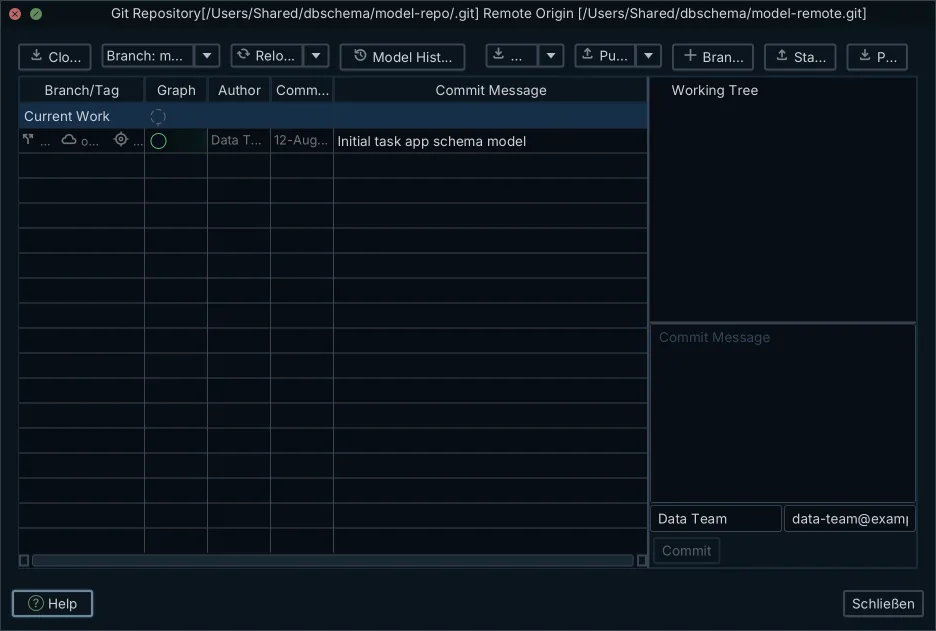
The whole schema design model can be stored as an offline XML file, allowing teams to design database schemas offline and track structure modifications as standard Git commits. Because the schema definition resides in a local model file, team members can review schema differences in pull requests and generate explicit migration scripts between specific Git revisions.
Synchronization between the design model and the database operates strictly on demand. Opening a project model or connecting to a SQL Server instance never writes changes to the target database. The DDL a schema comparison produces is executed only when you explicitly confirm and run the generated migration script.
- Save the database model to a local design file (.dbs XML format) tracked in Git repository history
- Establish target connection profiles with appropriate DDL permissions for development, staging, and production instances
- Review the schema difference report between the local design model and the target database instance
- Generate the Transact-SQL migration script and inspect each DDL statement prior to execution
Setting LOCK_TIMEOUT and XACT_ABORT before any DDL
Every DDL migration script executed against a production SQL Server instance must begin with explicit session-level configuration statements. Relying on default connection options introduces severe availability risks during schema rollouts.
The default setting for LOCK_TIMEOUT on new connections is -1, which instructs SQL Server to wait indefinitely to acquire a lock: the documentation states that a value of -1 (default) indicates no time-out period, and that at the beginning of a connection this setting has a value of -1[3]. If a migration script encounters a table with active read traffic, an unmodified session will wait forever for an Sch-M lock, keeping the blocking queue open. Setting LOCK_TIMEOUT to a short duration, such as 5000 milliseconds, forces the statement to terminate immediately with error 1222 if the lock cannot be acquired within 5 seconds.
Transact-SQL DDL statements are fully transactional and can be executed inside an explicit transaction block. By default, SQL Server sets XACT_ABORT to OFF, which can cause execution to continue after certain runtime errors, leaving transactions partially committed. Setting XACT_ABORT to ON guarantees that if any statement raises an execution error, the entire transaction is terminated and rolled back, while with XACT_ABORT OFF only the failing statement may be rolled back and the transaction continues processing[4].
- Configure SET LOCK_TIMEOUT 5000; at the top of the deployment script to prevent indefinite lock queue blocking
- Configure SET XACT_ABORT ON; to force automatic transaction rollback on any runtime error
- Open an explicit transaction with BEGIN TRANSACTION;
- Execute the prepared DDL statements in sequence
- Issue COMMIT TRANSACTION; to finalize changes, followed by SET LOCK_TIMEOUT -1; to restore defaults
The following script structure demonstrates how to wrap DDL modifications safely:
``sql SET XACT_ABORT ON; SET LOCK_TIMEOUT 5000;
BEGIN TRANSACTION;
ALTER TABLE Sales.Orders ADD LoyaltyPoints int NULL;
COMMIT TRANSACTION;
SET LOCK_TIMEOUT -1; ``
Adding columns, constraints and indexes without a rewrite
Certain DDL statements modify catalog metadata instantly, while others trigger full data scans or table rewrites. Selecting the correct syntax variant prevents long-running operations from holding locks on production tables.
Adding a nullable column is a metadata-only change on every edition of SQL Server. Adding a NOT NULL column with a runtime-constant default value on SQL Server 2012 Enterprise Edition and later operates as a metadata-only change[5]. A default that is not a runtime constant always runs offline under an exclusive Sch-M lock. Adding a CHECK or FOREIGN KEY constraint, however, defaults to validating all existing rows, which requires a validation scan across the entire table. You can skip this initial scan by specifying WITH NOCHECK during creation:
``sql ALTER TABLE Sales.Orders WITH NOCHECK ADD CONSTRAINT CK_Orders_TotalAmount CHECK (TotalAmount >= 0); ``
Using WITH NOCHECK creates an untrusted constraint. Because SQL Server has not verified existing rows, the query optimizer will ignore the constraint when constructing query plans until you validate it with a separate statement:
``sql ALTER TABLE Sales.Orders WITH CHECK CHECK CONSTRAINT CK_Orders_TotalAmount; ``
Rebuilding an index or creating a primary key offline acquires an exclusive (X) lock on the underlying data and associated indexes, which prevents modifications and queries until the index operation completes[6]. In SQL Server Enterprise Edition, you can specify ONLINE = ON to permit concurrent read and write queries during the operation. Starting with SQL Server 2017, you can combine ONLINE = ON with RESUMABLE = ON to pause and resume index rebuilds if maintenance windows close[7].
To prevent online index operations from blocking at the final metadata swap phase, use the WAIT_AT_LOW_PRIORITY option with MAX_DURATION and ABORT_AFTER_WAIT:
``sql ALTER INDEX IX_Orders_CustomerID ON Sales.Orders REBUILD WITH ( ONLINE = ON ( WAIT_AT_LOW_PRIORITY ( MAX_DURATION = 2 MINUTES, ABORT_AFTER_WAIT = SELF ) ), RESUMABLE = ON ); ``
| DDL Operation | Default Locking | Optimized Syntax Option | Engine Requirement |
|---|---|---|---|
| Add nullable column | Metadata only (instant) | ALTER TABLE ADD col_name data_type NULL | All editions |
| Add foreign key / check | Full table verification scan | WITH NOCHECK, then separate WITH CHECK | All editions |
| Rebuild index | Offline table lock (Sch-M) | REBUILD WITH (ONLINE = ON) | Enterprise Edition |
| Resumable index rebuild | Offline table lock (Sch-M) | REBUILD WITH (ONLINE = ON, RESUMABLE = ON) | SQL Server 2017+ Enterprise Edition |
| Low priority lock wait | Queues normal priority locks | WAIT_AT_LOW_PRIORITY (MAX_DURATION = 1, ABORT_AFTER_WAIT = SELF) | Enterprise Edition |
Generating the migration script from a schema comparison
Applying schema changes reliably requires inspecting the exact structural delta between your target environment and design model. In DbSchema, schema synchronization is an interactive, on-demand process that detects differences across tables, columns, data types, indexes, and constraints, as the documentation on how to Synchronize with the Database describes.
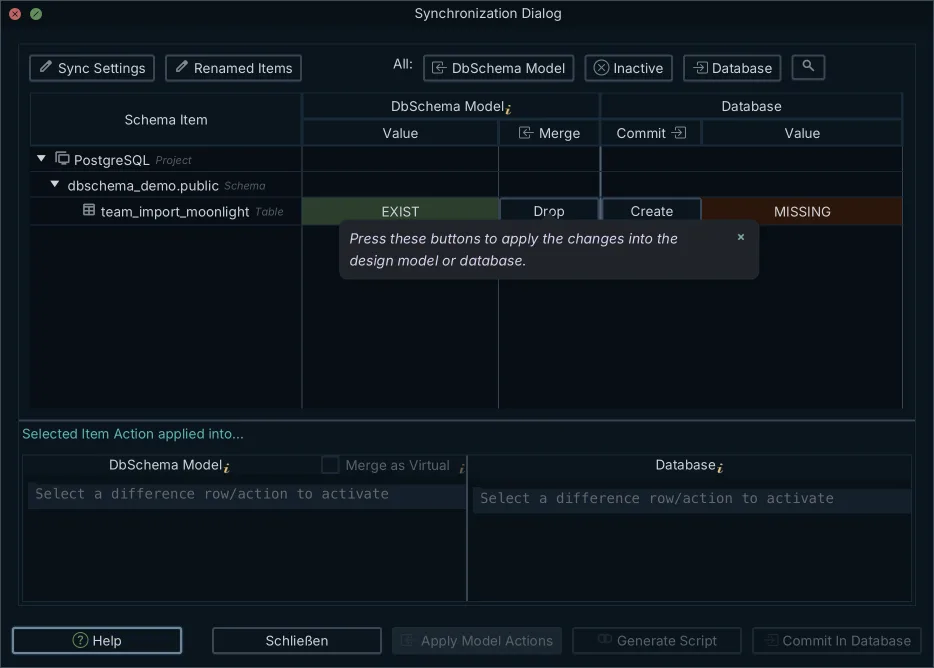
When you compare a local design model with a live SQL Server instance, the metadata from both sources is evaluated and a structured comparison dialog lists each difference. For every detected difference, you choose one of exactly three actions:
- Commit to database: generates the corresponding DDL to update the live SQL Server instance to match the design model
- Keep in design model: updates the local model file to incorporate modifications present only in the live database
- Do nothing: ignores the discrepancy, leaving both the local model file and live database untouched
After selecting the desired actions, the planned changes are compiled into a structured Transact-SQL script. You can review every statement, execute the batch directly, or export the script so that connection guard settings like LOCK_TIMEOUT can be added before it runs in your automated deployment pipeline.
Where SQL Server deployments usually break
Schema deployments in SQL Server frequently fail due to environmental mismatches and missing execution safeguards. Reviewing common breakdown points helps identify dangerous statements before they execute in production.
The most common failure in heterogeneous SQL Server environments is executing Enterprise-only syntax against Standard Edition instances. Running ALTER INDEX with ONLINE = ON against a Standard Edition database throws an immediate capability error. If a team tests a migration script on Developer Edition (which includes Enterprise features) and runs it on Standard Edition production, the deployment fails mid-batch.
Deploying scripts without explicit lock timeouts represents the second major failure mode. If an ALTER TABLE statement attempts to alter a column type or add a constraint on a heavily queried table without SET LOCK_TIMEOUT, the DDL command waits indefinitely and blocks all incoming application queries. A similar set of operational considerations applies when working with other relational engines, as detailed in our guide on PostgreSQL Schema Migration: Deploying Changes Safely.
- Executing ONLINE = ON index operations on SQL Server Standard Edition instances
- Omitting SET LOCK_TIMEOUT, causing long-running lock queues during peak traffic
- Omitting SET XACT_ABORT ON, resulting in partial batch execution when non-fatal errors occur
- Adding constraints with default validation scans instead of using WITH NOCHECK
- Executing DDL statements outside an explicit transaction block
Confirming the deployed schema matches the model
Verifying the deployed state immediately after running a migration script prevents silent structural divergences across environments. Checking the database structure ensures that every planned column, index, and constraint is active in the production catalog.
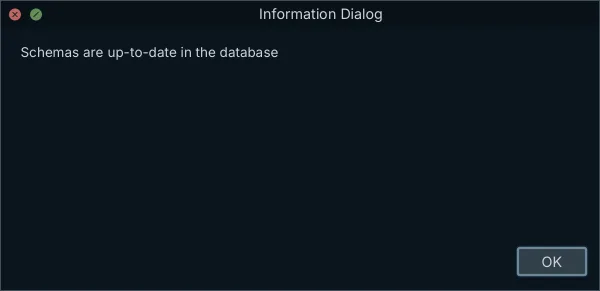
Once the migration script finishes execution, run a post-deployment comparison in DbSchema between the local XML model file and the live SQL Server database. The synchronization window should report zero uncommitted structural differences, confirming that the live catalog matches the version-controlled model. Catching unexpected differences at this stage is an essential part of finding schema drift between environments.
On SQL Server, DbSchema can also store model tags and documentation comments directly in the database using SQL Server extended properties (sys.extended_properties), in addition to being saved inside the project model file. This allows team members reverse-engineering the database to retrieve structural descriptions directly from the server.
DbSchema Pro Edition includes interactive schema synchronization, visual diff review, and migration script generation for SQL Server deployments. Download DbSchema, connect to your SQL Server instance, and compare your local design model against the live database before deploying your next release.
Frequently asked questions
Does ALTER TABLE lock the whole table in SQL Server?
Yes, an ALTER TABLE requires a schema modification (Sch-M) lock on the entire table. This lock is incompatible with all other locks, meaning it must wait for running queries to finish, and all new queries will queue behind it until the change completes.
How do I stop a schema change from blocking my application?
Set a session-level LOCK_TIMEOUT in milliseconds so the change fails with error 1222 instead of waiting indefinitely. You can also use WAIT_AT_LOW_PRIORITY for online index operations to prevent them from blocking new incoming queries while waiting for a lock.
What is the difference between a Sch-M and a Sch-S lock?
A schema modification (Sch-M) lock is taken during DDL changes and blocks all access. A schema stability (Sch-S) lock is held by ordinary read queries to prevent the table structure from changing while they read data. A Sch-M lock cannot be acquired until all Sch-S locks are released.
Can I roll back a schema change in SQL Server?
Yes, DDL statements in SQL Server are transactional. If you include SET XACT_ABORT ON in your script, any error during the schema change will automatically roll back the entire batch, returning the database to its previous state.
Do I need Enterprise Edition to rebuild an index online?
Yes, using ALTER INDEX ... REBUILD WITH (ONLINE = ON) requires SQL Server Enterprise Edition. If you run an online rebuild command on a Standard Edition instance, the operation will fail.
What is a DACPAC used for?
A .dacpac file is an artifact used by SqlPackage for state-based deployments in SQL Server. It contains a compiled model of the database schema and updates the target database to match that state, contrasting with explicit migration scripts generated between versions.
Sources
Compare the model before you deploy
DbSchema reverse-engineers your SQL Server database, shows what differs from your design model, and generates the migration script you review before it runs. Schema synchronization is a Pro Edition feature; the installer includes a 15-day Architect trial.









