SQL Server CREATE VIEW Guide with Examples in sqlcmd and DbSchema
For SQL beginners on SQL Server who can write a SELECT and now want to save one under a name that other queries and other people can use.
On this page
The support desk needs the name and contact of your customers in one country, and nothing else from the customer record. You can hand them a SELECT and hope they run it right every time, or store the SELECT in the database under a name with CREATE VIEW and grant them the name, which they query like a table. The statement in full:
CREATE [ OR ALTER ] VIEW [ schema_name . ] view_name [ ( column [ ,...n ] ) ]
[ WITH { ENCRYPTION | SCHEMABINDING | VIEW_METADATA } [ ,...n ] ]
AS select_statement
[ WITH CHECK OPTION ]
The brackets mark the optional parts, so the shortest statement that works is CREATE VIEW, a name, AS and a SELECT. Everything below applies to SQL Server 2022.
Create a view in sqlcmd, step by step
A SQL Server instance, a database you can create tables in and a login are all it takes. The article on how to create a SQL Server database covers getting that far.
1. Connect
sqlcmd -S servername -d dbname -U username
Put in your own server, database and login. Leave out -P and sqlcmd asks for the password: the sqlcmd documentation calls a password on the command line insecure.
2. Create the table the view reads
CREATE TABLE dbo.Customers (
    CustomerID INT PRIMARY KEY,
    CustomerName NVARCHAR(50),
    ContactName NVARCHAR(50),
    Country NVARCHAR(50)
);

INSERT INTO dbo.Customers VALUES
  (1, 'Alfreds', 'Maria', 'Germany'),
  (2, 'Ana Trujillo', 'Ana', 'Mexico'),
  (3, 'Around the Horn', 'Thomas', 'UK'),
  (4, 'Chop-suey', 'Yang', 'USA'),
  (5, 'Great Lakes', 'Howard', 'USA'),
  (6, 'Island Trading', 'Helen', 'UK');
GO
sqlcmd sends nothing to the server until you type GO on a line of its own. The SQL Server CREATE TABLE guide covers that statement in full.
3. Create the view
CREATE VIEW dbo.USA_Customers AS
SELECT CustomerName, ContactName
FROM dbo.Customers
WHERE Country = 'USA';
GO
The GO above the view matters as much as the one below it. CREATE VIEW has to be the first statement in its batch, and sent in one batch with the INSERT, it fails with error 111: "'CREATE VIEW' must be the first statement in a query batch."
4. Query it like a table
SELECT * FROM dbo.USA_Customers;
GO
| CustomerName | ContactName |
|---|---|
| Chop-suey | Yang |
| Great Lakes | Howard |
Two columns come back because the view lists two, and two rows because its WHERE keeps two.
What SQL Server stores for a view
SQL Server stores the view's definition, not its rows. Each query against dbo.USA_Customers becomes a query against dbo.Customers, so a change to the table shows in the view at the next select, with nothing to refresh.
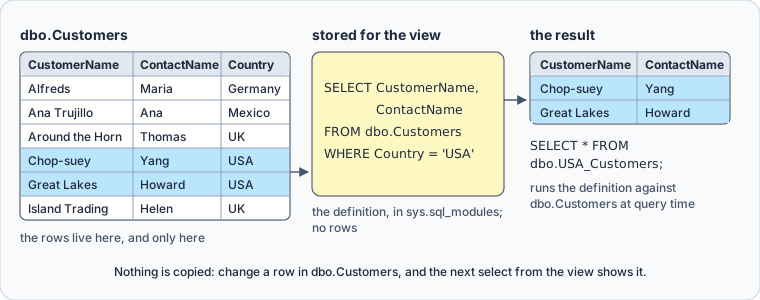
You can read the definition back:
SELECT OBJECT_DEFINITION(OBJECT_ID('dbo.USA_Customers'));
GO
OBJECT_DEFINITION returns the CREATE VIEW statement as you wrote it, from the sys.sql_modules catalog view. Two limits apply to every view: it can be created only in the current database, and it can have at most 1,024 columns.
A view keeps rows in one case. Put a unique clustered index on a schema-bound view, and SQL Server stores its result the way it stores a table with a clustered index, as Create indexed views describes. Such an indexed view suits queries that aggregate many rows, and Microsoft's Views page calls it a poor fit for tables that are updated often.
What views are for, and what they cost
The CREATE VIEW reference gives three uses. The first is a simpler picture of the database for each user, where a five-table join lives in one view instead of in every report that needs it. The second is security: people read the view without holding permissions on the tables under it, which is how the support desk gets two columns and none of the rest. The third is compatibility. When a table's columns change, a view can still present the old ones, so an application written against the old shape keeps working.
The costs are just as concrete. A view stores no result, so every select pays for the whole query, joins and aggregates included. A view also depends on its tables: drop a table it reads, and the view raises an error the next time anyone uses it. Change a table in a way that affects the definition, and the view can return unexpected results until you run sp_refreshview on it. And not every view accepts an INSERT, UPDATE or DELETE.
Views over joins and aggregates
A view can join tables, group them and aggregate them. Add a table of orders:
CREATE TABLE dbo.Orders (
    OrderID INT PRIMARY KEY,
    CustomerID INT NOT NULL REFERENCES dbo.Customers (CustomerID),
    Amount DECIMAL(10, 2) NOT NULL
);

INSERT INTO dbo.Orders VALUES
  (101, 4, 120.00),
  (102, 4, 80.00),
  (103, 5, 45.50),
  (104, 1, 300.00);
GO
Then a view that totals them per customer:
CREATE VIEW dbo.CustomerOrderTotals AS
SELECT c.CustomerName, c.Country,
       COUNT(*) AS OrderCount,
       SUM(o.Amount) AS TotalAmount
FROM dbo.Customers AS c
JOIN dbo.Orders AS o ON o.CustomerID = c.CustomerID
GROUP BY c.CustomerName, c.Country;
GO

SELECT * FROM dbo.CustomerOrderTotals ORDER BY TotalAmount DESC;
GO
| CustomerName | Country | OrderCount | TotalAmount |
|---|---|---|---|
| Alfreds | Germany | 1 | 300.00 |
| Chop-suey | USA | 2 | 200.00 |
| Great Lakes | USA | 1 | 45.50 |
Every column of a view needs a name, and an aggregate has none until AS gives it one. Leave out AS OrderCount and the CREATE VIEW fails with error 4511: "Create View or Function failed because no column name was specified for column 3." A column list after the view's name, dbo.CustomerOrderTotals (CustomerName, Country, OrderCount, TotalAmount), names them just as well.
Four things the SELECT inside a view can't contain:
ORDER BY, unlessTOP,OFFSETorFOR XMLis also there (error 1033)INTO- the
OPTIONclause - a temporary table or a table variable
Even with TOP, the ORDER BY only decides which rows TOP returns. The rows come back sorted only when the query that reads the view has its own ORDER BY, as the one above does.
Insert, update and delete through a view
A view passes an INSERT, UPDATE or DELETE on to its table when:
- the statement changes the columns of one base table only
- those columns come straight from the table, not from an aggregate, a calculation or a
UNION GROUP BY,HAVINGandDISTINCTdon't affect them- the view doesn't combine
TOPwithWITH CHECK OPTION
dbo.USA_Customers meets all four, so an update through it reaches dbo.Customers:
UPDATE dbo.USA_Customers SET ContactName = 'Yang Wang' WHERE CustomerName = 'Chop-suey';
SELECT CustomerID, CustomerName, ContactName, Country FROM dbo.Customers WHERE Country = 'USA';
GO
| CustomerID | CustomerName | ContactName | Country |
|---|---|---|---|
| 4 | Chop-suey | Yang Wang | USA |
| 5 | Great Lakes | Howard | USA |
An INSERT through the same view fails with error 515, for a different reason: the view has no CustomerID, and the table can't take a row without one. dbo.CustomerOrderTotals fails the second and third conditions, and an update through it stops at error 4403, "because it contains aggregates, or a DISTINCT or GROUP BY clause". A view that fails them can still accept writes through an INSTEAD OF trigger, which runs in place of the statement and writes the base tables itself. The SQL Server CREATE TRIGGER guide runs one on a view.
The WHERE of a view doesn't stop a change that moves a row out of it. CREATE OR ALTER VIEW replaces the view's definition, here to show Country as well, and then an update moves one customer to Canada:
CREATE OR ALTER VIEW dbo.USA_Customers AS
SELECT CustomerName, ContactName, Country
FROM dbo.Customers
WHERE Country = 'USA';
GO

UPDATE dbo.USA_Customers SET Country = 'Canada' WHERE CustomerName = 'Great Lakes';
SELECT * FROM dbo.USA_Customers;
GO
| CustomerName | ContactName | Country |
|---|---|---|
| Chop-suey | Yang Wang | USA |
The update went through, and Great Lakes left the view it was changed through. WITH CHECK OPTION after the SELECT refuses any change whose row would no longer be visible in the view:
CREATE OR ALTER VIEW dbo.USA_Customers AS
SELECT CustomerName, ContactName, Country
FROM dbo.Customers
WHERE Country = 'USA'
WITH CHECK OPTION;
GO

UPDATE dbo.USA_Customers SET Country = 'Canada' WHERE CustomerName = 'Chop-suey';
GO
SQL Server refuses the update with error 550: "The attempted insert or update failed because the target view either specifies WITH CHECK OPTION or spans a view that specifies WITH CHECK OPTION and one or more rows resulting from the operation did not qualify under the CHECK OPTION constraint." Chop-suey stays in the USA.
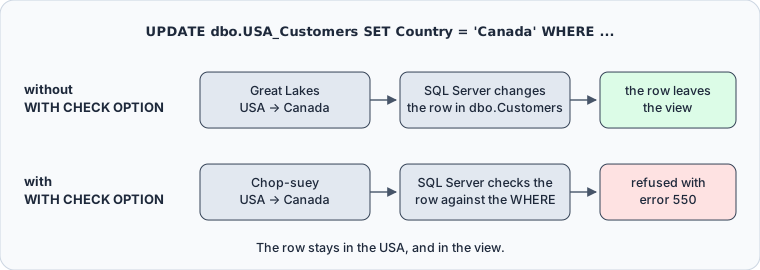
The check covers changes made through the view only. An UPDATE on dbo.Customers itself can still set any country.
The ENCRYPTION, SCHEMABINDING and VIEW_METADATA attributes
Three attributes can follow WITH, between the view's name and AS:
| Attribute | What it does |
|---|---|
ENCRYPTION | Encrypts the stored CREATE VIEW text |
SCHEMABINDING | Blocks changes to the referenced tables that would affect the view |
VIEW_METADATA | Reports the view, not its tables, to browse-mode clients |
SCHEMABINDING is the one to reach for, because it turns the silent breakage described above into an error at the moment someone changes the table:
CREATE OR ALTER VIEW dbo.USA_Customers
WITH SCHEMABINDING AS
SELECT CustomerName, ContactName, Country
FROM dbo.Customers
WHERE Country = 'USA'
WITH CHECK OPTION;
GO

ALTER TABLE dbo.Customers DROP COLUMN ContactName;
GO
The ALTER TABLE fails with error 5074, which names the view that depends on the column, followed by error 4922. The column stays until the view is changed or dropped. A schema-bound view has to name every table with its schema, dbo.Customers rather than Customers, or the CREATE VIEW fails with error 4512: "Names must be in two-part format and an object cannot reference itself." Indexed views need SCHEMABINDING too.
Permissions, and changing or dropping a view
Creating a view takes the CREATE VIEW permission in the database and ALTER permission on the schema that will hold it. Reading it takes permission on the view alone:
CREATE ROLE SupportDesk;
GRANT SELECT ON dbo.USA_Customers TO SupportDesk;
GO
Members of SupportDesk can select from dbo.USA_Customers without any permission on dbo.Customers. That works because the view and the table have the same owner. SQL Server then skips the permission check on the table, which Permissions (Database Engine) calls ownership chaining. Where the owners differ, the reader needs permission on the table as well.
Grants belong to the view, so the way you change a view decides whether they survive. ALTER VIEW replaces the definition and keeps the permissions, and CREATE OR ALTER VIEW alters the view when it exists. Dropping and re-creating the view drops its grants with it. Microsoft advises against renaming a view with sp_rename, because the old name stays in the stored definition. Drop the view, create it under the new name, and grant again. IF EXISTS makes the drop do nothing when the view isn't there:
DROP VIEW IF EXISTS dbo.CustomerOrderTotals;
GO
Create and query the view in DbSchema



DbSchema connects to SQL Server and reverse-engineers the database into a design model. Its tables and views appear in the Project Structure panel, and the tables with their foreign keys on a diagram, which is where you work out what a view should join before you write it. Reverse-engineering reads the database and changes nothing in it.
To create the view, open the SQL Editor from the Editors menu, type the CREATE VIEW statement, select it, and click Execute Query, which runs the selected text. Select SELECT * FROM dbo.USA_Customers; next and run it the same way, and DbSchema shows the rows as a table in the result pane.
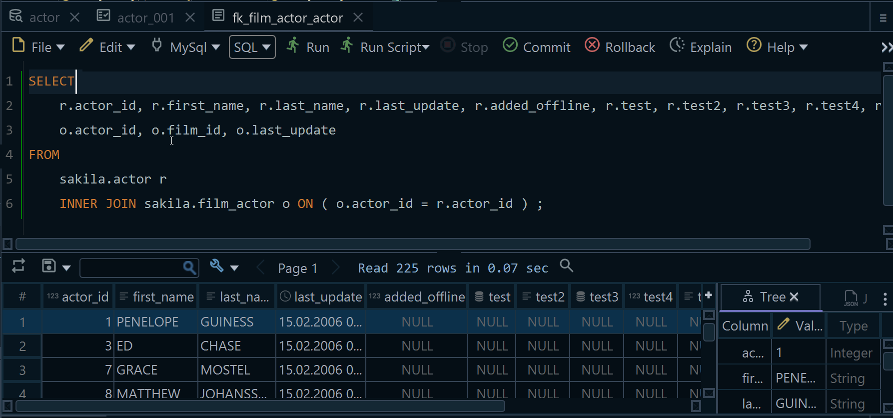
The statement runs against the connected database, so the view exists in SQL Server as soon as it succeeds, while the design model still shows the schema as it was. Choose Schema → Refresh Schema from Database, described on the Synchronize with the Database page, and DbSchema compares the model with the database and asks what to do with the difference, which here is the new view.
A view stores nothing but its definition, which makes it the cheapest way to stop a complicated SELECT from being copied around. Write the definition once, bind it to its tables with SCHEMABINDING, and grant the view rather than the tables. Download DbSchema, connect to your SQL Server database, and run the statements above in the SQL Editor. Connecting, reverse-engineering, the diagram and the SQL Editor are all in the free Community Edition; reading the new view back into the model is part of schema synchronization, in the Pro edition.









