Top Free PostgreSQL ER Diagram Tools for 2025/2026 – Compared | DbSchema
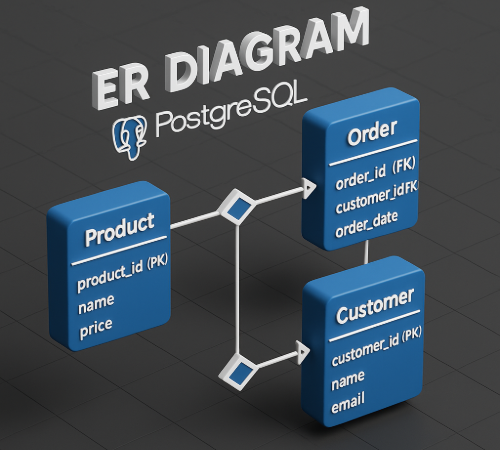
If you work with PostgreSQL, an ER diagram tool should do more than draw boxes. It should help you reverse-engineer the schema, understand relationships quickly, organize large databases, and share the result with teammates.
For most PostgreSQL teams, DbSchema is the best free starting point because it combines reverse engineering, visual design, and documentation in one desktop workflow. pgModeler is excellent for PostgreSQL specialists who want a modeling-focused desktop tool, while DBeaver is useful when diagramming is only one part of a broader database IDE.
Table of Contents
- Quick answer
- What matters in a PostgreSQL ER diagram tool
- Comparison table
- Tool reviews
- How to reverse-engineer PostgreSQL in DbSchema
- Best tool by use case
- FAQ
- Conclusion
Quick answer
- Best overall free PostgreSQL ER diagram tool: DbSchema
- Best for PostgreSQL-only power users: pgModeler
- Best for live database exploration: DBeaver
- Best for browser-based collaboration: SQLDBM or ChartDB
- Best for code-first, quick diagrams: dbdiagram.io or QuickDBD
If you want a PostgreSQL-specific walkthrough, also read Create ER Diagrams for PostgreSQL and Design a PostgreSQL Schema.
What matters in a PostgreSQL ER diagram tool
The best free PostgreSQL ER diagram tools in 2025 and 2026 usually solve at least one of these jobs well:
- reverse-engineer an existing PostgreSQL database
- design a new schema visually before writing SQL
- handle larger schemas without becoming unreadable
- export diagrams or documentation for the rest of the team
- support PostgreSQL-specific workflows without forcing manual redraws
That is why the comparison below focuses on reverse engineering, design-first capability, and documentation or sharing.
Comparison table
| Tool | Reverse engineer PostgreSQL | Design-first workflow | Docs / sharing | Best for |
|---|---|---|---|---|
| DbSchema | Yes | Yes | strong documentation export | full PostgreSQL schema workflow |
| pgModeler | Yes | Yes | export-focused desktop modeling | PostgreSQL specialists |
| DBeaver | Yes | Limited | useful ERD view, broader DB tooling | live database exploration |
| SQLDBM | Import / cloud workflow | Yes | strong browser collaboration | cloud-first teams |
| dbdiagram.io | SQL import | Yes, code-first | fast sharing and simple exports | quick prototypes |
| ChartDB | SQL import | Yes | browser or self-host sharing | modern lightweight teams |
| QuickDBD | Limited for PostgreSQL import | Yes, text-first | quick exports for small diagrams | fast sketches |
| Luna Modeler | Yes | Yes | trial-based export workflow | evaluation and short-term projects |
Tool reviews
1. DbSchema
DbSchema is the most complete free starting point when you want PostgreSQL ER diagrams for both design and documentation.
- reverse-engineer PostgreSQL through the PostgreSQL JDBC driver
- organize large schemas into multiple diagrams instead of one crowded layout
- generate interactive schema documentation
- compare the model and live database with schema synchronization
Best for: teams that want a diagram to stay useful after the first export.
2. pgModeler
pgModeler is one of the strongest PostgreSQL-focused modeling tools. It is especially attractive if you want a desktop application centered on PostgreSQL objects and design detail.
- PostgreSQL-first data modeling
- reverse engineering and SQL generation
- strong fit for database specialists who want direct control over the model
Best for: PostgreSQL-only power users.
3. DBeaver
DBeaver is a very practical option when your main job is exploring and editing live databases, and ER diagrams are part of that workflow rather than the entire point.
- generates ERD views from live PostgreSQL schemas
- strong SQL editor and data browser
- useful when you also connect to MySQL, SQLite, or cloud databases
Best for: developers who want one multi-database desktop client.
4. SQLDBM
SQLDBM is a browser-based modeling tool that makes collaboration easy. It is often chosen by teams that want design work to happen online rather than in a desktop app.
- design-first cloud workflow
- import-oriented PostgreSQL modeling
- good collaboration and sharing story
Best for: teams that prefer browser-based collaboration.
5. dbdiagram.io
dbdiagram.io is a fast, text-first tool. It is perfect when you want to paste SQL or DBML and get a diagram quickly.
- very fast code-to-diagram workflow
- easy to share and iterate on prototypes
- minimal setup compared with heavier desktop tools
Best for: quick schema mockups and code-first users.
6. ChartDB
ChartDB is a lightweight browser-based option with cloud and self-hosted angles, which makes it appealing to teams that want simple sharing without a heavyweight install.
- modern browser-based workflow
- useful for smaller projects and fast collaboration
- good fit when import plus lightweight editing is enough
Best for: small teams that want a fast web experience.
7. QuickDBD
QuickDBD is all about speed. You type, it draws. That makes it a good teaching, brainstorming, and prototyping tool.
- text-first interface
- quick results for small diagrams
- easy export for presentations or docs
Best for: students, sketches, and early-stage schema brainstorming.
8. Luna Modeler
Luna Modeler is a polished visual modeling product with PostgreSQL support and a trial workflow for evaluation.
- visual design and reverse engineering
- clean desktop interface
- useful when you are evaluating commercial modeling tools
Best for: short evaluations and commercial-tool comparisons.
How to reverse-engineer PostgreSQL in DbSchema
This is the workflow that makes DbSchema the easiest recommendation for many PostgreSQL teams:
- connect through the PostgreSQL JDBC driver
- follow the connect-to-database guide
- let DbSchema generate the diagram view from the live schema
- reorganize tables into cleaner layouts and annotate important areas
- publish the result as schema documentation
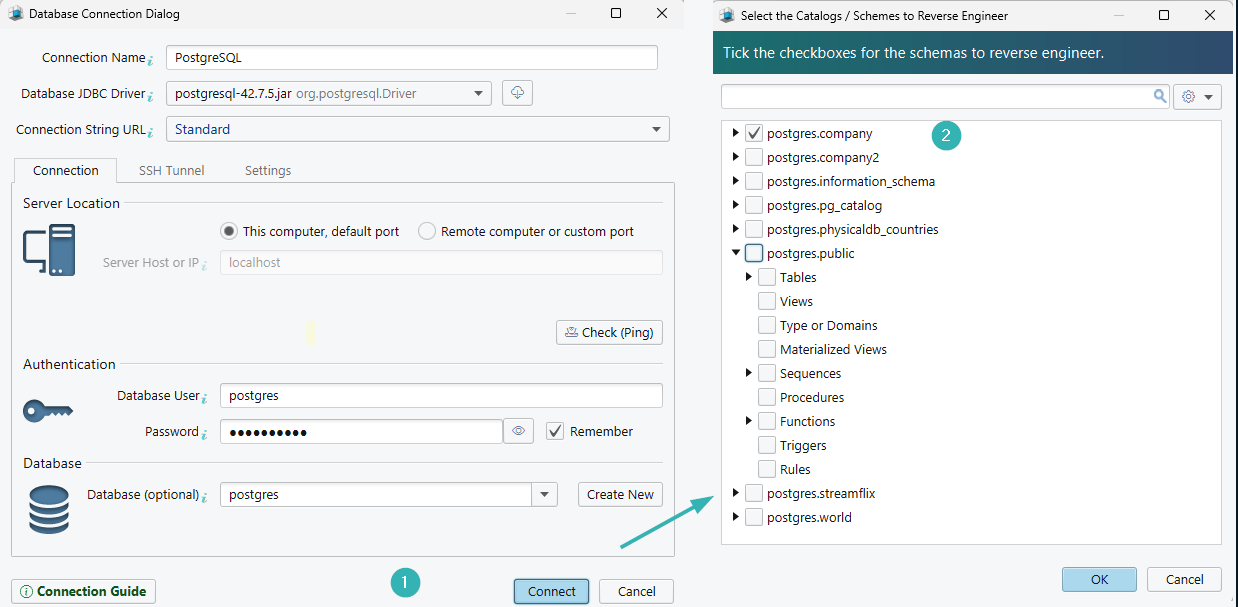
That is especially useful when the schema already exists and you need documentation, onboarding material, or a cleaner way to review future changes. If you are designing before implementation, pair this with Entity Relationship Diagram and Steps to Design a Relational Schema.
Best tool by use case
| If you need to... | Best fit |
|---|---|
| reverse-engineer and document PostgreSQL visually | DbSchema |
| work in a PostgreSQL-first modeling environment | pgModeler |
| explore a live schema alongside heavy SQL work | DBeaver |
| collaborate on diagrams in the browser | SQLDBM or ChartDB |
| sketch a fast code-first ERD | dbdiagram.io or QuickDBD |
FAQ
What is the best free ER diagram tool for PostgreSQL?
For most teams, DbSchema is the best free starting point because it combines reverse engineering, visual design, and documentation instead of stopping at diagram generation.
Is pgModeler better than DbSchema for PostgreSQL?
pgModeler is excellent for PostgreSQL-focused modeling, especially for specialists who want a PostgreSQL-first desktop workflow. DbSchema is the better fit when documentation, multiple diagrams, and schema sync are important too.
Can I create a PostgreSQL ER diagram from an existing database?
Yes. DbSchema, pgModeler, DBeaver, and several other tools can reverse-engineer an existing PostgreSQL schema into a diagram.
Which PostgreSQL ER tool is best for documentation?
DbSchema stands out because it can export the model as interactive documentation, not just as a static image.
Are browser-based PostgreSQL ER tools enough for production teams?
They can be enough for planning and collaboration, but production teams often need reverse engineering, schema review, and documentation features that are stronger in desktop tools like DbSchema.
What is the fastest way to understand a large PostgreSQL schema?
Reverse-engineer it into an ER diagram, split it into focused views, and publish documentation for the team. That is exactly where DbSchema is strongest.
Conclusion
The best free PostgreSQL ER diagram tool is the one that helps you understand and maintain the schema after the first diagram is generated. For most teams, that means reverse engineering, better layouts, documentation, and a workflow that can keep evolving with the database.
That is why DbSchema is the most practical recommendation here: it gives PostgreSQL teams a clear path from schema discovery to documentation and ongoing change review.






