PostgreSQL Aggregate Functions Guide with Examples
For someone who already writes SELECT statements against PostgreSQL and now needs one number out of many rows; the return types, the NULL rules and GROUP BY are explained where they appear.
On this page
A report needs the payroll total, the headcount and the average salary, and the rows that hold them run into the thousands. PostgreSQL computes them on the server with SUM, COUNT and AVG, and finds the extremes with MIN and MAX. Each one returns a single value for the whole table, or one value per group with GROUP BY. Two details decide whether the numbers come out right: the type each function returns, and the null that every one of them except COUNT returns when it gets no rows.
An aggregate function takes the values of many rows and returns one result. Here are the five on this page, with the type each one returns according to the PostgreSQL 18 reference:
| Function | What it returns | Type over an integer column |
|---|---|---|
COUNT(*) | The number of rows | bigint |
COUNT(column) | The number of non-null values | bigint |
SUM(column) | The total of the non-null values | bigint |
AVG(column) | The average of the non-null values | numeric |
MIN(column) | The smallest non-null value | integer, the column's own type |
MAX(column) | The largest non-null value | integer, the column's own type |
Run AVG, COUNT, MIN, MAX and SUM in psql
Connect to your database with psql. If there is no database to connect to yet, the CREATE DATABASE guide covers creating one and connecting to it.
psql -U <username> -d <database_name>
Then create the table that every example on this page uses:
CREATE TABLE employee (
  id         int PRIMARY KEY,
  name       varchar(60) NOT NULL,
  department varchar(30) NOT NULL,
  age        int NOT NULL,
  salary     int NOT NULL
);

INSERT INTO employee VALUES
  (1, 'John',    'Sales',       25, 5000),
  (2, 'Sarah',   'Sales',       28, 6000),
  (3, 'Michael', 'Engineering', 30, 5500),
  (4, 'Jessica', 'Engineering', 27, 6500),
  (5, 'William', 'Engineering', 32, 7000);
Each function goes in the select list of a SELECT, and the query returns one row.
AVG()
AVG adds the non-null values and divides by how many there were. An average of whole numbers is rarely a whole number, so over an integer column AVG returns numeric and keeps the decimal places. ROUND with a second argument sets how many of them you get:
SELECT ROUND(AVG(salary), 2) AS average_salary FROM employee;
| average_salary |
|---|
| 6000.00 |
COUNT()
COUNT(*) counts rows. COUNT(column) counts the rows where that column is not null, so the two differ on a column that holds nulls, as the section on nulls below shows.
SELECT COUNT(*) AS employee_count FROM employee;
| employee_count |
|---|
| 5 |
DISTINCT inside the parentheses feeds each distinct value to the function once, so this counts departments rather than employees:
SELECT COUNT(DISTINCT department) AS department_count FROM employee;
| department_count |
|---|
| 2 |
A FILTER clause narrows one aggregate and leaves the rest of the query alone: only the rows for which its condition is true reach that function. Two counts over different rows then fit in one query:
SELECT COUNT(*) AS everyone,
       COUNT(*) FILTER (WHERE salary > 6000) AS above_6000
FROM employee;
| everyone | above_6000 |
|---|---|
| 5 | 2 |
MIN()
MIN returns the smallest non-null value in the column's own type, so the youngest age comes back as an integer:
SELECT MIN(age) AS minimum_age FROM employee;
| minimum_age |
|---|
| 25 |
MAX()
MAX returns the largest. Both functions work on more than numbers. On a text column, MAX returns the value that sorts last rather than the longest one, and on a date column it returns the latest date. PostgreSQL 18 adds arrays and composite types to the types they accept.
SELECT MAX(salary) AS maximum_salary FROM employee;
| maximum_salary |
|---|
| 7000 |
SUM()
SUM over an integer column returns bigint, so a total can pass the integer limit of 2,147,483,647 without an overflow error:
SELECT SUM(salary) AS total_salary FROM employee;
| total_salary |
|---|
| 30000 |
All five in one query
Several of these functions can share one SELECT, and the answer is still one row:
SELECT COUNT(*)              AS headcount,
       SUM(salary)           AS total_salary,
       ROUND(AVG(salary), 2) AS average_salary,
       MIN(salary)           AS lowest,
       MAX(salary)           AS highest
FROM employee;
| headcount | total_salary | average_salary | lowest | highest |
|---|---|---|---|---|
| 5 | 30000 | 6000.00 | 5000 | 7000 |
One value per group with GROUP BY
Without GROUP BY, the whole table is one group, and the query returns one row. GROUP BY department splits the rows into one group per department, and each aggregate then runs once for every group:

SELECT department,
       COUNT(*)              AS headcount,
       SUM(salary)           AS total_salary,
       ROUND(AVG(salary), 2) AS avg_salary
FROM employee
GROUP BY department
ORDER BY department;
| department | headcount | total_salary | avg_salary |
|---|---|---|---|
| Engineering | 3 | 19000 | 6333.33 |
| Sales | 2 | 11000 | 5500.00 |
string_agg builds one text value out of each group. The order in which it receives the rows changes its result, so it takes an ORDER BY inside its own parentheses. SUM and MIN return the same value in any order and have no use for one.
SELECT department, string_agg(name, ', ' ORDER BY name) AS people
FROM employee
GROUP BY department
ORDER BY department;
| department | people |
|---|---|
| Engineering | Jessica, Michael, William |
| Sales | John, Sarah |
array_agg works the same way and returns an array instead of a string.
To keep only some of the groups, put the condition on the aggregate in HAVING. This query keeps the departments whose average salary is above 6000:
SELECT department, ROUND(AVG(salary), 2) AS avg_salary
FROM employee
GROUP BY department
HAVING AVG(salary) > 6000;
| department | avg_salary |
|---|---|
| Engineering | 6333.33 |
ROLLUP, CUBE and GROUPING SETS, which add subtotal rows to a grouped result, are covered in the general SQL aggregate functions tutorial.
What nulls and empty input do
The functions skip nulls: a null is left out of the total, the count of values and the average. COUNT(*) is the exception, because it counts rows rather than values. A three-row list with one null shows both:
SELECT COUNT(*)             AS row_count,
       COUNT(bonus)         AS bonus_count,
       SUM(bonus)           AS total_bonus,
       ROUND(AVG(bonus), 2) AS avg_bonus
FROM (VALUES (100), (NULL), (300)) AS t(bonus);
| row_count | bonus_count | total_bonus | avg_bonus |
|---|---|---|---|
| 3 | 2 | 400 | 200.00 |
The average is 400 divided by 2, not by 3. Where a missing bonus should count as zero, say so with COALESCE, which returns its first non-null argument: ROUND(AVG(COALESCE(bonus, 0)), 2) returns 133.33.
With no rows at all, COUNT returns 0 and every other function returns null. In particular, SUM of no rows returns null, not zero. The query below asks for a department that has no employees:
SELECT COUNT(*)                 AS headcount,
       SUM(salary)              AS total_salary,
       COALESCE(SUM(salary), 0) AS total_or_zero
FROM employee
WHERE department = 'Marketing';
psql prints nothing for a null by default, so the middle cell is empty:
| headcount | total_salary | total_or_zero |
|---|---|---|
| 0 | 0 |
The total_or_zero column shows the fix for a report that needs a number there: COALESCE turns the null into 0.
Where an aggregate can and cannot appear
PostgreSQL evaluates a SELECT in a fixed order. The aggregates are computed partway through, after WHERE and GROUP BY and before HAVING, the select list and ORDER BY:

That order decides where an aggregate may appear. It works in HAVING, in the select list and in ORDER BY. It is forbidden in WHERE and GROUP BY, because those clauses are evaluated before the aggregates are formed. Asking in WHERE for the people paid above the average fails:
SELECT name, salary FROM employee WHERE salary > AVG(salary);
ERROR: aggregate functions are not allowed in WHERE
A subquery computes the average on its own, and the outer WHERE compares each row with it:
SELECT name, salary
FROM employee
WHERE salary > (SELECT AVG(salary) FROM employee)
ORDER BY salary;
| name | salary |
|---|---|
| Jessica | 6500 |
| William | 7000 |
The PostgreSQL tutorial puts the rule for conditions plainly: WHERE selects input rows before groups and aggregates are computed, and HAVING selects group rows after. A condition on a group's total goes in HAVING. A condition on single rows goes in WHERE, where it also keeps those rows out of the aggregate and out of the work.
Aggregates don't nest either. The argument of an aggregate cannot contain another aggregate, so MAX(COUNT(*)) fails with "aggregate function calls cannot be nested". To find the headcount of the largest department, count in a subquery and take the maximum outside it:
SELECT MAX(headcount) AS largest_department
FROM (SELECT department, COUNT(*) AS headcount
      FROM employee
      GROUP BY department) AS d;
| largest_department |
|---|
| 3 |
The select list has a rule of its own. Once a query has an aggregate or a GROUP BY, every other column it selects must be grouped, because there would otherwise be more than one possible value to return for it:
SELECT name, AVG(salary) FROM employee;
ERROR: column "employee.name" must appear in the GROUP BY clause or be used in an aggregate function
PostgreSQL makes one exception. A column may stay out of GROUP BY when the grouped columns are the primary key of its table, since the key fixes its value. So SELECT id, name, MAX(salary) FROM employee GROUP BY id runs and returns one row per employee, although name is not in GROUP BY.
Grouping collapses the rows, which is what an aggregate is for, but sometimes you want every row with the total beside it. An aggregate followed by OVER () runs as a window function and keeps the rows:
SELECT name, salary, ROUND(AVG(salary) OVER (), 2) AS average_salary
FROM employee
ORDER BY id;
| name | salary | average_salary |
|---|---|---|
| John | 5000 | 6000.00 |
| Sarah | 6000 | 6000.00 |
| Michael | 5500 | 6000.00 |
| Jessica | 6500 | 6000.00 |
| William | 7000 | 6000.00 |
Run an aggregate query in DbSchema



DbSchema connects to PostgreSQL and reverse-engineers the schema into a diagram. From there you can type the queries above in the SQL Editor, or let the Query Builder write them for you.
To run a query from this page in the SQL Editor:
- Connect DbSchema to your PostgreSQL database.
- Open the SQL Editor from the Editors menu.
- Paste a query, such as the per-department one, and press Execute Query.
- Read the result, which DbSchema shows as a table. The Save button in the result pane writes the full result to a file.
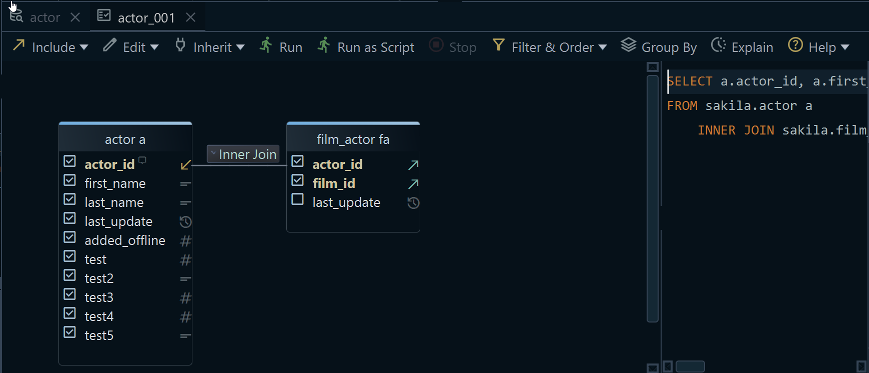
To build the per-department average in the Query Builder without typing it:
- Click the header of the
employeetable in the diagram. DbSchema opens the Query Builder with the table loaded. - Tick
departmentandsalary. - Turn on Group By mode with the toggle button in the Query Builder toolbar. Ticked columns without an aggregate become the
GROUP BYlist. - Right-click
salary, choose Aggregate, and pickAVG. - Read the SQL that DbSchema generates, which it updates live as you click.
The SQL Editor is in the free Community Edition, and the Query Builder is a Pro feature. An aggregate query only reads the database. When you close the SQL Editor or the Query Builder, DbSchema asks whether to keep it in the design model, so you can reopen the query later.
To run these queries against your own tables, download DbSchema from https://dbschema.com/download.html, connect it to PostgreSQL, and paste the per-department query into the SQL Editor. Connecting, the diagrams and the SQL Editor are in the free Community Edition; the Query Builder with its Group By mode is in Pro.
Sources
- PostgreSQL 18 documentation: 9.21. Aggregate Functions
- PostgreSQL 18 documentation: Release 18
- PostgreSQL 18 documentation: 8.1. Numeric Types
- PostgreSQL 18 documentation: psql
- PostgreSQL 18 documentation: SELECT
- PostgreSQL 18 documentation: 4.2.7. Aggregate Expressions
- PostgreSQL 18 documentation: 2.7. Aggregate Functions
- PostgreSQL 18 documentation: 3.5. Window Functions









