How to Import CSV into MySQL with SQL and DbSchema
For a MySQL user who has a CSV file on their own machine and wants its rows in a table, by statement or by dialog.
On this page
Someone hands you a CSV export and the rows have to end up in a MySQL table. MySQL reads the file for you with a single statement, LOAD DATA, which parses the file according to the separator and quote characters you declare and inserts the rows. DbSchema does the same import through a dialog that also creates the target table when it does not exist yet.
Both routes below run on MySQL 8.4 against this file, saved as C:/Temp/product.csv:
product_id,name,price
1,"coconut","20"
2,"wine",100
3,"banana","15"
The first line holds the column names. The table that receives the rows:
CREATE TABLE product (
  product_id int PRIMARY KEY,
  name varchar(60) NOT NULL,
  price decimal(10,2) NOT NULL
);
Loading the file with LOAD DATA
Start the mysql client with local file loading switched on and select the database:
mysql --local-infile=1 -u root -p
USE shop;
Then read the file into the table:
LOAD DATA LOCAL INFILE 'C:/Temp/product.csv'
INTO TABLE product
FIELDS TERMINATED BY ',' ENCLOSED BY '"'
IGNORE 1 ROWS
(product_id, name, price);
Records: 3 Deleted: 0 Skipped: 0 Warnings: 0
SELECT * FROM product;
| product_id | name | price |
|---|---|---|
| 1 | coconut | 20.00 |
| 2 | wine | 100.00 |
| 3 | banana | 15.00 |
LOCAL decides which machine the file is read from. With it, the mysql client reads C:/Temp/product.csv from your own disk and sends the contents to the server, so the account needs no FILE privilege and secure_file_priv does not apply. Without it, the server opens the path on the server host instead, which is a different file. LOCAL works only when the server and the client both permit it: the server needs the local_infile system variable on, and the mysql client has it off by default, which is what --local-infile=1 turns on above.
FIELDS TERMINATED BY ',' is needed because the default separator is a tab, not a comma. ENCLOSED BY '"' strips the quote character from both ends of a field value, so name receives coconut rather than "coconut", and the quoted "20" still lands in a decimal column as 20.00. Fields that carry no quotes, like 100, are read the same way.
IGNORE 1 ROWS skips the header line. Without it the header loads as a row of data. LOCAL converts a value that does not fit its column to the closest valid value for the column type rather than rejecting it, so the text product_id arrives as 0, price arrives as 0.00, and you delete that row afterwards. The column list at the end maps the fields to columns in the order they appear in the file, and it is what you edit when the file's columns are in a different order from the table's.
That conversion is the general rule, and it is worth knowing before you trust a clean-looking result. LOAD DATA LOCAL without REPLACE treats data interpretation errors as warnings and carries on, so the statement can report a non-zero Warnings count and still finish. Read that count, and run SHOW WARNINGS when it is not zero.
The same file in the DbSchema Data Importer



DbSchema loads the same file without a statement. Open the Data Importer from Data Tools → Import Data From File, or right-click the header of the target table in the diagram and choose Import Data From File.
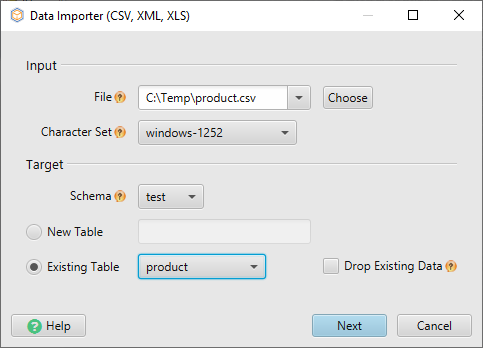
In the import dialog you enter the file path, pick the file encoding, choose the target schema, and say whether the rows go into an existing table or into a new one. When you choose a new table, DbSchema derives the column names and types from the file header and the content preview, and creates that table in the database when the import starts. When the table already exists, you map each file column to a database column and leave out the columns you do not want.
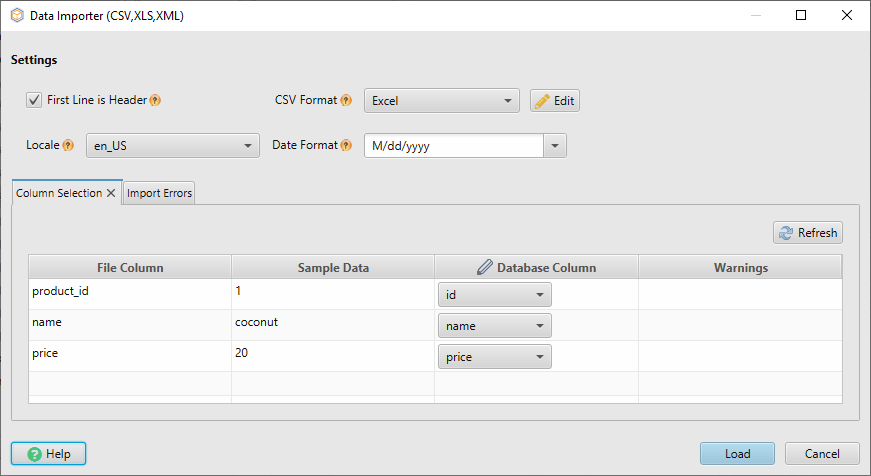
The Settings panel carries the parsing options that the FIELDS clause carries in SQL: First Line is Header, Separator character, Quote character, Escape character, and a date format and locale for date, time and timestamp columns. DbSchema tries to detect the separator, quote and encoding, so the part you check is that its guess matches the file. Errors and the line numbers they came from appear in the Error pane at the bottom of the dialog, which is faster to read than a warnings count.
DbSchema writes the rows to the connected database, not to the design model file. To see what arrived, right-click the table header in the diagram and choose Open in Relational Data Editor, which lists the rows and follows the foreign keys into the related tables.
If the file itself looks wrong before any of this, open it in the CSV Editor from Query Tools → CSV Editor. It handles files up to 5 GB, shows you which delimiter and encoding were detected, and lets you fix a stray value in place. The CSV Editor is free in both the Community and the Pro edition.
The Data Importer and the Relational Data Editor are both Pro edition features, together with saving the model to a file and synchronizing it with the database. Download DbSchema at https://dbschema.com/download.html, connect to MySQL, and point the Data Importer at your file with First Line is Header ticked.









