Scheduled Schema Compare: Tools That Report Schema Drift Automatically
How a scheduled drift check works, what the report should hold, and what each schema compare tool charges to run one.
On this page
A hotfix widens a column in production. Someone adds an index, a lookup structure for faster searches, by hand, and nobody writes it down. That is schema drift: the database no longer matches the design your team agreed on.
A scheduled schema compare checks the structure of your databases at a set time. It finds such changes every night, before the next release trips over them.
Short answer
Schedule a DbSchemaCLI script that saves a snapshot of each environment and lists the lines that differ. When the list has lines, open DbSchema Pro, compare, and export a change report. Every DbSchema download starts with a 15-day trial of all features.
- A scheduled check finds out that something changed. A person decides what to do about it.
- DbSchemaCLI runs the check free in every DbSchema edition. The compare and the change report need DbSchema Pro.
- DbSchema Pro costs 444 USD per seat over three years, the lowest published price in the table below.
DbSchema covers both halves of this job: the unattended check at night and the review the next morning.
What DbSchema adds to a scheduled drift check
- A nightly check that costs nothing. DbSchemaCLI is the command-line client of DbSchema, a program you start from a terminal or a script instead of a window. It comes with every DbSchema installation and is free, so the scheduled part needs no licence.
- One script for all your environments. An environment is one copy of your database, such as production or staging. DbSchemaCLI connects to several databases in one run, as Run SQL on several databases at once shows.
- The list reaches the people who act on it. DbSchemaCLI can send result files by email or FTP, and an alert email when a script fails. Both are listed on the DbSchemaCLI features page.
- Each difference decided, not only listed. Schema Synchronization in DbSchema Pro compares your model with the database. The model is DbSchema's own copy of the schema, in a
.dbsfile. Each difference gets a row and the SQL that fixes it. - A record that people outside the team can read. Export Report in DbSchema Pro writes the differences as HTML or Markdown. It keeps the ignored rows and, if you tick it, the SQL script as an appendix.
The steps are under Schedule the drift check in DbSchemaCLI and Review and report the drift in DbSchema.
How a scheduled drift check works
A scheduled schema compare reads each environment at a set time, for example at two in the morning. It saves a snapshot of each one: a text list of its columns and indexes at that moment. Then it answers one question: do the environments still match?
That gives the check two jobs. The first runs unattended and finds out whether something changed. The second needs a person, who decides for each difference whether the database or the design is right.
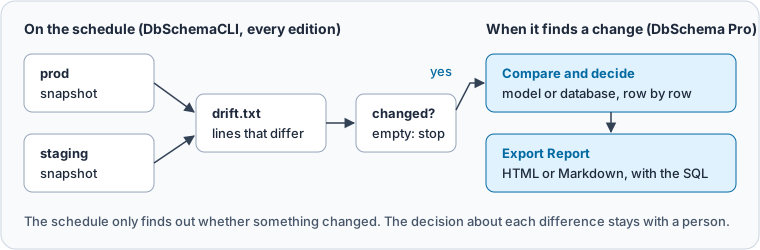
Keep the two jobs apart. A script can tell that orders.total changed. It cannot tell whether the change was a fix or a mistake.
Finding schema drift between environments explains how to pick the reference environment and what counts as drift. This article covers the nightly job and the report it leads to.
What a good drift report holds
A drift report has two readers. The engineer on call wants to see at a glance whether anything changed. The reviewer wants each difference with a decision and the SQL that settles it.
So the report comes in two stages:
- The nightly list. It has one line per column or index that differs, marked
-or+for the database it exists in. An empty list means no drift, and nobody needs to look. - The change report. It holds each difference with its direction, the ones you chose to ignore, and the SQL script. It goes with the release, or into Git next to your migration scripts.
Git is the version control system most teams keep their code in. A migration script is a file of SQL statements that moves a schema from one version to the next.
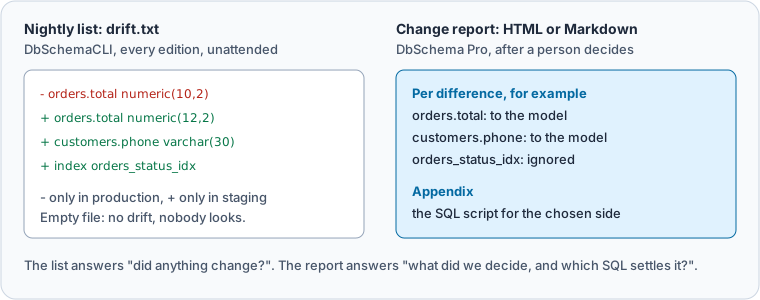
Send the nightly list to a mailbox or chat channel the team reads. Send the change report to whoever approves releases.
Schedule the drift check in DbSchemaCLI
Give DbSchemaCLI the path of a script file at start, and it runs the file. It quits at the line exit.
A scheduler is the program that starts a command at a set time. On Linux and macOS that is cron, and on Windows it is the Task Scheduler.
The example compares two PostgreSQL databases, shop_prod and shop_staging.
First, write snapshot.sql. This query reads information_schema.columns, the standard view that lists every column. It turns each column into one line of text with its type, its length and NOT NULL.
NOT NULL means the column may not be empty. It also adds the definition of each index from pg_indexes, the PostgreSQL view that lists indexes.
SELECT table_name || '.' || column_name || ' ' || data_type
       || coalesce('(' || character_maximum_length || ')', '')
       || coalesce('(' || numeric_precision || ',' || numeric_scale || ')', '')
       || CASE WHEN is_nullable = 'NO' THEN ' not null' ELSE '' END AS line
FROM information_schema.columns
WHERE table_schema = 'public'
UNION ALL
SELECT indexdef FROM pg_indexes WHERE schemaname = 'public'
ORDER BY 1
Second, write drift-check.sql. This script defines both connections and runs the snapshot on each. Then it writes every line that exists on one side only to drift.txt.
The parts between groovy and / are Groovy, a scripting language that reads like Java. In each Groovy block, sql is the open connection.
connection prod -d PostgreSQL -h 127.0.0.1 -P 55180 -D shop_prod -u postgres -p secret
connection staging -d PostgreSQL -h 127.0.0.1 -P 55180 -D shop_staging -u postgres -p secret
connect prod
groovy
def dir = '/srv/drift/'
new File(dir + 'reports/prod.txt').text = sql.rows(new File(dir + 'snapshot.sql').text)*.line.join('\n')
/
connect staging
groovy
def dir = '/srv/drift/'
new File(dir + 'reports/staging.txt').text = sql.rows(new File(dir + 'snapshot.sql').text)*.line.join('\n')
def prod = new File(dir + 'reports/prod.txt').readLines()
def staging = new File(dir + 'reports/staging.txt').readLines()
def drift = (prod - staging).collect { '- ' + it } + (staging - prod).collect { '+ ' + it }
new File(dir + 'reports/drift.txt').text = drift.join('\n')
println "Differences: " + drift.size()
/
exit
Then set it up to run on its own:
- Move the two
connectionlines intoinit.sqlto keep the passwords out of the script. DbSchemaCLI runsinit.sqleach time it starts, soconnect prodstill finds the connections. The file holds passwords as plain text, so only the scheduled account should be able to read it. - Schedule the run. Point cron or the Task Scheduler at DbSchemaCLI, with the full path of
drift-check.sqlafter it. On Windows, the command has the form"C:\Program Files\DbSchema\DbSchemaCLI.exe" C:/drift/drift-check.sql. - Alert on two signals. An exit code is the number a program returns when it ends, and 0 means success. Treat any other exit code as a failed check, and a
drift.txtwith lines as drift.
On our staging database, someone had widened a column, added a column and created an index by hand. Then drift.txt held four lines:
- orders.total numeric(10,2) not null
+ CREATE INDEX orders_status_idx ON public.orders USING btree (status)
+ customers.phone character varying(30)
+ orders.total numeric(12,2) not null
A line with - exists only in production. A line with + exists only in staging. The widened column shows up as one line of each.
Review and report the drift in DbSchema
When drift.txt has lines, open your model in DbSchema Pro and connect it to the environment.
-
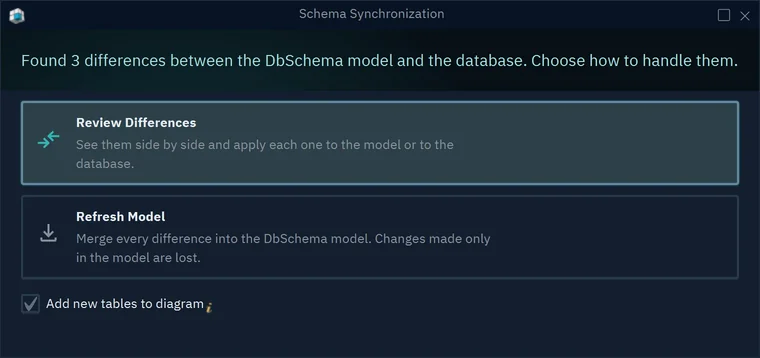
Choose Database → Refresh Model from Database. If nothing differs, DbSchema says "Schemas are identical". Otherwise it counts the differences.
-
Choose Review Differences. The Synchronize Model and Database dialog opens with one row per difference.
-
In the Action column of each row, click the side that wins, or Ignore. Select a row to see, in the lower pane, the SQL that each side would run.
-
Press Export Report. Under Changes, choose the direction, such as From Database to DbSchema Model.
-
Under Include, tick the ignored differences and the SQL script appendix. Under Format, choose HTML or Markdown, then press Export.
-
Apply your decisions with the button Apply to the model or Commit in the database. Commit in the database shows one statement at a time before it runs.
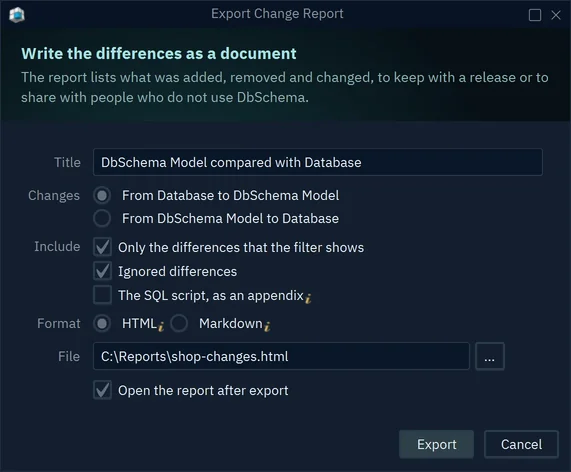
The HTML report opens in any browser and prints to PDF. The Markdown report fits a Git repository or a wiki, so each drift you resolved has a record. To design changes in the model and deploy them on purpose, read schema management tools.
What scheduled schema compare costs
Prices come from each vendor's own page, in USD per user, checked on 15 November 2026.
| Tool | What runs on the schedule | Edition you need | Price per user | 3 years |
|---|---|---|---|---|
| DbSchema | DbSchemaCLI script, free in every edition | Pro for compare and report | 294 one-time, updates 75 a year from year 2 | 444 |
| dbForge Schema Compare for SQL Server | Command-line compare | Professional | 359.95 a year | 1,079.85 |
| Redgate SQL Compare | Command line | Pro, sold only in SQL Toolbelt Essentials | 1,410 a year | 4,230 |
| Redgate Flyway | Drift detection and changes report | Enterprise | Price on request | On request |
| Liquibase | diff command | Open Source; Secure for procedures, functions and triggers | Secure: quote only | On request |
dbForge Schema Compare lists its command-line interface in the Professional subscription. Its system requirements name Windows only. Redgate states that automated use of its command-line tools needs a Flyway Enterprise, Redgate Deploy or SQL Toolbelt licence.
Flyway's feature summary marks drift detection and the changes report as Enterprise only. Liquibase Open Source compares tables, columns, keys, indexes, sequences and views for free. It has no model to review the differences in, and every Liquibase Secure plan is sold by quote.
DbSchema runs on Windows, macOS and Linux. It compares every database it connects to, SQL Server included.
Its licence is perpetual. The version you bought keeps working for good, and the yearly fee only pays for updates.
Download DbSchema and try all features free for 15 days, without registration. The DbSchemaCLI check stays free in DbSchema Community Edition after the trial. The model file, the compare and the change report need DbSchema Pro, priced on the purchase page.
Sources
Check every night, review only what changed
DbSchemaCLI runs the scheduled check in every DbSchema edition. Comparing the model with the database, deciding each difference and exporting the HTML or Markdown change report are in DbSchema Pro. Try all features free for 15 days.