DbVisualizer Alternative in 2026: DbSchema for Database Design
What DbSchema adds when the work moves from querying a database to designing, documenting and comparing it, and how to switch.
On this page
DbVisualizer has been your query client for years, and now somebody asks for a schema that does not exist yet, documentation a colleague can read, or a list of what changed between test and production. For that work, the DbVisualizer alternative is DbSchema: it keeps the design in a model file you edit offline, compares it with the live database, generates the migration SQL and exports HTML5 documentation. Both connect over JDBC, so the switch keeps your drivers and connections.
Short answer
Switch to DbSchema when the questions are about the design rather than the data: what the schema should become, how it differs from production, and how the rest of the team reads it. Keep querying where you query today if that suits you; DbSchema takes over the model.
- DbVisualizer reads databases; DbSchema designs them in a model file.
- Compare with the database and the migration SQL are in DbSchema Pro.
- Connecting, reverse-engineering, diagrams and the SQL editor are free in DbSchema Community.
A foreign-key graph misses every reference the database never declared
Most lists of DbVisualizer alternatives compare query clients such as DBeaver, Beekeeper Studio and TablePlus, which answer the same questions DbVisualizer already answers. The reason to leave is usually a different one: the work has moved from reading a database to shaping it, and DbVisualizer's own documentation draws the line in three places.
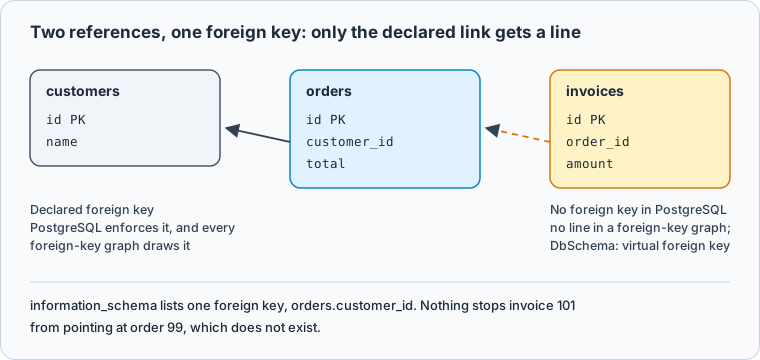
DbVisualizer's user guide, read on 3 November 2026, says its References graph shows how tables are related through foreign keys. A reference the database never declared gets no line. This PostgreSQL schema has two references and one foreign key:
CREATE TABLE customers (id integer PRIMARY KEY, name text);
CREATE TABLE orders (id integer PRIMARY KEY, customer_id integer REFERENCES customers(id), total numeric(10,2));
CREATE TABLE invoices (id integer PRIMARY KEY, order_id integer, amount numeric(10,2));
Asking information_schema for the foreign keys returns one row, so a graph built from them shows invoices on its own:
Result · PostgreSQL 17.6
| table_name | column_name | references_table |
|---|---|---|
| orders | customer_id | customers |
With nothing declared, nothing stops an invoice from pointing at an order that does not exist. After inserting order 10 and invoices 100 and 101, a join shows the orphan:
SELECT i.id, i.order_id, o.id AS matching_order
FROM invoices i LEFT JOIN orders o ON o.id = i.order_id
ORDER BY i.id;
Result · PostgreSQL 17.6
| id | order_id | matching_order |
|---|---|---|
| 100 | 10 | 10 |
| 101 | 99 |
The other two lines are in the same user guide. Its schema comparison "does not provide a way to fully show the differences between two schemas"; you compare grids one object type at a time, in the Pro edition. And its schema export writes SQL or XML for the structure, while its HTML output is "specifically for table data".
DbSchema keeps the design in a model you compare and document
DbSchema is a desktop application for designing, documenting and querying databases on Windows, macOS and Linux, for relational and NoSQL engines. It reverse-engineers a database into a diagram you edit, and the diagram belongs to a model that can exist without the server.
The model is where a design starts before the database has it. Database → Offline (connect later) lets you edit tables, columns and keys with no server reachable, and File → Save Model to File keeps the result as one .dbs file, which DbSchema Pro needs (DbSchema schema synchronization). With File → Git Collaboration you commit and pull that file from inside DbSchema, so a schema change reads as a diff in a pull request (DbSchema Git).
The reference the database never declared becomes a virtual foreign key. Drag invoices.order_id onto orders.id, tick Virtual in the dialog, and DbSchema draws the line and keeps it in the model file; the Query Builder and the Data Explorer, both in Pro, follow it like a real key (DbSchema foreign keys). The Data Explorer then opens an order and, beside it, only that order's invoices.
Comparison runs between the model and the database. Database → Refresh Model from Database counts the differences, and Review Differences opens the Synchronize Model and Database dialog, one row per difference, where you choose which side wins:
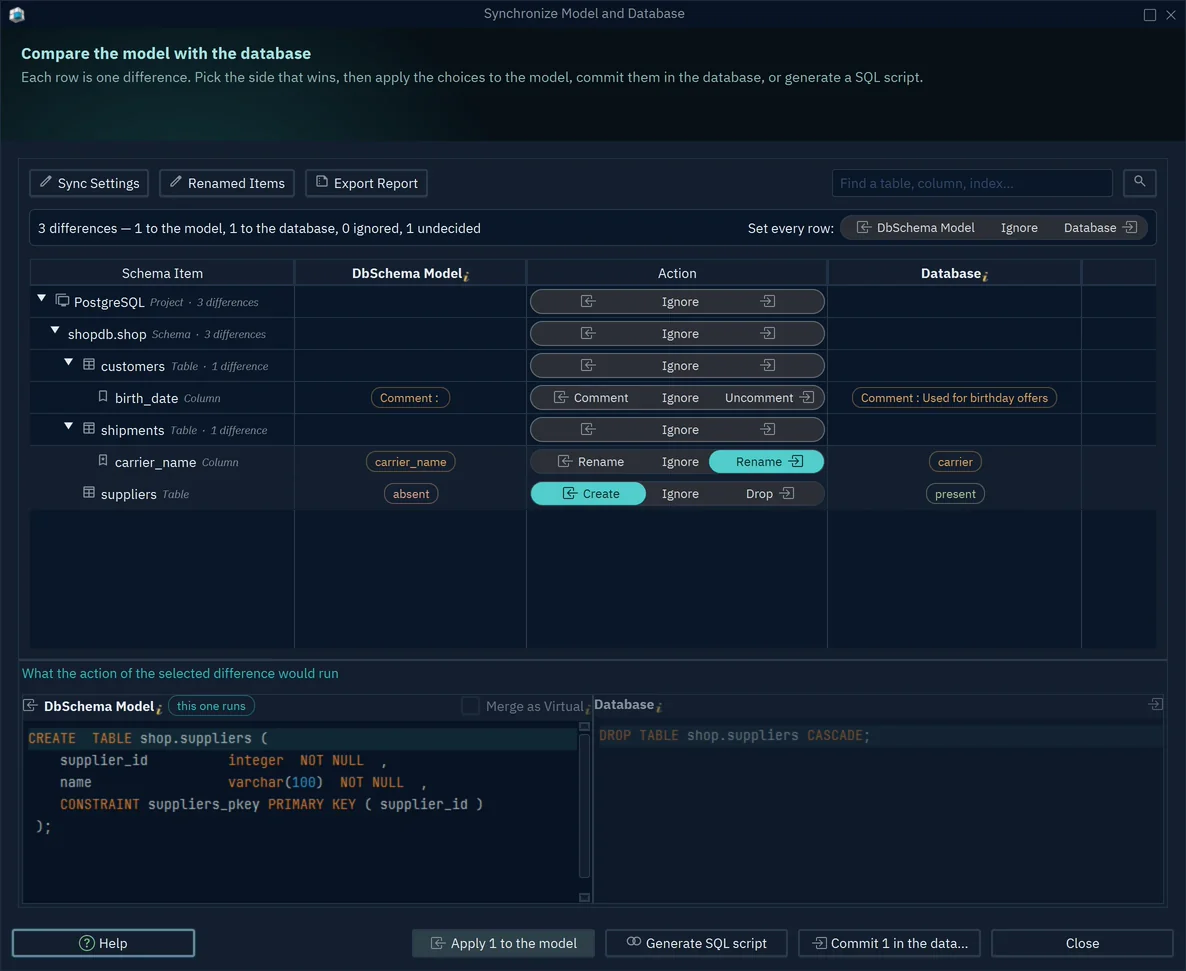
- 1Create birth_date in the database
- 2The statement that runs: ALTER TABLE ... ADD birth_date
- 3Write the statements to a script instead
Generate SQL script writes the statements without running them, so a migration goes through review like any other code. File → Export As... → HTML5/PDF Documentation exports the diagram as a vector image with table and column comments as mouse-over tooltips, plus PDF and Markdown, for colleagues without a database client (DbSchema schema documentation).
Moving a DbVisualizer project into DbSchema takes four steps
-
Connect to the same database Community
Choose the engine and enter the host, database and credentials you use in DbVisualizer. DbSchema connects over JDBC and downloads the driver.
-
Reverse-engineer the schema Community
In Reverse Engineer the Database, tick the schemas to import and press Import. DbSchema draws the tables and their declared foreign keys on a diagram you can edit.
-
Save the model and add the missing links Pro
Save with
File → Save Model to File, then drag each undeclared reference onto its parent column and tick Virtual. -
Compare before every release Pro
Run
Database → Refresh Model from Database, review the differences and generate the SQL script for the side that should win.
The switch pays off on design, comparison and documentation
The rows below are the ones that decide a switch. DbVisualizer values come from its pricing page and user guide, read on 3 November 2026.
What you can design and see
Only DbSchema keeps a design you can edit, version and extend beyond the declared keys:
| DbSchema | DbVisualizer | |
|---|---|---|
| Free edition | Community: connect, reverse-engineer, edit tables on the diagram, SQL editor | Free: References graphs, no table management |
| Diagram of the schema | Editable design, several diagrams per model | References graph from foreign keys |
| Undeclared references | Virtual foreign keys in the model file, Pro | Not drawn |
| Design kept in a file | .dbs model file in Git, Pro | Git for SQL scripts |
What you compare, publish and pay
DbSchema turns a comparison into migration SQL and documentation, for a one-time price:
| DbSchema | DbVisualizer | |
|---|---|---|
| Compare with the database | Model against database, with migration SQL, Pro | Grids compared one object type at a time, Pro |
| Schema documentation | HTML5 with the diagram, PDF, Markdown, Pro | HTML export for table data |
| Paid licence | Pro 294 USD one-time, or 29.40 USD a month | Pro 199 USD first year, 89 USD from the second |
| Trial | 15 days | 21 days |
Both paid licences keep working after the first year: DbSchema Pro's updates then cost 75 USD a year and are optional (DbSchema purchase page), and DbVisualizer's pricing page says every subscription includes a perpetual usage licence. The feature-by-feature head-to-head, beyond the reasons to switch, is in DbSchema vs DbVisualizer.
DbSchema pays off fastest when others must read your schema
DbSchema pays off fastest when somebody besides you has to understand the schema: a reviewer reading a migration in a pull request, a new developer reading the diagram on the first day, or a colleague opening the HTML5 documentation without a database client. It also pays off when you own several engines, because the model, the comparison and the documentation work the same way on each of them.
Download DbSchema, connect it to a database you already query in DbVisualizer and reverse-engineer it: the Community Edition shows the schema as a diagram you can edit. Saving the model to Git, virtual foreign keys, the comparison with migration SQL and HTML5 documentation are in DbSchema Pro, which you can try for 15 days.
Sources
Design the schema, not just query it
DbSchema keeps your design in a model file, compares it with the live database and generates the migration SQL. Connecting, reverse-engineering and diagrams are free in the Community Edition, with a 15-day trial of every feature.









