How to Design and Manage Apache Derby Databases Visually
For the Java developer who keeps an Apache Derby database running and wants its schema drawn, documented and editable without learning the catalog by hand.
On this page
Apache Derby stopped moving on 10 October 2025, when the developers voted to retire the project into a read-only state and ended development and bug-fixing[1]. Release 10.17.1.0, from November 2023, is the last one there will be. Existing databases keep working and the JDBC drivers still connect. The Derby database in your build is now something you maintain rather than something you upgrade, so an accurate picture of its schema is worth more than it was. DbSchema connects to the database directory, draws every table as a diagram, and exports documentation a colleague can read without a Derby client.
Connect to Apache Derby in DbSchema
Derby runs in two shapes, and the Method list names them Local Connection for the embedded engine and Remote Connection for the Derby Network Server. Embedded needs no server, no port and no credentials, so it is the fastest way to see the walkthrough below work.
- Open DbSchema and choose Connect to Database.
- Pick Apache Derby from the list. DbSchema downloads the JDBC driver for you.
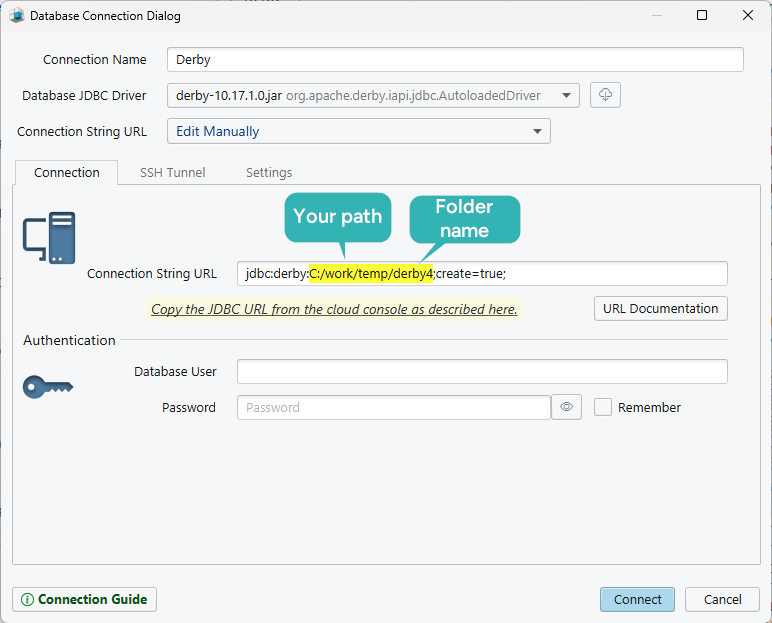
- Set the Method to Paste a JDBC URL.
- Enter the URL of the database directory, with
;create=trueon the end if you want Derby to create it.
jdbc:derby:C:/work/temp/derby4;create=true
Leave the user and password fields empty, because embedded Derby asks for neither, and click Connect. Any folder path works in place of the one above. One thing to know before you try it against a database an application already uses: an embedded Derby database belongs to a single JVM, so a running application keeps DbSchema out until it stops. The Derby 10.17 admin guide names the Network Server as the route for multiple JVMs[2]. Start it and connect with a jdbc:derby://host:1527/mydb URL, where 1527 is the default port, and several clients get in at once. Connecting and reverse-engineering are in the free Community Edition.
See a Derby schema as an interactive diagram
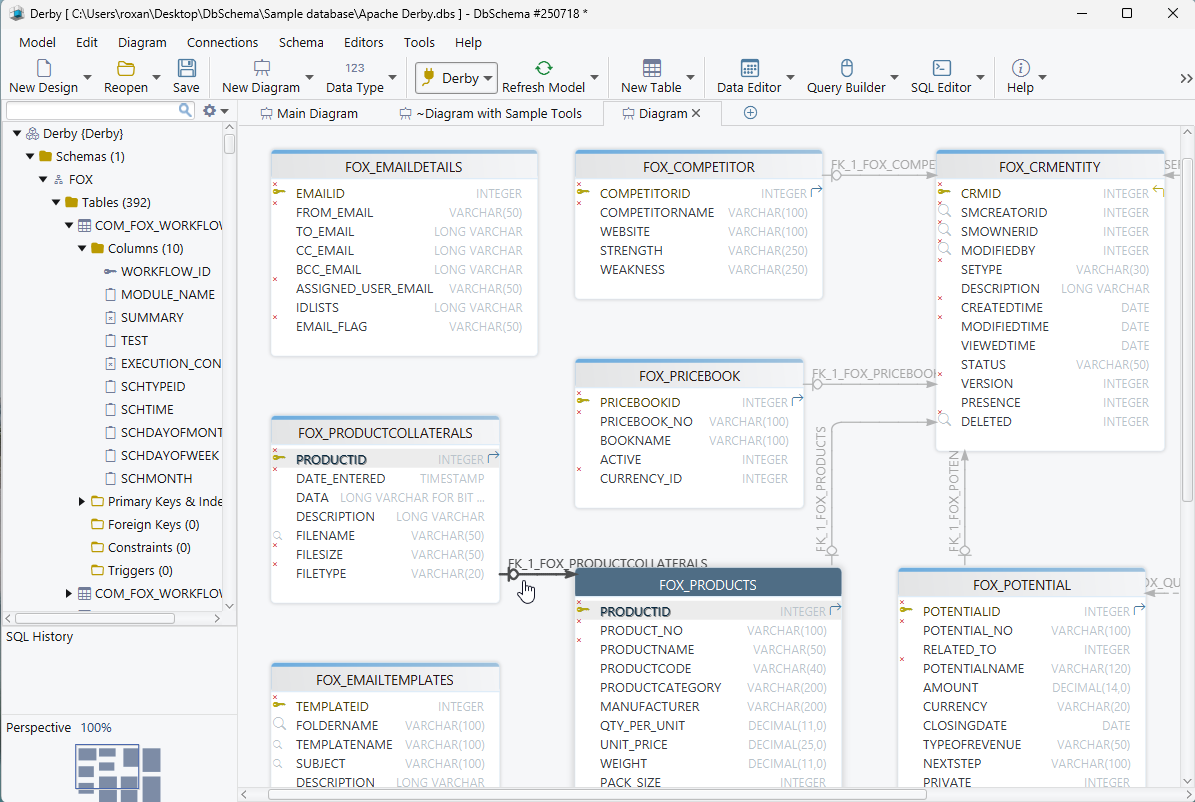
Every table lands on the canvas with its columns, types, primary key and constraints, and each foreign key is drawn as a line to the table it points at. Reading that is faster than reading the DDL, and it answers the question the DDL makes you assemble by hand: what depends on the table you are about to change.
The diagram is editable in place. Double-click a table to change a column, drag one column onto another to draw a relationship, and put a large schema on several named diagrams instead of one canvas nobody can read. While DbSchema is connected, an edit made here runs against the Derby database straight away; in offline mode the same edit changes only the model, and you decide later what reaches the database.
Create interactive HTML5 documentation
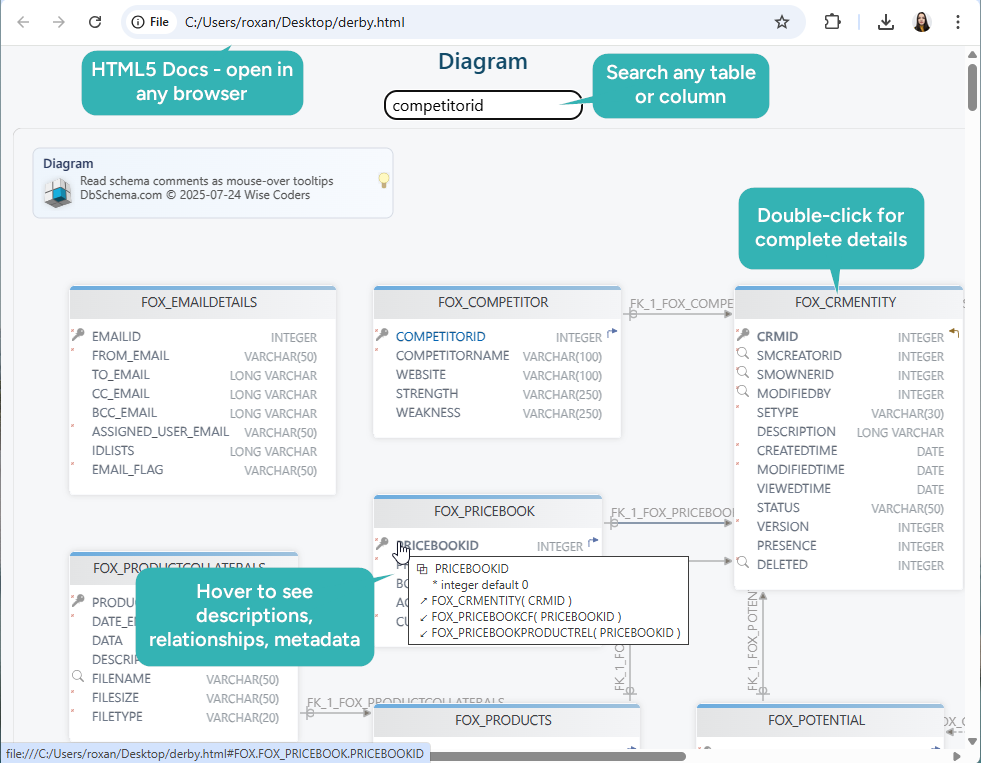
Choose Diagram → Export HTML5 or PDF Documentation and DbSchema writes the model out as HTML5, PDF or Markdown. The HTML5 output is one page that opens in any browser with no server behind it: a vector diagram, a searchable list of tables, and the full column details underneath.
Descriptions are where the value accumulates. Text typed into the Description field of a table or a column appears in every output format, and in HTML5 it also shows as a mouse-over tooltip on the diagram. Comment tags sit beside the descriptions as key-value pairs, which is a good place to record who owns a table or why a column is still there. For a frozen engine, that page is often the only current account of the schema anyone has. Documentation export is a Pro Edition feature.
Track Derby model changes with Git
DbSchema saves the design as a .dbs file in XML, so it belongs in the repository next to the code that uses the database. Choose Git — Collaborative Design from the Model menu and the Git dialog opens, where you clone a repository into an empty folder. Stage, Commit and Push publish what you changed; a colleague pulls the file and opens the same diagram.
Branches are the reason to bother. Try a redesign on a branch, review the diff the way you would review code, and drop the branch if the idea does not survive. None of it touches Derby: the branch, the merge and the review all happen on the file, and the database changes only when you synchronize. The saved model file the workflow versions is a Pro Edition feature.

Build and run queries, visually or with SQL
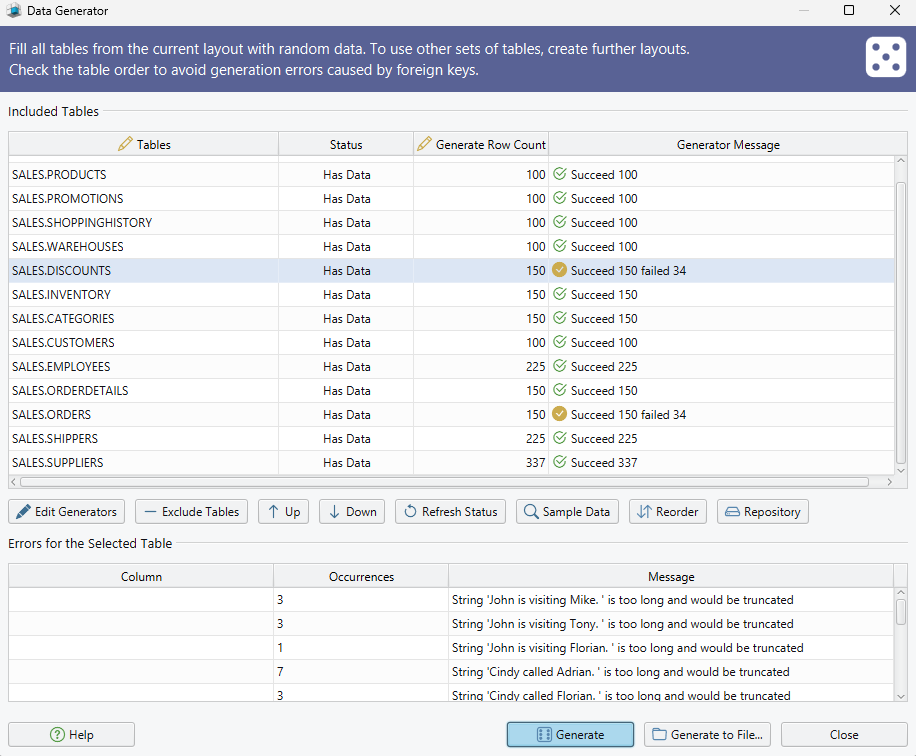
Click a table header in the diagram and the Query Builder opens with that table loaded. Tick the columns you want, follow a foreign key to pull in the related table, and the join comes with it; clicking the join label switches between INNER JOIN, LEFT JOIN and EXISTS. The generated SQL updates live at the bottom of the builder, so the builder is also a way to read the SQL for a join before you commit it to code.
The SQL editor is the other route, with autocomplete over the schema and the rows coming back in the result pane. The SQL editor is in the Community Edition; the Query Builder is Pro.
Sync the model with the live Derby database
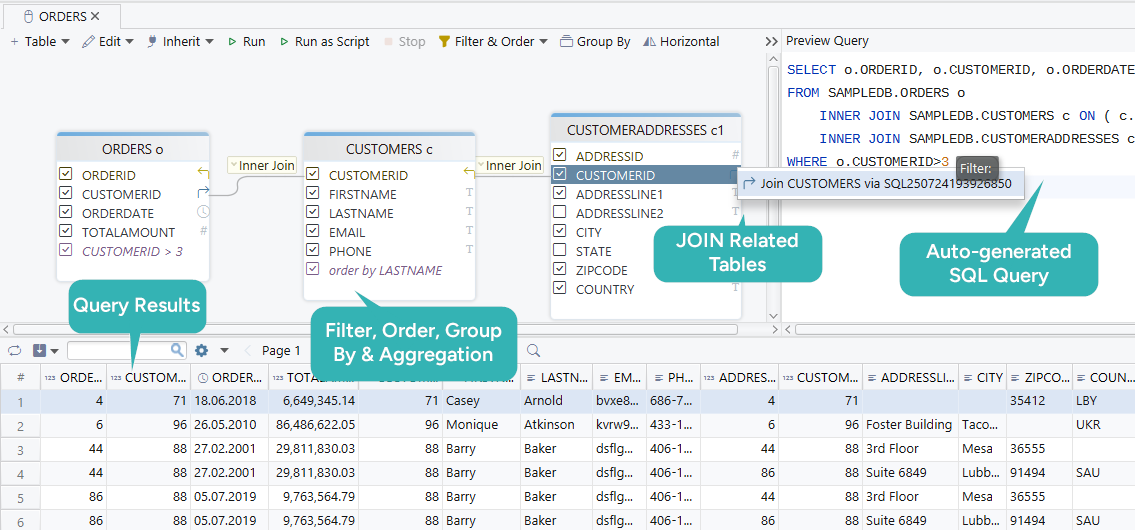
Schema → Compare Model with Database lists every difference between the design and the Derby database, object by object. For each one you decide separately: update the model, push the change to the database, or skip it. Nothing is applied while you read.
Schema → Synchronize Model with Database then opens the Sync Dialog, which generates the SQL for exactly what you approved. The statements are editable before they run, and the database changes when you click Execute and not before. Save the model to a file first, so a run that goes wrong has something to restore from.
DbSchema can also open two model files at once and synchronize between them, so reverse-engineering two Derby directories into two files is how you find out what a test copy has that production does not. Schema synchronization is a Pro Edition feature.
Browse Derby rows in the Relational Data Editor
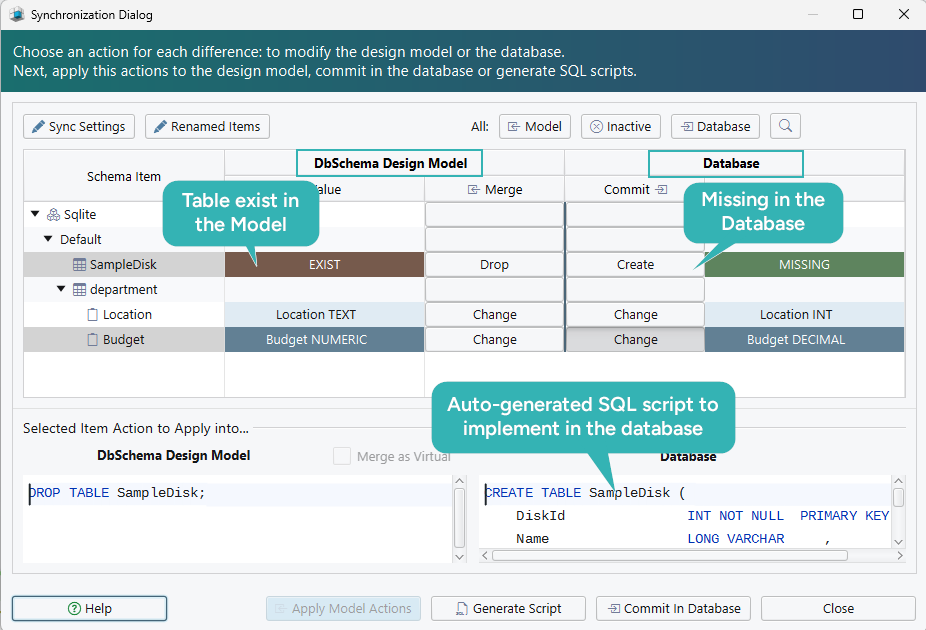
Right-click a table header in the diagram and choose Open in Relational Data Editor. The table opens as a grid, and the foreign key button on its header panel adds a child table as a second pane. Click a row in the parent and the child pane refilters to the rows that match it, cascading as many levels deep as the foreign keys go.
Rows are editable in the grid, each pane filters and sorts on its own, and what you are looking at exports to CSV, JSON or XML. Reading a Derby database this way beats writing a SELECT with three joins to answer a question you will ask once. Every change here goes to the database rather than the model. Relational data browse is a Pro Edition feature; the Relational Data Editor guide shows the panes in action.

Generate test data automatically
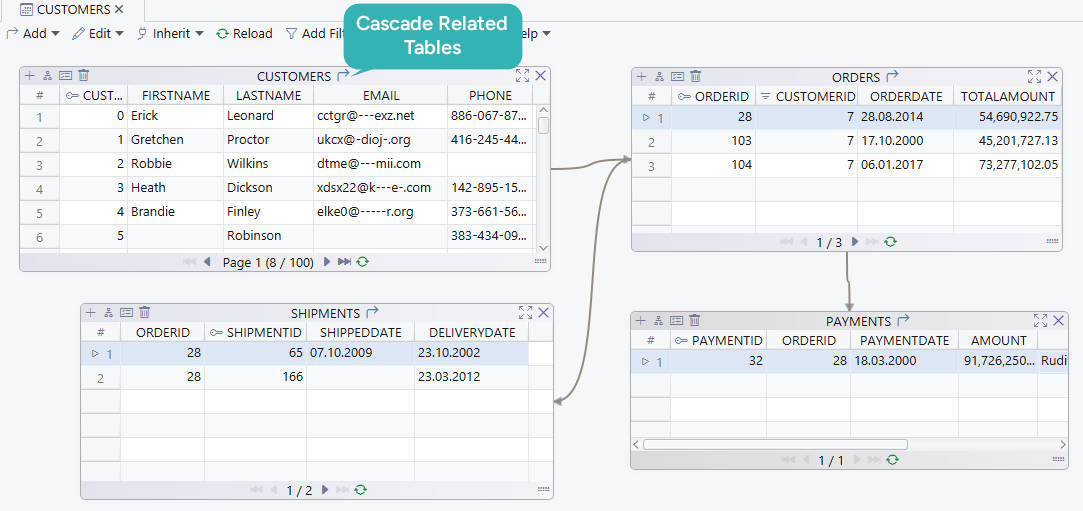
An empty Derby database tells you nothing about how a query behaves, so fill it. Open the Data Generator from Data Tools → Generate Random Data, set the number of rows per table, and give each column a pattern: a name, a date range, a reverse regular expression, or a Groovy script where none of the built-in ones fit.
Two settings make the result usable rather than merely large. A foreign key column takes the load_values_from_pk pattern, which picks its values from the primary keys already in the parent table, so the generated rows join to something. And a seed makes a run repeatable: two columns sharing a seed produce the same sequence of values every time. Order the tables so parents are populated before the tables that reference them. The generator writes to the Derby database, so point it at a development copy. The Data Generator is a Pro Edition feature.
Derby ships ij for SQL and dblook for DDL text, and neither draws a diagram or writes documentation, which is the gap DbSchema fills. Download it at https://dbschema.com/download.html, point it at your Derby directory with a jdbc:derby: URL and read the diagram it draws. Connecting, reverse-engineering, the interactive diagrams and the SQL editor are in the free Community Edition. The saved model file, HTML5 documentation, the Query Builder, schema synchronization, relational data browse and the Data Generator are in the Pro Edition.
Sources
Put a diagram on a database that no longer ships releases
Apache Derby is retired and frozen at 10.17.1.0, which makes an accurate picture of an existing schema more useful, not less. DbSchema connects over the embedded or network driver, reverse-engineers the schema into interactive diagrams, and exports HTML5 documentation your team can read without installing anything. Documentation, schema synchronization and the saved model file are Pro features.









