SQL NULL Functions Explained with Examples
For SQL beginners whose query returns an empty cell where a value should be, and who want a readable value in its place.
On this page
A column that nobody filled in holds NULL. A report shows it as an empty cell, and arithmetic or a label built from it turns NULL too. Three engines have a function of their own that swaps the NULL for a value you choose: IFNULL() in MySQL, ISNULL() in SQL Server, NVL() in Oracle. COALESCE() does the same job on those three and on PostgreSQL.
| Function | Runs on | Returns |
|---|---|---|
| IFNULL(a, b) | MySQL | a, or b when a is NULL |
| ISNULL(a, b) | SQL Server | a, or b converted to a's type when a is NULL |
| NVL(a, b) | Oracle | a, or b when a is NULL |
| COALESCE(a, b, ...) | MySQL, SQL Server, PostgreSQL, Oracle | the first argument that is not NULL |
| NULLIF(a, b) | MySQL, SQL Server, PostgreSQL, Oracle | NULL when a equals b, otherwise a |
Two names catch people out. MySQL's own ISNULL() takes one argument and returns 1 or 0[1], so it tests for NULL rather than replacing it. PostgreSQL has neither IFNULL() nor NVL(), so COALESCE() is how it replaces a NULL[2].
What NULL is, and the table every example uses
NULL means that no value is there. It is not zero and not an empty string, which are both values, and any comparison with it returns NULL instead of true or false[3]. SQL NULL values covers filtering and sorting on NULL; this page covers replacing it.
Every example starts from three students:
CREATE TABLE Students (
    ID    INT PRIMARY KEY,
    Name  VARCHAR(20),
    Age   INT,
    Grade CHAR(1)
);

INSERT INTO Students VALUES
    (1, 'Alice', 20,   NULL),
    (2, 'Bob',   NULL, 'B'),
    (3, 'Carol', 22,   'C');
Alice has no grade and Bob has no age:
| ID | Name | Age | Grade |
|---|---|---|---|
| 1 | Alice | 20 | NULL |
| 2 | Bob | NULL | B |
| 3 | Carol | 22 | C |
IFNULL(), ISNULL() and NVL() belong to one engine each
IFNULL() in MySQL
IFNULL() returns its first argument when that is not NULL, and its second when it is[4]:
SELECT Name, IFNULL(Age, 'Unknown') AS Age FROM Students;
| Name | Age |
|---|---|
| Alice | 20 |
| Bob | Unknown |
| Carol | 22 |
MySQL returns the whole column as text, because IFNULL() takes the more general of its two argument types[4]. If you still need to sort or add up the column, replace the NULL with a number: IFNULL(Age, 0).
ISNULL() in SQL Server
ISNULL() returns the type of its first argument and converts the replacement to that type[5]. Age is an integer, and the words Not Specified cannot become one, so this query fails:
SELECT Name, ISNULL(Age, 'Not Specified') AS Age FROM Students;
A number works, and Bob's age comes back as 0:
SELECT Name, ISNULL(Age, 0) AS Age FROM Students;
The same rule cuts text short. Grade holds one character, so ISNULL(Grade, 'Unknown') returns U for Alice[5]. COALESCE(Grade, 'Unknown') returns the whole word, because COALESCE() takes its type from all of its arguments[6].
NVL() in Oracle
NVL() is Oracle's version. When the two arguments differ in type, Oracle converts one to the other's type and returns an error when it cannot[7], so a word as the default for the numeric Age fails. Turn the age into text with TO_CHAR() first, as Oracle's own example does:
SELECT Name, NVL(TO_CHAR(Age), 'Unknown') AS Age FROM Students;
It returns the same rows as the IFNULL() query.
COALESCE() on all four engines
COALESCE() reads its arguments from the left and returns the first one that is not NULL, or NULL when all of them are[2]. With three arguments it becomes a chain of fallbacks:
SELECT Name, COALESCE(Age, Grade, 'Unknown') AS Detail FROM Students;
On MySQL:
| Name | Detail |
|---|---|
| Alice | 20 |
| Bob | B |
| Carol | 22 |
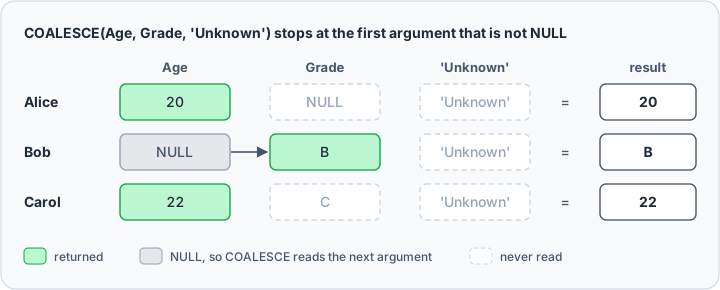
No row reaches 'Unknown', because every student has an age or a grade.
That query runs on MySQL, which gives the result a type that fits every argument[1]. PostgreSQL needs one common type[2] and stops with "COALESCE types integer and character cannot be matched". SQL Server takes the type with the highest precedence[6], integer here, and fails on Bob's B. With one type, the query runs on all four engines:
SELECT Name, COALESCE(Grade, 'Unknown') AS Grade FROM Students;
| Name | Grade |
|---|---|
| Alice | Unknown |
| Bob | B |
| Carol | C |
Of the four names, write COALESCE(). The engine-specific names add nothing to a two-argument replacement, and each ties the query to one database.
IS NULL, not = NULL, and NULL in arithmetic
A comparison with NULL is neither true nor false[3]. A WHERE clause keeps only the rows where its condition is true, so this query returns no rows, not even Alice's:
SELECT Name FROM Students WHERE Grade = NULL;
IS NULL is the test that works:
SELECT Name FROM Students WHERE Grade IS NULL;
| Name |
|---|
| Alice |
To treat two NULLs as equal, the SQL standard writes IS NOT DISTINCT FROM, which MySQL spells <=>[1].
Arithmetic with a NULL returns NULL, so wrap the column rather than the whole expression:
SELECT Name, Age + 1 AS NextAge, COALESCE(Age, 0) + 1 AS Wrapped FROM Students;
| Name | NextAge | Wrapped |
|---|---|---|
| Alice | 21 | 21 |
| Bob | NULL | 1 |
| Carol | 23 | 23 |
NULL in COUNT() and AVG()
Aggregate functions skip NULL, except COUNT(*), which counts rows whatever they hold[8].
SELECT COUNT(*) AS rows_total,
       COUNT(Age) AS ages_known,
       AVG(Age) AS avg_age,
       AVG(COALESCE(Age, 0)) AS avg_zero
FROM Students;
On MySQL:
| rows_total | ages_known | avg_age | avg_zero |
|---|---|---|---|
| 3 | 2 | 21.0000 | 14.0000 |
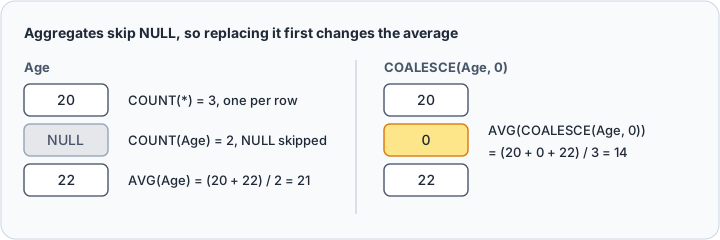
AVG(Age) adds 20 and 22 and divides by 2. Replace the NULL with 0 first and the average drops to 14, which is right only if a missing age really means zero. To count the missing ages, filter on IS NULL:
SELECT COUNT(*) AS missing_ages FROM Students WHERE Age IS NULL;
| missing_ages |
|---|
| 1 |
NULL in string concatenation
Joining text to a NULL is where the engines disagree most. The SQL standard joins strings with two pipes:
SELECT Name, Age || ' years' AS AgeDetail FROM Students;
On PostgreSQL:
| Name | AgeDetail |
|---|---|
| Alice | 20 years |
| Bob | NULL |
| Carol | 22 years |
Bob's label is gone, and the other engines differ again:
| Engine | || with a NULL operand | CONCAT() with a NULL argument |
|---|---|---|
| MySQL | 1 or NULL, as a logical OR[9] | NULL[10] |
| SQL Server 2025 | NULL[11] | the other arguments[12] |
| PostgreSQL | NULL | the other arguments[13] |
| Oracle | the other operand[14] | the other operand[15] |
MySQL's pipes join text only when the PIPES_AS_CONCAT SQL mode is on[9]. Oracle's reference advises wrapping a nullable expression in NVL() anyway, in case its behavior changes[14].
Where the join returns NULL, wrap the whole expression in COALESCE(). On PostgreSQL:
SELECT Name, COALESCE(Age || ' years', 'age unknown') AS AgeDetail FROM Students;
| Name | AgeDetail |
|---|---|
| Alice | 20 years |
| Bob | age unknown |
| Carol | 22 years |
Where the NULL drops out of the join instead, replace the column before you join it.
Empty strings are not NULL, and NULLIF() fixes that
A blank that somebody typed is a value, not a NULL, so none of the functions above replace it. Add a student whose grade was saved as an empty string:
INSERT INTO Students VALUES (4, 'Dan', 21, '');

SELECT Name,
       COALESCE(Grade, 'Unknown') AS Plain,
       COALESCE(NULLIF(Grade, ''), 'Unknown') AS Fixed
FROM Students;
On MySQL:
| Name | Plain | Fixed |
|---|---|---|
| Alice | Unknown | Unknown |
| Bob | B | B |
| Carol | C | C |
| Dan | '' | Unknown |
NULLIF(a, b) returns NULL when a equals b, and a otherwise[4], so NULLIF(Grade, '') turns Dan's blank into a NULL that COALESCE() replaces. Oracle treats an empty string as NULL[16], so there the Plain column already reads Unknown for Dan.



Test NULL replacements in DbSchema
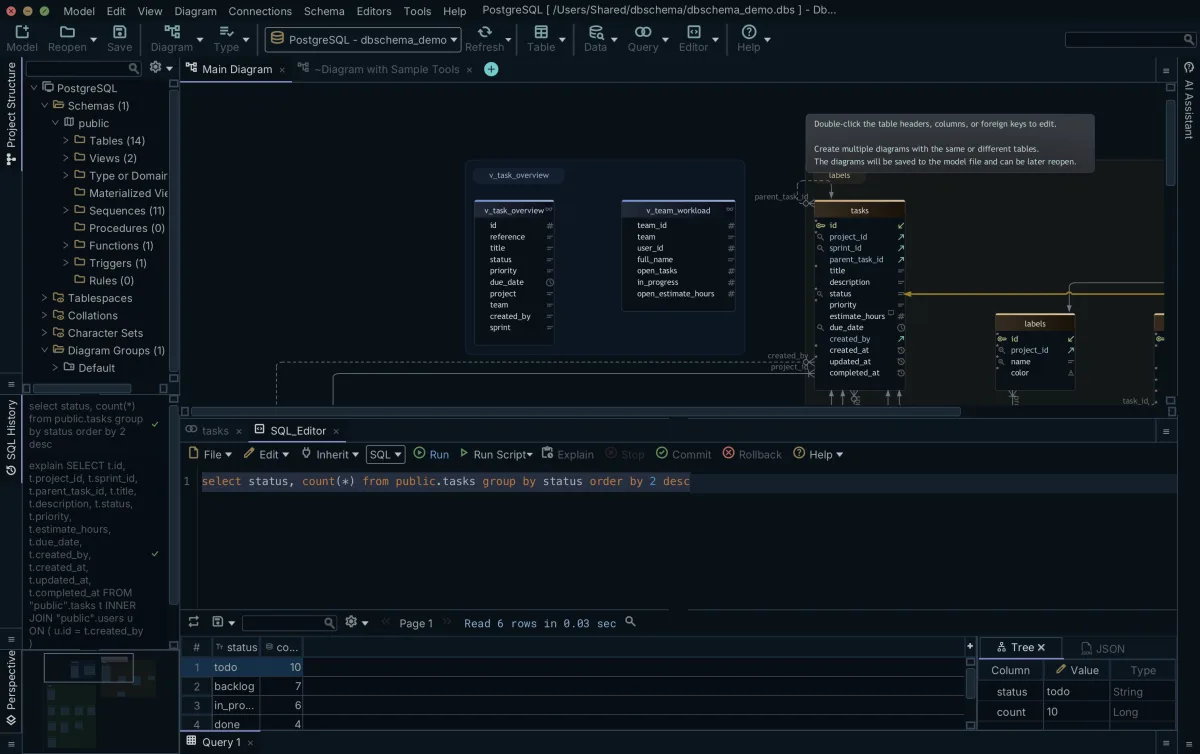
The results above change with the engine, so test your query on the one it will run on. Connect DbSchema to that database, open the SQL Editor, paste the variants one under the other, and run each: DbSchema shows its result as a table under the editor.
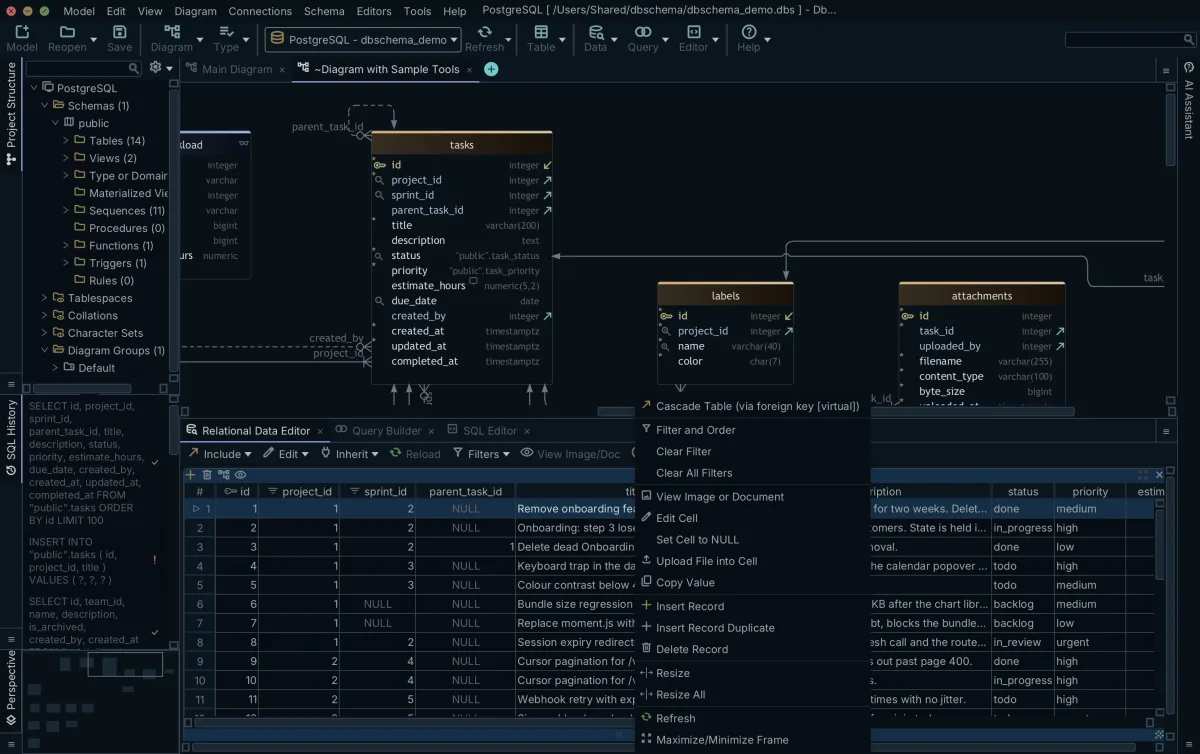
To get rows that hold NULL, edit cells in DbSchema's Relational Data Editor. The change reaches the live database when you click Commit, while the editor itself is saved in the DbSchema model file.
Practice exercises
- List the students whose grade is missing.
- Return every grade, with "Not Assessed" in place of a missing one.
- Compute the average age over the students who have one, then over all of them.
- Build one column that reads "Alice, 20", with "Unknown" where the age is missing.
Download DbSchema from https://dbschema.com/download.html, connect to your database, and try the exercises in the SQL Editor. The SQL Editor is in the free Community Edition, and the Relational Data Editor is in Pro.
Sources
- MySQL 8.4: Comparison Functions and Operators
- PostgreSQL 17: Conditional Expressions
- MySQL 8.4: Working with NULL Values
- MySQL 8.4: Flow Control Functions
- SQL Server: ISNULL
- SQL Server: COALESCE
- Oracle Database 26: NVL
- MySQL 8.4: Aggregate Function Descriptions
- MySQL 8.4: Logical Operators
- MySQL 8.4: String Functions and Operators
- SQL Server: || (String Concatenation)
- SQL Server: CONCAT
- PostgreSQL 17: String Functions and Operators
- Oracle Database 26: Concatenation Operator
- Oracle Database 26: CONCAT
- Oracle Database 26: Nulls
Test your NULL logic before it ships
DbSchema's SQL Editor runs IFNULL, ISNULL, COALESCE and NVL against your own connection and shows the result grid, so engine differences surface before production does. Free Community Edition included.









