Schema Mapping Tools Compared (2026): DbSchema, Navicat, erwin, Talend and MapForce
Five tools for two different mapping jobs, a design mapped onto a database and data mapped between systems, with a run that shows why the type map matters.
On this page
Your design has to land on PostgreSQL for one product and MySQL for another, and the spreadsheet that maps one onto the other is out of date again. For that job, the schema mapping tool to use is DbSchema: it keeps the design in a model file, maps each data type onto the target engine with rules you can read and edit, and generates the SQL when the model and a live database differ. Navicat Data Modeler and erwin Data Modeler do design mapping too; Talend Data Mapper and Altova MapForce map data between systems instead.
Short answer
DbSchema is the schema mapping tool for an architect who maps one design onto real databases and has to review the map with the code. Navicat Data Modeler and erwin Data Modeler model and map designs as well; Talend Data Mapper and Altova MapForce transform data, not designs.
- Mapping a design onto one or more databases, kept in Git: DbSchema.
- A governed model repository with an annual seat licence: erwin Data Modeler.
- Mapping records between formats in a pipeline: Talend Data Mapper or Altova MapForce.
Schema mapping means two jobs, and architects usually need the first
"Schema mapping" names two jobs. The first maps a design onto a database: entities onto tables, logical types onto the types of PostgreSQL, MySQL or SQL Server, and the design onto the live schema when either one changes. DbSchema, Navicat Data Modeler and erwin Data Modeler do this. The second maps data between systems: the fields of an XML or JSON message onto the columns of a table, inside a running integration. Talend Data Mapper and Altova MapForce do this, and most "data mapping tools" lists you find are about the second job.
A database architect usually needs the first, and the run below shows why it is more than renaming types.
One CREATE TABLE gives PostgreSQL and MySQL different column types
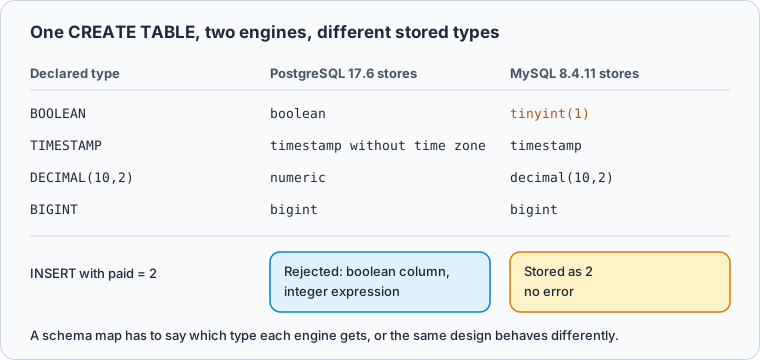
This statement runs unchanged on PostgreSQL 17.6 and on MySQL 8.4.11:
CREATE TABLE orders (id BIGINT PRIMARY KEY, placed_at TIMESTAMP, paid BOOLEAN,
                     total DECIMAL(10,2), note TEXT);
Each engine stores the declared types as its own. PostgreSQL reports them in information_schema.columns.data_type, MySQL in column_type:
Result · PostgreSQL 17.6 and MySQL 8.4.11
| column | declared | PostgreSQL 17.6 | MySQL 8.4.11 |
|---|---|---|---|
| id | BIGINT | bigint | bigint |
| placed_at | TIMESTAMP | timestamp without time zone | timestamp |
| paid | BOOLEAN | boolean | tinyint(1) |
| total | DECIMAL(10,2) | numeric | decimal(10,2) |
| note | TEXT | text | text |
The paid row is the one that changes behaviour. Inserting 2 into it works on MySQL, which stores 2. PostgreSQL rejects the same insert:
INSERT INTO orders VALUES (1, now(), 2, 10, NULL);
PostgreSQL 17.6 answers ERROR: column "paid" is of type boolean but expression is of type integer.
DbSchema states each type mapping and keeps it in Git
In DbSchema Architect you can design without a database first: a logical design holds entities, attributes and relations with general types such as BOOLEAN, DATETIME and NUMERIC, and connects to no database. Model → Generate Physical Model asks for the Target DBMS and shows the Model Conversion Rules, one row per logical type with the type it becomes on that engine. You can edit a row or add your own with Data Type Mapping before you press Convert, so the type map is a decision you make once and can read later.
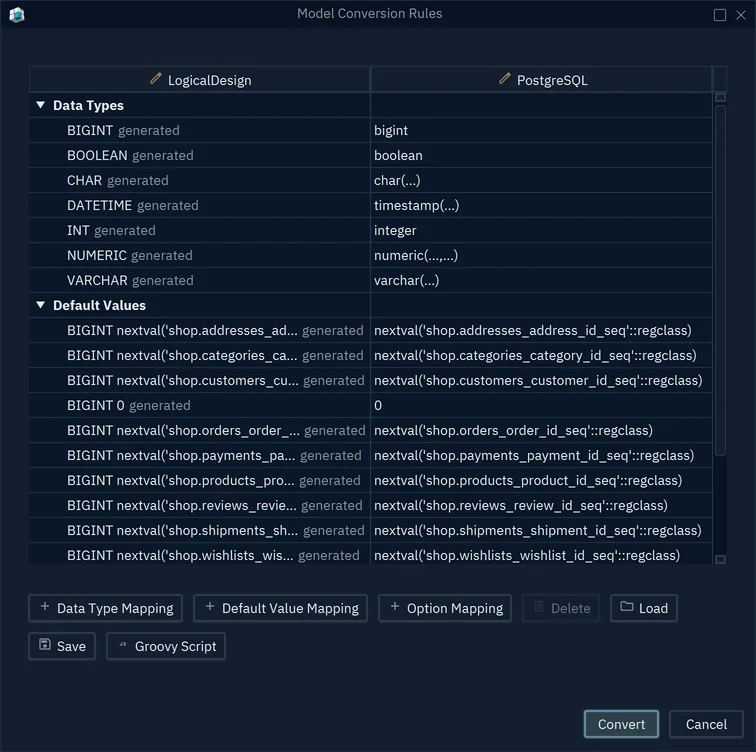
- 1BOOLEAN maps to boolean on PostgreSQL
- 2Add your own data type mapping
The physical model opens in its own window, and the logical design stays as it is. Saving either one with File → Save Model to File, which needs DbSchema Pro, puts the design and its mapping in one file you keep in Git, so a change to the map arrives in a pull request.
Deploying the map is a separate step. Database → Create or Upgrade Model in the Database writes a model into an empty database or brings a database up to the model, one statement at a time in the Execute Script In Database Dialog. When the database has moved, Database → Refresh Model from Database lists every difference, and in the Synchronize Model and Database dialog you choose per row whether the model or the database wins, or generate the SQL script without running it (schema synchronization). Schema synchronization is in DbSchema Pro; logical design is in Architect.
Navicat Data Modeler converts models for eight databases in one workspace
Navicat's product page says Navicat Data Modeler works across conceptual, logical and physical models in one workspace and converts a conceptual model to logical, then to physical. It lists eight databases: MySQL, PostgreSQL, MongoDB, MariaDB, SQL Server, Oracle, SQLite and Snowflake. It rebuilds a model from a live database or from SQL, generates DDL for a model or part of it, compares two model workspaces side by side, and keeps a logical design and its physical schema in step with Model Mapping. Teams share model workspaces through Navicat Cloud or a Navicat On-Prem Server. It is sold as a perpetual licence in Enterprise and Non-Commercial editions with the first year of maintenance included, and its store gives 15 percent off from five licences and 20 percent from ten.
erwin Data Modeler keeps type standards in a per-seat repository
erwin Data Modeler, sold by Quest, comes as an annual subscription per named user in two editions. Standard includes "reusable standards such as model templates, domains, automation macros, naming and datatype standards". Workgroup "extends data modeling capabilities with a centralized model management repository". The naming and datatype standards are erwin's place for the type map; the repository is where a team reviews changes to it.
Talend Data Mapper maps data inside Talend jobs, not designs
Talend Data Mapper is a mapping component used inside Talend Jobs and Routes, where it maps data on its way between systems. It is "not included by default in Talend Runtime": you install it with feature:install talend-data-mapper before you deploy a Job or Route that uses a data mapping component, according to Talend's Data Mapper guide. It works next to a design tool such as DbSchema: one defines the tables, the other moves records into them.
Altova MapForce converts data between formats and databases
Altova describes MapForce as a desktop "graphical data mapping tool for any-to-any conversion and integration" across XML, JSON, relational and NoSQL databases, flat files, Excel and EDI, including data from one database type to another. MapForce 2027 Basic, from 289 EUR, maps XML to XML; Professional, from 559 EUR, adds database and flat-file mapping; Enterprise, from 919 EUR, adds JSON, NoSQL, EDI and Excel, according to Altova's shop. It maps the rows, so the tables it writes into come from a design made elsewhere.
DbSchema starts free and sells one-time or monthly licences
The prices below come from each vendor's own page, read on 3 November 2026. Navicat's store showed no amount for Data Modeler that day, so its row names the licence model only, and Talend Data Mapper is left out because it is installed into Talend Runtime as a feature. erwin's price recurs every year, while DbSchema and Navicat sell licences you keep:
| Tool | Maps | Licence | Price |
|---|---|---|---|
| DbSchema | A design onto databases, and model onto live schema | Community free; Pro and Architect one-time or monthly | Pro 294 USD, Architect 470.40 USD one-time |
| Navicat Data Modeler | Conceptual, logical and physical models | Perpetual, Enterprise or Non-Commercial | Volume discount from 5 licences |
| erwin Data Modeler | Models under shared standards | Annual subscription per named user | Standard and Workgroup, price per seat a year in the Quest shop |
| Altova MapForce | Data between formats and databases | Per edition, from Basic to Enterprise | 289 EUR to 919 EUR |
DbSchema Community Edition is free for any use and covers connecting, reverse-engineering, diagrams and the SQL editor. Pro, at 294 USD one-time with the first year of updates or 29.40 USD a month, adds the model file, schema synchronization and documentation. Architect, at 470.40 USD one-time or 47.04 USD a month, adds logical and conceptual design (DbSchema purchase page). A perpetual licence keeps working if you stop renewing updates.
Choose by whether you map a design or move data
Start from what is being mapped. When it is a design onto one or more databases, and the map has to be reviewed with the application code, run DbSchema: the conversion rules state each target type, the model file goes through pull requests, and synchronization writes the SQL that brings the database to the design. erwin Data Modeler suits a team that has chosen a shared repository with an annual seat licence, and Navicat Data Modeler a team already on Navicat Cloud. When the data itself has to move between systems, Talend Data Mapper and Altova MapForce do that next to whichever tool drew the tables.
To check your own type map, download DbSchema, connect it to the target database and reverse-engineer the schema: the Community Edition shows each column with the type the engine stored. The model file and schema synchronization are in DbSchema Pro, and logical design with its Model Conversion Rules is in DbSchema Architect; both can be tried for 15 days.
Frequently asked questions
What is a schema mapping tool?
A tool that records how one structure maps onto another. For a database architect that is a design mapped onto the tables and types of a real database, as in DbSchema; for an integration developer it is the fields of one system mapped onto another in a pipeline, as in Talend Data Mapper or Altova MapForce.
How much does erwin Data Modeler cost?
Quest sells it as an annual subscription per named user, in a Standard edition and a Workgroup edition that adds the centralized model repository. The current price per seat is in the Quest shop.
Does Navicat Data Modeler offer a perpetual license?
Navicat sells Data Modeler as a perpetual licence in Enterprise and Non-Commercial editions, with the first year of maintenance included. DbSchema Pro and Architect are perpetual too, and also come monthly.
How does DbSchema handle schema changes?
Editing the diagram changes the model file only. Database → Refresh Model from Database lists the differences against the live database, and the Synchronize Model and Database dialog applies each one to the model, commits it in the database, or generates the SQL script.
Are schema mapping tools different from data integration tools?
They map different things. A schema mapping tool for design, such as DbSchema, maps entities and types onto a database; a data integration tool, such as Talend Data Mapper, maps and moves the records once those tables exist.
Sources
Map your schema in a file you can review
DbSchema models offline in a Git-versionable .dbs file, reverse-engineers live SQL and NoSQL databases over JDBC, and generates the migration script from a visual diff. Interactive diagrams and the SQL editor are in the free Community edition.









