SQLite Transactions Explained with Examples
For a developer writing to a SQLite file from an application or the shell, who needs two statements to land together or not at all.
On this page
Two UPDATE statements that move money from one account to another can land separately in SQLite, because a statement run on its own is committed as soon as it finishes. If the second one fails, the first is already in the file. Put BEGIN before the pair and COMMIT after it, and SQLite writes both or neither. End with ROLLBACK instead, and it writes neither. The examples run in the sqlite3 shell, and SQLite CREATE DATABASE shows how to get it. Every result below was produced by SQLite 3.50.4.
Run a transfer as one transaction in sqlite3
1. Open the database file
sqlite3 Bank.db
The shell opens Bank.db, and creates the file if it does not exist yet.
2. Create the accounts
CREATE TABLE Accounts (
    id      INTEGER PRIMARY KEY,
    name    TEXT NOT NULL,
    balance INTEGER NOT NULL CHECK (balance >= 0)
);

INSERT INTO Accounts (name, balance) VALUES ('Alice', 500), ('Bob', 300);
Alice and Bob start with 500 and 300:
| id | name | balance |
|---|---|---|
| 1 | Alice | 500 |
| 2 | Bob | 300 |
The CHECK constraint keeps a balance from going below zero, which the section on failed statements relies on.
3. Move the money inside one block
BEGIN;
UPDATE Accounts SET balance = balance - 100 WHERE name = 'Alice';
UPDATE Accounts SET balance = balance + 100 WHERE name = 'Bob';
SELECT id, name, balance FROM Accounts;
Inside the block, this shell already shows the new balances:
| id | name | balance |
|---|---|---|
| 1 | Alice | 400 |
| 2 | Bob | 400 |
No other connection sees them yet. A second sqlite3 Bank.db, opened in another terminal, still reads 500 and 300 at this point.
4. Commit
COMMIT;
Now the second shell reads 400 and 400 too. Had the block ended with ROLLBACK instead, both rows would have gone back to 500 and 300, and no other connection would ever have seen the change.
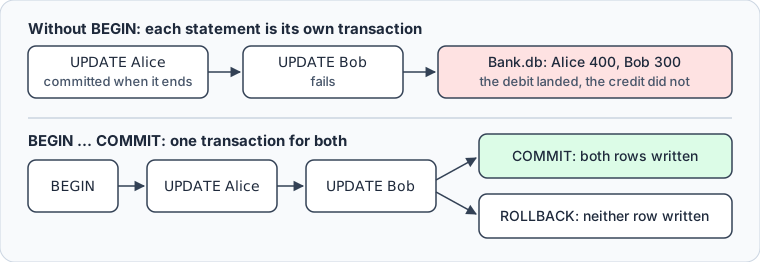
Three commands control a block, and the words in square brackets are optional:
| Command | What it does |
|---|---|
BEGIN [TRANSACTION] | opens the block |
COMMIT [TRANSACTION] or END [TRANSACTION] | makes every change in the block permanent |
ROLLBACK [TRANSACTION] | discards every change in the block |
END is the same statement as COMMIT under another name, as the transaction documentation says.
What a transaction guarantees in SQLite
A transaction is a group of statements that SQLite applies as one unit. The commit after each statement, from the opening paragraph, is called autocommit mode, and BEGIN turns it off until the block ends.
The four ACID properties describe what the block guarantees, and SQLite keeps all four even when a program crash, an operating system crash or a power failure interrupts the transaction. Each one can be checked on Bank.db:
| Property | What it promises | What you can check on Bank.db |
|---|---|---|
| Atomicity | all of the block or none of it | end the transfer with ROLLBACK: both balances stay |
| Consistency | every constraint holds once the block commits | a debit below zero fails the CHECK |
| Isolation | other connections see the block only after COMMIT | the second shell read 500 and 300 until step 4 |
| Durability | a committed block survives a crash or power failure | reopen the file after COMMIT: the new balances are there |
Isolation between connections is serializable: SQLite lets one writer at a time change the file, and a reader on another connection sees only committed transactions (isolation in SQLite). A block also rolls back when its connection closes. Quit the shell in the middle of step 3, and the reopened file still holds 500 and 300.
CREATE TABLE and DROP TABLE are part of the block too, so a schema change rolls back with the data:
BEGIN;
CREATE TABLE Transfers (id INTEGER PRIMARY KEY, amount INTEGER);
ROLLBACK;
SELECT name FROM sqlite_schema WHERE name = 'Transfers';
The SELECT returns no row: the table was created inside the block and went with it.
When a statement inside the block fails
A block stays open when a statement in it fails, and a statement that matches no row counts as a success. Both cases leave the decision to you.
The first case is a transfer to an account that does not exist:
BEGIN;
UPDATE Accounts SET balance = balance - 100 WHERE name = 'Alice';
UPDATE Accounts SET balance = balance + 100 WHERE name = 'Carol';
SELECT changes();
| changes() |
|---|
| 0 |
There is no row named Carol, and SQLite reports no error: the second UPDATE changed zero rows, and a COMMIT now would take 100 from Alice and give it to nobody. Check how many rows each statement changed, with changes() in the shell or the row count your driver returns, and end the block with ROLLBACK when the count is 0.
The second case is a statement that SQLite rejects. Here the credit goes first, and the debit breaks the CHECK constraint because Alice has 400:
BEGIN;
UPDATE Accounts SET balance = balance + 500 WHERE name = 'Bob';
UPDATE Accounts SET balance = balance - 500 WHERE name = 'Alice';
The second UPDATE fails with CHECK constraint failed: balance >= 0. SQLite undoes that one statement and keeps the block open, with the credit still in it:
SELECT id, name, balance FROM Accounts;
| id | name | balance |
|---|---|---|
| 1 | Alice | 400 |
| 2 | Bob | 900 |
A COMMIT here would give Bob 500 from nowhere. Answer a failed statement with ROLLBACK, which puts both rows back at 400.
A few errors can cancel the whole block on their own: SQLITE_FULL when the disk is full, SQLITE_IOERR on a disk I/O error, SQLITE_INTERRUPT when the operation is interrupted, and SQLITE_NOMEM when memory runs out. Even for those, SQLite first tries to undo only the failing statement, so the transaction documentation advises a ROLLBACK after any of them. If the block is already gone, that ROLLBACK fails with an error saying that no transaction is active, which does no harm.
When SQLite takes the write lock
SQLite lets many connections read a database at the same time, but only one of them write. BEGIN has three forms, and they differ in when the block claims that single write lock:
| Form | Takes the write lock | Other connections can read during the block |
|---|---|---|
BEGIN or BEGIN DEFERRED | at the first write statement | yes |
BEGIN IMMEDIATE | at BEGIN | yes |
BEGIN EXCLUSIVE | at BEGIN | only in WAL mode |
BEGIN alone means BEGIN DEFERRED. The transfer writes in its first statement, so for it the two behave the same. They differ for a block that reads before it writes, such as one that checks the balance before it takes money out:
BEGIN IMMEDIATE;
SELECT balance FROM Accounts WHERE name = 'Alice';
UPDATE Accounts SET balance = balance - 100 WHERE name = 'Alice';
UPDATE Accounts SET balance = balance + 100 WHERE name = 'Bob';
COMMIT;
The SELECT sees the balance that the debit starts from:
| balance |
|---|
| 400 |
Run the same block with a plain BEGIN in two shells at the same moment, and both read Alice's balance before either one writes. The first UPDATE takes the write lock. The other shell's UPDATE fails with database is locked, the SQLITE_BUSY error, and that shell has to roll back and start again. It fails at once, even when a busy timeout is set: in the default rollback-journal mode, the first shell cannot commit while the second holds its read lock, and the second cannot write while the first holds the write lock. The busy handler documentation calls this a deadlock, which SQLite breaks by returning SQLITE_BUSY. With BEGIN IMMEDIATE, the second shell stops at BEGIN, before it reads a balance that is about to change.
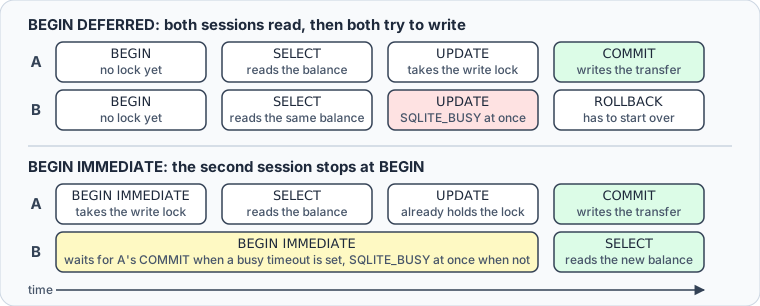
Waiting at BEGIN needs a busy timeout. Without one, the second BEGIN IMMEDIATE fails at once with SQLITE_BUSY. With one, the connection keeps retrying until the lock comes free or the time runs out, here after five seconds:
PRAGMA busy_timeout = 5000;
The lock is also what an open block costs. It stays held until COMMIT or ROLLBACK, so a block left open while the application waits for a user or a network call stops every other writer on the file (file locking and concurrency). Open the block once the data is ready, and close it straight after. In WAL mode, readers and the writer no longer block each other, but there is still one writer at a time.
Undo part of a block with a savepoint
A second BEGIN inside an open block fails with cannot start a transaction within a transaction, because blocks opened with BEGIN do not nest. Savepoints are the form that does:
| Command | What it does |
|---|---|
SAVEPOINT name | marks a point inside the block, or opens a block when none is open |
ROLLBACK TO name | undoes the work done after the mark; the block stays open |
RELEASE name | drops the mark, keeps the work; commits if that mark opened the block |
Here the credit to Bob stays, the debit from Alice is undone, and the block still ends in a commit:
BEGIN;
UPDATE Accounts SET balance = balance + 100 WHERE name = 'Bob';
SAVEPOINT before_debit;
UPDATE Accounts SET balance = balance - 100 WHERE name = 'Alice';
ROLLBACK TO before_debit;
COMMIT;
SELECT id, name, balance FROM Accounts;
Bob's credit is written, and Alice's balance is where the block found it:
| id | name | balance |
|---|---|---|
| 1 | Alice | 300 |
| 2 | Bob | 600 |
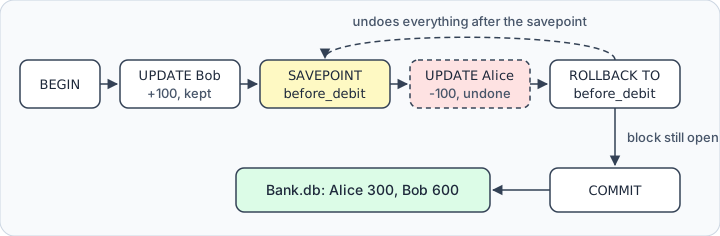
Without the COMMIT after it, ROLLBACK TO would leave the block open and its lock held. Releasing an inner savepoint writes nothing to the file either: its work is safe only once the outermost transaction commits. Savepoints fit a long import, where one bad batch should be undone without losing the batches before it.
Run the transfer in DbSchema



DbSchema runs the same block against Bank.db from its SQL Editor:
- In DbSchema, choose Connect to Database, pick SQLite, and point the Connection Dialog at
Bank.db. DbSchema downloads the JDBC driver itself. - Open the DbSchema SQL Editor from the Editors menu.
- Paste the
BEGINblock from the sqlite3 steps into the DbSchema SQL Editor, and addCOMMIT;as its last line. - Press Run Script, which makes DbSchema execute the whole editor content, one statement after the other.
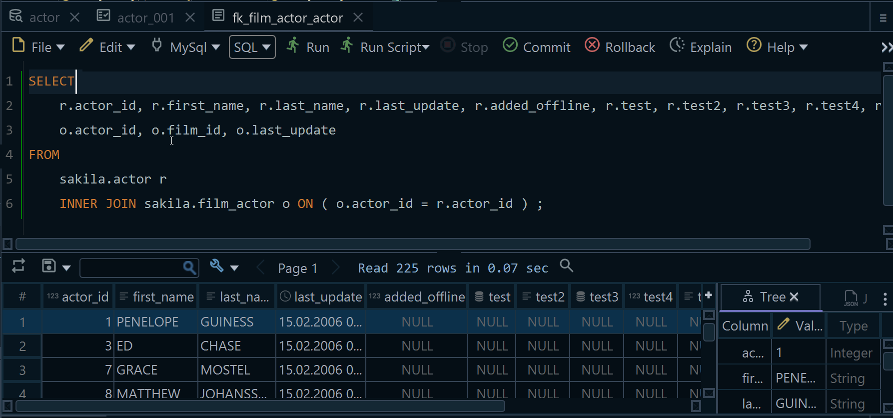
DbSchema opens a SQLite connection in autocommit mode, as the shell does. Each statement outside a block is committed as it runs, and a block ends with the COMMIT or ROLLBACK you write at its end. The statements change Bank.db itself, not the DbSchema model file. The model holds the diagram and the editors you keep, and saving it to a file is part of DbSchema Pro.
Download DbSchema from https://dbschema.com/download.html, connect it to Bank.db, and run the transfer and the savepoint example in its SQL Editor. Connecting, reverse-engineering, the interactive diagrams and the SQL Editor are all in the free Community Edition.
Sources
- SQLite documentation: Transaction
- SQLite documentation: Savepoints
- SQLite documentation: SQLite is transactional
- SQLite documentation: Isolation in SQLite
- SQLite documentation: File locking and concurrency
- SQLite documentation: Register a callback to handle SQLITE_BUSY errors
- SQLite documentation: PRAGMA busy_timeout
- SQLite documentation: Write-ahead logging
- SQLite documentation: Command line shell









