SQLite LIMIT Clause Explained with Examples
For someone who writes SELECT statements against a SQLite file and needs a fixed number of rows back, or one page of them at a time.
On this page
Opening a table you have never looked at with a bare SELECT gives you every row it holds, which in the sqlite3 shell means watching thousands of them scroll past. LIMIT stops that: it caps the number of rows the whole SELECT returns. OFFSET skips rows before the cap applies, which is how you get one page of rows at a time.
SELECT column_list
FROM table_name
ORDER BY sort_column
LIMIT row_count OFFSET rows_to_skip;
Run LIMIT in the sqlite3 shell
- Open a terminal and run
sqlite3 SampleDB.db. The shell opens the file, and SQLite creates the database if it is missing. - Paste in the table below.
- Run the queries in this article, and type
.exitwhen you are done.
CREATE TABLE orders(
   id INT PRIMARY KEY,
   product TEXT NOT NULL,
   quantity INT NOT NULL
);

INSERT INTO orders (id, product, quantity) VALUES
   (1, 'Apples', 5),
   (2, 'Oranges', 7),
   (3, 'Bananas', 8),
   (4, 'Grapes', 10),
   (5, 'Pears', 6);
LIMIT 3 returns the first three rows of the result:
SELECT * FROM orders ORDER BY id LIMIT 3;
| id | product | quantity |
|---|---|---|
| 1 | Apples | 5 |
| 2 | Oranges | 7 |
| 3 | Bananas | 8 |
The ORDER BY is what gives "first" a meaning. Without it, SQLite returns the rows in an order that its SELECT documentation calls undefined, so the same query can hand back a different three rows once the table changes. Sort on another column and the same table answers another question, such as which product sold the most:
SELECT * FROM orders ORDER BY quantity DESC LIMIT 1;
| id | product | quantity |
|---|---|---|
| 4 | Grapes | 10 |
The LIMIT value can be any expression that converts to an integer without loss, including a ? parameter that your program binds. Each value below was run against the table on SQLite 3.50.4:
| LIMIT value | Rows returned |
|---|---|
3 | the first 3 |
10, more than the table holds | all 5 |
0 | none |
-1, or any negative number | all 5, with no upper bound |
'2' or 2.0 | the first 2 |
2.5, NULL or 'two' | an error, "datatype mismatch" |
Paging through rows with OFFSET
OFFSET skips rows before LIMIT starts counting. The second page of two rows skips the first two:
SELECT * FROM orders ORDER BY id LIMIT 2 OFFSET 2;
| id | product | quantity |
|---|---|---|
| 3 | Bananas | 8 |
| 4 | Grapes | 10 |
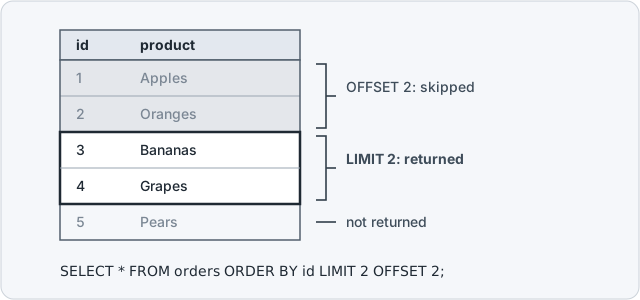
To page through a table, keep LIMIT at the page size and set OFFSET to the page size times the number of pages already shown. Past the end of the table, the query returns whatever rows are left, or none, and never an error. A negative OFFSET counts as zero.
The same pair finds the second-largest value, or any other rank: sort in descending order and skip the rows above it.
SELECT product, quantity FROM orders ORDER BY quantity DESC LIMIT 1 OFFSET 1;
| product | quantity |
|---|---|
| Bananas | 8 |
OFFSET is only allowed after a LIMIT. To skip rows and keep everything after them, write a negative LIMIT, which means no upper bound:
SELECT * FROM orders ORDER BY id LIMIT -1 OFFSET 3;
| id | product | quantity |
|---|---|---|
| 4 | Grapes | 10 |
| 5 | Pears | 6 |
SQLite also accepts LIMIT 2, 2, and it reverses the two numbers: the first is the OFFSET and the second is the LIMIT. SQLite keeps that order for compatibility with other database systems, and its documentation encourages you to write the OFFSET keyword instead. LIMIT 2, 5 returns three rows here, not two.
Why deep pages get slow
LIMIT saves work when SQLite can read the rows in the order you asked for, because it stops after the last row it needs. Sorting by id qualifies, since the primary key's index holds the rows in id order. Sorting by quantity, which has no index, makes SQLite read and sort every row first; our article on EXPLAIN QUERY PLAN shows how the plan reports that.
OFFSET saves no work at all. To return the rows after 900,000 skipped ones, SQLite steps through all 900,000 and throws them away. The fix is keyset pagination: remember the last id the previous page showed, and ask for the rows after it.
SELECT * FROM orders WHERE id > 2 ORDER BY id LIMIT 2;
It returns the same two rows as the OFFSET page above, but the plans differ:
| Query | EXPLAIN QUERY PLAN |
|---|---|
ORDER BY id LIMIT 2 OFFSET 2 | SCAN orders USING INDEX sqlite_autoindex_orders_1 |
WHERE id > 2 ORDER BY id LIMIT 2 | SEARCH orders USING INDEX sqlite_autoindex_orders_1 (id>?) |
SCAN reads the index from its first entry, and SEARCH jumps into it just past id 2. On an in-memory table of 1,000,000 rows with an INTEGER PRIMARY KEY, SQLite 3.50.4 took a median of 11.4 ms over 20 runs for ORDER BY id LIMIT 10 OFFSET 900000, and 0.007 ms for WHERE id > 900000 ORDER BY id LIMIT 10, the same as for the first page.
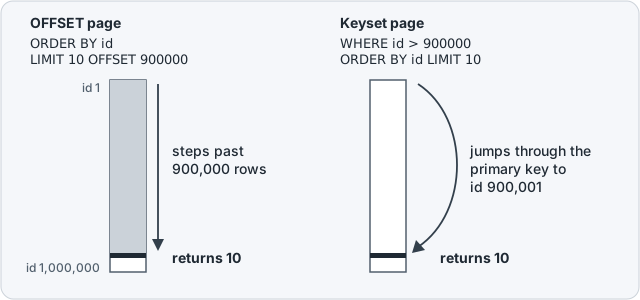
Keyset pagination only knows the page before, so it cannot jump to page 47. Use OFFSET where people pick a numbered page from a short list, and keyset pagination for a long list read in order, such as an export or an endless scroll.
The restrictions on a LIMIT clause
In a compound SELECT, the one built with UNION, UNION ALL, INTERSECT or EXCEPT, only the last SELECT may carry a LIMIT, and that LIMIT applies to the whole compound. A LIMIT on an earlier branch fails with "LIMIT clause should come after UNION ALL not before". To limit each branch, wrap it in a subquery:
SELECT * FROM (SELECT product, quantity FROM orders ORDER BY quantity DESC LIMIT 1)
UNION ALL
SELECT * FROM (SELECT product, quantity FROM orders ORDER BY quantity LIMIT 1);
| product | quantity |
|---|---|
| Grapes | 10 |
| Apples | 5 |
A compound whose last element is a VALUES clause takes no LIMIT at all. Our article on UNION and UNION ALL covers the other compound rules.
Paging also needs an order that stays the same between runs. When two rows tie on the ORDER BY column, SQLite may return them in either order, so one row can show up on two pages and the other on none. Make a unique column the last sort key, as in ORDER BY quantity DESC, id.
DELETE and UPDATE accept ORDER BY and LIMIT only in a SQLite built with the SQLITE_ENABLE_UPDATE_DELETE_LIMIT option, which the DELETE documentation describes. Run PRAGMA compile_options; to check: a build that has it lists ENABLE_UPDATE_DELETE_LIMIT, and one without it rejects DELETE ... LIMIT 1 as a syntax error. A subquery works in every build:
DELETE FROM orders WHERE id IN (SELECT id FROM orders ORDER BY id LIMIT 1);
SQL Server has no LIMIT and uses TOP, or OFFSET and FETCH for paging. Our article on TOP, LIMIT, FETCH FIRST and ROWNUM shows the clause for each engine.
LIMIT in the DbSchema SQL Editor



Every query above runs unchanged in DbSchema:
- Start DbSchema, choose Connect to Database, and pick SQLite from the list of database types.
- In the Connection Dialog, point DbSchema at
SampleDB.dband click Connect. - Open the SQL Editor from the Editors menu or the toolbar.
- Type a query and run it. DbSchema runs the statement at the cursor and shows the rows in a result table below the editor.

The statements go to the connected SQLite database. The DbSchema model file holds the diagram and the editors rather than the data. Save the model, which is a Pro feature, and a paging query you tuned can be reopened later. When a LIMIT is in your way, the Save button of the result pane runs the query again and writes the complete result set to a file.
The SQL Editor, the connection and the diagram are all in the free DbSchema Community Edition. Download it at https://dbschema.com/download.html, connect it to your SQLite file, and run the paged query you use most next to a diagram of the tables it reads.









