DbSchema 10.5.2 Release Notes
Explore the DbSchema v10 release notes, featuring the latest updates, new features, and improvements for database design and management.
On this page
DbSchema Release Notes
DbSchema 10.5.2
Release date: 07.09.2026 — changes since version 10.5.0 (10.08.2026).
This release adds Users & Roles — database users, roles and grants managed in versioned permission plans and deployed like any other schema change — and a Flyway Manager that writes the next migration file from the design model. The interface was reworked throughout: a bundled font, a menu bar restructured from nine menus to eight and moved into the title bar, a redesigned welcome screen, and a filter bar on every Data Explorer frame.
Upgrade notes — please read
- The menu bar was restructured. Nine menus became eight:
File · Edit · View · Diagram · Model · Database · Query · Help. The boundary is what the entry needs — Model is the design and works offline, Database is everything that needs a connection, Query is writing and running. TheConnections,Schema,Tools,Logical DesignandDeploymenus are gone and their entries moved into those three. A logical design model shows the same bar without Database. - Customized add-on and statistics queries were reset. The DBMS settings gained a Server
section, and the queries that read the live server — MySQL engines, collations, character sets
and tablespaces; Oracle packages; TimescaleDB hypertables; table row counts and statement
history — moved into it from
engineer. Edits made to those queries fall back to the defaults; re-apply them under the new section. - DbSchema now ships and runs on Java 26 (Liberica 26, JavaFX 26). Nothing has to be installed — the runtime is inside the installation kit as before.
New Features
Users & Roles — permission plans
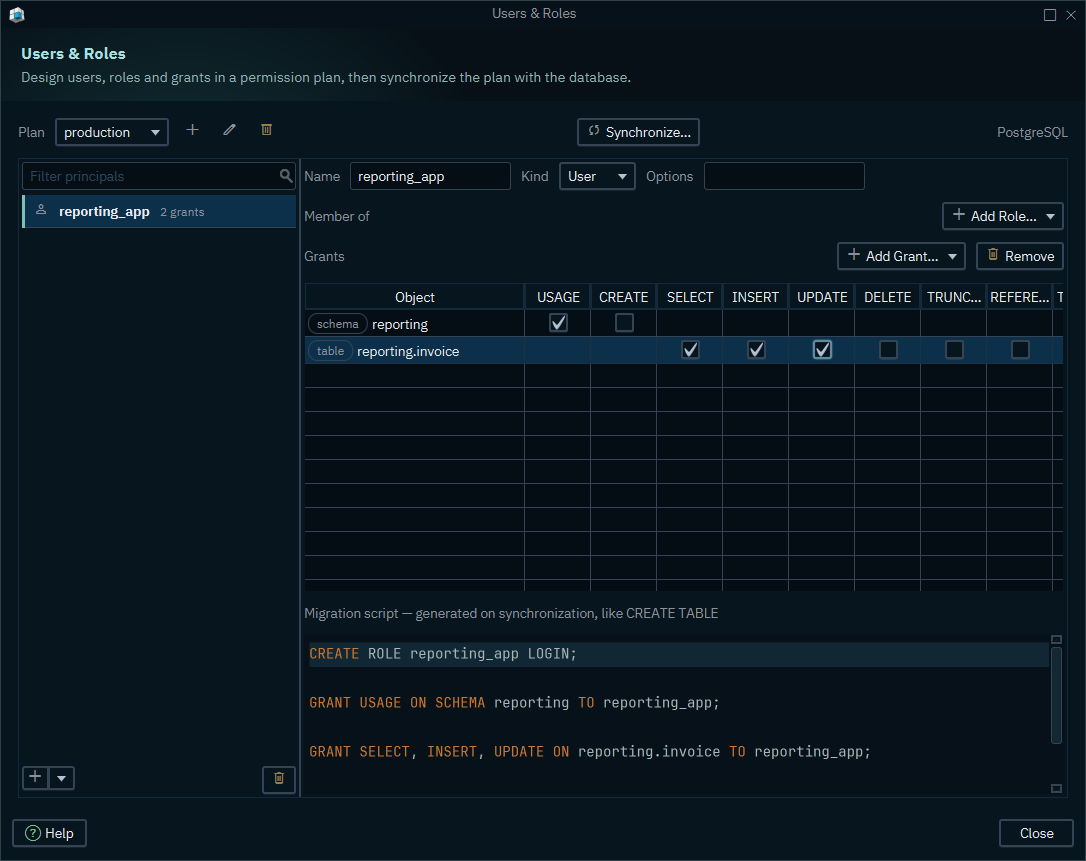
Database users, roles and grants are now designed, versioned and deployed the way tables are.
Database → Users & Roles opens the permission plan editor: the users and roles on the left,
the selected one's memberships and grants on the right, and the migration script the plan would
run underneath — generated on synchronization, exactly like CREATE TABLE.
- A plan is a file beside the model, not inside the
.dbs. Keep several — one per environment — and review each one in Git like any other source file. A password never enters a plan file: a principal records how it authenticates, never the secret. - Add User and Add Role, put a role inside another under Member of, and grant privileges on the objects of the model — with the grant option where the database has one.
- Synchronize compares the plan with the database and applies the difference, through the same engine the schema uses. What it produces is a script you can read and edit before anything runs.
- Removing a principal from the plan leaves the database user or role alone. The plan is a design, and nothing happens to the server until you synchronize.
- The privilege columns follow the database. On PostgreSQL a schema grant offers
USAGEandCREATEwhile a table grant offersSELECT,INSERT,UPDATE,DELETE,TRUNCATE,REFERENCESandTRIGGER, and a user is written as a role withLOGIN. - This first release covers PostgreSQL and MongoDB. The dialog opens on any model, but only those two carry the templates that turn a plan into a script; more engines follow.
Flyway Migrations
Model → Flyway Migrations writes the next migration file from the difference between the design
model and what a folder, a database, a revision or another model holds.
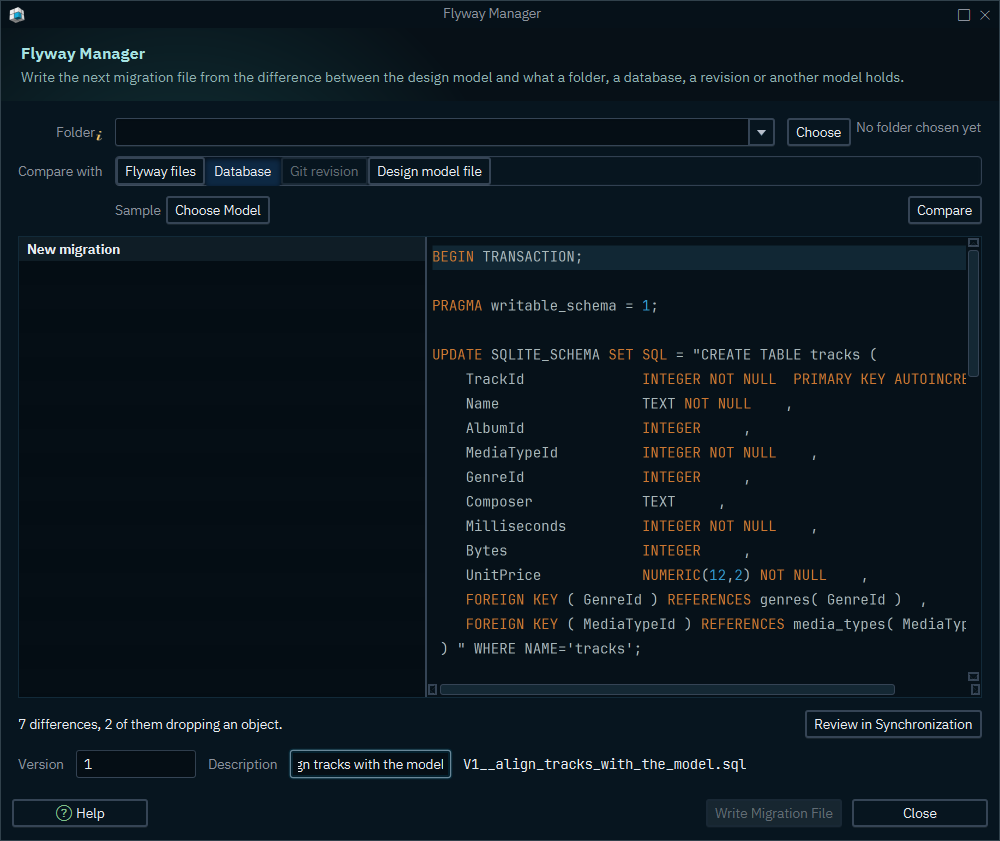
- Point the manager at a migration folder. Its scripts are read, never run — DbSchema replays them in order and builds the schema they describe.
- Compare the design model with any of four sources: the Flyway files replayed that way, the connected database, a Git revision of the model, or another design model file.
- The difference becomes the next migration: give it a version and a description, review the script, and Write Migration File puts it in the folder under the name Flyway expects.
- A Parse Report names the files carrying statements the parser could not apply, so nothing is silently missing, and Review in Synchronization opens the same comparison in the full synchronization dialog.
Data Explorer — a filter bar on every frame
Each browse frame gained a WHERE field between its action bar and its grid.
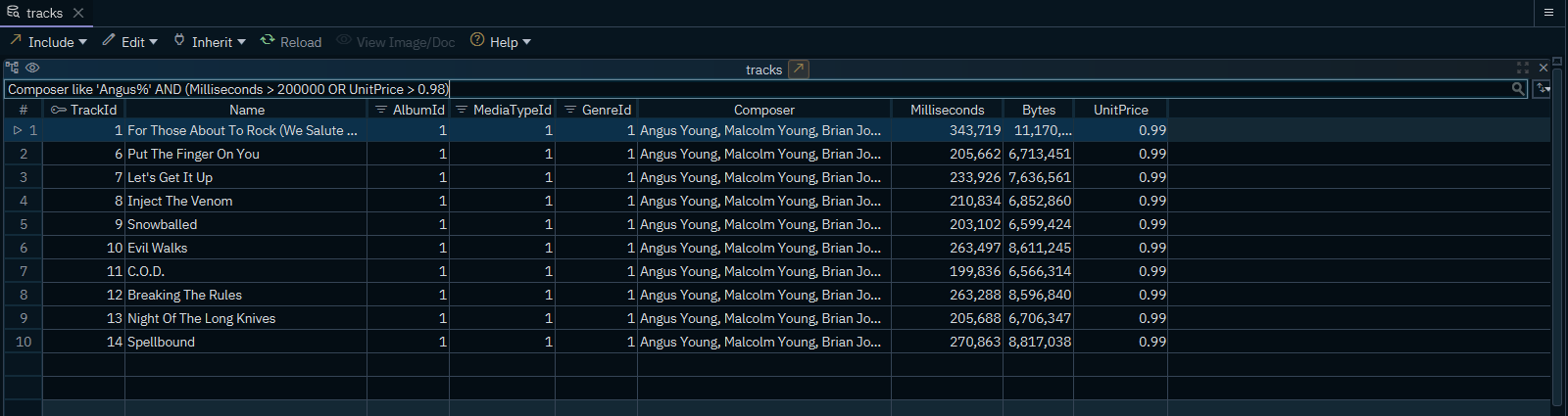
- Type the condition you want —
city like 'Milton%' AND (address_id > 10 OR postal_code IS NULL). The old map of one condition per column is gone, soORand parentheses are finally possible. On MongoDB the field takes a JSON filter. - Right-click a column header and the term is written into the field for you, and the field completes column names as you type.
- Sorting moved to a single button at the end of the row: its menu lists the sorted columns in order, each with its direction and a cross that stops sorting by it.
The workspace, redesigned
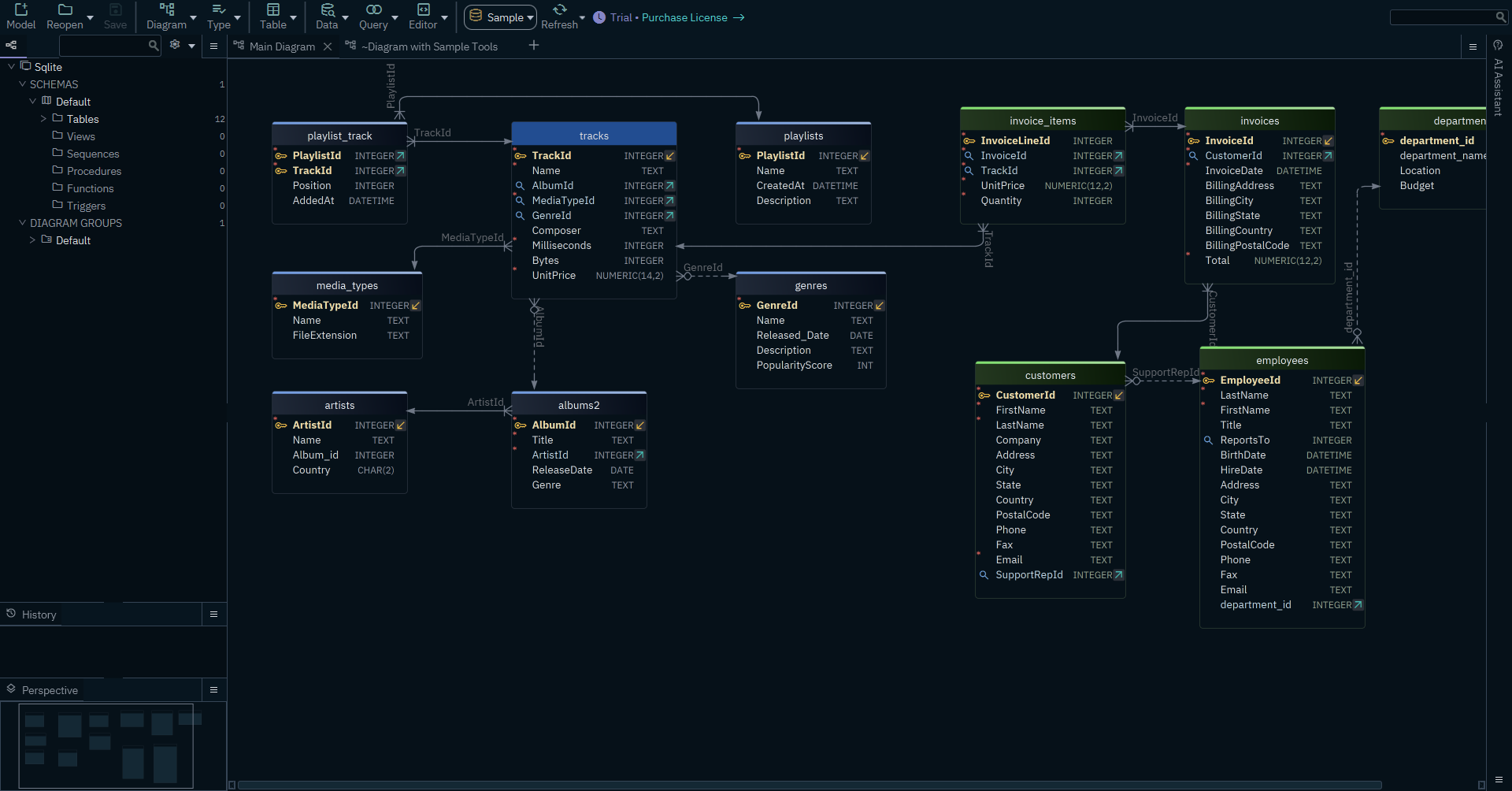
- A bundled font. The interface draws in Dbs UI Sans, shipped inside the installation, and code and data in Dbs JetBrains Mono. A font installed on the machine can no longer shadow the one DbSchema asks for — the cause of the garbled text a few customers saw.
- The menu bar moved into the title bar. On Windows and Linux the menus, the model name and the window buttons share one row, which gives the diagram back the height a separate menu bar took. macOS keeps its system menu bar.
- Tab headers were reworked throughout, and the project structure tree redrawn.
- Two-line dialog headers. A dialog now carries a bold title over a muted line saying what it is for, with its icon in a rounded tile — applied to 34 dialogs in one pass.
The welcome screen
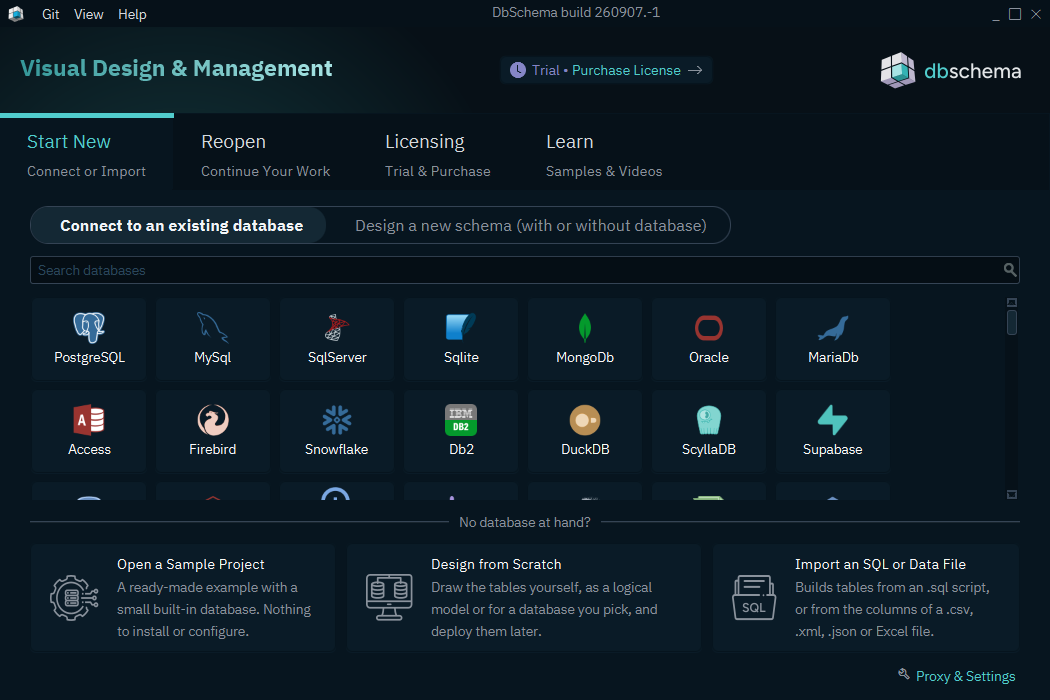
- The grid shows every supported database, ranked by how often each one is actually used and alphabetical after that, instead of a curated handful behind an "All databases" tile. The same order is used when you create a new project from inside the workspace.
- Design from Scratch is its own choice, with the logical-design tile marked out in the grid.
- The Quick Tour was rewritten into twelve annotated steps and remembers where you stopped.
AI Assistant
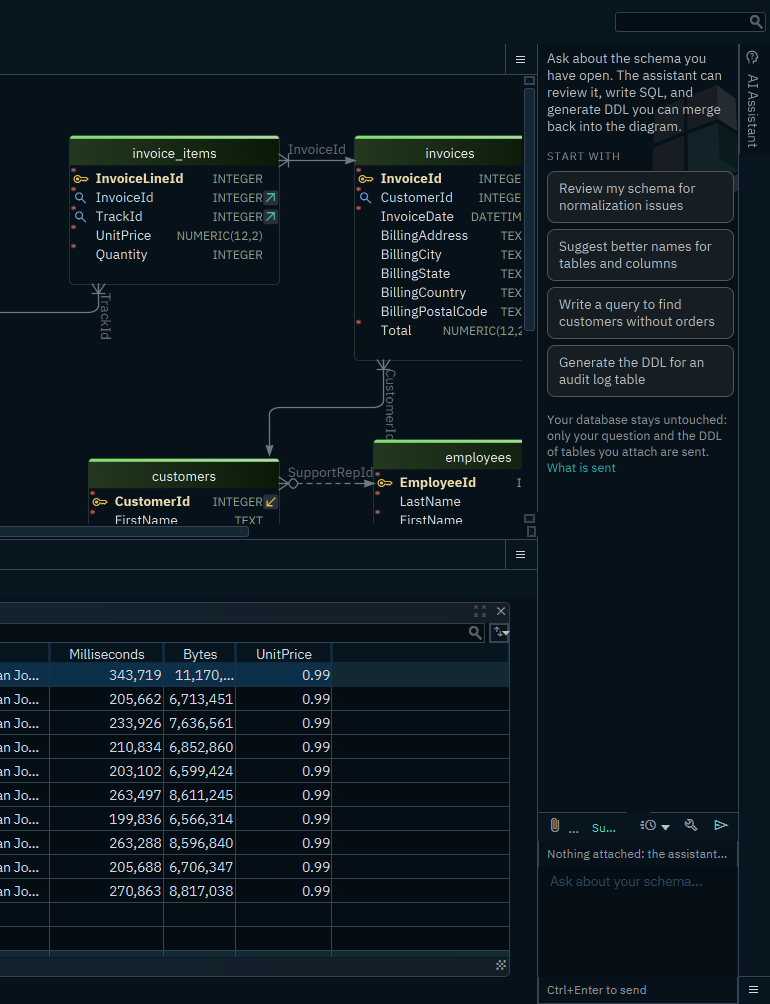
- Reasoning effort is yours to choose. Models that support it can be told how hard to think before answering.
- Azure OpenAI is configured by resource endpoint and deployment name; a stored chat URL is migrated into that pair automatically.
- Attachments are sent as attachments, not folded into the system instructions, so a model reads a file the way it expects to.
- The temperature is optional instead of always being sent as
0.0, which some providers reject. - The assistant pane was reworked: an empty state that suggests what to ask, clickable suggestions, a line showing what is attached, and a link to the model settings.
Redesigned dialogs
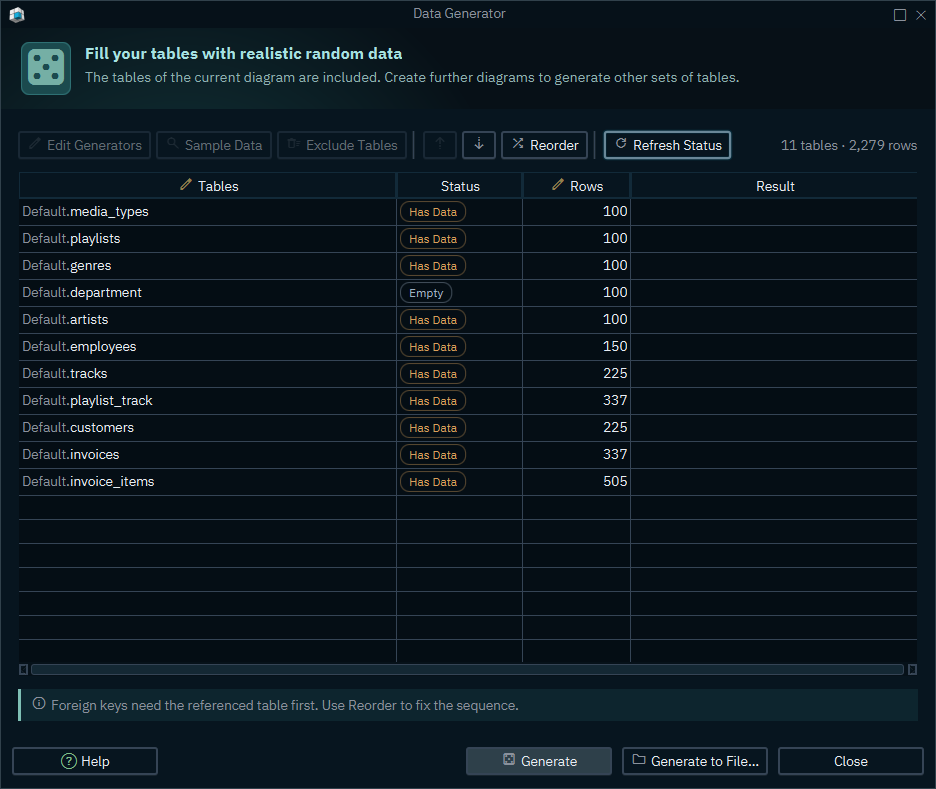
The Data Generator, above, shows the shape the redesigned dialogs share: a title and a line saying what the dialog is for, the actions in one bar, and a hint at the foot where a rule is easy to trip over.
- Data Generator, Data Loader, Import Selection, Automation Scripts, Driver Updates, Connector Manager and the Table Options tab were each rebuilt.
- Table Options: a switch owns each clause, so what is written into the
CREATE TABLEis visible without reading the generated SQL. - Data Loader: numbered steps and one card per source.
- Driver Updates: what is installed, what is available, and what a download would change.
- Character-set detection is one shared detector now, offered as Detect automatically in every dialog that reads a file.
Schema synchronization and the DDL parser
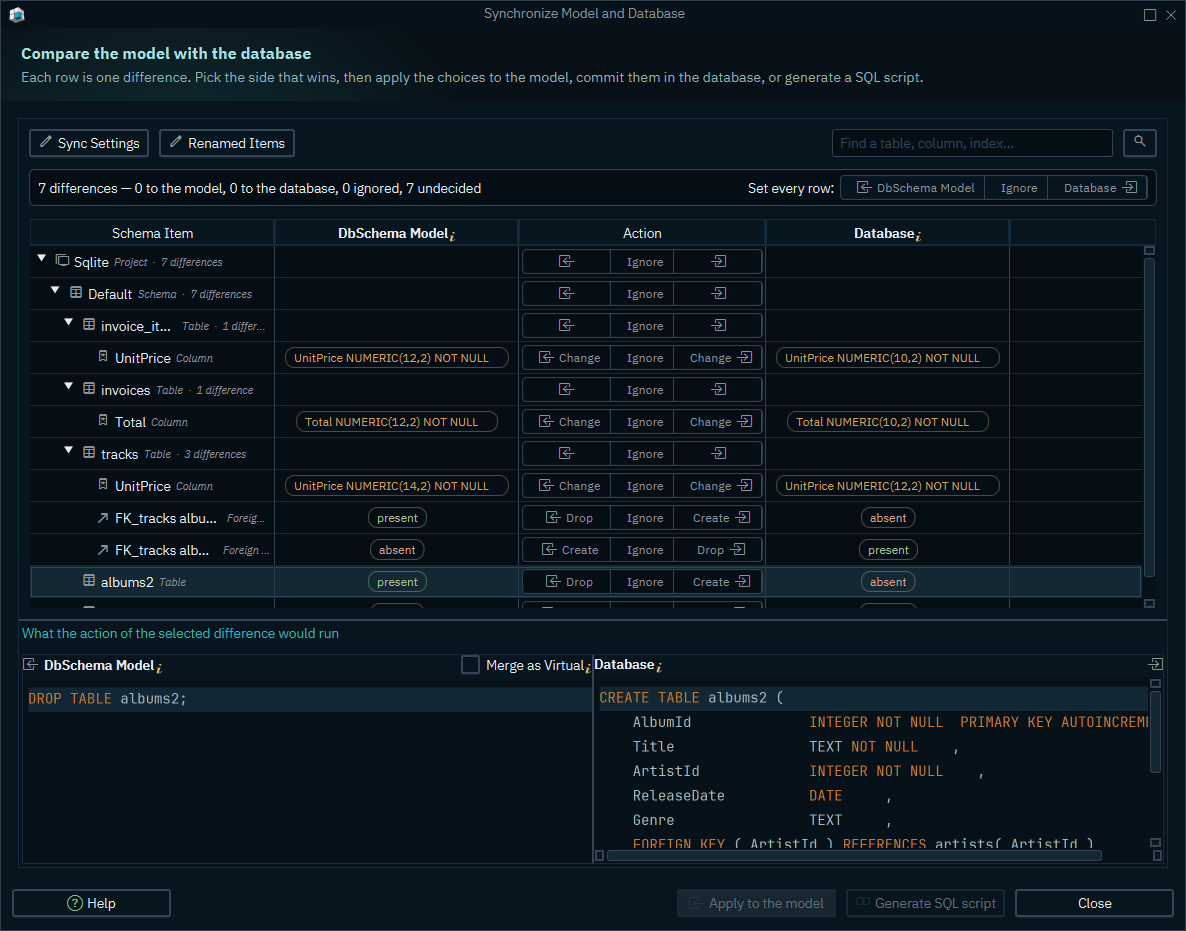
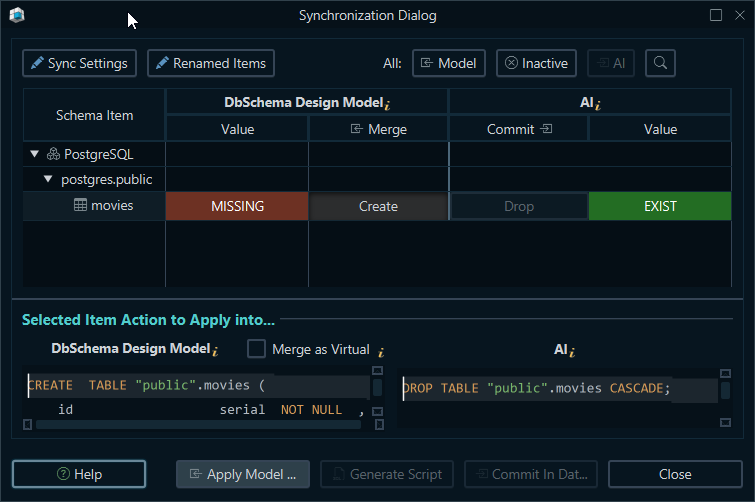
- The "Found N differences" dispatcher was rebuilt: each action is its own row, carrying the sentence that explains it, instead of a paragraph above a button strip.
- A refused statement no longer takes the rest of the script with it. Until now the first error aborted the commit and reported only the driver's sentence, with no way to tell which statement had failed. The commit now runs past a refused statement, skipping only the statements that depend on it, and reports at the end every statement the database refused — with its own message under it — and every statement left unrun. What was already applied is kept, so the next comparison shows the remainder of the work rather than a broken state.
- The DDL parser was improved across the board —
ALTERstatements, comment handling in the script splitter, and routines whose bodies contain the statement separator. - Schema Export writes a comment block above each
CREATE TABLE. The template lives inConfiguration → Schema Export → Table Headerand takes${tableName},${schemaName},${table}and${comment}, with Groovy expressions evaluated —${tableName.center(45)}centers the name in 45 characters. Leave it empty and no header is written.
Server folder
The add-ons a project reads from the live server now sit under a Server node in the project tree, at project level (MySQL engines, collations, character sets, tablespaces) and at schema level (Oracle packages and package bodies, TimescaleDB hypertables). They belong to the database, not to the design model, and the tree now says so.
SQL Editor
- Auto-completion was rebuilt. The popup filters as you type instead of closing on every
keystroke, suggestions are ranked and de-duplicated, and completion triggers after
FROM,JOIN,INTO,UPDATE,SET,WHERE,ONand insideINSERTparentheses without a typed prefix. - Foreign-key JOIN completion: after
JOIN, DbSchema offers each related table with an alias and the fullONcondition already written, taken from the design model — so it works on virtual foreign keys the database itself does not have. - Functions insert their parentheses with the caret between them; templates land the caret in the first blank.
Databases
- Trino — catalog schemas are listed correctly.
- Databricks — a synchronization defect on foreign keys is fixed.
- SQL Server — view column comments are reverse engineered, and renaming an object writes the rename instead of dropping and recreating it.
- Hologres is supported, as a PostgreSQL-compatible entry.
- H2 is no longer downloaded at startup — the driver ships with the installation.
- H2 and SQLite local connection URLs keep the file path they were given.
Bugfixes
Most of this list comes from a review of the exceptions DbSchema reported home over the last months, worked through defect by defect.
Generated scripts
- Reserved words are quoted. A column named
order,keyorindexproduced a script the database refused — on SQLite and 81 other engines. - PostgreSQL: the
CREATE TYPE/CREATE DOMAINand view templates were executed verbatim with their placeholders still in them; unique-constraint column options rendered asCOLLATE null ASC DESC. - SQL Server:
ALTER COLUMNandDROP COLUMNignored the constraint defined on that column. - Databricks:
CREATE UNIQUE INDEXis not valid Spark SQL and is no longer generated. - A generated script could create a table before the user data type one of its columns uses.
- A foreign key was generated without checking that the key it references exists.
- The check for an unfilled template did not look at the
...marker, so a half-filled template reached the database.
Reverse engineering
- Oracle: a
DBMS_METADATA.GET_DDLfailure aborted the import, and the loop then read a closed result set. - PostgreSQL: reading schema comments failed on an older server and on a schema dropped meanwhile; listing sequences used a column an older server does not have.
- MariaDB 12: routines were read from
mysql.proc, which that version no longer has. - DuckDB: reverse engineering queried
information_schematables DuckDB does not have. - Snowflake:
SHOW DYNAMIC TABLESnested insideRESULT_SCAN. - SQL Server: the DDL query needed
VIEW DATABASE STATE, which most accounts do not have. - SAP HANA: objects of an unknown type stopped the import.
- SqlBase: a negative offset computed inside the Gupta driver.
- InfluxDB: a disabled Flux query service was discovered halfway through the import.
- One broken view in the database no longer fails the whole import.
Opening a model
- An unknown index type, a
precision,scalepair written with a comma, and content before the XML prolog each made a model file unreadable; all three are handled. - An out-of-memory condition when opening large models.
Drivers and startup
- Windows: installing a downloaded JDBC driver failed because the files were in use.
- A driver download blocked by the network was reported as a DbSchema failure.
jfxwebkitmissing from the installed runtime, and a JavaFX toolkit that finds no graphics backend, are both reported with what is actually wrong.- The WebView user data directory could already be in use.
- A file watcher failed with "Incorrect function" on a file system without change notification.
Interface
- Null-pointer failures committing a cell edit, dropping an item in the table dialog, and clearing the selection of a list being emptied.
- macOS: an
ArrayIndexOutOfBoundsExceptionin the accessibility bridge. - The view column inspector pointed at four icons that do not exist.
- The Validation Result dialog opened with no title and an unlabeled button.
- Tooltips and bubble tips were reworked after several sizing and flicker reports.
- Unicode characters were mangled in the translation files.
Reported as crashes, but not crashes
Half the exceptions DbSchema received were not failures of the application: a refused connection,
a wrong password, a script the user wrote, a read-only guard doing its job. These now reach you as
what they are — a message that says what to do — instead of a stack trace. Named cases: "The JDBC
URL could be wrong" raised on an already-open connection, "Please create at least one Schema",
"The validation code is wrong", "Connection is Read Only", "Missing signature" from a truncated
license key, MS Access reporting a locked file as UCAExc:::5.1.6 (n/a), and the Data Loader
throwing the CSV parser's own exception at you on a malformed file.
Elsewhere
- Git pulls the way the dialog was told to, whatever the machine's Git configuration says, and
authenticates with the SSH key picked in the dialog rather than the one in
~/.ssh/config. - Update checks are made against DbSchema itself rather than through the launcher.
- Proxy and TLS configuration is read from the usual environment variables.
- A
StackOverflowErrorin proxy selection.
Under the hood
- DbSchema moved to JavaFX 26 and the bundled runtime to Liberica 26. The build now runs on the very JDK the product ships.
- Every dialog, menu, tab, button, label and field built from the resource bundles carries a stable id, which is what lets the interface be driven and captured by test automation.
- The build number of each CI build is reported to the DbSchema server, so a crash report names the exact build it came from.
DbSchema 10.5.0
Release date: 10.08.2026 — changes since version 10.4.0 (16.07.2026).
This release introduces database tags synchronized with SQL Server extended properties, a redesigned network configuration with named proxy setups and real TLS certificate validation, per-driver JDBC URL parameters, AND/OR filter groups in the Query Builder, a schema change history for Git users, and a calmer licensing experience without startup dialogs.
The Architect edition
DbSchema is sold in three editions: Community (free), Pro and Architect. Architect was added in version 10.4.0 and sits above Pro. Its main feature is logical design — model entities and relationships independently of any database, then generate the physical schema for MySQL, PostgreSQL, MongoDB or any other supported engine, with naming and type dictionaries applied on the way. Architect also covers conceptual design, schema validation, and the AI Assistant with a local provider or your own API key. Everything else — physical design, schema synchronization and deployment, browse and query, data tools, documentation, and Git integration — stays in Pro.
Existing Pro licenses were migrated to Architect at no cost. No key has to be re-generated, and a running subscription keeps its renewal price. Inside DbSchema, the active edition is shown in the toolbar status button and in the About dialog; the Compare Plans tab lists the three plans side by side. New installations start in a 15-day Architect trial.
See the pricing and edition comparison for the full feature list.
Upgrade notes — please read
- TLS certificates are now validated. DbSchema's own HTTP traffic — license activation and
renewal, JDBC driver and file downloads, the AI Assistant, bug reports — previously accepted any
server certificate. Connections that silently worked behind a TLS-inspecting corporate proxy may
now fail with a certificate error. By default DbSchema trusts the Java CA list and the operating
system trust store, which covers most corporate proxies; if a connection still fails, add your
company CA in
Edit → Settings → Network → SSL Certificates → Trust Custom Certificates. Certificates imported into the old trust-store settings are not carried over — re-add them on the new page. - Proxy settings become named configurations. An existing manual proxy is migrated automatically
into a named configuration. There is no separate HTTPS proxy type anymore — one proxy applies to
all protocols. No proxy for entries now match precisely:
example.comno longer bypassesnotexample.com,.example.comcovers the domain and its subdomains, and*.example.commatches subdomains only. - Git users: check your global Git configuration. Older DbSchema versions wrote
http.sslVerify = falseinto the global.gitconfig, which disabled TLS verification for every Git tool on the machine. DbSchema no longer writes this entry, but an existing one stays until you remove it:git config --global --unset http.sslVerify.
New Features
Database Tags — synchronized with SQL Server
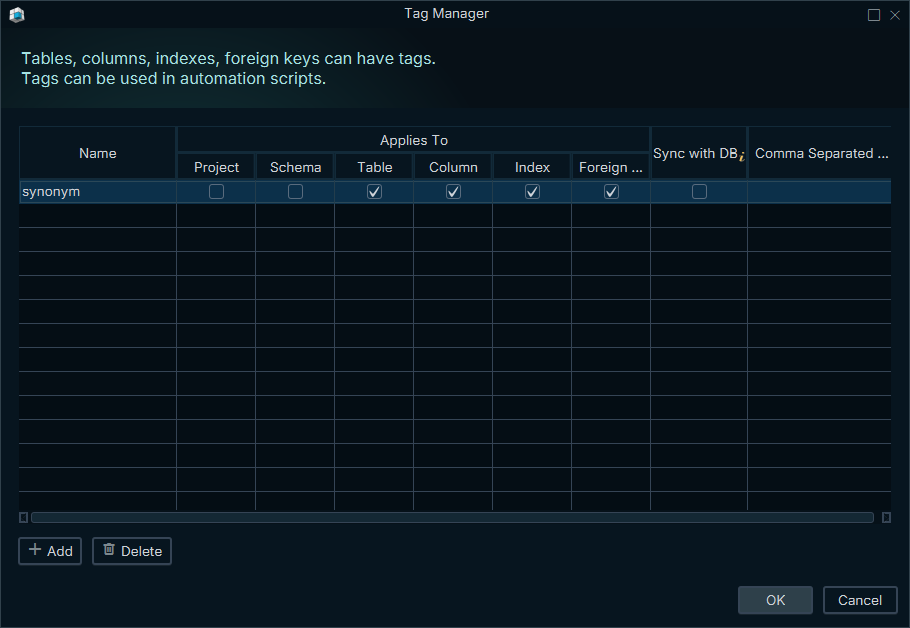
Tables, columns, indexes and foreign keys can carry tags — key/value pairs usable in documentation and automation scripts. New in this release, tags can be synchronized with SQL Server extended properties (also on Azure SQL and Synapse):
- In the Tag Manager (Design menu), create a tag with the same name as the extended property and check Sync with DB.
- Reverse engineering then imports the values of matching extended properties as tags.
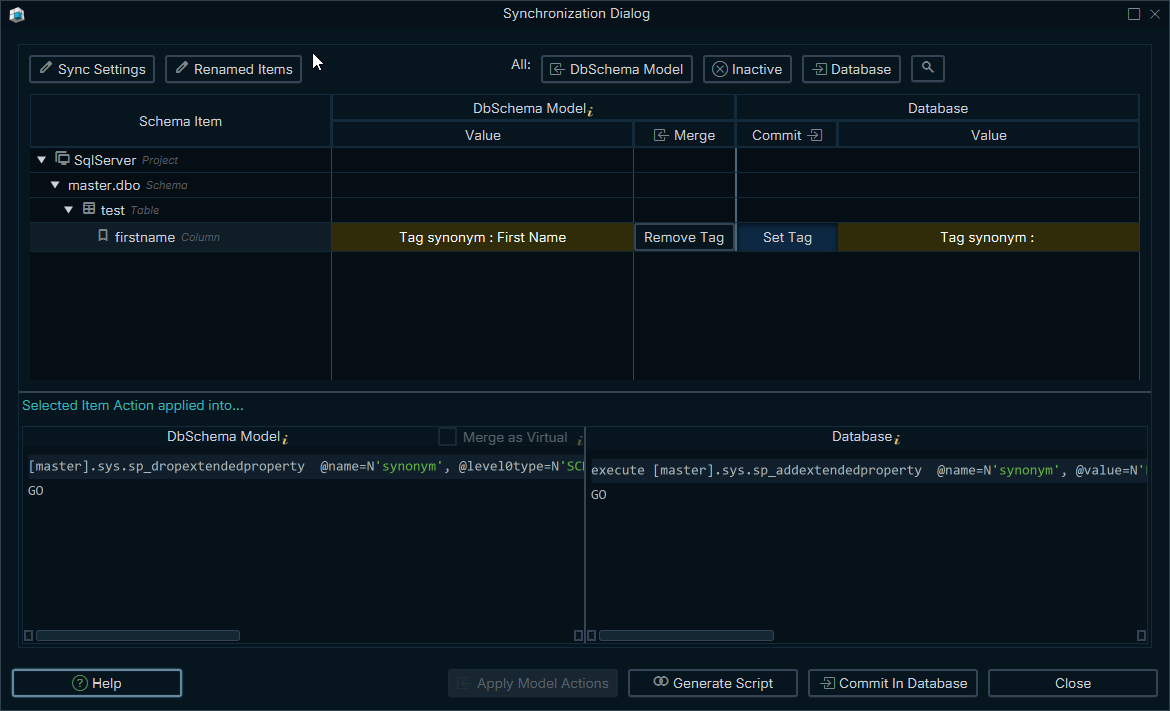
- Tag differences appear in the synchronization dialog with a dedicated tag icon, and table and column tags are written back to the database as extended properties.
- A tag value set in the model is preserved when the database side has none.
- The Quick Table Editor gained an Add Tag Column button — edit a tag for all tables and columns at once, like in a spreadsheet.
Network Configuration — Proxy & SSL Trust
The network settings were redesigned, under Edit → Settings → Network:
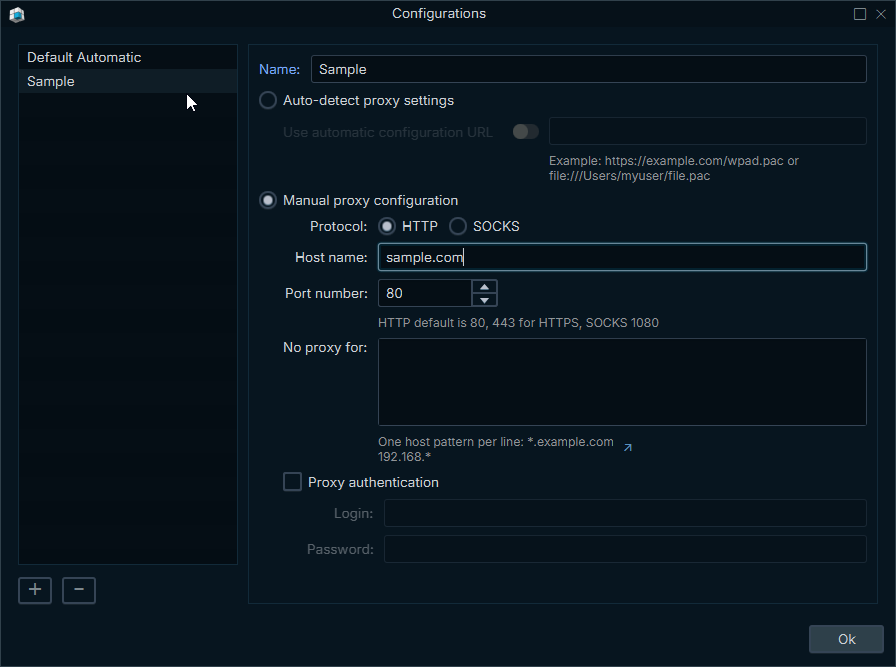
- Proxy: reusable named proxy configurations. Auto-detect (system settings, optionally a PAC URL) is the default; Manual supports HTTP and SOCKS5 proxies with authentication and a No proxy for bypass list.
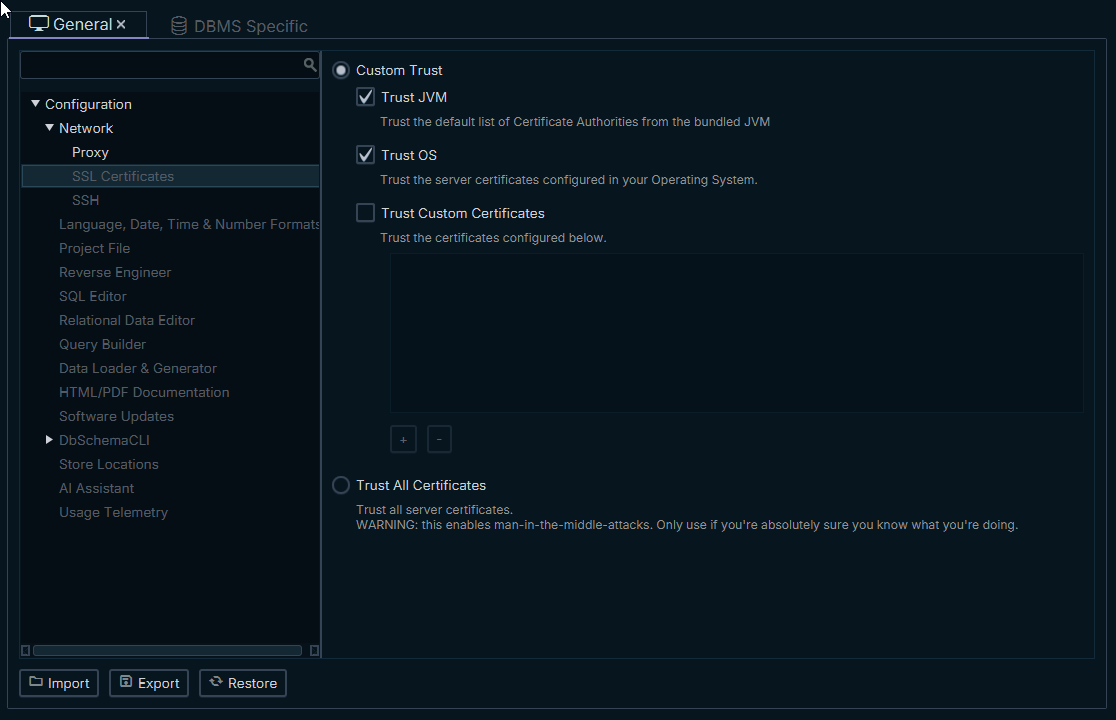
- SSL Certificates: choose exactly what DbSchema trusts — the Java CA list, the operating system trust store, and your own certificate files (PEM/DER); or Trust All Certificates for test environments.
- The AI Assistant now works through a proxy — including SOCKS — which was previously not possible at all.
- Driver and file downloads, license activation and renewal, and bug reports all honor the configured proxy and TLS trust.
- Bug reports (
Help → Report a Bug, previously Technical Support) are now submitted through dbschema.com with hardened per-installation credentials, and the dialog stays open if the submission fails, so nothing typed is lost.
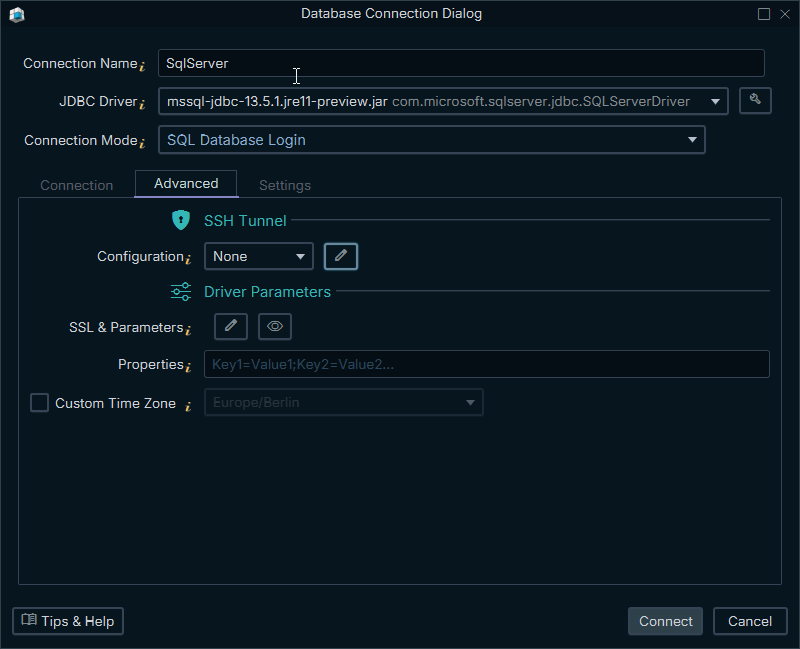
Connection Dialog & JDBC URL Parameters
- URL parameters are now defined per JDBC driver, not only per database: Db2 (JCC vs. AS/400), MariaDB (own connector vs. MySQL Connector/J), Hive (Apache vs. Cloudera) and SAP (jTDS vs. jConnect) each show the parameters their driver actually understands.
- The parameter catalogs of ~50 databases were reviewed: corrected defaults, better descriptions, and a link that opens the vendor's own documentation for the exact parameter.
- PostgreSQL SSL parameters were reworked: the SSL modes are explained, a Client Certificate group supports mutual TLS, and advanced options cover direct TLS (PostgreSQL 17+), SCRAM channel binding and more.
- Every parameter has an on/off toggle switch — switched off, it is left out of the URL entirely.
- A new Show URL action previews the exact JDBC URL used to connect, with the password masked.
- The dialog is reorganized into Connection, Advanced (SSH tunnel, URL parameters, driver properties, time zone) and Settings (read-only connection, schema mapping, highlight color, Java location) tabs.
- The SSH tunnel form gained a Test Tunnel button that tests the SSH connection on its own, before connecting to the database.
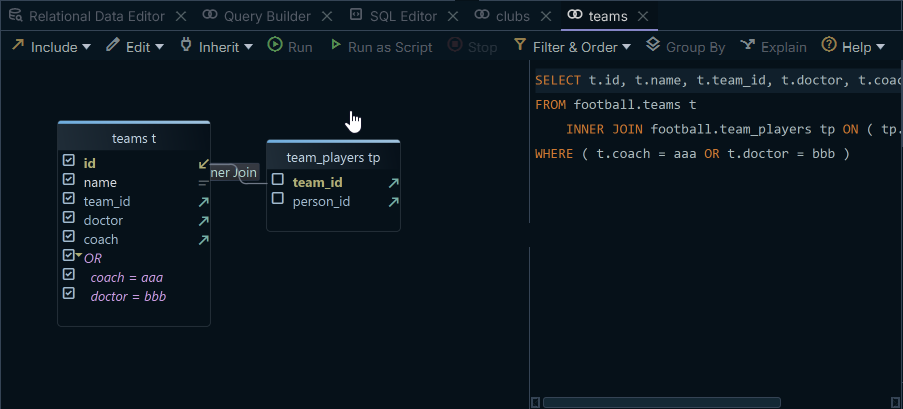
Query Builder — AND/OR Filter Groups
- Select several filter conditions, right-click, and choose Group in AND / Group in OR. Groups can be nested, flipped between AND and OR, and ungrouped again.
- The generated SQL is correctly parenthesized, for example
WHERE active = 1 AND ( age > 60 OR city = 'Rome' ). MongoDB queries use the equivalent nested$and/$or.
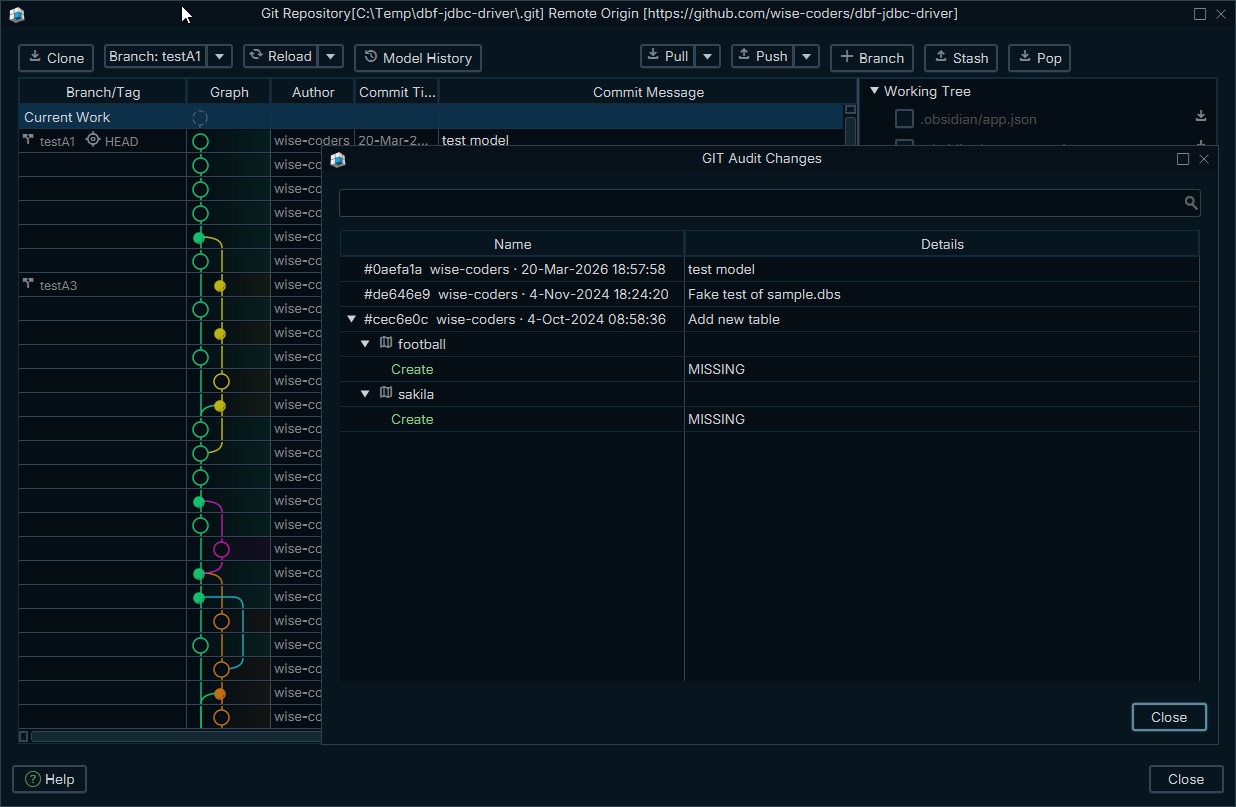
Git — Model History & Safer Push
- Push now checks the remote first: if your branch is behind, DbSchema asks you to pull instead of failing with a cryptic error. Rejected pushes report the actual reason — for example a protected branch — and name the affected branch.
- A new Model History button shows every revision of the design model together with the schema changes each commit introduced — a one-click audit trail. The revision list can be filtered to model file commits only.
SQL Editor
- Large files open noticeably faster and the editor uses a fraction of the memory it did before; the undo history no longer grows unbounded.
- New Bind Parameters setting (
Edit → Settings → SQL Editor): switch it off to send@varliterally to databases where it has a native meaning, instead of prompting for a value. - Groovy code completion was removed from the SQL Editor. Groovy syntax checking and script execution are unchanged, and the installer got about 10 MB smaller.
Licensing — Fewer Interruptions
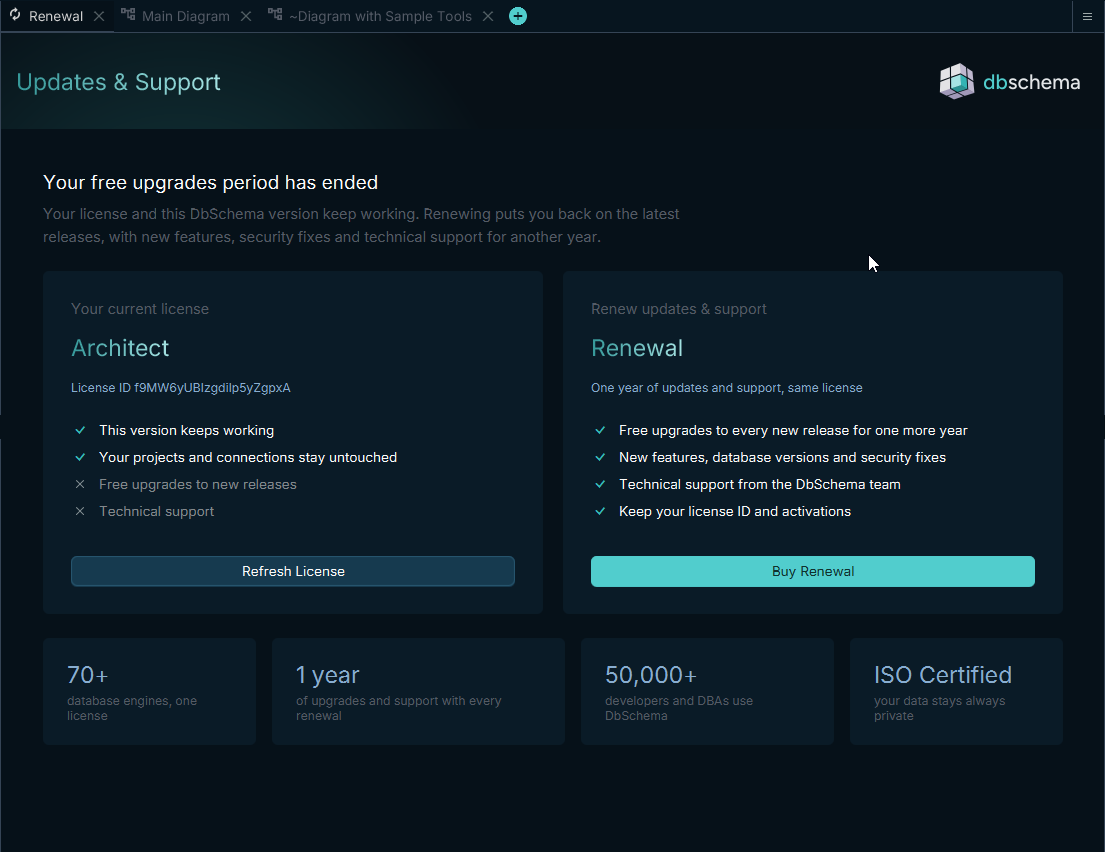
- License reminders no longer pop up dialogs at startup. A Renewal tab opens instead — and only at milestones: 14, 7 and 1 day before the free-upgrades period ends, on the day itself, then once per month.
- The Renewal tab has a Refresh License button, and a renewal purchased while DbSchema was closed is picked up automatically instead of showing the license as expired.
- When the automatic 15-day trial ends, a dialog offers Purchase License, Extend Trial 2 Weeks or Use Community Edition.
- The toolbar status button shows the actual edition — Architect, Pro, or their floating variants; during a trial, the welcome screen shows the remaining days.
- Registering with an on-premise Floating License Server saves the server address only after a seat was actually granted, and explains the failure otherwise.
Software Updates
Help → Software Updates → Settingschooses when DbSchema checks for updates (default: at every start) and can check immediately.- The update window no longer opens behind the main window, and the separate background updater no longer launches on its own schedule.
- MSI installer: in-app updates now install through
msiexec(enabling silent updates), the package installs per-user, and the redundant elevation prompt is gone.
Other Improvements
- Settings with an on/off state use toggle switches across the application.
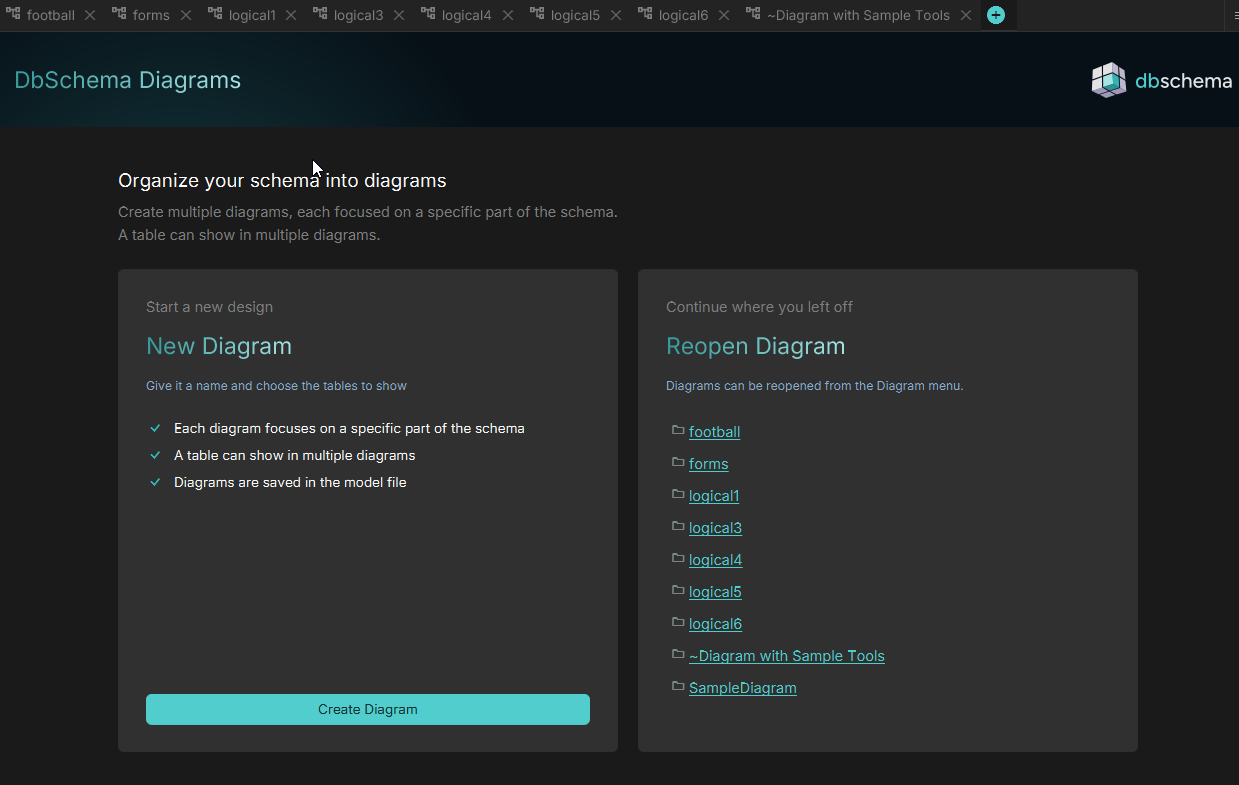
- The New Diagram tab was redesigned: start a new design on one side, reopen an existing diagram on the other.
View → Themegained an Edit Custom CSS button — appearance tweaks that survive DbSchema updates.- Sharper toolbar icons and font rendering fixes (occasional wrong glyphs, missing italics).
- Tooltips no longer disappear after a few seconds, with several size and flicker issues fixed.
- The toolbar Help menu now includes license registration, hotkeys, software updates and About.
Bugfixes
- Opening a model file could crash at startup because of a threading issue.
- Inspectors no longer change the letter case of an existing table, column or index name just by opening it.
- The data type combo in the Column Inspector could revert a filtered selection on Enter.
- Dragging a column to create a foreign key works again on zoomed-out diagrams.
- Settings load defensively now: one corrupted value no longer resets the settings after it, edited keyword lists are saved reliably, and an imported certificate file no longer overwrites an existing file with the same name.
- Connection presets: Impala default port corrected to 21050; Hive, Informix, CouchBase and MarkLogic URL or driver class fixes; the misspelled "Truso" database is now Turso.
- Download progress no longer jumps straight to 100% at the start of a download.
- A dialog that fails to open reports the error instead of doing nothing; a broken custom naming pattern falls back to the default pattern instead of failing.
- No proxy for entries support port numbers and wildcards anywhere in the entry.
- The registration dialog showed a raw message key (
renewOutdatedBuild) to customers with an outdated build. - Removed a duplicated "Description" label from the comment section of all object inspectors.
- Browse frame border color fixed in light and dark themes.
Security
- TLS certificates are validated on all application HTTP traffic — see the upgrade notes.
- Bug report submission no longer embeds a shared credential in the application; tickets are submitted through dbschema.com with per-installation authentication.
- DbSchema no longer writes
http.sslVerify=falseinto the global Git configuration — see the upgrade notes. - Updated the installer/updater framework (install4j 12.0.5) and the Kotlin toolchain (2.4.10).
DbSchema 10.4.0
Release date: 16.07.2026 — changes since version 10.3.0 (26.06.2026).
This release introduces Architect, a new license edition, starts new installations in an automatic 15-day trial, and adds a major upgrade to the database management plugins. The Architect edition is for the logical and conceptual design.
Old Pro licenses are migrated automatically to Architect. The old subscription are also keeping their old renewal price.
Upgrade notes — please read
Three changes in this release alter existing behaviour. Please review them before updating.
- On-premise Floating License Server must be updated first. DbSchema 10.4 requires the licensed
edition from the license server. Connecting to an older on-premise Floating License Server now fails
with: "This DbSchema version requires a newer version of the Floating License Server. Please install
the latest version of the License Server and try again." Pull the latest
dbschema/dbschema-license-serverDocker image before rolling out 10.4 to your users. - Own-key AI now requires an Architect license. Using your own AI provider key (OpenAI, Anthropic, Gemini, Ollama, and all other providers) now requires the Architect edition. The DbSchema AI subscription remains available to everyone, including Community users, and a trial subscription can be requested from inside the application.
- Logical / conceptual design now requires an Architect license. The menu entries remain visible; using them with a non-Architect license opens an upgrade dialog and the project is not opened.
Existing paying customers are not affected: your current license key is automatically recognised as Architect, keeping every feature at your current price, with no new key to install.
New Features
Architect — a new license edition
- New Architect edition sits above Pro. It unlocks logical / conceptual database design and own-key AI. Everything else — physical design, schema synchronisation and deployment, browse and query, data tools, documentation, and Git integration — remains available in Pro.
- Existing licenses are grandfathered to Architect for free, at the current price, with no key re-generation: license keys without an edition field are recognised as Architect.
- The active edition is now displayed in the About dialog and the license information — for example "Licensed, Architect edition" or "Trial, Architect edition (expires at … UTC)".
- Pro license holders get an "Upgrade to Architect" action in the
Helpmenu, in the About dialog, and in the upgrade dialog. Each opens the upgrade page for the running license. - Trial licenses and floating licenses are Architect.
- The floating license server (both the DbSchema account service and the on-premise server) now returns the licensed edition, so a floating seat is gated by the edition it actually leased.
New installations start in an automatic 15-day trial
- A fresh installation now starts directly in a 15-day Architect trial with access to all features — nothing needs to be activated or registered. When the trial expires, DbSchema moves to the Community edition.
New "Compare Plans" tab
- A new Compare Plans tab replaces the old Trial tab. It shows three side-by-side plans — Community, Pro and Architect — each with its feature list.
- A banner shows the current plan and, during the trial, the remaining days ("Architect Trial — N days left").
- The tab adapts to the current license state and is never shown to licensed or floating-license users.
Database management plugins
The management dashboard plugins (available for ~30 database engines) received a substantial upgrade:
- Running Queries: automatic refresh with a selectable interval and countdown, Cancel query and Terminate session actions with a confirmation dialog showing the exact SQL, a "blocked by" badge, and a details panel with the full query, Copy, and "open in SQL editor".
- Database Locks: a blocking-chain tree showing which session blocks which, with "blocking N" / "waiting" badges and a Terminate blocker action.
- Space Usage: a treemap of schema › table › data / indexes, and a growth chart with forecast whose history is now kept across restarts.
- Slow plugin queries no longer freeze the application — plugin queries now run asynchronously, with timeouts and cancellation.
- Plugin settings (refresh interval, growth history) are stored per database and connection, and survive restarts.
- For plugin authors: multi-file plugins via
<script src>/<link>, a sharedplugin-lib.js/plugin-lib.css(dialogs, toasts, drawers, auto-refresh, formatters), bundled ECharts,app.openSqlEditor(sql)andapp.copyToClipboard(), and plugin console output routed to the application log.
Import / Export connections
- The Connection Manager dialog gained Import and Export buttons. Connections are exported to a
standard
connections.xmlfile, either all of them or only those of the current database. Passwords are never exported. - Importing merges into the existing connections: identical connections are skipped, name conflicts are imported under a new name, and a notification reports how many were imported, renamed and skipped.
Connection troubleshooting — corporate SSL proxies
- Connection failure advices now explain corporate SSL-inspecting proxies (Zscaler, Netskope and
similar), which re-sign the database certificate with a company CA that Java does not trust — a
frequent cause of
PKIX path building failed/ "unable to find valid certification path" errors. The advice suggests enablingEdit → Settings → Trust Store → Use Windows Trust Store, importing the CA withkeytool, or using driver-specific URL parameters. - A new advice covers certificate hostname mismatch ("No subject alternative names matching", "Hostname X not verified"), including the SSH-tunnel and proxy-rewrite cases.
- Database-specific guidance was added for PostgreSQL, MySQL, MariaDB, SQL Server, Oracle, Db2, MongoDB, Snowflake, Redshift, Cassandra, ScyllaDB, Databricks, Elasticsearch, InfluxDB, Salesforce, SAP HANA, DynamoDB and Exasol, and is inherited by derived databases (Aurora, Neon, Supabase, TiDB, SingleStore, Synapse, Fabric, Azure SQL, CosmosDB and others).
Other
- DuckDB: user-defined data types (
CREATE TYPE) are now supported. - The Spreadsheet editor now opens as a tab instead of a dialog.
- The Quick Tour opening page was rewritten as an overview of Interactive Diagrams, Design Model, Team Collaboration, Data & Query Tools and the Data Generator.
- The About dialog is now resizable.
- Switching to offline mode without a license now shows an actionable dialog with Purchase License and Skip buttons, explaining what a license adds.
- In the Sync Refresh dialog, Review Differences is now the default action.
- Improvements in translations
- Improvements in AI editor
Bugfixes
- Browse — the Filter acted on the previously selected column instead of the one under the cursor when right-clicking. This was most visible on Linux, where the context menu opens before the selection updates. Right-clicking a column header now resolves the correct column as well.
- MariaDB downloaded the MySQL JDBC driver instead of its own.
- Db2 Express could not load the schema list (
SQLCODE=-2439) on instances whose catalog routines are out of sync with the installed Db2 level. Schemas are now read directly fromSYSCAT.SCHEMATA. - Google Cloud Spanner connections failed because of an outdated transitive Guava dependency.
- PostgreSQL —
numericanddecimalwere swapped.numericis now the primary type name, so generated DDL and reverse-engineered columns match what PostgreSQL itself reports. - MongoDB — generating the collection validator failed when column type options or enumerations were written MongoDB-style with single quotes or unquoted field names. Invalid values now produce an error naming the column and showing the expected format.
- Printing large diagrams on very large paper sizes (for example Arch-E) failed with an out-of-memory error.
- The automatic updater did not close DbSchema before replacing application files. DbSchema is now closed cleanly — saving work and closing database connections — before the update proceeds.
- Fixed a crash ("Cannot coerce value to an empty range") when showing a tooltip near a screen edge.
- The New Design Model dialog opened behind the Connection Inspector window.
- SQL Editor — the
...browse button stayed disabled after ticking the Open File checkbox. - SQL Editor — Automation Script files are now recognised by extension; HTML, CSS, YAML and text files are shown as plain text instead of being highlighted as SQL, which could hang the editor. Groovy files are no longer highlighted with the JSON lexer.
- HTML documentation — links are no longer underlined, except on hover.
- Shortened over-long tooltips in the Column, Constraint, Foreign Key, Index, Schema, Sequence, Table and View inspectors.
- Entering a wrong AI trial validation code left no way to re-enter it. The dialog now re-prompts with the previous code, reusing the same request so the emailed code stays valid.
- Fixed a flickering AI editor toolbar on macOS when resizing the panel.
- The AI provider dropdown displayed "null Key" in empty rows.
- Two plugin editors reloading at the same time could clash; the plugin loading spinner did not animate.
- Ollama fixes (via the updated AI library).
Security
- Updated Apache HttpClient (5.6 → 5.6.2) and Jackson (2.21.2 → 2.22.0) to versions that include security fixes.
- Updated the installer/updater framework (install4j 12.0.5) and the build toolchain (Gradle 9.6.1).
Version 10.3.0
PostgreSQL & JSON
- JSONB reverse engineering is complete. JSON columns are analyzed and expanded into sub-columns in the model.
- JSON reverse engineering works for all users. It no longer requires the beta option.
- Query Builder supports JSONB columns when building queries.
- The JSON editor highlights syntax errors as you type.
- In Browse, JSON values can be shown in a compact popup view.
- A Random JSON Generator helps create sample JSON data for testing.
- PostgreSQL connection options are clearer and easier to read.
- Physical columns can no longer be assigned virtual-only data types.
Database Support
- YugabyteDB is now supported as a built-in database type.
- Snowflake adds a JDBC URL template for Azure AD authentication.
- Snowflake sequence reverse engineering works correctly again.
- MongoDB field creation no longer fails when adding new fields.
- Mimer
varchar()columns reverse engineer ascharacter varyingas expected. - DynamoDB driver updated to the latest AWS SDK.
Connections & JDBC Drivers
- JDBC drivers are no longer bundled in the installer. They download automatically when you connect or refresh a model.
- The Connection Dialog is easier to use. URL selection, manual URLs, and pattern editing are improved.
- The Driver Dialog is clearer when managing JDBC drivers.
- Passwords are no longer shown in JDBC URLs for SQL Server and SAP HANA.
- Old 32-bit driver files are removed automatically to prevent compatibility issues.
- Native libraries now use 64-bit versions only.
- Connection test errors show more helpful details when a ping fails.
- Proxy and update-check messages are clearer.
Diagrams & Logical Design
- Logical design supertables support inheritance modeling. When converting to a physical database, choose single-table, class-table, or concrete-table inheritance.
- Diagram rendering is faster, especially when scrolling large layouts.
- HTML/SVG diagram export shows improved table header styling and foreign key visuals.
- Schema names appear in tooltips when Diagram → Show Schema Name is enabled.
- Columns can have a content type attribute for richer metadata.
- A new validator checks that referenced columns exist in the model.
- Creating a new layout no longer fails in certain cases.
- Reverse engineering large tables with a column limit works correctly again.
Data Editing & Query Tools
- Grid Editor is renamed to Bulk Editor to better reflect its purpose.
- Bulk Editor cell editing works reliably again.
- Query Editor received multiple fixes and stability improvements.
- Query filters and result-pane JSON editing work more smoothly.
- Auto-completion in combo boxes works correctly again.
- In Browse, comment-related display issues are fixed.
Schema Import & Synchronization
- Schema import from file loads into the
publicschema when none is specified. Foreign keys are imported as well. - The synchronization dialog behaves more predictably.
- Foreign key action editing no longer crashes when viewing FK actions.
Editors & Model Tools
- Column Editor allows hierarchical columns to share names with their parent columns.
- Constraint Editor loads previously defined options correctly.
- Tooltips display correctly in several dialogs.
- Paths starting with
~expand to the home directory as expected. - DDL script splitting recognizes DDL statements more accurately.
Welcome Screen, Updates & Appearance
- The Welcome screen has a refreshed look and clearer navigation.
- DbSchema checks for updates at startup and can install them from the welcome screen.
- Multiple theme improvements across light, dark, and architect themes.
- The Quick Tour and in-app messages are updated.
- About → Help shows build information for easier support requests.
Licensing & Registration
- Pro features stay visible in menus. If your license does not include them, a clear Unavailable dialog explains how to upgrade.
- License date parsing and subscription checks are fixed.
- Registration and activation URL handling work correctly again.
- The start-trial button text is clearer.
- Sending feedback from the app is improved.
Command Line & Scripting
- DbSchema CLI runs Groovy scripts even when no database connection is active.
- Groovy scripts can read and set column
lengthagain. - Groovy script exit codes are more consistent after execution.
Bug Fixes
- Fixed null-pointer error when editing foreign key actions.
- Fixed Snowflake sequence reverse engineering.
- Fixed MongoDB field creation.
- Fixed Mimer
varchar()reverse engineering. - Fixed Bulk Editor cell editing.
- Fixed auto-completion in combo boxes.
- Fixed constraint editor not loading saved options.
- Fixed registration dialog issues.
- Fixed comment display in Browse and related views.
Version 10.2.0
- Improve Git Dialog. Remove stage buttons - leaven only commit
- Virtual checkbox ticked and disabled when schema is virtual
- Fixes in DDL parser: ALTER TABLE ... ALTER COLUMN ... TYPE + support interval to seconds
- Postgres NULLS WITH DISTINCT
- Improve AI Assistant
- Data Editor: Save cell on focus lost
- Redshift IAM authentication
- Fixes in automation scripts
- Bug fixes: translations,
Version 10.1.4
Improved Git Client Dialog
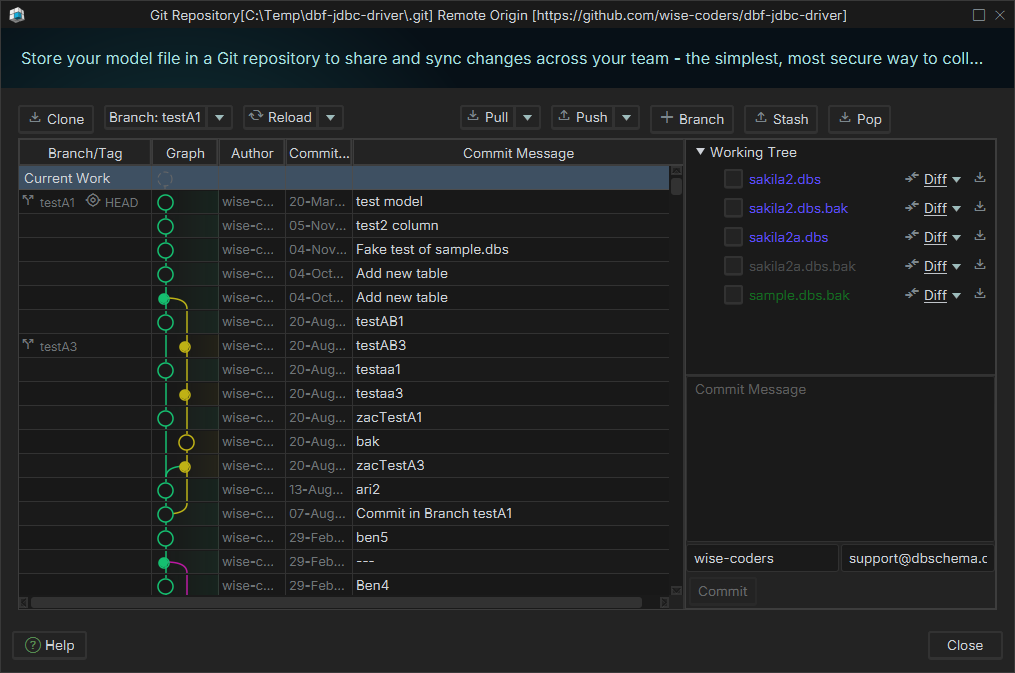
The Git dialog has been simplified. It now shows only a list of files to commit, without a staging area. You can perform a diff on each file individually, which provides more flexibility when handling renames. You can also mark a file as a reference and later compare it against another file from a different commit.
Improvements in AI Assistant
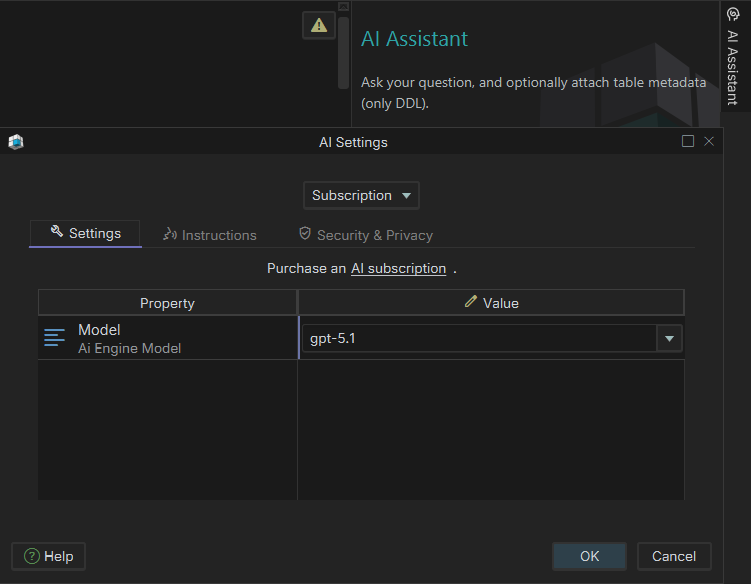
The AI Assistant can now connect via a DbSchema account subscription, or through different providers (Claude, ChatGPT, Gemini, etc.) using your own API key, or a locally installed Ollama.
Quick Tour with Animated Samples
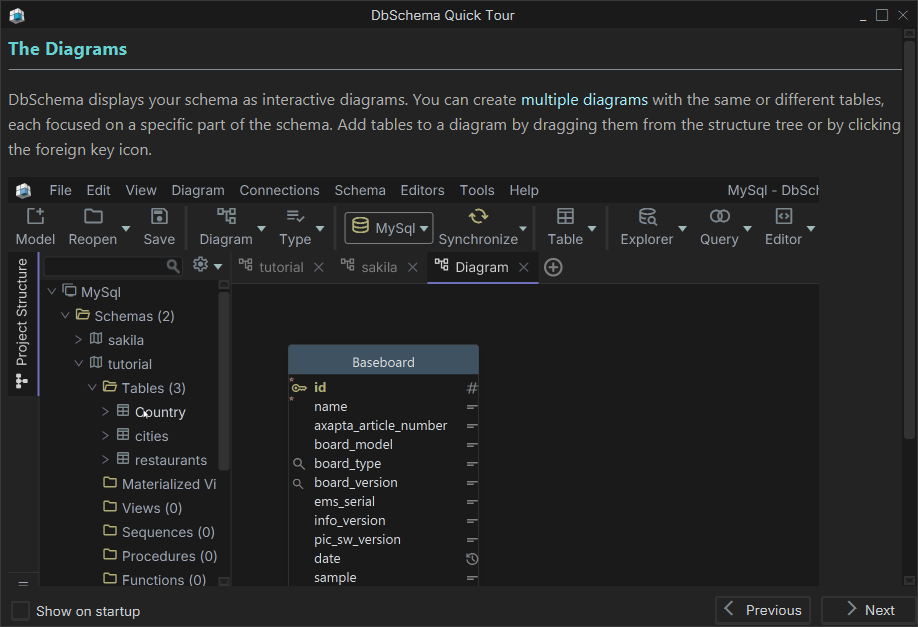
The Help / Quick Tour is now more interactive, featuring animated samples to guide you through the key features.
New JDBC Drivers
We have released several new JDBC drivers, including support for MongoDB, Cassandra, ScyllaDb, Influx.
Version 10.1.0

Class Renaming
We did few renaming in DbSchema API:
- com.wisecoders.dbs to com.wisecoders.dbschema
- Layout to Diagram
call documentation writers as:
- new MarkdownWriter(expose).generate();
- new PdfDocumentationWriter(expose).generate();
- new HTML5Writer(expose).generate();
Our target it to make DbSchema more fit for AI. In the next release we will let AI write automation scripts for you.
Menu Reorganization
The Git dialog is now under tools. The 'New Model' menu item shows a dialog with 3 options.
Customer Area on Website
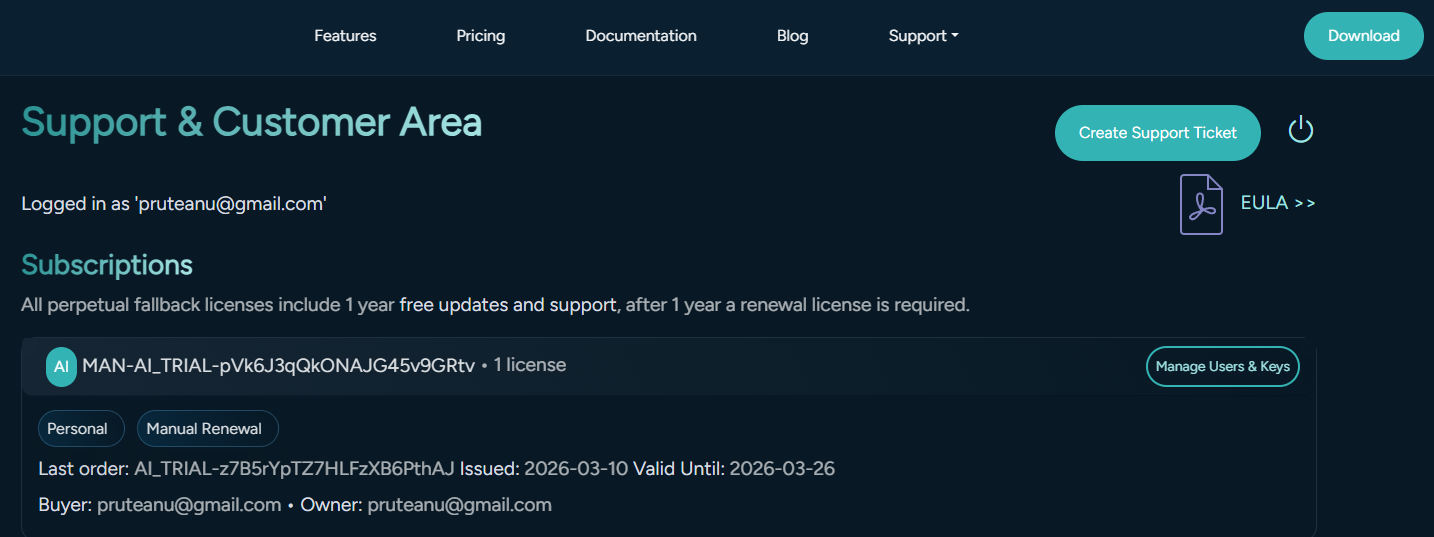
The license management is possible via the dbschema.com Support / Customer Area. There you can associate the licenses directly to end-users ( commercial with quantity > 1 or floating licenses ), using end-users email.
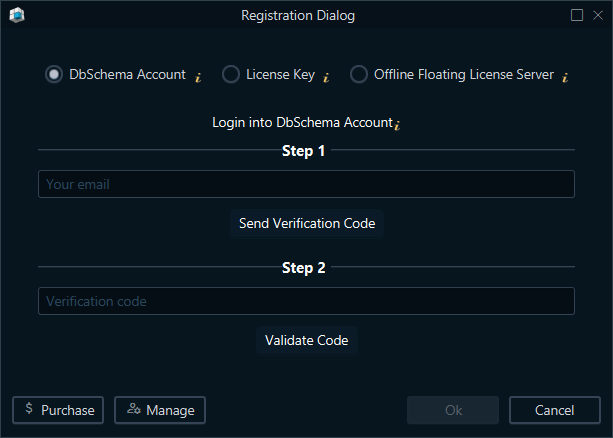
The registered users may log-in into account from DbSchema Help / Registration Dialog using their account.
Improved AI Assistant
The AI assistant can now use multiple models, via a DbSchema subscription or using own API Key.
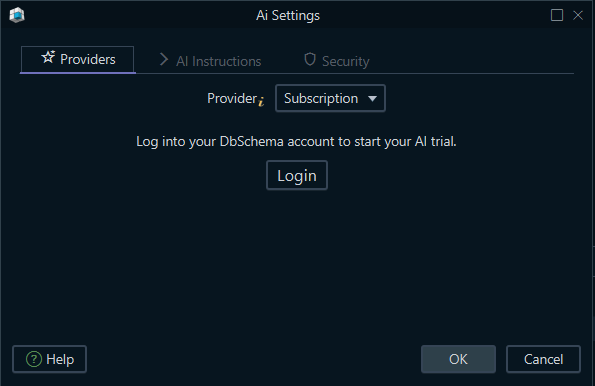
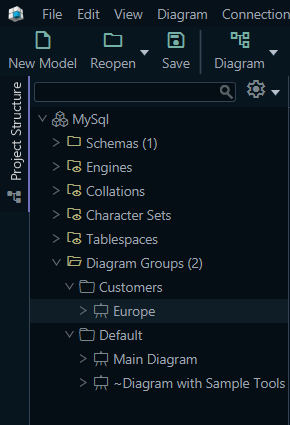
Diagram Groups
Diagram Groups allow organizing diagrams into Groups ( similar with folders ). This is useful for large schemes, with many tables.
Various Bug Fixes
- Improvements in Logical Design
- MySql GENERATE ALWAYS AS
- Filtering uses wrong column on right-click column header in Data Editor
- Fixes on Dialog Title Bar
- Postgres improve DDL generator procedure. Instead of using information_schema use pg_catalog
DbSchema 10.0.0

Ai Assistant
Start a conversation from the right-side 'Ai Assistant' window.

Connect to an Ai provider ( OpenAi, Anthropic Claude, Google, DeepSeek ) using your own ApiKey. First, you will have to enter your Api Key, and choose a model.

Write a question and optionally choose to send attach the current diagram structure:
- the table structure for all diagram tables
- the table structure for the selected tables in diagram
- a custom selection

Press the 'Send' button on the bottom-right:

If the Ai answer contains a code block with 'CREATE TABLE' statement, you can choose to merge this into the actual design model. The schema changes won't be applied into the database.
Apply them into the database with one more synchronization, between the design model and the database.
Use Docking Framework
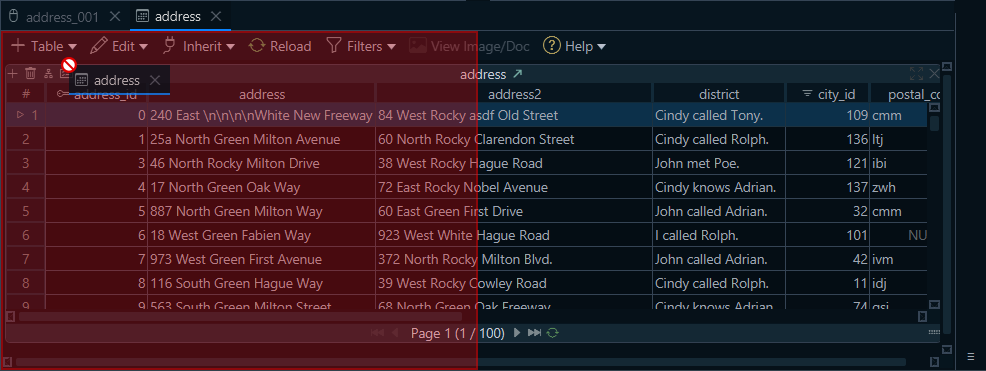
Now we use for diagrams and tools ( SQL Editor, Data Explorer, Query Builder ) a docking manager. The docking framework allow moving panes around the window. The frames can be minimized, like the 'Ai Assistant'.
Other Features
- Naming Dictionary - convert letterCases to underscore
- Introduce View menu and move Appearance as Theme under View
- Offline Editor save comment on pressing Enter on text area, new lines with Ctrl+Enter. This makes it consistent with browse behaviour.
- Use DBMS specific code to escape comment quotes
- New DbSchema kit for ARM processors (Windows, Linux)
Bug Fixes
- Column Editor pressing tab until the data type is selected will show an empty data type combo
- On MacOS mouse-over diagram may hide other applications if they are on top
- MacOS Drag title bar
- Offline Editor Add Column button is always active
- Choose .db file in Connection Dialog didn't work on MacOS
- Crash in opening a file with Query Column pointing to missing column
- Editing virtual foreign keys is duplicating the columns
- SqlServer - cannot drop a column if it has a default value. The default constraint should be dropped first.
- Organize user.home/.DbSchema into config/ and data/. Groovy scripts are moved under data/scripts









