PostgreSQL JSONB – Operators, GIN Indexes, and Query Examples | DbSchema

Table of Contents
- JSON vs JSONB – which to use
- When to use JSONB vs normal tables
- Create a table with JSONB
- Insert JSONB data
- JSONB operators reference
- Query JSONB fields
- Containment and existence operators
- Unpack JSONB arrays with jsonb_array_elements
- Iterate key-value pairs with jsonb_each
- jsonb_path_query – SQL/JSON path expressions
- Update JSONB data
- Nested JSONB structures with LATERAL JOIN
- Index JSONB for performance
- Model JSONB safely in PostgreSQL
- Explore JSONB visually in DbSchema
- FAQ
- Conclusion
PostgreSQL JSONB is a binary storage format for JSON data that supports indexing, rich operators, and efficient querying. Unlike plain JSON, JSONB parses the document on insert and stores it in an internal format that is much faster to search and filter.
JSONB is the preferred PostgreSQL option for semi-structured data such as settings, event payloads, flexible attributes, and API responses. It becomes even easier to work with when you can inspect the document structure visually in DbSchema instead of treating every query as hand-written text.
JSON vs JSONB – which to use
| Feature | JSON | JSONB |
|---|---|---|
| Storage format | plain text | binary |
| Preserves whitespace and key order | yes | no |
| Keeps duplicate keys | yes | no |
| Supports indexing | no | yes |
| Best for | exact text preservation | querying and application data |
Use JSONB for most production cases. Use plain JSON only when you must preserve the original document text exactly.
When to use JSONB vs normal tables
One of the biggest search-intent gaps on JSONB pages is explaining when not to use it.
| Use JSONB when... | Use normal relational tables when... |
|---|---|
| attributes vary by row | the columns are stable and well-defined |
| the payload comes from external APIs | you need foreign keys and strict relational integrity |
| you store nested arrays or objects | you join and aggregate the same fields constantly |
| you want flexible metadata beside relational columns | the data needs strong type checks and reusable constraints |
For example, products.attributes, events.payload, or users.preferences are often good JSONB candidates. But customers, orders, invoices, and other core business entities are usually better modeled as normal tables with explicit columns and foreign keys.
If a JSONB document starts growing into a stable mini-schema, it is often time to normalize it. DbSchema helps here because you can compare JSONB-heavy tables with the rest of the relational model and decide when a nested field should become a real column or related table. For broader modeling guidance, see Design a Relational Database Schema.
Create a table with JSONB
CREATE TABLE countries (
    id     SERIAL PRIMARY KEY,
    name   TEXT NOT NULL,
    cities JSONB
);
JSONB can live beside regular relational columns, which is often the best design: keep stable identifiers relational, and use JSONB for the flexible part.
Insert JSONB data
INSERT INTO countries (name, cities) VALUES
('France', '[
  {"name": "Paris",     "population": 2148000, "area": 105.4},
  {"name": "Lyon",      "population": 513000,  "area": 47.9},
  {"name": "Marseille", "population": 861000,  "area": 240.6}
]'),
('Germany', '[
  {"name": "Berlin",  "population": 3769000, "area": 891.8},
  {"name": "Munich",  "population": 1472000, "area": 310.7},
  {"name": "Hamburg", "population": 1841000, "area": 755.2}
]');
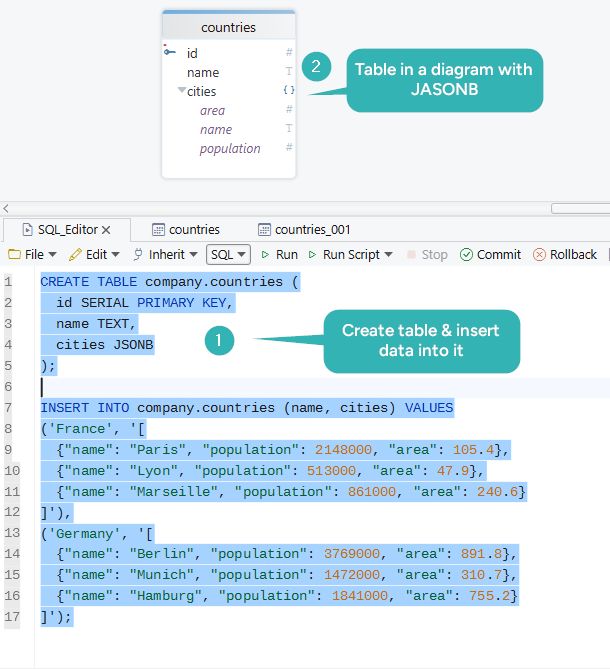
If you are still creating the base schema, pair this with PostgreSQL Create Table.
JSONB operators reference
| Operator | Returns | Description |
|---|---|---|
-> | jsonb | get object field or array element |
->> | text | get object field as text |
#> | jsonb | get value at a path |
#>> | text | get value at a path as text |
@> | bool | containment: left contains right |
<@ | bool | left is contained by right |
? | bool | key exists at top level |
?| | bool | any listed keys exist |
?& | bool | all listed keys exist |
\|\| | jsonb | concatenate or merge JSONB values |
- | jsonb | remove a key or array element |
Query JSONB fields
Using -> (returns JSONB)
SELECT name, cities -> 0 AS first_city
FROM countries;
Using ->> (returns text)
SELECT name, cities -> 0 ->> 'name' AS first_city_name
FROM countries;
Using #>> for a path
SELECT name, cities #>> '{0,name}' AS first_city
FROM countries;
Filtering by a nested value
SELECT name
FROM countries
WHERE (cities -> 0 ->> 'population')::INT > 2000000;
That cast pattern matters. ->> returns text, so numeric comparison usually needs an explicit cast.
Containment and existence operators
Containment (@>) checks whether the left JSONB value contains the right:
SELECT name
FROM countries
WHERE cities @> '[{"name": "Paris"}]';
Existence (?) checks whether a key exists at the top level:
SELECT *
FROM countries
WHERE cities ? 'capital';
These are among the most useful PostgreSQL JSONB features because they combine readable syntax with strong GIN-index support.
Unpack JSONB arrays with jsonb_array_elements
jsonb_array_elements expands a JSONB array into one row per element:
SELECT
    c.name AS country,
    city->>'name'              AS city,
    (city->>'population')::INT AS population,
    (city->>'area')::NUMERIC   AS area_km2
FROM countries c,
     jsonb_array_elements(c.cities) AS city;
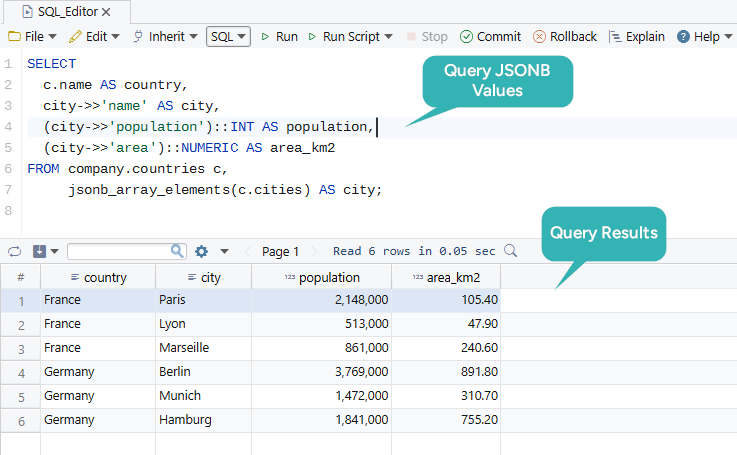
This is the gateway from document-style storage to regular SQL result sets.
Iterate key-value pairs with jsonb_each
jsonb_each expands a JSONB object into a set of (key, value) rows:
SELECT key, value
FROM jsonb_each('{"name": "Paris", "population": 2148000, "area": 105.4}'::jsonb);
Use jsonb_each_text when you want plain text values:
SELECT key, value
FROM jsonb_each_text('{"status": "active", "score": "99"}'::jsonb);
This is useful when profiling unknown documents or flattening JSONB for quick diagnostics.
jsonb_path_query – SQL/JSON path expressions
PostgreSQL 12+ supports JSON path queries through functions such as jsonb_path_query:
SELECT jsonb_path_query(cities, '$[*] ? (@.population > 1000000).name')
FROM countries;
Path expressions use:
$for the root[*]for array elements?()for filters
This is often easier to read than long chains of -> operators when the document is deeply nested.
Update JSONB data
Set a nested value with jsonb_set
UPDATE countries
SET cities = jsonb_set(cities, '{0,name}', '"Paris (updated)"')
WHERE name = 'France';
Remove a key with -
UPDATE countries
SET cities = cities - 'obsolete_field'
WHERE name = 'France';
Merge new fields into a document
UPDATE countries
SET cities = cities || '{"capital": "Paris"}'::jsonb
WHERE name = 'France';
JSONB updates are powerful, but repeated writes to large documents can become expensive. When the same attributes are updated constantly, normal columns may be a better fit.
Nested JSONB structures with LATERAL JOIN
For multi-level nesting, use LATERAL JOIN to unwrap each level:
CREATE TABLE products (
    id    SERIAL PRIMARY KEY,
    name  TEXT,
    specs JSONB
);

INSERT INTO products (name, specs) VALUES
('Laptop', '{
  "variants": [
    {"color": "Silver", "options": [
      {"ram": "16GB", "storage": "512GB SSD"},
      {"ram": "32GB", "storage": "1TB SSD"}
    ]},
    {"color": "Black", "options": [
      {"ram": "8GB", "storage": "256GB SSD"},
      {"ram": "16GB", "storage": "512GB SSD"}
    ]}
  ]
}');

SELECT
    p.name,
    variant->>'color'  AS color,
    option->>'ram'     AS ram,
    option->>'storage' AS storage
FROM products p
JOIN LATERAL jsonb_array_elements(p.specs->'variants') AS variant ON true
JOIN LATERAL jsonb_array_elements(variant->'options')  AS option  ON true;
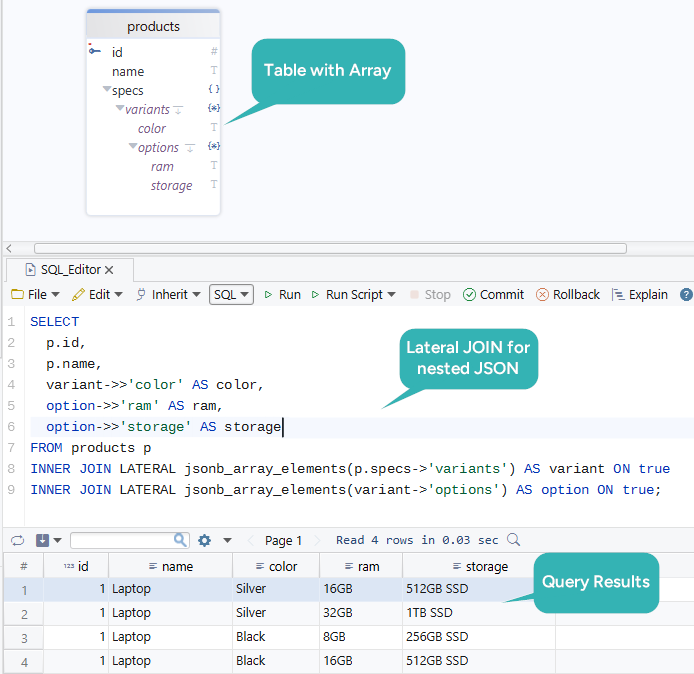
LATERAL JOIN makes the dependency between nesting levels explicit and avoids messy cartesian logic.
Index JSONB for performance
JSONB is powerful, but it needs the right index strategy.
| Index type | Best for | Example |
|---|---|---|
default GIN | general containment and key-existence queries | CREATE INDEX idx_countries_cities ON countries USING GIN (cities); |
GIN ... jsonb_path_ops | smaller, faster containment-only lookups | CREATE INDEX idx_countries_cities_path ON countries USING GIN (cities jsonb_path_ops); |
| expression index | one frequently queried nested field | CREATE INDEX idx_city_population ON countries (((cities -> 0 ->> 'population')::INT)); |
Full-document GIN index
CREATE INDEX idx_countries_cities
ON countries USING GIN (cities);
Containment-focused path-ops index
CREATE INDEX idx_countries_cities_path
ON countries USING GIN (cities jsonb_path_ops);
Expression index on one extracted field
CREATE INDEX idx_first_city_population
ON countries (((cities -> 0 ->> 'population')::INT));
If JSONB queries become performance-critical, review PostgreSQL Create Index and test the generated SQL in DbSchema's SQL Editor.
Model JSONB safely in PostgreSQL
JSONB should add flexibility, not hide structure completely.
Practical rules:
- keep identifiers and stable business keys in normal columns
- use foreign keys for real cross-table relationships
- add
CHECKconstraints when the JSONB value must have a predictable shape - normalize fields that become heavily joined, filtered, or aggregated
For example, you can enforce that a column always stores an object:
ALTER TABLE products
ADD CONSTRAINT chk_specs_object
CHECK (jsonb_typeof(specs) = 'object');
DbSchema helps here because you can keep the relational model, the JSONB-heavy tables, and the generated documentation in one place. If you inherit an existing database first, Show Tables in PostgreSQL and List All Schemas in PostgreSQL help you map the environment.
Explore JSONB visually in DbSchema
When you connect a PostgreSQL database in DbSchema, JSONB columns are recognized and displayed in the schema diagram. In the Query Builder, you can expand JSONB column structures and select nested fields without writing every expression by hand.
- Connect through the PostgreSQL JDBC driver
- Open a table with a JSONB column in the diagram or Query Builder
- Expand the JSONB column to inspect nested arrays and objects
- Generate SQL for extracted fields and joins
- Save the query and include it in shared schema documentation
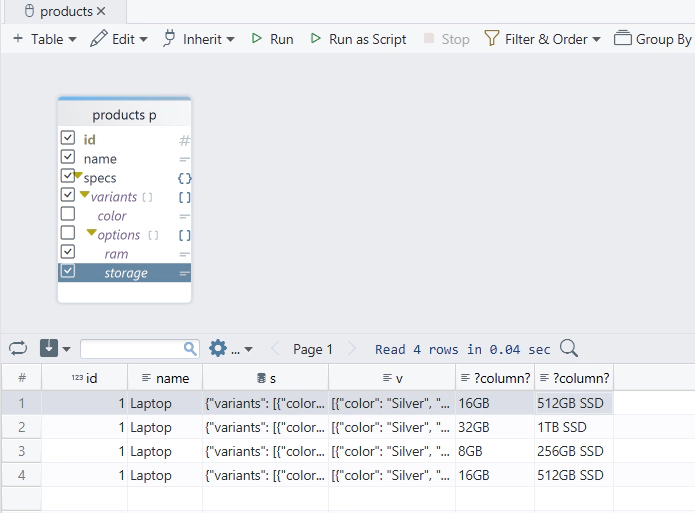
This is especially useful when onboarding teammates who understand the data better from a visual structure than from raw JSON text alone.
FAQ
When should I use JSONB instead of a normal table?
Use JSONB when the structure is flexible or nested and does not justify separate tables yet. Use normal tables when the attributes are stable, strongly typed, and joined frequently.
What is the difference between -> and ->> in PostgreSQL JSONB?
-> returns JSONB. ->> returns text. Use ->> when you need to compare, sort, or cast the extracted value.
How do I index a JSONB column?
Use a GIN index for general JSONB queries, jsonb_path_ops for containment-heavy workloads, or an expression index for a frequently queried extracted field.
Can I update a single key inside a JSONB value?
Yes. Use jsonb_set() in an UPDATE statement.
Is JSONB slower to write than JSON?
Slightly, because PostgreSQL parses and stores the value in a binary format. The tradeoff usually pays off for read-heavy workloads.
Does PostgreSQL support JSON path queries?
Yes. PostgreSQL 12+ supports JSON path functions such as jsonb_path_query, jsonb_path_exists, and related operators.
Conclusion
PostgreSQL JSONB is one of the database's most practical features for semi-structured data. With operators such as ->, ->>, @>, and ?, plus jsonb_array_elements, jsonb_path_query, and GIN indexes, you can query nested documents with much more control than many teams expect.
Connect DbSchema through the PostgreSQL JDBC driver to explore JSONB structures visually, build extraction queries faster, and document how JSONB fits into the rest of your schema.






