Best MySQL Database Design Tools for 2026 – Features Compared | DbSchema
Choosing the best MySQL database design tool depends on how you work. Some tools are best for design-first modeling, some are better for reverse engineering an existing schema, and others mainly help with administration or quick whiteboard-style diagrams.
If you want one short answer, DbSchema is the strongest all-around recommendation for MySQL teams because it combines visual design, schema synchronization, documentation, and offline modeling in one workflow. MySQL Workbench is still relevant for MySQL-only administration, while DBeaver and DbVisualizer are practical when you also work with other database engines.
Table of Contents
- Quick answer
- How we evaluated the tools
- MySQL design tool comparison table
- Tool reviews
- Best tool by MySQL use case
- How to model a MySQL schema visually in DbSchema
- FAQ
- Conclusion
Quick answer
- Best overall for MySQL design: DbSchema
- Best official MySQL tool: MySQL Workbench
- Best for Windows-heavy professional teams: dbForge Studio
- Best for multi-database developers: DBeaver
- Best for SQL-heavy cross-database work: DbVisualizer
- Best for conceptual whiteboard collaboration: Lucidchart
If you are mainly looking for an ERD workflow, also read Create ER Diagrams for MySQL and the broader guide to Entity Relationship Diagrams.
How we evaluated the tools
For 2026, the most useful MySQL design tools are not just diagram editors. They should help you:
- design schemas before the database exists
- reverse-engineer an existing MySQL schema
- document tables and relationships clearly
- compare model changes against real databases
- support a team workflow, not only one-off screenshots
That is why this comparison emphasizes design-first workflow, reverse engineering, schema diff or documentation support, and practical fit for MySQL teams instead of just listing generic SQL clients.
MySQL design tool comparison table
| Tool | Design-first modeling | Reverse engineer MySQL | Docs / schema sync | Best for |
|---|---|---|---|---|
| DbSchema | Yes | Yes | Strong documentation and schema sync | teams that want one visual workflow |
| MySQL Workbench | Yes | Yes | basic model export, MySQL-native workflow | MySQL-only projects |
| dbForge Studio | Yes | Yes | strong compare and deployment tooling | Windows-based professional teams |
| Navicat for MySQL | Limited | Yes | polished admin workflow and sharing | commercial teams wanting a refined UI |
| DbVisualizer | Limited | Yes | better for exploration than design-first docs | SQL-heavy cross-database work |
| DBeaver | Limited | Yes | useful ERD view, broad connectivity | developers working across many databases |
| Lucidchart | Manual | Import-based | strong collaboration, weak database-native automation | conceptual design and presentations |
Tool reviews
1. DbSchema
DbSchema is the best fit when MySQL design is more than drawing tables once. It supports visual modeling, reverse engineering, synchronization, and documentation from the same project file.
Why DbSchema stands out for MySQL in 2026
- create or edit the model visually before writing DDL
- reverse-engineer a live schema using the MySQL JDBC driver
- compare the model with the database using schema synchronization
- generate shareable schema documentation
- keep multiple focused diagrams for large schemas instead of one unreadable canvas
Best for
Teams that want a design-first MySQL workflow plus documentation and deployment review in one tool.
Watch out for
It is a desktop application, so it is better for serious design work than for quick browser-only sketches.
2. MySQL Workbench
MySQL Workbench remains the default choice for many MySQL administrators because it is the official tool in the MySQL ecosystem. It handles EER diagrams, SQL editing, and server administration in one package.
Best reasons to pick it
- official MySQL support and familiar workflow
- forward and reverse engineering for MySQL schemas
- useful when administration and design happen in the same desktop tool
Main limitation
It is focused on MySQL rather than broader documentation or multi-database collaboration.
3. dbForge Studio
dbForge Studio is a strong choice for professional MySQL shops that want compare, deployment, and SQL development features in a polished Windows application.
Best reasons to pick it
- strong schema compare and sync features
- visual query builder and MySQL-oriented tooling
- good fit when deployment scripts and database comparison are daily tasks
Main limitation
It is most attractive to Windows-based teams and is less appealing if you want a lighter free workflow.
4. Navicat for MySQL
Navicat is a premium administration suite with modeling features. It is often chosen for its polished interface and cross-platform support.
Best reasons to pick it
- smooth user experience across Windows, macOS, and Linux
- convenient import, export, and scheduled task tooling
- good when design, data work, and administration all happen in one commercial tool
Main limitation
The modeling workflow is useful, but it is not as design-first or documentation-centric as DbSchema.
5. DbVisualizer
DbVisualizer is a dependable SQL client for teams that connect to many database engines and want a stable interface for daily work.
Best reasons to pick it
- solid SQL editor and data exploration experience
- useful for browsing live MySQL schemas
- practical when MySQL is only one part of a larger database stack
Main limitation
It is better at exploring existing databases than building and maintaining a design-first model from scratch.
6. DBeaver
DBeaver is a popular community tool because it supports many databases, has a capable SQL editor, and can generate ERD views from live schemas.
Best reasons to pick it
- very broad connectivity
- practical live-database exploration
- good option when one desktop tool must handle MySQL, PostgreSQL, SQLite, and more
Main limitation
Its ERD support is useful, but the product is still more of a database IDE than a dedicated schema design platform.
7. Lucidchart
Lucidchart is not a MySQL-native database tool, but it remains useful for conceptual design, presentations, and collaborative discussions with non-database stakeholders.
Best reasons to pick it
- easy-to-share diagrams in the browser
- simple feedback and collaboration workflow
- helpful for planning or explaining a schema before implementation
Main limitation
It does not give you the same reverse engineering, schema sync, or MySQL-native workflow you get from dedicated database tools.
Best tool by MySQL use case
| If you need to... | Best fit |
|---|---|
| design a new MySQL schema visually and keep docs updated | DbSchema |
| stay inside the official MySQL ecosystem | MySQL Workbench |
| compare databases and generate deployment scripts on Windows | dbForge Studio |
| manage MySQL with a polished commercial UI | Navicat for MySQL |
| explore MySQL plus other database engines from one client | DBeaver or DbVisualizer |
| sketch a conceptual diagram with non-technical teammates | Lucidchart |
How to model a MySQL schema visually in DbSchema
This is the workflow that makes DbSchema the easiest recommendation for many MySQL teams:
- connect through the MySQL JDBC driver
- use Connect to Database to reverse-engineer the schema
- reorganize tables in the diagram view and split large schemas into multiple layouts
- review differences with schema synchronization before deployment
- publish the result as interactive documentation
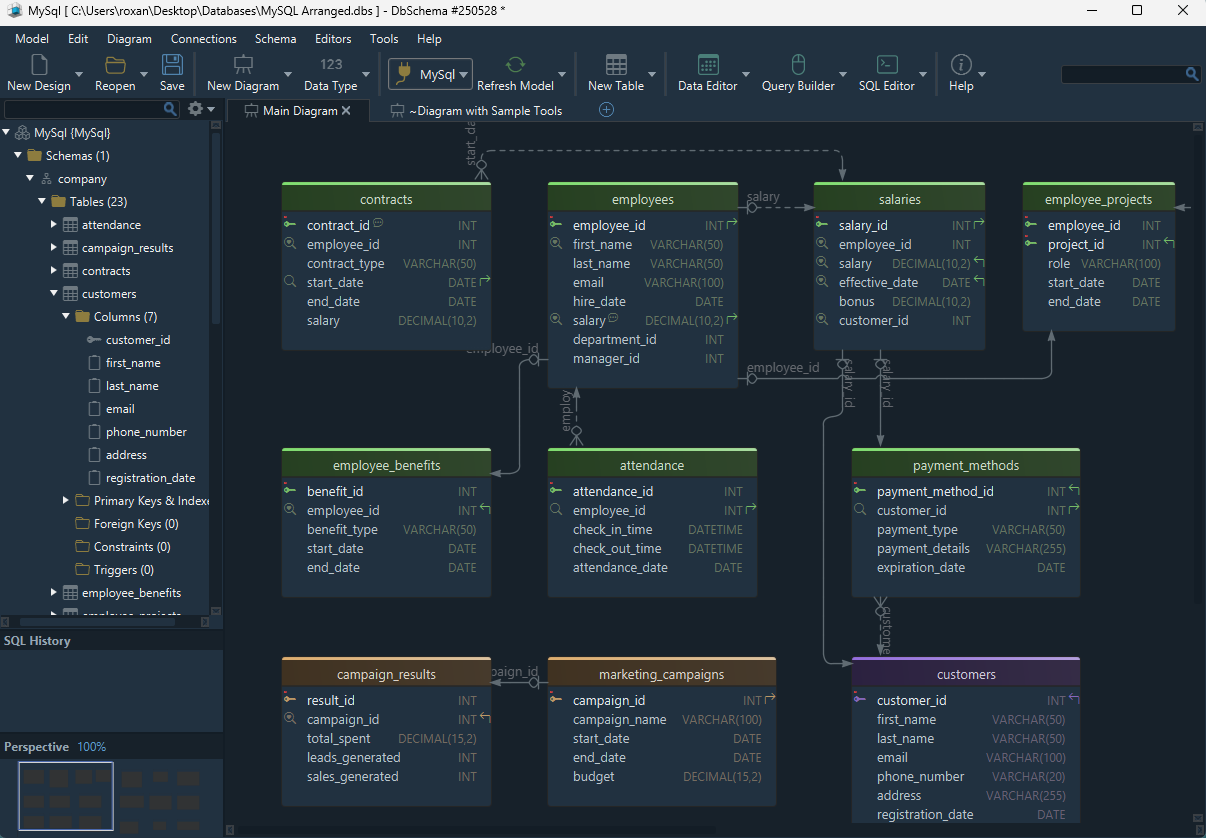
This matters in practice because you can move from discovery to documentation without redrawing the schema in a second tool. If you are still refining the design itself, also read Steps to Design a Relational Schema and Top Free Tools for Database Design.
FAQ
What is the best MySQL database design tool overall?
For most teams, DbSchema is the strongest all-around option because it combines visual design, reverse engineering, schema sync, and documentation instead of focusing on only one part of the workflow.
Is MySQL Workbench still good in 2026?
Yes. It is still relevant, especially for MySQL-only environments that want an official desktop tool for modeling and administration.
Which MySQL tool is best for ER diagrams?
If you want diagrams plus documentation and schema comparison, DbSchema is the better fit. If you only need a MySQL-native diagramming experience, MySQL Workbench is still a solid choice.
Can I reverse-engineer an existing MySQL database into a diagram?
Yes. DbSchema, MySQL Workbench, DBeaver, dbForge Studio, and several other tools can import an existing schema and generate a diagram from it.
Which MySQL design tool is best for documentation?
DbSchema stands out because it can export interactive schema documentation directly from the same model you use for design and sync.
What if my team uses more than MySQL?
DbSchema, DBeaver, and DbVisualizer are usually better choices than MySQL-only tools because they support broader database stacks.
Is a browser-based diagramming tool enough for MySQL projects?
It can be enough for conceptual planning, but serious MySQL schema work usually benefits from reverse engineering, schema diff, and documentation features that dedicated database tools provide.
Conclusion
The best MySQL database design tool is the one that matches your real workflow, not just your first screenshot. For most teams, that means visual design, reverse engineering, documentation, and schema review all in one place.
That is why DbSchema is the most practical recommendation on this list: it covers the full MySQL design lifecycle, from the first diagram to the final documentation and schema sync.






