Firebird CREATE DATABASE Guide in isql and DbSchema
For anyone who has a Firebird server running and now needs the database file itself, from isql or from DbSchema.
On this page
You've installed Firebird and the server is running, but there is no database yet to hold your
tables. In Firebird a database is one file, and a single statement creates it: CREATE DATABASE,
typed in isql, the command-line client that comes with the server. On Firebird 5.0 and a Linux
server it reads:
CREATE DATABASE 'localhost:/var/lib/firebird/data/shop.fdb'
  USER 'SYSDBA' PASSWORD 'masterkey'
  PAGE_SIZE 8192
  DEFAULT CHARACTER SET UTF8;
On Windows the path takes the form 'localhost:C:\data\shop.fdb'. Besides the running server, you
need the password of its SYSDBA account, and DbSchema for the last section.
Create the database in isql
-
Open a terminal and go to the directory that holds the Firebird tools. On Windows that is the installation directory itself; on Linux it is the
bindirectory of the installation, typically/opt/firebird/bin. -
Start isql with no arguments:
isqlon Windows,./isqlon Linux. It isn't attached to any database yet, and says so:Use CONNECT or CREATE DATABASE to specify a database SQL> -
At the
SQL>prompt, type the statement from above. isql runs it when it reaches the semicolon, and shows aCON>prompt for each line before that. -
Wait for the
SQL>prompt to come back. isql prints nothing when the statement succeeds: the file exists, and isql is now connected to it. Type SHOW DATABASE to see what Firebird created:SQL> SHOW DATABASE; Database: localhost:/var/lib/firebird/data/shop.fdb Owner: SYSDBA PAGE_SIZE 8192 ... Default Character set: UTF8 -
Type
EXIT;to leave.EXITcommits your work before it quits, andQUITrolls it back.
To work in the database later, start isql again and attach to it with CONNECT. SHOW TABLES
then confirms that it's still empty:
CONNECT 'localhost:/var/lib/firebird/data/shop.fdb' USER 'SYSDBA' PASSWORD 'masterkey';
SHOW TABLES;
There are no tables in this database
masterkey in these statements stands for your SYSDBA password. Some Firebird installers set
exactly that, but depending on the version, the operating system and the architecture, the installer
may ask you for a password instead, or generate a random one and save it in the file
SYSDBA.password in the installation directory, as the
Firebird 5 Quick Start Guide
describes.
What each part of the statement decides
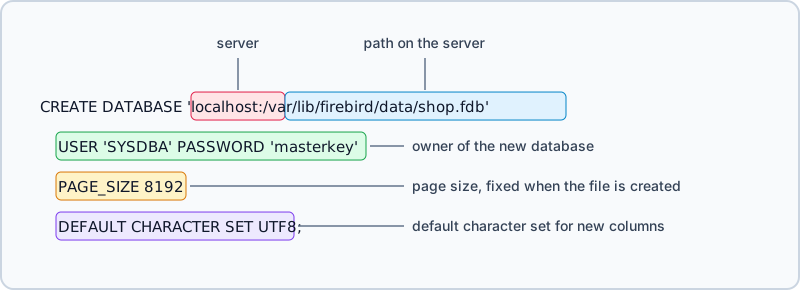
The path must be inside quotes, and so must the password; single and double quotes both work.
USER and PASSWORD log you in, and the user you name becomes the owner of the new database, which
matters later when privileges on its objects are granted. A user name inside double quotes is
case-sensitive, as any quoted identifier is.
Every clause after the path is optional. What Firebird uses when you leave one out:
| clause | when you leave it out |
|---|---|
USER, PASSWORD | the ISC_USER and ISC_PASSWORD environment variables |
PAGE_SIZE | 8192 |
DEFAULT CHARACTER SET | NONE |
Databases are created in SQL dialect 3; the older dialect 1 needs SET SQL DIALECT 1 before the
statement. Firebird accepts CREATE DATABASE from an administrator, or from a user who holds the
CREATE DATABASE privilege. Each of these rules is in the
Firebird 5.0 Language Reference,
under CREATE DATABASE.
Where the file goes, and who owns it
The part of the path before the colon decides which program writes the file. With a host name, isql asks the Firebird server on that host to create the database, and the path is a path on that server's own disk, whichever computer you typed it on. Without a host name, isql tries to create the file itself, and your operating system login becomes its owner.
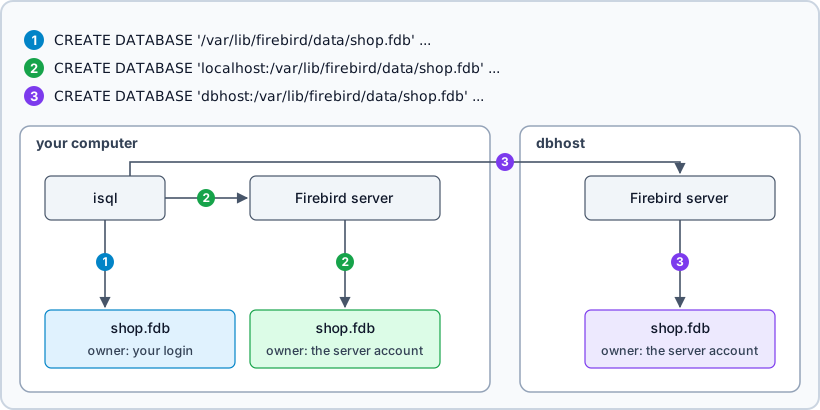
The owner matters because only the owner and its group may open the file. On a Linux test server
whose Firebird server runs as root, the login alice created one file without a host name and one
through the server:
CREATE DATABASE '/var/lib/firebird/data/nohost.fdb' USER 'SYSDBA' PASSWORD 'masterkey';
CREATE DATABASE 'localhost:/var/lib/firebird/data/viaserver.fdb' USER 'SYSDBA' PASSWORD 'masterkey';
-rw-rw---- 1 alice alice 1835008 Sep 10 22:20 nohost.fdb
-rw-rw---- 1 root  root  1835008 Sep 10 22:20 viaserver.fdb
The isql manual
warns that a file created without a host name "may cause access denied errors for others who may
want to connect at a later stage". Put localhost: in front of a local path, or xnet:// on
Windows, and the account that runs the server creates and owns the file instead; on Linux that
account is usually firebird.
Give a full path or an alias. With a bare file name, the Language Reference says, the database "will
be created in one of the system directories", which is rarely where you'll look for it. An alias is a
name that the server's administrator maps to a path in databases.conf:
shop = /var/lib/firebird/data/shop.fdb
CREATE DATABASE 'localhost:shop' then creates the file at that path, and every later connection can
use the short name.
Page size and character set
Every page of a Firebird database has the same size, fixed when the file is created. Firebird 5.0
supports 4,096, 8,192, 16,384 and 32,768 bytes, and uses 8,192 when you leave PAGE_SIZE out. It
doesn't reject other values: a size under 4,096 is rounded up to 4,096, and any other unsupported
size is rounded down to the closest supported one. Asked for and created on a Firebird 4.0 server:
| PAGE_SIZE | page size created |
|---|---|
| left out | 8192 |
| 3000 | 4096 |
| 10000 | 8192 |
| 20000 | 16384 |
| 65536 | 32768 |
Keep 8,192 unless you have measured a reason to change it. Larger pages hold more records and wider indexes on each page, but they waste more space on BLOBs and make the page cache use more memory, as the Language Reference warns. The Firebird 3.0 Developer's Guide calls 8,192 "good for most cases".
DEFAULT CHARACTER SET is the character set that CHAR, VARCHAR and BLOB SUB_TYPE TEXT columns get
when they don't name one of their own. Left out, it is NONE, so set it in the statement. The
Developer's Guide recommends UTF8, which every current programming language supports. An optional
COLLATION after the character set names the database's default collation.
SHOW DATABASE exists only in isql. From any other client, read the same values with a query:
SELECT m.MON$PAGE_SIZE, m.MON$SQL_DIALECT, r.RDB$CHARACTER_SET_NAME
FROM MON$DATABASE m CROSS JOIN RDB$DATABASE r;
| MON$PAGE_SIZE | MON$SQL_DIALECT | RDB$CHARACTER_SET_NAME |
|---|---|---|
| 8192 | 3 | UTF8 |
Changing them once the database exists
The default character set can change at any time:
ALTER DATABASE SET DEFAULT CHARACTER SET UTF8;
The Language Reference says the change "does not affect existing data or columns". A column created
before it keeps the old character set, as two tables in a database created with NONE show, one
created before the ALTER DATABASE and one after:
CREATE TABLE before_change (s VARCHAR(10));
ALTER DATABASE SET DEFAULT CHARACTER SET UTF8;
CREATE TABLE after_change (s VARCHAR(10));

SELECT TRIM(rf.RDB$RELATION_NAME) AS tbl, TRIM(cs.RDB$CHARACTER_SET_NAME) AS charset
FROM RDB$RELATION_FIELDS rf
JOIN RDB$FIELDS f ON f.RDB$FIELD_NAME = rf.RDB$FIELD_SOURCE
JOIN RDB$CHARACTER_SETS cs ON cs.RDB$CHARACTER_SET_ID = f.RDB$CHARACTER_SET_ID
WHERE rf.RDB$RELATION_NAME IN ('BEFORE_CHANGE', 'AFTER_CHANGE') ORDER BY 1 DESC;
| TBL | CHARSET |
|---|---|
| BEFORE_CHANGE | NONE |
| AFTER_CHANGE | UTF8 |
The page size has no ALTER DATABASE clause, and ALTER DATABASE SET PAGE_SIZE 16384 fails with
"Token unknown". A new page size takes a backup and a restore with gbak, whose -page_size option
sets the page size of the restored database:
gbak -b -user SYSDBA -password masterkey localhost:/var/lib/firebird/data/shop.fdb /var/lib/firebird/backup/shop.fbk
gbak -c -page_size 16384 -user SYSDBA -password masterkey /var/lib/firebird/backup/shop.fbk localhost:/var/lib/firebird/data/shop16k.fdb
-b writes the backup and -c creates a new database from it, so the original file stays as it
was. The restored shop16k.fdb reports a page size of 16,384; point your connections at it once
you've checked it. The gbak manual
lists the other restore options.
When CREATE DATABASE fails
Firebird creates nothing when the statement fails, and says why. Each message below was captured on a Firebird 4.0 server.
The file already exists
Statement failed, SQLSTATE = 08001
I/O error during "open O_CREAT" operation for file "/var/lib/firebird/data/shop.fdb"
-Error while trying to create file
-File exists
CREATE DATABASE never overwrites a file. Pick another name, or attach to the existing database with
CONNECT.
The server doesn't allow that directory
Statement failed, SQLSTATE = 28000
Use of database at location /tmp/shop.fdb is not allowed by server configuration
The DatabaseAccess setting in the server's firebird.conf limits where databases may live. The
comments in that file describe its values: Full, the default, allows any path; Restrict lists the
directory trees allowed; None allows only the aliases in databases.conf. Create the file in a
directory the setting names, or use an alias.
The login is refused
Statement failed, SQLSTATE = 28000
Your user name and password are not defined. Ask your database administrator to set up a Firebird login.
The user name or the password is wrong. For SYSDBA, check where the installer put the password, as described at the end of the isql steps.
Open the new database in DbSchema
The Language Reference says CREATE DATABASE needs special handling in the application or in its
database driver, which isql has, so create the file there first, as above. DbSchema then connects to
it and gives you a diagram to design the tables in. It asks for the database type first:
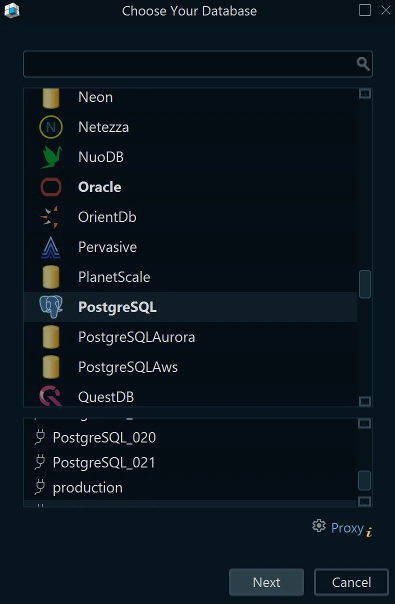
- In DbSchema, choose Connect to Database and pick Firebird in the Choose Your Database list. DbSchema opens the Connection Dialog for Firebird and downloads the Firebird JDBC driver, Jaybird, on its own.
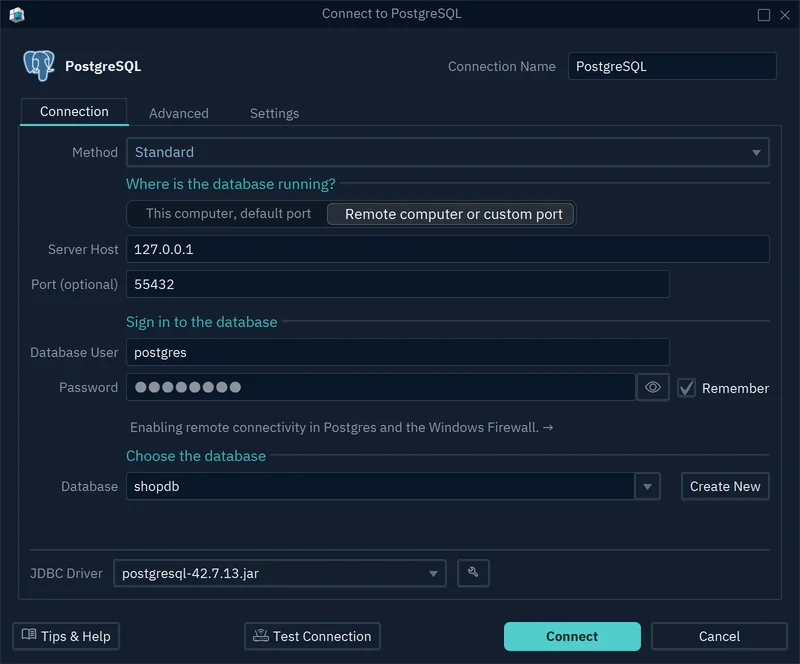
- Type a name in Connection Name. Leave the Method on Standard, which builds the JDBC URL from the fields you fill in.
- On the Connection tab, keep This computer, default port when the server runs on your computer, or choose Remote computer or custom port and fill in Server Host and Port. Firebird listens on port 3050 unless its administrator changed it.
- Enter SYSDBA and its password in Database User and Password. Tick Remember to keep the password stored on your computer.
- In the Database field, type the path or the alias of the file you created: the text that follows
localhost:in the isql statement. - Click Test Connection to check that the server answers, then Connect. DbSchema saves the connection for later.
DbSchema then reverse-engineers the database, which has no tables yet. Right-click the diagram canvas and choose New Table to add the first one; the Firebird CREATE TABLE guide goes on from there.
While DbSchema is connected, every table you add is executed against the database at once and logged in the SQL History pane. The diagram and the table definitions are also kept in DbSchema's design model, which is separate from the database, and saving that model to a file is a DbSchema Pro feature.



isql creates the Firebird file and fixes its owner, page size and character set in one statement; DbSchema connects to that file and gives you the diagram to design its tables in. Download DbSchema, connect to your Firebird server from the Connection Dialog, and design the first tables in the free Community Edition, which covers connecting and the diagrams; saving the design to a model file is in DbSchema Pro.









