Steps to Design a Relational Database Schema – Step-by-Step Guide | DbSchema
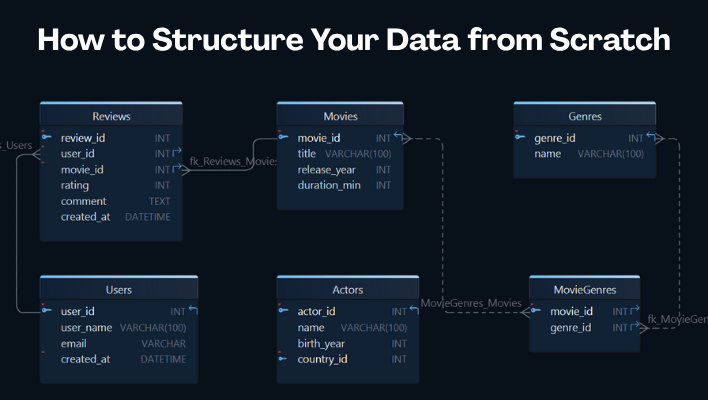
Designing a relational database schema is easier when you follow a repeatable process: understand the business rules, identify the entities, define keys and relationships, normalize the structure, then validate everything with sample data and real queries.
This guide walks through the steps to design a relational database schema using a simple streaming-platform example. It also shows how DbSchema helps you move from a rough ER diagram to a documented, production-ready model.
Table of Contents
- What a relational schema is
- The design checklist before you start
- Step 1: define the scope and business rules
- Step 2: identify entities and attributes
- Step 3: choose keys and relationships
- Step 4: normalize the structure
- Step 5: choose data types and constraints
- Step 6: validate with sample data and queries
- Visual workflow in DbSchema
- Pre-launch review checklist
- FAQ
- Conclusion
What a relational schema is
A relational schema is the structural definition of a database:
- tables
- columns
- primary keys
- foreign keys
- constraints
- indexes and relationships
If the ER diagram is the visual map, the relational schema is the precise implementation. The two belong together, which is why this article pairs well with Entity Relationship Diagram and the DbSchema page about logical design.
The design checklist before you start
Before creating tables, write down what the system must answer.
| Step | Output | Why it matters |
|---|---|---|
| clarify scope | business rules and user actions | prevents random tables from appearing later |
| identify entities | first draft of tables | keeps the model anchored in real concepts |
| define relationships | foreign keys and cardinality | avoids disconnected data |
| normalize | cleaner, less duplicated structure | reduces update anomalies |
| validate | sample data and test queries | proves the design works in practice |
For this guide, imagine a streaming app called StreamFlix. It needs users, movies, genres, actors, watchlists, and reviews. That is enough to demonstrate the full design workflow without becoming too abstract.
Step 1: define the scope and business rules
Start with questions, not tables.
Ask:
- What data does the application store?
- What business events matter?
- Which actions should be easy to query later?
- Which records must be unique?
- Which relationships are optional and which are mandatory?
For StreamFlix, the first draft might include:
- users create accounts
- movies belong to one or more genres
- movies can have multiple actors
- users can write reviews
- users can save movies to a watchlist
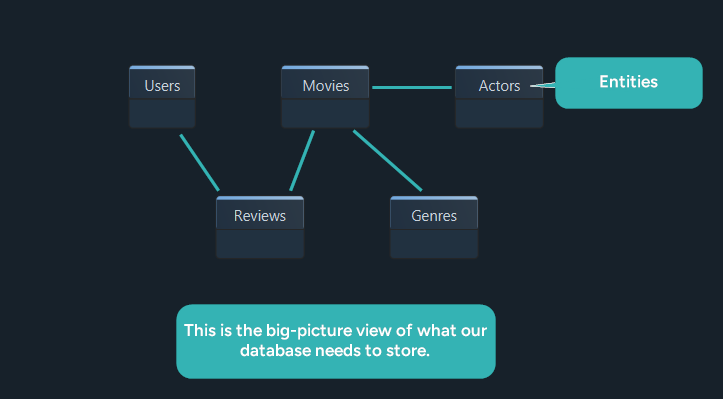
At this stage, you are identifying the nouns and rules behind the system. DbSchema is useful here because you can start with a visual model before the physical database exists, then refine the diagram as requirements change.
Step 2: identify entities and attributes
Now turn the business concepts into tables and columns.
| Table | Core fields |
|---|---|
| Users | user_id, username, email, created_at |
| Movies | movie_id, title, release_year, duration_minutes |
| Reviews | review_id, user_id, movie_id, rating, comment, created_at |
| Genres | genre_id, name |
| Actors | actor_id, name, birth_year, country |
| MovieGenres | movie_id, genre_id |
| MovieActors | movie_id, actor_id |
| Watchlist | user_id, movie_id, added_at |
The goal is not perfect detail on the first pass. The goal is to capture the main entities and the minimum fields needed to support the business rules.
Step 3: choose keys and relationships
Next, define how tables connect.
Users.user_idis the primary key for usersMovies.movie_idis the primary key for moviesReviews.user_idreferencesUsers.user_idReviews.movie_idreferencesMovies.movie_idMovieGenresconnects movies to genresMovieActorsconnects movies to actors
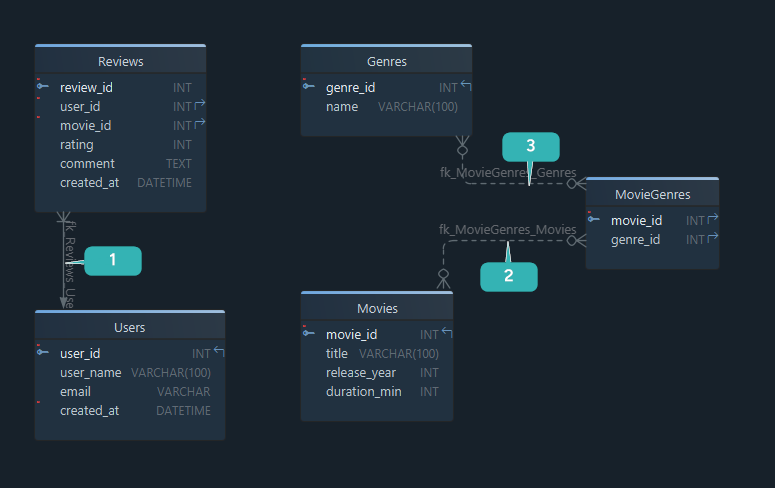
A few practical rules help here:
- use simple, stable primary keys
- create a foreign key for every real dependency
- introduce a junction table for many-to-many relationships
- decide whether child rows are optional or required
If you want a deeper refresher, use What Is a Foreign Key? and DbSchema's diagram documentation together.
Step 4: normalize the structure
Normalization keeps the schema clean, consistent, and easier to update.
Example of a bad first draft
| movie_id | title | genres |
|---|---|---|
| 1 | The Matrix | Action, Sci-Fi |
This looks convenient, but it mixes multiple values into one column.
Better version
| movie_id | genre_id |
|---|---|
| 1 | 10 |
| 1 | 14 |
What 1NF, 2NF, and 3NF mean in practice
| Normal form | What to fix | Example |
|---|---|---|
| 1NF | repeating groups and multi-value columns | split comma-separated genres into MovieGenres |
| 2NF | fields that depend on only part of a composite key | move descriptive data out of a junction table |
| 3NF | non-key fields that depend on other non-key fields | keep genre names in Genres, not in Movies |
Normalization is not about making the schema academic. It is about avoiding duplicated data, inconsistent updates, and hard-to-maintain queries. For the broader workflow, see How to Design a Relational Database Schema.
Step 5: choose data types and constraints
Once the table structure is stable, choose the implementation details carefully.
- pick numeric or UUID-style identifiers consistently
- choose the smallest practical type for counts and flags
- add
NOT NULLwhere a value is mandatory - add
UNIQUEto columns such as email or username when duplicates are not allowed - decide which foreign keys should cascade on delete or update
This is also where logical design becomes physical design:
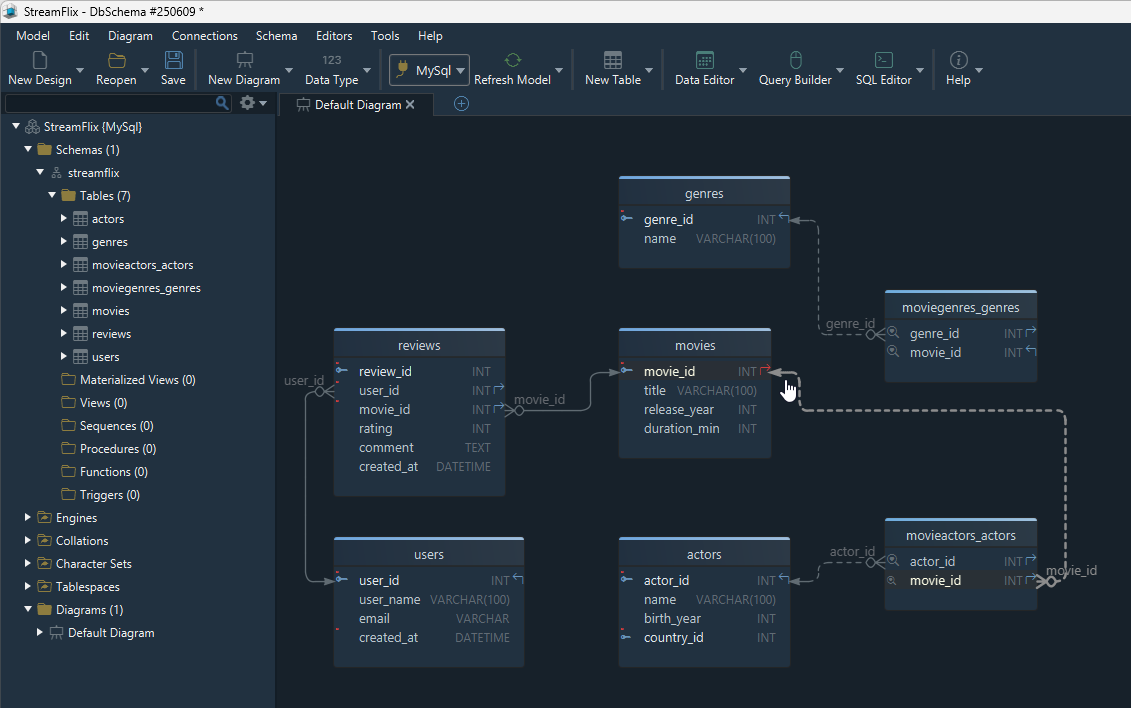
In DbSchema, you can define tables visually, then generate the physical SQL afterward. That keeps the design readable while still producing exact DDL.
Step 6: validate with sample data and queries
Do not stop when the diagram looks correct. Validate the design with data and queries.
INSERT INTO Movies (movie_id, title, release_year, duration_minutes)
VALUES (1, 'Inception', 2010, 148);
Then test real questions:
- can one user review many movies?
- can one movie belong to multiple genres?
- can a deleted movie leave broken references behind?
- are the most common joins simple and obvious?
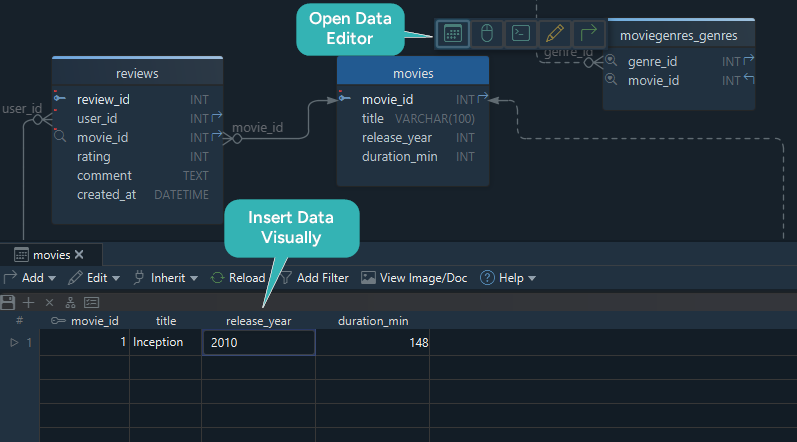
DbSchema helps here because you can use the Random Data Generator, inspect rows in the Relational Data Explorer, and compare your model against a live database with schema synchronization.
Visual workflow in DbSchema
If you want a fast design-to-implementation workflow, this is a practical sequence:
- start a new model and sketch the entities visually
- add primary keys, foreign keys, and many-to-many tables in the diagram
- refine the logical structure with the logical design tools
- generate SQL or connect to a database and reverse-engineer the current schema
- publish the result as schema documentation for teammates
This is one reason DbSchema works well for schema projects: the same model supports visual design, documentation, data validation, and deployment review instead of splitting the workflow across multiple tools.
Pre-launch review checklist
Before you call the schema ready, confirm:
- every table has a clear primary key
- every relationship has a matching foreign key
- many-to-many relationships use junction tables
- duplicate business data has been normalized
- important columns use the right
NOT NULL,UNIQUE, and default rules - the schema supports the most common read and write queries
- the design is documented, not just implemented
If the last point is still missing, generate a diagram and documentation first. That step is often what makes onboarding and code review much easier later.
FAQ
What are the main steps to design a relational database schema?
Define the scope, identify entities, choose keys and relationships, normalize the structure, add data types and constraints, then validate with sample data and real queries.
Should I start with an ER diagram or with SQL?
For most projects, start with an ER diagram or logical model. It is faster to review visually, and tools like DbSchema can generate the SQL afterward.
How many normalization steps do I need?
Most application schemas benefit from getting at least to 3NF. Go further only when the design really requires it.
How do I handle many-to-many relationships?
Create a junction table that stores the foreign keys from both parent tables, such as MovieGenres(movie_id, genre_id).
When should I add indexes?
Usually after the relational structure is stable and you know which joins and filters are most common. Indexes support performance, while the schema itself defines correctness.
Can I design a relational schema without a live database?
Yes. Design-first tools such as DbSchema let you work offline, then synchronize the model with the real database later.
What is the best tool for designing a relational schema visually?
If you want visual modeling, schema documentation, and synchronization in one workflow, DbSchema is a strong choice because it handles both design-first and reverse-engineering use cases.
Conclusion
The best way to design a relational database schema is to follow a clear sequence: understand the business rules, model the entities, define keys and relationships, normalize carefully, and validate with sample data before deployment.
Use DbSchema when you want that process to stay visual from the first diagram to the final documentation and schema sync.






