Best Database Tools with Git for Team Design in 2026
For the team lead who wants schema changes reviewed in the same pull request as the code.
On this page
If your team wants the schema reviewed alongside the code, start with DbSchema: the whole design is one XML .dbs file, and the Git client is built into the application. DBeaver ships Git integration in its Enterprise, Ultimate, and Team editions, dbForge Studio reaches Git through the dbForge Source Control add-in, and DbVisualizer versions SQL scripts in Git from its Pro edition. Navicat takes the other route, a cloud workspace the team shares.
Database tools with Git workflows compared
| Tool | Git support | Model format | Merge behavior | Team licensing |
|---|---|---|---|---|
| DbSchema | Built in | XML .dbs | Git text merge on the .dbs | Perpetual or subscription, per user |
| DBeaver | Enterprise, Ultimate, Team | JSON and XML projects | Git text merge | Subscription |
| dbForge Studio | dbForge Source Control add-in | Directory of SQL scripts | Add-in diff, manual commit | Perpetual or subscription, per user |
| Navicat | None | Proprietary | Cloud workspace sync | Subscription |
| DbVisualizer | Pro edition | SQL scripts | Git merge view, per script | Subscription |
The model format column decides more than the Git column does. Git tracks text, so a design saved as a text file can be branched, diffed, reviewed, and reverted with the commands your team already uses, while a design held in a proprietary workspace gives Git nothing to track no matter which integration sits on top. That is why the table separates the two, and why a tool with no Git support can still be listed as collaborative: the collaboration simply happens somewhere other than the repository.
Licensing is the other column worth reading before a trial. Git support is not always in the edition a team ends up buying, so the question to answer early is which edition carries it for the number of seats you need. The merge behavior column follows from the format: a single XML file merges the way any text file does, a directory of SQL scripts merges per script, and a workspace that lives in a vendor's cloud is synchronized rather than merged, so the last writer decides what the others see.
The tools in this overview
 DbSchema
DbSchema keeps the entire design, tables, columns, foreign keys, and every diagram layout, in a single .dbs file in XML, and opens a Git dialog from the Model menu that clones a repository, stages, commits, pushes, pulls, branches, and stashes against any Git host or an in-house server. One repository can hold several .dbs files, one per database or component.
 Navicat
Navicat has no Git integration. Collaboration runs through Navicat Cloud, which stores connections, queries, and models for the team to share, and data transfer and synchronization move objects between environments.
 DbVisualizer
DbVisualizer versions SQL scripts in Git, in its Pro edition. Its Git integration clones a remote repository or mounts one that is already on disk, checks out local and remote branches, commits, pushes, fetches, and shows the commit history of the selected branch. A conflicting file opens in a merge view with the two versions on either side and the result between them, and GitHub authentication runs in the browser. The repository holds the scripts, so the schema is versioned as the SQL that builds it rather than as one model of it.
 DBeaver
DBeaver lists Git integration and project sync to a Git repository in its Enterprise, Ultimate, and Team editions; the Lite edition does not include them. Versioning is at file level, over scripts and project files, rather than over one model of the schema.
 dbForge Studio
Git for dbForge Studio comes through the dbForge Source Control add-in, which also covers SVN, TFVC, Mercurial, and Perforce. Its schema comparison and synchronization keep environments aligned once changes are committed. The dbForge Studio editions page does not list Git itself, so check which bundle includes the add-in.
What a Git workflow for schema design requires
A database has state, which application code does not, and that is what makes version control for a schema different. Three things have to be true before a Git workflow means anything. The design has to be a text file on disk, so that branch, review, and revert behave the way they do for code. Two people have to be able to take the schema in different directions and reconcile it afterwards. And the reconciliation has to happen before anything reaches the live database, because a merge that lands in the model is free and a merge that lands in production is not.
The habits around it are a separate subject, covered in the guide on team collaboration in schema design.
What makes a schema model diffable
A DbSchema .dbs file is XML, and one table in it looks like this:
<table name="players" row_count="0" spec="" >
    <column name="id" type="integer" length="32" mandatory="y" >
        <identity><![CDATA[GENERATED BY DEFAULT AS IDENTITY]]></identity>
    </column>
    <column name="team_id" type="integer" length="32" mandatory="y" />
    <column name="name" type="varchar" length="100" mandatory="y" />
    <index name="pk_players" unique="PRIMARY_KEY" >
        <column name="id" />
    </index>
    <fk name="fk_players_team" to_schema="sports.public" to_table="teams" >
        <fk_column name="team_id" pk="id" />
    </fk>
</table>
Adding a column in the diagram adds one column line. Drawing a relationship adds the three-line fk element. A pull request on the model file therefore reads as the schema change itself, and a reviewer who has never opened DbSchema can still see that a foreign key was added to players and which column it uses. When two branches touch different tables, Git merges them without asking. When they touch the same one, the conflict is resolved as a text merge in the Git client the team already uses, exactly like a conflict in code.
Using Git to manage database projects
Every clone holds the full history, so the branch, the diff, and the revert are local, and the schema history stays inside the network you already trust rather than in a vendor's workspace. That is the same argument that put application code in Git, applied to the object that most often changes without anyone noticing.
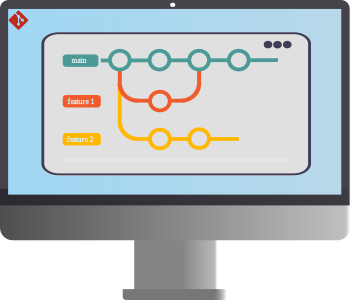
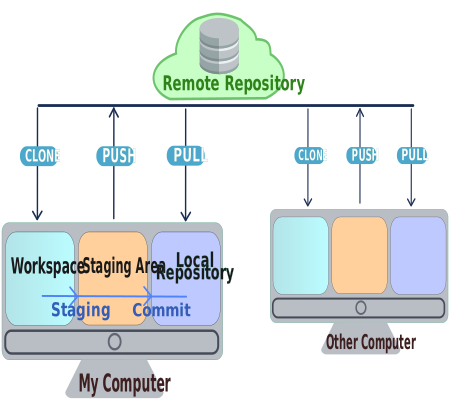
In DbSchema the loop runs from one place. Open the Git dialog from the Model menu, clone the repository into an empty local folder, and save the .dbs model inside it. Stage the file, write a commit message, and push it. Pull brings in what teammates pushed, and Compare with Current opens the Synchronization Dialog on the version you just pulled, which lists what changed and either applies the differences to your database or generates the SQL migration script. Stash and Pop park uncommitted work while you switch branches, and Create Branch isolates a feature from the main line.
Which step touches what is worth being precise about. Cloning, saving, staging, committing, pushing, and pulling all act on the .dbs file and the repository, and never on a database. Only the Synchronization Dialog writes to the database, and even then it offers the script as an alternative to running it. Git collaboration and offline design are Pro and Architect features. If Git itself is new to the team, the Git basics overview covers the repository, the staging area, and the branch-per-environment layout in a page.
Features a team needs besides Git
Documentation is the first of them, because a repository answers what changed and not what the schema means. DbSchema exports the model as interactive HTML5, PDF, or Markdown from Diagram → Export HTML5 or PDF Documentation, and the HTML5 version opens in a browser with the diagram as a vector image and each table and column description as a mouse-over tooltip, which makes it something you can publish for people who will never install a database client. Descriptions and comment tags are edited in the model and travel with it into the repository.
Comparison and synchronization matter next, since environments drift: DbSchema compares the model against a live database and generates the migration script, and dbForge Studio offers schema comparison and data synchronization for the same job. Navicat Cloud shares connections, queries, and models for teams that prefer a hosted workspace, and DbVisualizer keeps the SQL scripts behind those changes in a Git repository. Whichever of those you use, keep a backup and restore routine of your own, because a model file restores a schema and never the rows inside it.
Team workflow scenarios
In a Git-based workflow, with DbSchema, DBeaver, dbForge Studio, or DbVisualizer, each developer pulls the current state, makes the change locally, and pushes it for review, so the schema arrives through the same pull request as the code that depends on it. What sits in that pull request differs by tool. With DbSchema it is the model file, so the reviewer reads the tables, the foreign keys, and the diagram layout as one document, and the migration script is generated from it afterwards. With the other three it is the SQL and the project files that carry the change.
In a cloud workflow, with Navicat, the team shares database objects, queries, and projects through Navicat Cloud, and the shared copy is the current one, with no branches to reconcile. A shared workspace suits a small team working in one place at one time. A Git workflow is the one that survives parallel feature branches and an audit of who changed what, and DbSchema puts the design itself under that audit rather than the scripts generated from it.
Pick the workflow first and the choice follows from it. If the schema should be branched, reviewed, and released with the code, DbSchema puts the design in your repository as one text file and the Git client in the same window you design in; DBeaver, dbForge Studio, and DbVisualizer version SQL and project files in a repository too; Navicat suits teams that share a hosted workspace instead. Download DbSchema at https://dbschema.com/download.html, clone your repository from the Git dialog, and save the model inside it. Git collaboration, offline design, and the documentation export are in the Pro and Architect editions; connecting, reverse-engineering, and the interactive diagram are free in Community.
Review the schema in the same pull request as the code
DbSchema saves the design as an XML .dbs file, and the Git dialog in the Model menu clones, branches, commits and pushes it against any Git host or your own server. Git collaboration and offline design are Pro and Architect features; connect, reverse-engineer and interactive diagrams are free in Community.









