Canonical Data Model: One Logical Model for Every System That Shares the Data
What a canonical data model holds, when it is worth building, and how one logical model turns into a schema on each database.
On this page
Your CRM calls it an account, billing calls it a customer, and the shop keeps its own user ID. A canonical data model ends the argument over which fields mean what: one shared definition of the data that several systems exchange, independent of any one application, that each system maps to once. DbSchema Architect keeps that model as one logical design and generates each system's database schema from it, per engine.
Short answer
A canonical data model is one agreed set of entities, attributes, data types, relations and rules for the data that several systems share. It belongs to no single application. Each system translates its own data into the model and out of it, and nothing else.
- Each system maps to the canonical model once, so a new system adds two translations, not one per existing system.
- Keep the model logical: entities, attributes, general types and relations, with no engine in it.
- Each database then gets its own physical schema, because engines differ even on basic types such as UUID and boolean.
Why one shared model cuts the number of translations
Gregor Hohpe and Bobby Woolf describe the canonical data model as a model "independent from any specific application", placed between the data formats of the applications that exchange data. Without it, every pair of systems needs its own translator, one in each direction. Their example: six applications need 30 translators without a canonical model. By the same count, routing through the model takes one translator in and one out per application: 12 for the same six.
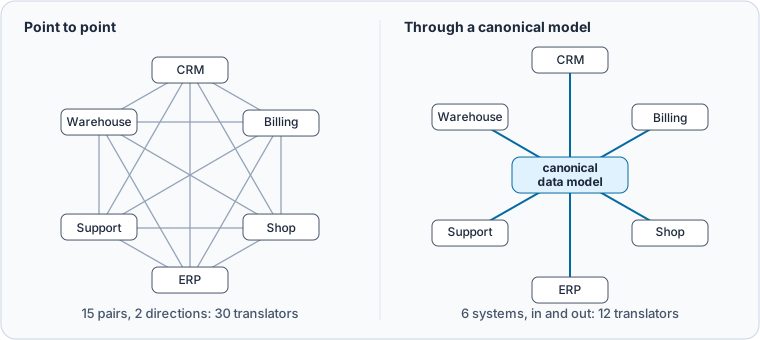
The same arithmetic cuts the other way for small setups. With two applications, a direct link needs 2 translators and a canonical model needs 4, which is why Hohpe and Woolf call the extra level of indirection complicated when only a few applications take part. The model pays off as systems are added, because a new system maps to one model instead of to everything that already exists.
The term has two homes. In integration work, the canonical model describes the messages that travel between applications, such as XML or JSON documents. On the database side, it describes the entities and relations that every system's tables should agree on. The rest of this page covers the database side: the model you design once and turn into tables.
What goes into the model, and what stays out
Put in only what crosses a system boundary: the customer, the product, the order, and the attributes whose meaning everyone has to agree on. Todd Schraml calls canonical data models "expressions of the primary and vital business rules for the corporation", and once they exist they serve "as a standard by which to evaluate the solutions implemented". That is the test for each entity: if two systems disagree about it today, it belongs in the model.
Leave out the tables that only one system needs, such as the shop's session data or billing's internal run log. Also leave out engine details. A canonical attribute is "customer id, UUID, required", not customer_id char(36) NOT NULL. BMC advises designing the model from scratch rather than copying an existing system such as an ERP, so that one product's choices don't become everyone's rules.
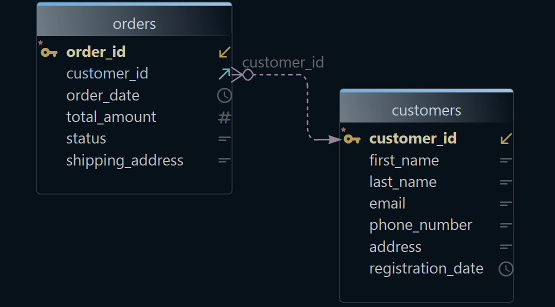
One table pattern does belong in the model: the link between the canonical key and each system's own key. Every system keeps its ID, and the model records which IDs mean the same customer:
CREATE TABLE customer (
  customer_id  uuid PRIMARY KEY DEFAULT gen_random_uuid(),
  legal_name   varchar(200) NOT NULL,
  email        varchar(254) NOT NULL UNIQUE,
  country_code char(2) NOT NULL,
  is_active    boolean NOT NULL DEFAULT true,
  created_at   timestamp NOT NULL DEFAULT now()
);
CREATE TABLE customer_source_key (
  source_system varchar(30) NOT NULL,
  source_id     varchar(64) NOT NULL,
  customer_id   uuid NOT NULL REFERENCES customer(customer_id),
  PRIMARY KEY (source_system, source_id)
);
After one customer and its three source keys were inserted, a lookup by email returns every system's ID for that customer:
SELECT k.source_system, k.source_id, c.legal_name
FROM customer_source_key k JOIN customer c USING (customer_id)
WHERE c.email = '[email protected]'
ORDER BY k.source_system;
Result · PostgreSQL 17.6
| source_system | source_id | legal_name |
|---|---|---|
| billing | C-104233 | Northwind Traders GmbH |
| crm | 0035g00000XyZ12 | Northwind Traders GmbH |
| shop | 88412 | Northwind Traders GmbH |
A new system adds rows to customer_source_key, not a new mapping to each of the other three.
The model stays logical, and each database gets its own schema
When the systems that share the model run on different databases, keep the model logical and generate a physical schema per engine. The same customer entity looks different as soon as it lands on a real engine.
We ran the same customer model on PostgreSQL 17.6 and on MySQL 8.4.11. PostgreSQL has a native uuid type. MySQL rejects it:
CREATE TABLE customer (customer_id uuid PRIMARY KEY);
ERROR 1064 (42000) at line 1: You have an error in your SQL syntax; check the manual that corresponds to your MySQL server version for the right syntax to use near 'uuid PRIMARY KEY)' at line 1
On MySQL, the key became char(36). MySQL can also store a UUID in 16 bytes: UUID_TO_BIN() returns a VARBINARY(16) value. The boolean column was accepted, but MySQL reports it as tinyint(1), because BOOL and BOOLEAN are synonyms for TINYINT(1) there. In DbSchema Architect, the Conversion Dictionary maps each logical type to a type of the target database, and the Model Conversion Rules show those mappings before every conversion, so you check per engine what UUID or BOOLEAN becomes.
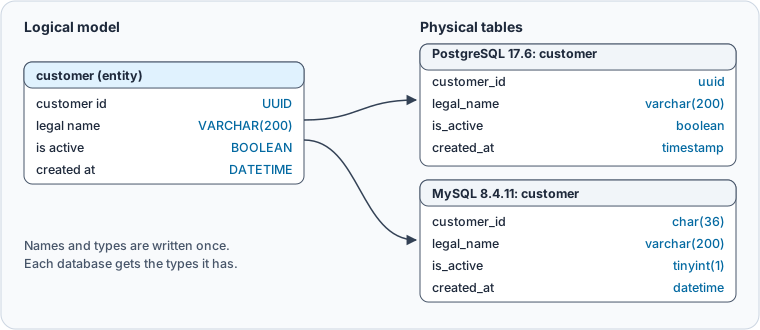
A type mismatch is the small problem. The larger one is drift: when each team writes its own DDL from a wiki page, the names and nullability slowly stop matching. Keeping one logical model and generating every schema from it keeps the agreement in a single place. In DbSchema, each physical model comes from Generate Physical Model on that one logical design, and the logical design stays as it is, so the names and meanings are kept in the design rather than in each team's DDL.
How DbSchema keeps the canonical model and generates each schema
DbSchema holds the canonical model as a logical design: entities, attributes and relations with general data types, connected to no database. Logical design needs DbSchema Architect.
-
Start the logical model Architect
Choose
File → New Model, then Design without Database, then Logical Design, and press Start Design. Name it in Project/SubjectArea Name. -
Draw the canonical entities Architect
Create each entity with
Table → Create Entityand give its attributes logical types such asUUID,VARCHARorBOOLEAN. Drag a child attribute onto the parent key to create a relation and set its cardinality. -
Set the naming and type rules Architect
Under
Model → Dictionaries, the Naming Dictionary turnscustomer idintocustomer_id, and the Conversion Dictionary maps each logical type to a type of the target database. -
Generate one physical model per database Architect
Choose
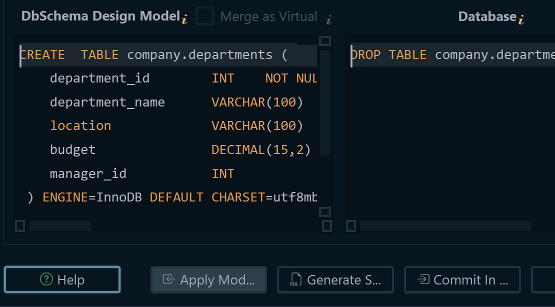
Model → Generate Physical Model, set Target DBMS, check the Model Conversion Rules and press Convert. Repeat for each engine the systems use.
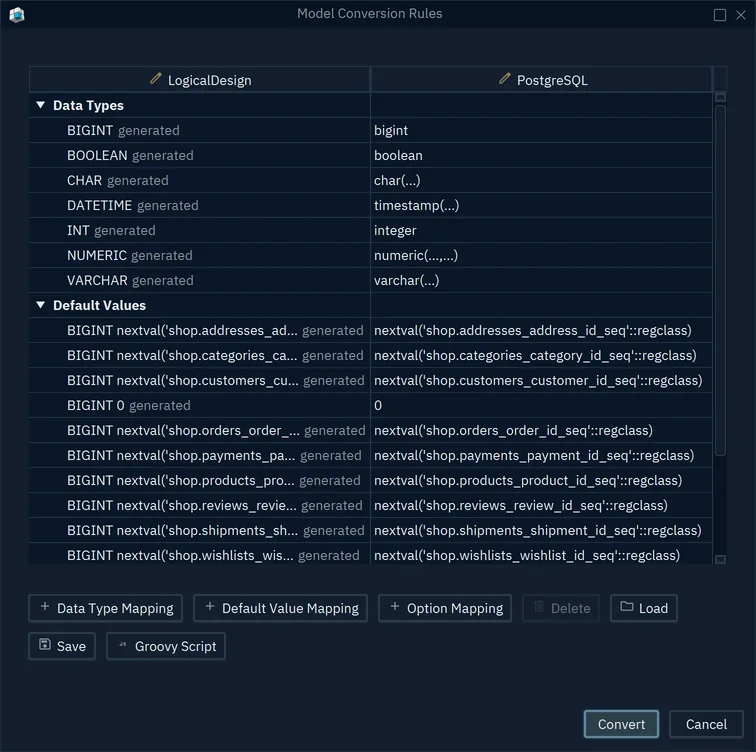
- 1BOOLEAN becomes boolean on PostgreSQL
- 2DATETIME becomes timestamp
- 3Convert writes a new physical model
Each generated physical model opens in a new window, and the logical design stays as it is. The model and the databases stay separate:
DbSchema logical model the canonical design
- Entities, attributes and relations in plain names
- General types such as UUID and BOOLEAN
- Changes the model file only
Live databases what each system runs
- One physical schema per engine
- Engine types such as uuid or char(36)
- Created when you write the physical model into the database
When one system's database is the best starting point, DbSchema converts it the other way: Model → Convert Model with Target DBMS set to LogicalDesign makes a new logical model from a reverse-engineered one. Rename and trim it until it describes the shared data rather than that one system.
When a canonical model is not worth it
With two or three systems that rarely change, direct mappings are less work, as the translator count above shows. BMC also warns that a model covering a whole company takes time, resources and a commitment across the company. Start with the two or three entities that cause the most disputes today, such as customer or product, and add the next one only when a new integration needs it. Schraml makes the same point: the models can be built in order of priority.
Download DbSchema and draw your canonical model as a logical design: every new installation starts with a 15-day trial of DbSchema Architect, which covers logical design, the Naming and Conversion Dictionaries and Generate Physical Model for each of your databases.
Sources
- Gregor Hohpe and Bobby Woolf: Canonical Data Model, Enterprise Integration Patterns
- BMC: What Is a Canonical Data Model?
- Todd Schraml: The Importance of Canonical Data Models, DBTA, 1 July 2020
- PostgreSQL 17 documentation: UUID type
- MySQL 8.4 reference manual: numeric data type syntax
- MySQL 8.4 reference manual: miscellaneous functions, UUID_TO_BIN()
- DbSchema: Logical Design
Keep one canonical model for every database
Every new DbSchema installation starts with a 15-day trial of DbSchema Architect. Logical design, the Naming and Conversion Dictionaries and Generate Physical Model are in DbSchema Architect.