SQL Server Design Tool for 2025: Visual Schema Diagrams, Documentation, and Sync
For the person choosing how a team will design, document and deploy a SQL Server schema; each DbSchema feature named below says which edition covers it.
On this page
Moving a schema to SQL Server 2025 brings vector and json columns and checks written as regular expressions into its tables, and the team has to see, document and review each of them before it reaches production. DbSchema does all three. It reverse-engineers the SQL Server database into ER diagrams in the free Community Edition, and its Pro edition generates the schema documentation and the migration SQL that deploys a change.
What SQL Server 2025 adds to a table definition
The new column types and functions show best in one table that uses them:
CREATE TABLE dbo.Products
(
    ProductID    INT IDENTITY PRIMARY KEY,
    Name         NVARCHAR(100) NOT NULL,
    SupportEmail VARCHAR(320)
        CHECK (REGEXP_LIKE(SupportEmail, '^[A-Za-z0-9._%+-]+@[A-Za-z0-9.-]+\.[A-Za-z]{2,}$')),
    Specs        JSON,
    Embedding    VECTOR(3)
);

INSERT INTO dbo.Products (Name, SupportEmail, Specs)
VALUES (N'Smartphone X', '[email protected]',
        '{"color": "black", "storage": "128GB", "features": ["5G", "NFC"]}');
Each addition comes with limits that decide where it fits in a design. These are the ones Microsoft's reference pages state:
| Addition | Stores or does | Can't | Status in SQL Server 2025 |
|---|---|---|---|
json | a JSON object or array in a native binary format, up to 2 GB | be an index key column, or hold a bare scalar such as true | preview |
vector(n) | 1 to 1,998 floating-point numbers, shown as a JSON array | be a key, a default, a check or a B-tree index column | available; float16 elements in preview |
REGEXP_LIKE | a pattern test, usable in a CHECK | run below database compatibility level 170 | available |
A query that filters on one property of the document reads it with JSON_VALUE:
SELECT Name
FROM dbo.Products
WHERE JSON_VALUE(Specs, '$.storage') = '128GB';
| Name |
|---|
| Smartphone X |
That filter reads every row. SQL Server has no index on an expression, so Microsoft's page on indexing JSON data promotes the property to a computed column and indexes that:
ALTER TABLE dbo.Products
    ADD Storage AS CAST(JSON_VALUE(Specs, '$.storage') AS NVARCHAR(20));

CREATE INDEX IX_Products_Storage ON dbo.Products (Storage);
A query on WHERE Storage = N'128GB' can then seek the index. The cast keeps the key short: JSON_VALUE returns up to 4,000 characters, and a value longer than an index key's 1,700 bytes makes the insert fail. SQL Server 2025 also has CREATE JSON INDEX, which indexes chosen paths of a json column in one statement. It is in preview and needs a clustered primary key:
CREATE JSON INDEX IX_Products_Specs ON dbo.Products (Specs) FOR ('$.storage');
The computed column is also the answer to the design question a json column raises: which attributes get a column of their own. A property you filter or join on gets promoted; the rest stays in the payload. That rule belongs next to the table, where the person adding the next attribute will read it.
Vectors and AI models, and what the schema has to record
A vector column holds an embedding: a list of numbers that an AI model computes from a text, so that texts with a similar meaning get numbers that lie close together. SQL Server 2025 calls the model itself, over REST, once the model is registered with CREATE EXTERNAL MODEL:
CREATE EXTERNAL MODEL ProductEmbeddings
WITH (
    LOCATION   = 'https://my-endpoint.cognitiveservices.azure.com/openai/deployments/text-embedding-3-small/embeddings?api-version=2024-02-01',
    API_FORMAT = 'Azure OpenAI',
    MODEL_TYPE = EMBEDDINGS,
    MODEL      = 'text-embedding-3-small',
    CREDENTIAL = [https://my-endpoint.cognitiveservices.azure.com/]
);
CREDENTIAL names a database scoped credential that holds the endpoint's key, and the server needs external rest endpoint enabled switched on with sp_configure. API_FORMAT also accepts OpenAI, Ollama and ONNX Runtime.
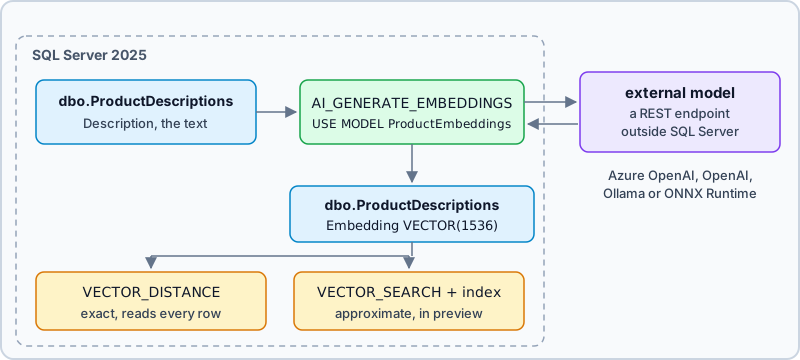
MODEL_TYPE accepts only EMBEDDINGS, so an external model turns text into vectors and answers no questions of its own. This one returns 1,536 numbers per text. The column that stores them is declared to match, here on a table of product descriptions, and AI_GENERATE_EMBEDDINGS fills it in one statement:
CREATE TABLE dbo.ProductDescriptions
(
    ProductID   INT PRIMARY KEY REFERENCES dbo.Products (ProductID),
    Description NVARCHAR(MAX) NOT NULL,
    Embedding   VECTOR(1536)
);

UPDATE dbo.ProductDescriptions
SET Embedding = AI_GENERATE_EMBEDDINGS(Description USE MODEL ProductEmbeddings);
The numbers come from outside the server, and the search runs inside it:
The Embedding column of dbo.Products is VECTOR(3) so that a search can be checked by hand. Three rows with hand-written vectors, and a question vector that stands in for the embedding of a question such as "something for breakfast":
INSERT INTO dbo.Products (Name, Embedding)
VALUES (N'Oat granola',    '[1, 2, 2]'),
       (N'Rye crackers',   '[1, 2, 5]'),
       (N'Espresso beans', '[4, 6, 2]');

DECLARE @question VECTOR(3) = '[1, 2, 2]';

SELECT TOP (3) Name,
       VECTOR_DISTANCE('euclidean', @question, Embedding) AS distance
FROM dbo.Products
WHERE Embedding IS NOT NULL
ORDER BY distance;
The granola's vector equals the question, so its distance is 0:
| Name | distance |
|---|---|
| Oat granola | 0 |
| Rye crackers | 3 |
| Espresso beans | 5 |
The euclidean distance is the square root of the summed squared differences: from [1, 2, 2] to [4, 6, 2] it is the square root of 9 + 16 + 0, which is 5. VECTOR_DISTANCE also takes cosine and dot. It is exact: it compares the question with every row and uses no index. For a large table, CREATE VECTOR INDEX and VECTOR_SEARCH give an approximate nearest-neighbor search, and both need the PREVIEW_FEATURES database scoped configuration.
None of this is visible in the column definition. VECTOR(1536) doesn't say which model produced the numbers, from which column's text, or what refills them when a description changes. That note belongs on the column in the design model, which is where DbSchema keeps it, as the documentation section below shows.
Changes that need no new column
Most of the release changes how the server runs rather than how a table is written. From Microsoft's list of what's new, the changes that matter for a schema's owner and what you do to get each:
| Change | What it does | What you do |
|---|---|---|
| optimized locking | fewer locks held, each taken only after the row qualifies | enable it per database |
| ZSTD backup compression | a faster, more effective algorithm than MS_XPRESS | name it in BACKUP |
| tempdb space resource governance | stops one workload from filling tempdb | set a limit in Resource Governor |
| PBKDF2 password hashes | hashes SQL login passwords with PBKDF2 by default | nothing |
| managed identity with Microsoft Entra | connects to Azure resources without a stored secret | connect the server to Azure Arc |
| mirroring in Fabric | replicates data continuously to Microsoft Fabric | set up mirroring in Fabric |
| Standard edition | up to 32 cores and a 256 GB buffer pool | nothing |
| Express edition | databases up to 50 GB | nothing |
Optimized locking is off by default in SQL Server 2025. It needs accelerated database recovery first, and its lock-after-qualification part works only under read committed snapshot isolation. Each of these ALTER DATABASE statements needs the database free of other connections:
ALTER DATABASE Shop SET ACCELERATED_DATABASE_RECOVERY = ON;
ALTER DATABASE Shop SET READ_COMMITTED_SNAPSHOT ON;
ALTER DATABASE Shop SET OPTIMIZED_LOCKING = ON;

SELECT DATABASEPROPERTYEX('Shop', 'IsOptimizedLockingOn') AS optimized_locking;
| optimized_locking |
|---|
| 1 |
Read committed snapshot changes what a reader sees while another transaction writes, so test the application under it before production. ZSTD is chosen per backup, and backup compression runs on the Enterprise, Standard and Developer editions:
BACKUP DATABASE Shop TO DISK = N'D:\Backup\Shop.bak'
WITH COMPRESSION (ALGORITHM = ZSTD, LEVEL = MEDIUM);
What to look for in a SQL Server design tool
A schema of a few hundred tables has relationships nobody holds in their head, and the 2025 types add decisions that the DDL doesn't explain. A design tool earns its place when it reads the database it is pointed at, draws it, lets you change the design without touching production, shows the change as SQL before it runs, and publishes what the team decided.
SQL Server Management Studio has a Database Designer that draws and edits tables too. Here is DbSchema beside it, on what each vendor documents:
| DbSchema | SSMS Database Designer | |
|---|---|---|
| first diagram | drawn on connect, foreign key lines included | tables you add to a new diagram |
| where the diagram lives | a .dbs model file that goes into Git | inside the database |
| designing with no connection | disconnected mode | works on a connected database |
| when an edit reaches the database | at once while connected; after you review the differences, when disconnected | when you save the diagram, after a list of the changes |
| schema documentation | HTML5, PDF and Markdown | not part of the designer |
| runs on | Windows, macOS, Linux | Windows 11 and Windows Server |
| backups, Agent jobs, server settings | done in SSMS, open beside DbSchema | yes |
Both connect to the same instance at once, so SSMS keeps the server administration and DbSchema takes the picture, the documentation and the reviewable migration. The SSMS column comes from Microsoft's pages on the Database Designer, on saving database diagrams and on the SSMS system requirements.
How DbSchema draws and documents a SQL Server schema
DbSchema keeps its own copy of the schema, the design model, and every action below either reads the database into it or writes from it:
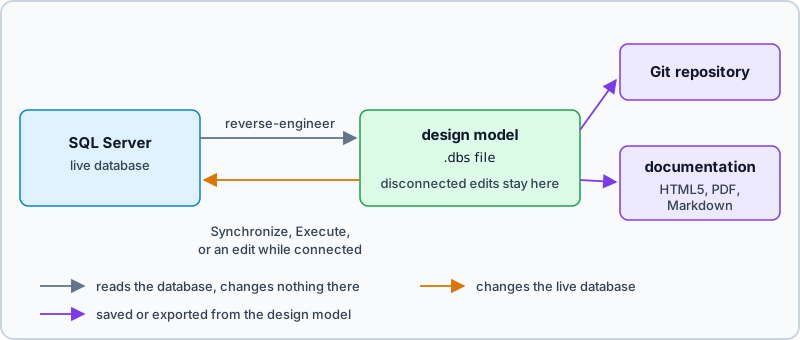
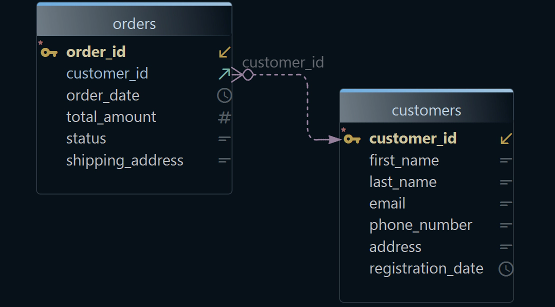
DbSchema connects to SQL Server 2025 as to any SQL Server database, through Microsoft's SQL Server JDBC driver. It downloads the driver when you create the connection, and the driver runs inside DbSchema on your machine, with no DbSchema server in between. DbSchema then reverse-engineers the schema: the tables come back on a diagram with their foreign key lines drawn. On the diagram, double-click a table header to open the Table Dialog and change columns, indexes and keys, or right-click the canvas and choose New Table. The diagrams are in the free Community Edition.
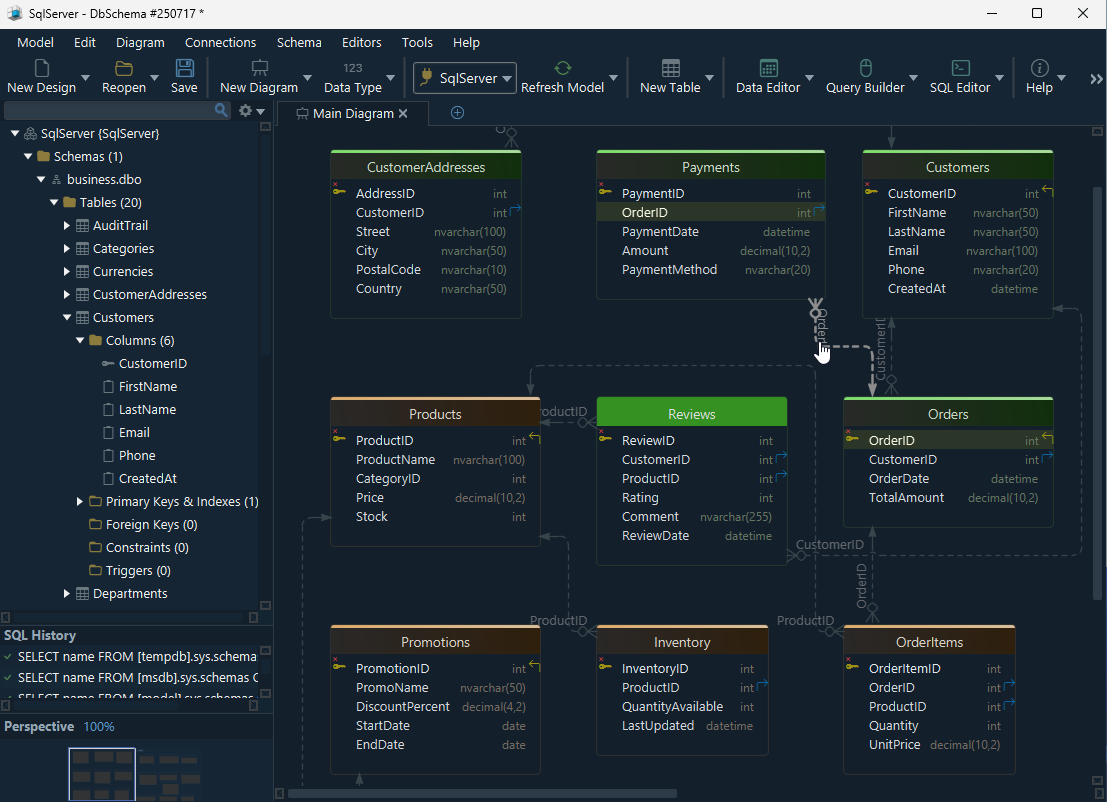
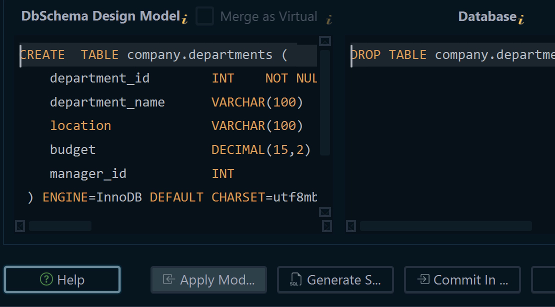


While DbSchema is connected, an edit on the diagram runs against the database at once, and the statement appears in the SQL History pane. To design without touching the server, choose Disconnected from the connection menu in the toolbar, and edits then change only the design model. When you reconnect, DbSchema lists the differences in the Synchronization Dialog and you apply the ones you choose. That step is schema synchronization, a Pro edition feature, and so is saving the design model as a .dbs file, so that the design outlives the session.
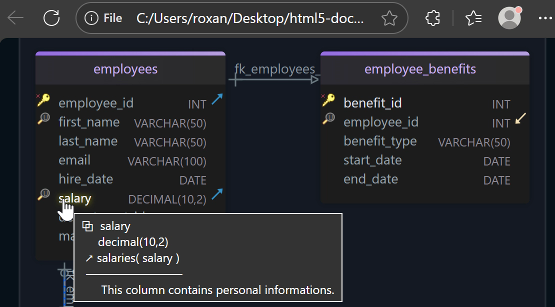
Each table and column has a Description field, and that is where the decisions of the sections above go: which model fills Embedding and from which column, and which JSON properties get a computed column. Comment tags add key-value metadata beside it, such as an owner or a retention rule.

Diagram → Export HTML5 or PDF Documentation generates the schema as HTML5, PDF or Markdown. The HTML5 page opens in any browser with no server behind it and holds the diagram as a vector image, a searchable table list and every column's details. The descriptions appear in every format, and in HTML5 also as a tooltip over the table or column. Documentation is a Pro edition feature.
How DbSchema deploys a change
Schema → Compare Model with Database lists what differs between the design model and the live SQL Server database: added, removed and changed tables, columns, indexes and foreign keys. For each difference you choose to update the model, push the change to the database, or skip it. Schema → Synchronize Model with Database then generates the SQL, which you read and can edit before Execute applies it. In this synchronization, Execute is the step that changes the database. Schema synchronization is a Pro edition feature.
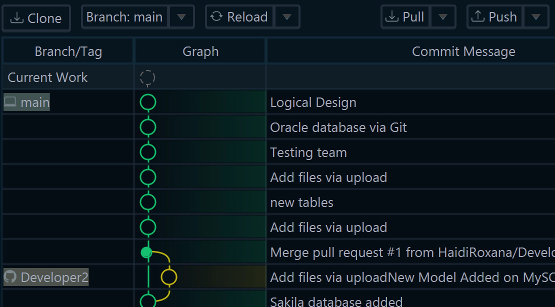
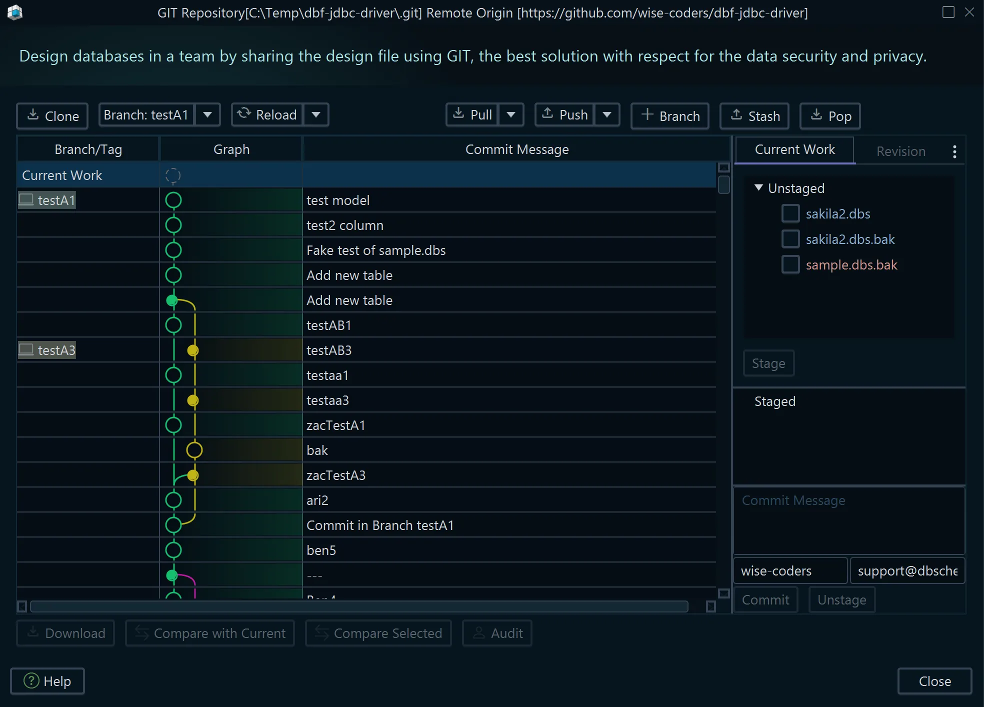
Because the design model is one XML file, it goes into the Git repository beside the application code, and a schema change travels through the same pull request as the code that needs it. DbSchema's Git dialog, opened from the Model menu, commits, pushes and pulls the file, and after a pull Compare with Current opens the Synchronization Dialog on what changed. Working from the saved model file puts this in the Pro edition.
To check the rows that a relationship joins, the Relational Data Editor opens a table and, below it, the rows of each child table that match the selected row, following the foreign keys. Open it from the Editors menu with New Relational Data Editor, or right-click a table header and choose Open in Relational Data Editor. It edits rows in place, and the changes reach the database on Commit. The Relational Data Editor is in the Pro edition.
The statements behind these designs have tutorials of their own: CREATE TABLE, partitioning, triggers and data compression.
Download DbSchema, connect it to your SQL Server 2025 instance, and let the free Community Edition draw the first diagram of the schema. The Pro edition adds the saved design model, the documentation and the synchronization described above, and the 15-day Architect trial in the same download covers it.
See your SQL Server schema as a diagram
DbSchema reverse-engineers SQL Server into interactive ER diagrams in the free Community Edition, and adds HTML5 documentation and schema synchronization in Pro.