Catching a table without a primary key before the schema ships
For the person who reviews a team's schema changes and already keeps the design in a DbSchema model file.
On this page
The schema review found a table without a primary key and three columns in camelCase in a schema that is otherwise snake_case, and it found them by eye, after the tables were already in staging. DbSchema's Model Validation turns that review into rules you write once: run them and you get a list of every table, column, index, or foreign key that breaks one, with a click that takes you to the object in the diagram.
What a rule looks like
Open the Model menu and choose Model Validation. Each validator is a sequence of steps, and the Add button adds one. A step is one of three kinds. An operation selects what to iterate over: tables, columns, foreign keys, or indexes. A filter is a condition that must hold before the check is applied, for example only tables whose name starts with tmp_. A check is the condition that must be met, and every item that fails it is flagged.
Four rules cover most of what a schema review looks for. All table names match a naming pattern, so the camelCase columns from the review above never get past the check. Every table has a primary key. Every column has a description, which is the rule that keeps the generated documentation from having blank rows. No column uses a data type your team has retired.
For a check the built-in conditions can't express, choose the Java Groovy Check and write the condition in code. The code receives a variable called unit, the schema object being tested, whichever kind the operation iterates over, and returns true to pass or false to flag the object. Anything you can read from the object's properties can be a rule.
Running the rules before anything ships
Click Validate and every validator runs against the current model. The results panel lists each schema item that failed at least one check, together with the rule it violated, and clicking a result navigates to the failing object in the diagram, so the fix is one step away from the finding.
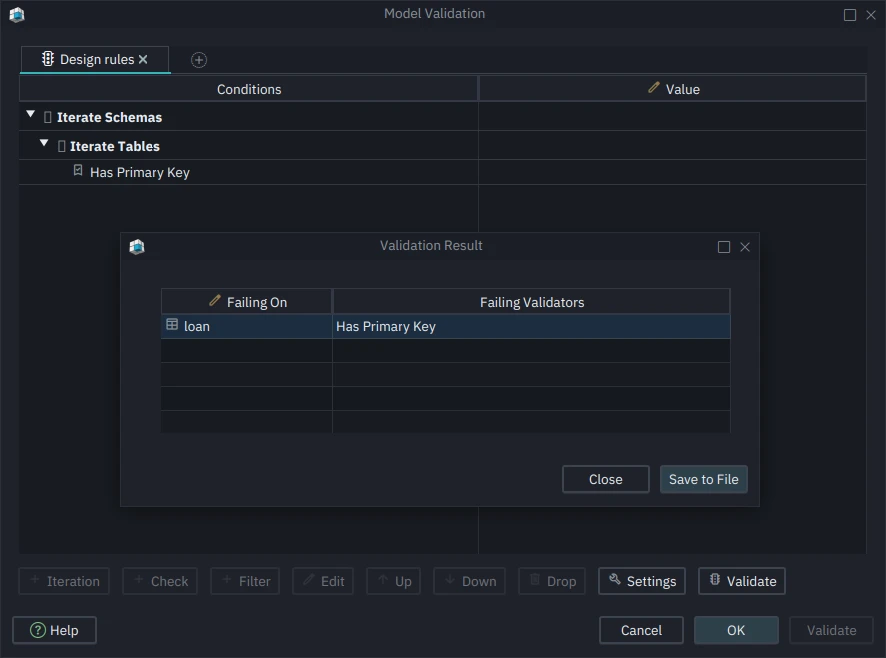
Validation reads the model, not the database. Nothing is sent to the connected database while it runs, so you can run it on a model that is still being designed offline, on a model reverse-engineered from a database an hour ago, or on a branch of the model file that a colleague pushed to Git and you haven't deployed. The point of the tool is to run it in that last position: after the change is made in the model and before the synchronization dialog writes it to the database.
Model Validation is in the Pro edition. Download DbSchema at https://dbschema.com/download.html, open your model, choose Model Validation from the Model menu, and add the primary key rule first.









