MongoDB JDBC Driver Download
Download the MongoDb JDBC driver, copy the JDBC URL into DbSchema, and start designing schemas with ER diagrams — free Community Edition.
About the MongoDb JDBC driver
A JDBC driver is a Java .jar library that lets applications connect to MongoDb.
DbSchema uses JDBC to reverse engineer schemas, run SQL, and generate documentation.
Driver files are usually published by the database vendor or an open-source project.
JDBC URL format
Host, port, database name, and SSL options are passed in a URL starting with jdbc:.
Each MongoDb driver uses its own syntax — see the connection details below.
The MongoDb JDBC driver
MongoDB is the most popular document-oriented database, storing data as flexible JSON-like BSON documents instead of rows in tables. It is widely used for content management, real-time analytics, IoT, and applications that need schema flexibility.
We open source our JDBC driver for MongoDb. DbSchema features for MongoDb are described here. The driver source code is accessible on GitHub.
The driver binaries can be downloaded as zip file, which you should uncompress.Download the zip, unpack and include the jar files in your classpath. The driver is compatible with Java 11.
For accessing the driver source code please visit the GitHub repository:
The driver is written on top of the native MongoDb Java driver.
The driver URL is the same as in the MongoDb documentation.
Example:
mongodb://[username:password@]host1[:port1][,host2[:port2],...[,hostN[:portN]]][/[database][?options]]
The URL allows connecting to multiple databases. In DbSchema you can set this by choosing 'Custom URL' in the connection editor and entering the URL as string. For URL details check the MongoDb documentation.
Connecting to a Self-Hosted MongoDB
A default installation is deliberately unreachable from anywhere but its own machine, so two things have to change before DbSchema connects.
-
Bind the server to a reachable interface.
mongodbindslocalhostout of the box, which refuses every remote client. Inmongod.confsetnet.bindIpto the private address clients use — MongoDB recommends naming that interface rather than opening all of them. Where all addresses really are needed,net.bindIpAllornet.bindIp: 0.0.0.0does it. Restartmongodafterwards. -
Name the database that holds the user.
MongoDB authenticates against the database a user was created in, which is often
adminrather than the one you want to browse. That is what?authSource=in the URL is for, and a mismatch produces an authentication failure that looks like a wrong password. - Open port 27017 in the server's firewall. The database listens on port 27017 unless it was installed with a different one. A host firewall on the server blocks incoming connections on that port until a rule allows them. The firewall guide has the commands for Windows, ufw, firewalld and iptables.
- Connect from DbSchema. In the Connection Dialog choose Remote computer or custom port, fill in the server host and the port, then press Test Connection to check that the server answers before you connect.
Bind narrowly and firewall the port. An exposed MongoDB without authentication is found by scanners within hours.
MongoDB Atlas
Atlas is managed, so there is no mongod.conf. Access is governed by an allowlist and the
host is an SRV record rather than a machine name.
- Add your address to the IP Access List. Until it is there, the cluster refuses the connection before any password is checked. A changing home IP address is the usual reason a connection that worked yesterday stops today.
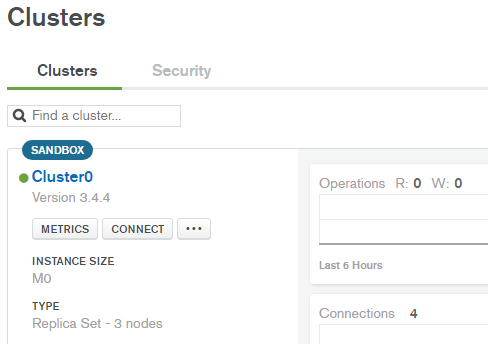
- Copy the JDBC URL from the Atlas console. You will find it in the cluster's Connect dialog, choosing a driver connection string.
-
Pick a Cloud preset that matches.
The Connection Mode combo carries an entry per authentication method — password, SCRAM,
X.509, AWS IAM, Kerberos, LDAP — in a Cloud variant using
mongodb+srv://and an On-Premise variant usingmongodb://. An Atlas cluster needs a Cloud entry: the SRV form is what resolves the cluster's members for you. - Paste the URL into DbSchema. In the Connection Dialog set Connection Mode to Edit the JDBC URL Manually and paste the string you copied. The user and the password are entered in the first tab, not in the URL.
The same connection page in Atlas has a link for resetting the database user's password, which is separate from your Atlas account password.
Where the cluster sits in a peered VPC with no public route, use Setup SSH Tunnel... through a host inside that network instead; DbSchema ships presets for tunnelled connections in both the Cloud and On-Premise families.
DbSchema and MongoDB
DbSchema displays MongoDB collections and their inferred schemas as interactive diagrams, even without a fixed schema. Use the Relational Data Explorer to browse documents and navigate embedded sub-documents, and the Query Builder to compose MongoDB-compatible SELECT queries via the JDBC interface.
Test the driver with DbSchema
Connect MongoDb, build your first ER diagram in minutes. No account required.
Download driver & DbSchema
Get the MongoDb driver zip below and install DbSchema for Windows, macOS, or Linux.
Register the .jar
In DbSchema, open Driver Manager, add the extracted JAR, and paste your JDBC URL.
Design & document
Reverse engineer MongoDb, edit the model visually, and publish schema documentation.
Use MongoDb visually in DbSchema
After the JDBC driver connects, you get ER diagrams, SQL editor, schema sync, and HTML documentation in one desktop app. Compare DbSchema editions.
ER diagrams
Reverse engineer MongoDb into an interactive diagram and edit structures visually.
SQL & query builder
Run SQL with autocomplete or compose queries without writing every join by hand.
Schema documentation
Export HTML docs your team can browse without installing DbSchema.
Full MongoDb guide
Connection tips, ports, SSL, and schema design workflows on the database landing page.
Setup guides
JDBC driver FAQ
Related JDBC drivers
Other drivers teams often configure alongside MongoDb.
 DocumentDB JDBC
 Couchbase JDBC
 DynamoDB JDBC
 Neo4j JDBC
 Redis JDBC
 Cassandra JDBC
Related databases
Teams working with MongoDb often use these engines too. Explore dedicated guides and JDBC setup for each.