MariaDB: Galera Clusters and ColumnStore Tables, Visualized

Connect DbSchema to MariaDB and turn the live schema into an editable visual model: explore relationships in interactive ER diagrams, plan changes on the canvas, and generate reviewed SQL scripts for deployment.

The workflow is designed for fast schema design, query iteration, and safe MySQL-compatible deployments — keep an offline model in Git, collaborate across teams, and publish documentation that developers, analysts, and stakeholders can navigate in minutes.

DbSchema Database Designer

Download DbSchema See MariaDB Features Download MariaDB JDBC Driver · All drivers

What happens after you download?

Get to your first MariaDB schema diagram in minutes. No account, no credit card.

1
Install in minutes

Download the installer for Windows, macOS, or Linux and launch DbSchema. No signup required.

2
Connect to MariaDB or open a sample

Reverse engineer an existing MariaDB database or open a sample model to explore tables, relationships, and indexes.

3
Design, document, and deploy

Edit schema visually, generate documentation, and prepare reviewed migration scripts for safer releases.

Visual Tooling for MariaDB's Expanded Feature Set

MariaDB extends its MySQL-compatible foundation with capabilities that have no direct upstream equivalent — Galera Cluster for synchronous multi-master replication, system-versioned temporal tables that automatically retain row history, and the ColumnStore engine for analytical workloads. DbSchema handles MariaDB-specific metadata and syntax, so the visual model accurately reflects what your MariaDB instance actually supports rather than defaulting to a generic MySQL representation.

Download DbSchema Free See MariaDB Features

ER Diagrams for MariaDB Schemas

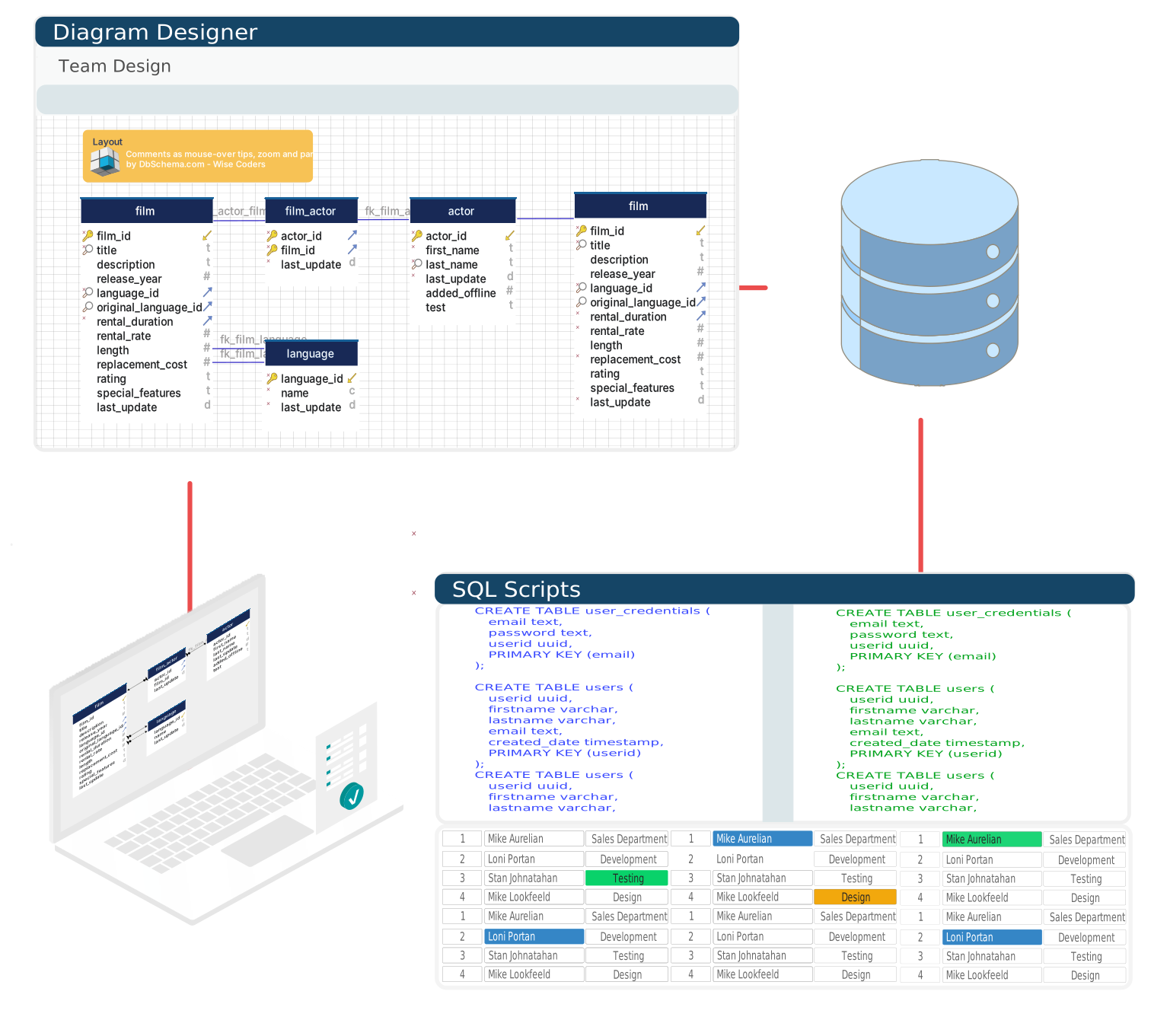
Connect DbSchema to any MariaDB instance and it reverse-engineers tables, views, foreign keys, and indexes into an interactive diagram. Build layouts that span multiple databases on the same MariaDB server, and use the canvas to design new tables or modify existing ones without writing DDL.

Creating a MariaDB ER diagram in DbSchema

SQL Editor with MariaDB Syntax Support

The SQL editor recognizes MariaDB-specific syntax including system-versioned table queries, temporal extensions, and Galera-specific statements. Schema-aware autocomplete surfaces column names and functions as you type, reducing the need to switch between editor and documentation.

SQL editor with MariaDB syntax support in DbSchema

Browse Data Across the Cluster

In a Galera Cluster deployment, all nodes share the same schema — connecting DbSchema to any node gives full visibility into both structure and data. Use the data explorer to paginate through rows, apply column filters, and follow foreign key links without writing SELECT queries by hand.

Browsing MariaDB table data in DbSchema's data explorer

Set Up the MariaDB Connection in DbSchema

Getting from a bare installation to a browsable MariaDB diagram takes only a few steps.

  1. Install DbSchema on Windows, macOS, or Linux.
  2. Start a new connection and pick MariaDB from the database list; DbSchema fetches the MariaDB Connector/J driver on first use, which is distinct from the MySQL Connector/J driver.
  3. Supply host, port 3306 (the MariaDB default, shared with MySQL), and your credentials — DbSchema builds the URL as jdbc:mariadb://host:3306/dbname.
  4. For a Galera Cluster, point the connection at any single node's IP address instead of a load balancer.
  5. Finish the wizard — DbSchema reads the catalog and lays out the first ER diagram automatically.

Every Galera node carries an identical schema, so whichever node you connect to, DbSchema reads the full structure and data for the cluster. Remote MariaDB servers need the same bind-address and per-host user grants as a standalone instance to accept the connection. See a full walkthrough in connecting MariaDB to DbSchema.

Why Development Teams Pick DbSchema for MariaDB

  • Accurately model MariaDB-specific features like temporal tables and ColumnStore schemas.
  • Design schema changes offline and synchronize them to a live MariaDB instance on demand.
  • Connect to any Galera node to inspect the full cluster schema and data in one place.
  • Generate migration scripts by diffing two MariaDB databases or a model against a live server.
  • Export schema documentation that includes MariaDB-specific column attributes and storage engines.

Have a MariaDB instance ready? Download DbSchema and turn its temporal tables and ColumnStore layout into a reviewable ER diagram in the same session.

Tutorials and guides

Frequently asked questions

Yes. DbSchema connects to MariaDB over JDBC using the MariaDB Connector/J driver, which it downloads automatically, then reverse-engineers the schema into an interactive ER diagram.

MariaDB listens on port 3306 by default, the same as MySQL, and DbSchema builds the JDBC URL as jdbc:mariadb://host:3306/dbname.

Yes. Point the connection at any single node's IP address instead of a load balancer - every Galera node holds an identical schema, so DbSchema reads the full structure and data from whichever node it connects to.

Teams working with MariaDB often use these engines too. Explore dedicated guides and JDBC setup for each.

Browse all 100+ supported databases