SQL Server Concurrency and Deadlocks Guide in sqlcmd and DbSchema
For SQL Server developers whose application has come back with error 1205 and who need to know what caused it and what to change.
On this page
A batch that ran fine all week comes back with this, and the work it had done is gone:
Msg 1205, Level 13, State 51, Line 7
Transaction (Process ID 51) was deadlocked on lock resources with another process and has been chosen as the deadlock victim. Rerun the transaction.
Two transactions each held a lock that the other one needed, so neither could move. SQL Server found the cycle, rolled one of them back and let the other finish. You stop it by making your transactions take rows in the same order, so the cycle can't form, and you give the batch that lost a way to run again.
Locks, blocking and deadlocks in SQL Server
Concurrency is several sessions reading and writing the same data at the same time. SQL Server keeps each session from seeing another's half-finished work by locking what each one touches. The Transaction Locking and Row Versioning Guide says the Database Engine picks the level of each lock automatically, and a lock can cover any of these resources:
| Resource | What it locks |
|---|---|
| RID | A single row in a heap |
| KEY | A single row in a B-tree index |
| PAGE | An 8 KB data or index page |
| HoBT | A heap, or a B-tree index |
| TABLE | The whole table, data and indexes |
| DATABASE | The entire database |
Row locks let the most sessions work side by side, but a large change needs a great number of them. A table lock is cheap to hold and keeps everyone else out of the table.
What a lock allows depends on its mode. A read takes a shared (S) lock, an update takes an update (U) lock while it finds the row, and a change holds an exclusive (X) lock. A second session gets its lock only when the two modes are compatible:
| Requested mode | S held | U held | X held |
|---|---|---|---|
| S | Yes | Yes | No |
| U | Yes | No | No |
| X | No | No | No |
A transaction that changes a row keeps its X lock until it commits or rolls back. A session that asks for a conflicting lock in the meantime waits. That wait is blocking, and it's normal: the holder finishes, its locks go, and the waiter carries on. A deadlock is two sessions waiting for each other at once. Neither one can finish, so the wait has no end, and SQL Server has to break it.
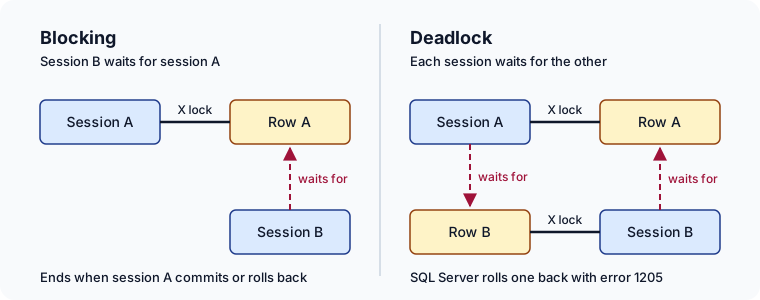
Watch one session block another
The examples run on SQL Server 2022, in a test database named DeadlockDemo. SQL Server: how to create a database shows how to create one. Open two command windows and connect each one with the sqlcmd utility:
sqlcmd -S localhost -d DeadlockDemo
Without -U, sqlcmd signs in with Windows authentication. For a SQL Server login, add -U and the login name, and sqlcmd prompts for the password. sqlcmd sends nothing to the server until it reads GO on a line of its own, so every block below ends with one.
In the first window, create a table with two rows:
CREATE TABLE Employees (
    ID INT PRIMARY KEY,
    Name NVARCHAR(50),
    Salary DECIMAL(10, 2)
);

INSERT INTO Employees VALUES (1, 'John', 5000.00);
INSERT INTO Employees VALUES (2, 'Jane', 7000.00);
GO
Run SELECT @@SPID; and GO in each window, and note the number. That number is the session ID, which the views below report and which the 1205 message calls the process ID. The first window is session 1, and the second is session 2.
Session 1 changes a row and leaves its transaction open:
-- session 1
BEGIN TRAN;
UPDATE Employees SET Salary = 5500 WHERE ID = 1;
GO
From the same window, list the locks that session 1 now holds, with sys.dm_tran_locks:
-- session 1
SELECT resource_type, request_mode
FROM sys.dm_tran_locks
WHERE request_session_id = @@SPID
  AND resource_type <> 'DATABASE'
ORDER BY resource_type;
GO
The row carries the exclusive lock:
| resource_type | request_mode |
|---|---|
| KEY | X |
| OBJECT | IX |
| PAGE | IX |
KEY is the row with ID 1, in the index that the primary key created. The intent exclusive (IX) locks on its page and on the table tell other sessions that a row below is locked, so none of them can lock the whole table in the meantime. Now session 2 reads the same row:
-- session 2
SELECT Salary FROM Employees WHERE ID = 1;
GO
The query doesn't come back. Under READ COMMITTED, SQL Server's default isolation level, the read asks for a shared lock, and the X lock that session 1 holds is compatible with nothing. Back in session 1, sys.dm_exec_requests shows who is waiting for whom:
-- session 1
SELECT session_id, blocking_session_id, wait_type
FROM sys.dm_exec_requests
WHERE blocking_session_id <> 0;
GO
The one row is session 2's SELECT. Its blocking_session_id is session 1's ID, and its wait_type is LCK_M_S, a wait for a shared lock. Session 2 would wait forever, because every connection starts with a lock timeout of -1, which means no time-out. End the wait from session 1:
-- session 1
ROLLBACK;
GO
Session 2's SELECT returns at once, with 5000.00, because the update never happened. Nothing had to be broken here: one session waited for another, and the wait ended when the transaction did.
A deadlock you can reproduce in two sqlcmd sessions
Run the four statements below in the order they are numbered, switching windows between them. Statements 1 and 2 each lock one row and keep the lock, because their transactions stay open:
-- session 1, statement 1
BEGIN TRAN;
UPDATE Employees SET Salary = 5500 WHERE ID = 1;
GO
-- session 2, statement 2
BEGIN TRAN;
UPDATE Employees SET Salary = 7500 WHERE ID = 2;
GO
Now each session asks for the row the other one holds. Statement 3 waits, because session 2 has row 2:
-- session 1, statement 3
UPDATE Employees SET Salary = 6000 WHERE ID = 2;
GO
-- session 2, statement 4
UPDATE Employees SET Salary = 8000 WHERE ID = 1;
GO
Statement 4 closes the cycle. Within a few seconds, one of the two windows prints error 1205, like the message at the top of this article but with its own process ID and line number. SQL Server has rolled that session's transaction back, its first UPDATE included. The other session's waiting UPDATE completes, and its transaction is still open. Commit it in that window, and read the table:
-- the session that did not get 1205
COMMIT;
SELECT ID, Salary FROM Employees;
GO
Only the two updates of the surviving session are left, so the result depends on which session lost:
| Session that got 1205 | Salary of ID 1 | Salary of ID 2 |
|---|---|---|
| Session 1 | 8000.00 | 7500.00 |
| Session 2 | 5500.00 | 6000.00 |
How SQL Server chooses the deadlock victim
SQL Server breaks a deadlock without waiting for any timeout. A lock monitor thread searches for cycles every 5 seconds by default, according to the Deadlocks Guide. While it keeps finding deadlocks, the interval drops to as little as 100 milliseconds, and it climbs back to 5 seconds when they stop. Once it finds a cycle, SQL Server ends the current batch of one session, rolls back its transaction, releases every lock that the transaction held, and returns error 1205 to that session.
Which session loses depends first on the deadlock priority of each session, and then on cost:
| Deadlock priorities | Victim |
|---|---|
| Different | The session with the lower priority |
| Equal | The session whose transaction is cheaper to roll back |
| Equal, and equal cost | Chosen at random |
The cost is the number of log bytes each transaction has written, which the deadlock report shows as logused. A task that is already rolling back is never chosen.
In the reproduction, both sessions have the default priority and have written one update each, so you can't tell in advance which one loses. SET DEADLOCK_PRIORITY decides it. It takes LOW, NORMAL or HIGH, which count as -5, 0 and 5, or any integer from -10 to 10, and NORMAL is the default. Run this in session 2 before its BEGIN TRAN, replay the four statements, and session 2 is the one that gets 1205:
-- session 2
SET DEADLOCK_PRIORITY LOW;
GO
The setting holds for the rest of the session. Give LOW to the work you can afford to repeat, such as a nightly report, so that the transaction a user is waiting for wins.
Reading the deadlock report, and the permission it needs
Every deadlock is already recorded. The system_health event session is enabled by default and captures xml_deadlock_report events, which contain the deadlock graph, so the deadlock you just caused is on the server without any tracing turned on. This query, adapted from the Deadlocks Guide, reads those events from the session's ring_buffer target, newest first:
SELECT xdr.value('@timestamp', 'datetime') AS deadlock_time,
       xdr.query('.') AS event_data
FROM (SELECT CAST(xt.target_data AS XML) AS target_data
      FROM sys.dm_xe_session_targets AS xt
      JOIN sys.dm_xe_sessions AS xs
        ON xs.address = xt.event_session_address
      WHERE xs.name = N'system_health'
        AND xt.target_name = N'ring_buffer') AS t
CROSS APPLY t.target_data.nodes('RingBufferTarget/event[@name="xml_deadlock_report"]') AS x(xdr)
ORDER BY deadlock_time DESC;
GO
Each row is one deadlock. Its event_data column holds the deadlock graph as XML, and the graph has three parts, which the table below maps onto the reproduction.
| Element | What it lists | In the reproduction |
|---|---|---|
victim-list | The process that was rolled back | The session that got 1205 |
process-list | Each process, with its spid, isolation level and statements | Both sqlcmd sessions |
resource-list | Each locked resource, with its owner and its waiter | The two Employees rows, as key locks |
The spid of each process is the session ID that you noted with @@SPID, and its inputbuf holds the statement the session was running. Between them, the report tells you which two statements took the same rows in opposite order. Trace flags 1204 and 1222 write the same details to the error log, and SQL Server Profiler has a deadlock graph event, but the Deadlocks Guide recommends the xml_deadlock_report event over both.
Reading these views takes a server permission, not membership in sysadmin. The sys.dm_xe_session_targets and sys.dm_tran_locks pages ask for VIEW SERVER STATE, and for SQL Server 2022 and later they name VIEW SERVER PERFORMANCE STATE instead. Without VIEW SERVER STATE, sys.dm_exec_requests shows only your own session, and the blocking query above returns no rows. A DBA can grant a developer's login the read without giving it the server.
What to do when your batch gets error 1205
Rolling the victim back whole is what keeps the data consistent: none of its partial work reaches the table. The price is that the work is undone and has to be done again, and only the application knows what to redo. The Deadlocks Guide says that any batch which can be chosen as a victim needs an error handler for 1205, or the application carries on unaware that its transaction is gone. TRY...CATCH catches error 1205, so the retry can live in T-SQL. Here session 2's transaction is tried up to three times:
-- session 2
DECLARE @attempt INT = 1, @done BIT = 0;
WHILE @done = 0
BEGIN
    BEGIN TRY
        BEGIN TRAN;
        UPDATE Employees SET Salary = 7500 WHERE ID = 2;
        UPDATE Employees SET Salary = 8000 WHERE ID = 1;
        COMMIT;
        SET @done = 1;
    END TRY
    BEGIN CATCH
        IF XACT_STATE() <> 0
            ROLLBACK;
        IF ERROR_NUMBER() <> 1205 OR @attempt = 3
            THROW;
        SET @attempt += 1;
        WAITFOR DELAY '00:00:00.500';
    END CATCH
END;
GO
After a deadlock, SQL Server has already rolled the transaction back, and XACT_STATE returns 0 when no transaction is open, so the ROLLBACK runs only after other errors. THROW raises the error again when it isn't 1205, or when the third attempt has failed, so a real failure still reaches the caller. The half-second WAITFOR gives the winning transaction time to commit.
A lock timeout behaves differently. After SET LOCK_TIMEOUT 3000, a statement that has waited three seconds fails with error 1222, "Lock request time out period exceeded.", and SQL Server cancels that one statement. The transaction stays open, so your handler has to decide whether to roll it back.
Take rows in the same order, and the cycle never closes
If every transaction touches rows and tables in the same order, a deadlock turns into plain blocking: one transaction waits for the other, then runs. In the reproduction, session 1 took ID 1 and then ID 2, while session 2 went the other way. Change session 2 so that it takes the lower ID first, as session 1 does:
-- session 2, in ascending ID order
BEGIN TRAN;
UPDATE Employees SET Salary = 8000 WHERE ID = 1;
UPDATE Employees SET Salary = 7500 WHERE ID = 2;
COMMIT;
GO
Replay it between session 1's statements 1 and 3, then commit session 1. Session 2's first UPDATE waits for ID 1 while it holds no row, so session 1 can take ID 2 and commit, and session 2 goes through after it:
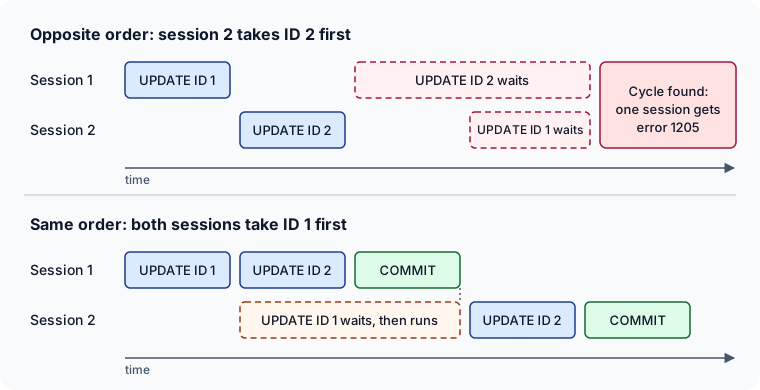
The Deadlocks Guide suggests routing every change to a set of tables through stored procedures. The order then lives in one place, instead of in every application that writes to those tables.
Shorter transactions and row versioning
The order removes the cycle. The Deadlocks Guide lists more measures, and each one shortens the time during which two transactions hold locks at once, or takes locks away:
- Keep user interaction out of a transaction, because its locks stay until it ends.
- Keep a transaction short, and in one batch.
- Use
READ COMMITTEDrather thanREPEATABLE READorSERIALIZABLEwhere the query allows it, because the higher levels keep read locks until the transaction ends. - Turn on
READ_COMMITTED_SNAPSHOT, or use snapshot isolation, so that reads use row versions instead of shared locks. - Bound connections, which share their locks between two connections of one application, are on the list too, but sp_bindsession, which binds them, is deprecated in favor of MARS or distributed transactions.
Row versioning is a database setting rather than a code change. With READ_COMMITTED_SNAPSHOT on, a read under READ COMMITTED uses row versions instead of shared locks, and Microsoft recommends it for all applications, unless an application relies on readers being blocked. SQL Server has it off by default, and Azure SQL Database has it on. While the option changes, only the connection running ALTER DATABASE may be in the database, so close session 2 first:
-- session 1
ALTER DATABASE DeadlockDemo SET READ_COMMITTED_SNAPSHOT ON;
GO
Reconnect session 2 and replay the blocking example. Session 1 updates ID 1 and leaves its transaction open, and session 2's SELECT now returns at once, with the salary that ID 1 had before that open UPDATE, instead of waiting. Reads stop waiting for writes, which is how row versioning reduces the deadlocks between a read and a write. Writes still take exclusive locks, so the two UPDATE statements of the reproduction still deadlock with the option on, and the order is what fixes them.
Snapshot isolation also reads row versions, but a transaction has to ask for it with SET TRANSACTION ISOLATION LEVEL SNAPSHOT, after ALLOW_SNAPSHOT_ISOLATION has been turned on for the database.
The tables a deadlock ran through, on the DbSchema diagram



The deadlock report names the statements and the objects. The next question is which tables those statements share and which foreign keys tie them together, because that's where the order has to be agreed. DbSchema connects to SQL Server, reverse-engineers the schema, and lays the tables out on a diagram with a line for every foreign key, so the path from Employees to whatever else the losing batch wrote is in one picture. Reverse-engineering reads the database into the DbSchema model, and writes nothing to the database.

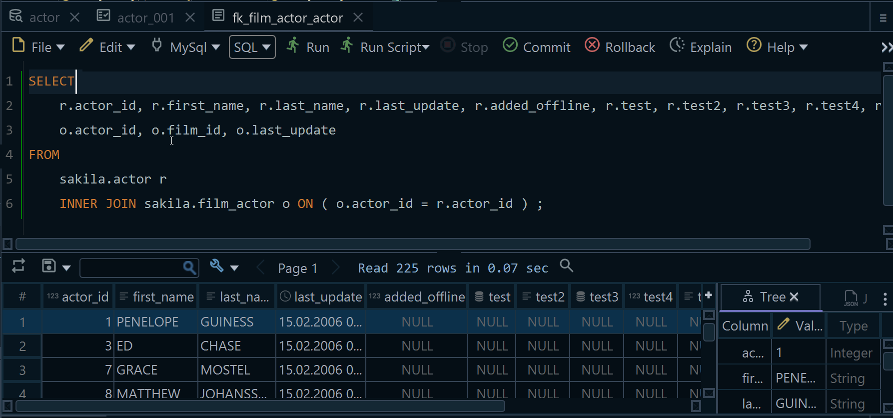
Run the system_health query above in the DbSchema SQL Editor. Open it from the Editors menu, and click Execute Query to run the statement at the cursor and see the result as a table. The SQL History pane keeps every statement of the session, so the query is one click away the next time a batch gets 1205.
The SQL Editor page also says that INSERT, UPDATE and DELETE need an explicit COMMIT, from the Commit and Rollback buttons in the toolbar. Until you click one, SQL Server keeps the statement's exclusive locks, as it did for session 1 above, so commit or roll back before you leave the editor.
Reproducing the deadlock, reading its report and fixing the order are three separate jobs, and only the last one changes anything for good. Download DbSchema, reverse-engineer the schema that the losing batch ran through, and keep the system_health query in a SQL Editor beside the diagram. Connecting, reverse-engineering, the diagrams and the SQL Editor are all in the free Community Edition.
Sources
- Deadlocks Guide, SQL Server
- Transaction Locking and Row Versioning Guide, SQL Server
- MSSQLSERVER_1205
- SET DEADLOCK_PRIORITY (Transact-SQL)
- SET LOCK_TIMEOUT (Transact-SQL)
- sys.dm_tran_locks (Transact-SQL)
- sys.dm_exec_requests (Transact-SQL)
- sys.dm_xe_session_targets (Transact-SQL)
- TRY...CATCH (Transact-SQL)
- XACT_STATE (Transact-SQL)
- THROW (Transact-SQL)
- ALTER DATABASE SET options (Transact-SQL)
- sp_bindsession (Transact-SQL)
- sqlcmd utility
- DbSchema SQL Editor
- DbSchema diagrams









