PostgreSQL List All Schemas – psql, information_schema, pg_namespace, and search_path | DbSchema
PostgreSQL organizes database objects into schemas — named namespaces that contain tables, views, sequences, functions, and other objects. Every PostgreSQL database ships with at least public plus several system schemas such as pg_catalog and information_schema.
If you are searching how to list all schemas in PostgreSQL, the right command depends on where you work: psql, a SQL script, or a GUI such as DbSchema. This guide covers all three and shows how search_path changes what you see.
Table of Contents
- What listing schemas means in PostgreSQL
- Which method should you use?
- List schemas with psql
- List schemas with information_schema
- List schemas with pg_catalog
- Filter out system schemas
- Inspect schema owners and privileges
- Count objects per schema
- Show schema size
- Check the current search_path
- Browse schemas visually in DbSchema
- FAQ
- Conclusion
What listing schemas means in PostgreSQL
Schemas are containers inside one database. Listing schemas helps you answer questions such as:
- which application schemas exist in this database?
- which schema owns the tables I need?
- which schemas are system-managed versus user-created?
- what does the current role see through
search_pathand privileges?
If your next step is browsing tables or describing columns, the companion tutorials are Show Tables in PostgreSQL, Describe Table in PostgreSQL, and Create Table in PostgreSQL.
Which method should you use?
| Method | Best when | Why people choose it |
|---|---|---|
\dn in psql | quick interactive exploration | shortest command and easiest human-readable output |
information_schema.schemata | scripts or portable SQL | standard view and simple column names |
pg_catalog.pg_namespace | PostgreSQL-specific metadata | includes system schemas and richer native details |
| DbSchema | visual browsing and documentation | shows schemas, tables, and relationships together |
List schemas with psql
Connect to PostgreSQL and run:
\dn
Typical output:
        List of schemas
   Name    |  Owner
-----------+----------
 public    | postgres
 sales     | app_user
 reporting | app_user
For extra detail including access privileges, use:
\dn+
psql is the fastest method when you already have a shell open. If you are not connected yet, see the PostgreSQL JDBC driver page for GUI connectivity or use:
psql -U postgres -d my_database
List schemas with information_schema
The SQL-standard view information_schema.schemata shows schemas visible to the current role:
SELECT
  schema_name,
  schema_owner
FROM information_schema.schemata
ORDER BY schema_name;
Example output:
| schema_name | schema_owner |
|---|---|
| information_schema | postgres |
| pg_catalog | postgres |
| pg_toast | postgres |
| public | postgres |
| sales | app_user |
This method is ideal when you need a clean SQL query inside migration scripts, automation, or a JDBC query window.
List schemas with pg_catalog
The native PostgreSQL catalog table gives you more control:
SELECT
  nspname AS schema_name,
  pg_catalog.pg_get_userbyid(nspowner) AS schema_owner,
  nspacl AS access_privileges
FROM pg_catalog.pg_namespace
ORDER BY schema_name;
Use pg_namespace when you also care about internal schemas such as pg_toast or temporary schemas like pg_temp_*.
Filter out system schemas
Most day-to-day work focuses on user schemas. Filter the system ones out like this:
SELECT schema_name
FROM information_schema.schemata
WHERE schema_name NOT IN ('information_schema', 'pg_catalog')
  AND schema_name NOT LIKE 'pg_%'
ORDER BY schema_name;
Or with pg_namespace:
SELECT nspname AS schema_name
FROM pg_catalog.pg_namespace
WHERE nspname NOT LIKE 'pg_%'
  AND nspname <> 'information_schema'
ORDER BY nspname;
That pattern is especially useful before generating reports or counting only application-owned objects.
Inspect schema owners and privileges
Two users can see different schema lists because schema visibility depends on permissions. This query shows ownership and whether the current role can use or create objects in each schema:
SELECT
    n.nspname AS schema_name,
    pg_catalog.pg_get_userbyid(n.nspowner) AS schema_owner,
    has_schema_privilege(n.nspname, 'USAGE') AS can_use,
    has_schema_privilege(n.nspname, 'CREATE') AS can_create
FROM pg_catalog.pg_namespace n
ORDER BY n.nspname;
If can_use is false, the schema may exist but still be impractical for your session. That is one reason information_schema.schemata and pg_namespace can feel different in real environments.
Count objects per schema
Count tables, views, and sequences per schema:
SELECT
    n.nspname AS schema_name,
    COUNT(*) FILTER (WHERE c.relkind IN ('r', 'p')) AS table_count,
    COUNT(*) FILTER (WHERE c.relkind IN ('v', 'm')) AS view_count,
    COUNT(*) FILTER (WHERE c.relkind = 'S') AS sequence_count
FROM pg_catalog.pg_namespace n
LEFT JOIN pg_catalog.pg_class c
  ON c.relnamespace = n.oid
WHERE n.nspname NOT LIKE 'pg_%'
  AND n.nspname <> 'information_schema'
GROUP BY n.nspname
ORDER BY table_count DESC, schema_name;
If you are cleaning up or documenting a database, object counts help you spot which schemas are active and which ones look abandoned.
Show schema size
Get the total size of all base tables in each schema:
SELECT
  table_schema AS schema_name,
  pg_size_pretty(SUM(pg_total_relation_size(quote_ident(table_schema) || '.' || quote_ident(table_name)))) AS total_size
FROM information_schema.tables
WHERE table_type = 'BASE TABLE'
  AND table_schema NOT IN ('information_schema', 'pg_catalog')
GROUP BY table_schema
ORDER BY SUM(pg_total_relation_size(quote_ident(table_schema) || '.' || quote_ident(table_name))) DESC;
This is a practical follow-up before archiving data, reviewing storage, or deciding which schema needs the most attention.
Check the current search_path
Schemas affect object resolution in PostgreSQL, so it is often useful to inspect the active search_path too:
SHOW search_path;
If you want PostgreSQL to resolve unqualified names from a specific schema first, set it explicitly:
SET search_path = sales, public;
To see the fully expanded schema order for the current session:
SELECT current_schemas(true);
That is especially helpful when a query works in one session but fails in another because the schema order is different.
Browse schemas visually in DbSchema
DbSchema is useful when listing schemas is only the beginning and you also need to understand the objects inside them.
With DbSchema you can:
- connect through the PostgreSQL JDBC driver
- reverse-engineer all schemas from the live database
- expand each schema in the left panel to inspect tables, views, routines, and relationships
- drag objects from multiple schemas into one diagram when cross-schema dependencies matter
- publish schema documentation and refine layouts in the diagram editor
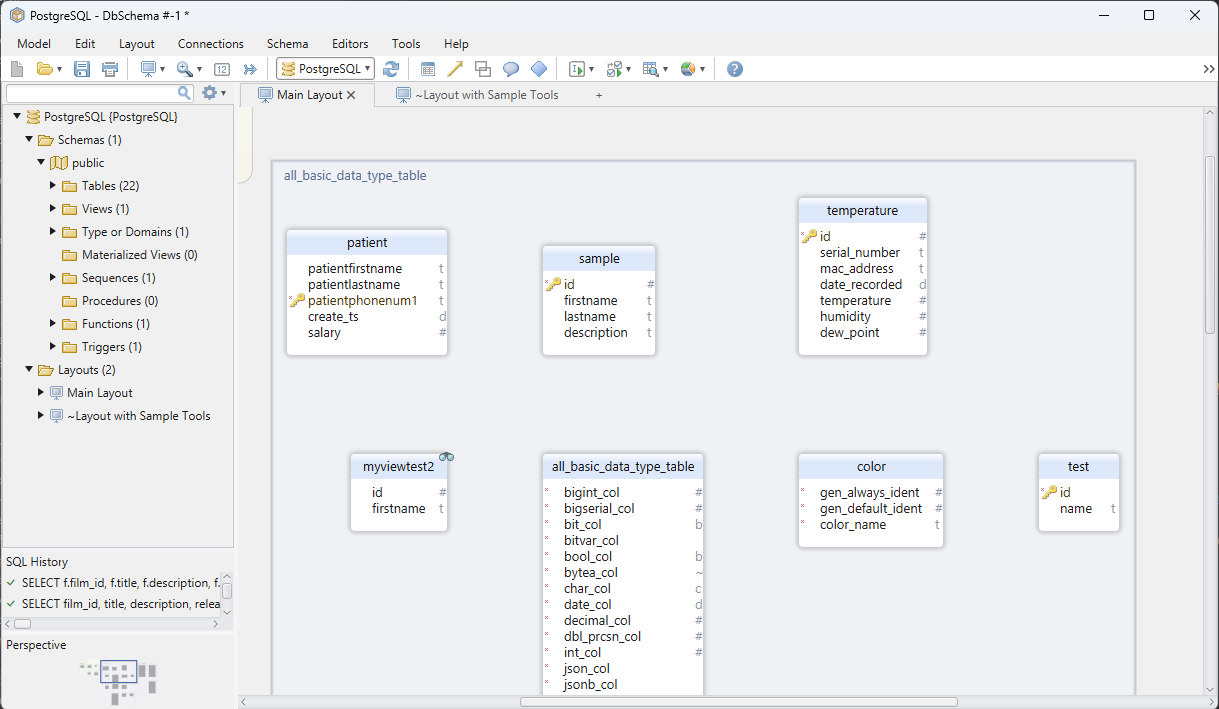
This workflow is especially helpful before you create new routines in PostgreSQL procedures or review existing objects with Show Tables in PostgreSQL.
FAQ
How do I list all schemas in PostgreSQL?
Use \dn in psql, or run SELECT schema_name FROM information_schema.schemata;.
How do I see only user-created schemas?
Filter with WHERE schema_name NOT LIKE 'pg_%' AND schema_name <> 'information_schema'.
What is the difference between information_schema.schemata and pg_namespace?
information_schema.schemata is cleaner and more portable. pg_namespace is PostgreSQL-specific and includes richer internal metadata.
What is the default schema in PostgreSQL?
The default schema is usually public. You can change name resolution order with SET search_path = myschema, public;.
Why can two users see different schema lists?
Schema visibility depends on privileges. The current role, grants, and search_path all affect what feels visible in a session.
Conclusion
To list all schemas in PostgreSQL, use \dn for quick interactive work, information_schema.schemata for standard SQL queries, and pg_namespace when you want PostgreSQL-native metadata. Once you know which schemas exist, the next step is usually checking tables, routines, and permissions inside them.
DbSchema makes that follow-up much easier because the schemas, objects, relationships, and generated documentation live in one visual workflow.






