MySQL DROP CONSTRAINT – Foreign Key, Unique, Check, and Primary Key Syntax | DbSchema
MySQL does not use one generic DROP CONSTRAINT command for every case. Instead, the syntax depends on the constraint type:
- foreign keys use
DROP FOREIGN KEY - unique constraints use
DROP INDEX - check constraints use
DROP CHECKin supported versions - primary keys use
DROP PRIMARY KEY
That version-specific behavior is where most tutorials stay too shallow, so this guide covers MySQL 5.7, 8.0, and 8.4 with practical examples.
Table of Contents
- MySQL drop constraint syntax by version
- Find existing constraint names
- Drop a foreign key
- Drop a unique constraint
- Drop a check constraint
- Drop or replace a primary key
- Disable foreign key checks temporarily
- Common errors and safe workflow tips
- Drop constraints visually in DbSchema
- FAQ
MySQL drop constraint syntax by version
| Constraint type | MySQL 5.7 | MySQL 8.0 | MySQL 8.4 | Notes |
|---|---|---|---|---|
| Foreign key | ALTER TABLE orders DROP FOREIGN KEY fk_orders_customer; | same | same | drop the supporting index separately if you do not need it |
| Unique constraint | ALTER TABLE products DROP INDEX uq_products_sku; | same | same | MySQL stores UNIQUE as an index |
| Check constraint | not enforced; no practical DROP CHECK workflow | ALTER TABLE employees DROP CHECK chk_salary_positive; in 8.0.16+ | same | 5.7 may parse CHECK, but it does not enforce it |
| Primary key | ALTER TABLE products DROP PRIMARY KEY; | same | same | referencing foreign keys must be removed first |
The key takeaway: MySQL has type-specific syntax, not one portable ALTER TABLE ... DROP CONSTRAINT ... pattern.
Find existing constraint names
Before dropping anything, confirm the exact name MySQL is using.
SELECT
    constraint_name,
    constraint_type
FROM information_schema.table_constraints
WHERE table_schema = 'your_database'
  AND table_name = 'orders';
For foreign keys:
SELECT
    constraint_name,
    column_name,
    referenced_table_name,
    referenced_column_name
FROM information_schema.key_column_usage
WHERE table_schema = 'your_database'
  AND table_name = 'orders'
  AND referenced_table_name IS NOT NULL;
And for a quick reality check, SHOW CREATE TABLE is often the fastest way to see what MySQL actually created:
SHOW CREATE TABLE orders;
Drop a foreign key
Use the constraint name, not the column name:
ALTER TABLE orders
DROP FOREIGN KEY fk_orders_customer;
If you also want to remove the backing index:
ALTER TABLE orders
DROP FOREIGN KEY fk_orders_customer,
DROP INDEX fk_orders_customer;
That second pattern is helpful during refactors where the relationship and its supporting index are both obsolete.
Example
Suppose orders.customer_id references customers.customer_id through fk_orders_customer. Dropping only the foreign key removes referential enforcement, but the index may remain and still affect query plans. Decide deliberately whether you want both changes.
If your next step is redesigning relationships, also see Create ER Diagrams for MySQL.
Drop a unique constraint
In MySQL, a unique constraint is dropped as an index:
ALTER TABLE products
DROP INDEX uq_products_sku;
To find the unique index name:
SHOW INDEX FROM products WHERE Non_unique = 0;
This is why articles that say "use DROP CONSTRAINT for unique keys" are misleading for MySQL specifically.
Drop a check constraint
CHECK constraints are enforced starting with MySQL 8.0.16+ and remain supported in 8.4:
ALTER TABLE employees
DROP CHECK chk_salary_positive;
Version note
- MySQL 5.7:
CHECKsyntax may appear in DDL, but the server does not enforce it, so there is no meaningful productionDROP CHECKworkflow. - MySQL 8.0.16+ and 8.4:
DROP CHECKworks as expected.
If you are unsure which version created the table, SHOW CREATE TABLE will reveal whether the check constraint is truly part of the current schema definition.
Drop or replace a primary key
To remove a primary key:
ALTER TABLE products
DROP PRIMARY KEY;
If you want to replace it in one statement:
ALTER TABLE products
DROP PRIMARY KEY,
ADD PRIMARY KEY (id, version);
You cannot drop a primary key while active foreign keys in other tables still reference it. Drop or update the referencing foreign keys first.
Disable foreign key checks temporarily
When you need to truncate or bulk-load related tables in a specific session:
SET FOREIGN_KEY_CHECKS = 0;

TRUNCATE TABLE order_items;
TRUNCATE TABLE orders;

SET FOREIGN_KEY_CHECKS = 1;
Use this carefully:
- it affects only the current session
- it does not fix bad data automatically
- re-enabling checks does not retroactively validate all existing rows
If you are planning a larger schema cleanup, compare the model first in DbSchema so you know exactly which constraints will disappear.
Common errors and safe workflow tips
1. Wrong name
ERROR 1091 usually means the name you typed does not match the real constraint or index name. Check SHOW CREATE TABLE.
2. Dropping the foreign key but forgetting the index
That may leave an unnecessary index behind, which is harmless sometimes but confusing later.
3. Trying DROP CHECK on MySQL 5.7
That is a version mismatch problem. Move to MySQL 8.0.16+ or 8.4 if you need enforced check constraints.
4. Dropping a primary key before reviewing dependent relationships
Always inspect foreign keys first. A diagram makes this much easier than reading table definitions one by one.
Drop constraints visually in DbSchema
DbSchema is useful here because constraint cleanup is easier when you can see the relationships first.
- connect through the MySQL JDBC driver
- import the schema with Connect to Database
- inspect relations in the diagram view
- remove the foreign key, unique index, or check constraint from the editor
- review the generated DDL through schema synchronization
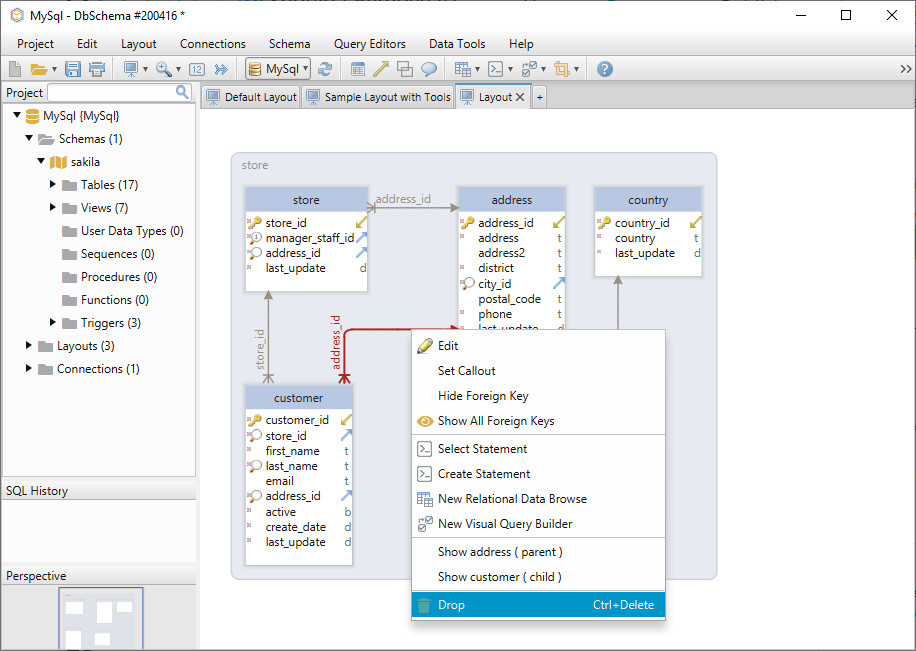
This makes production changes safer because you can review the exact SQL before execution instead of editing DDL blind.
FAQ
Does MySQL support a generic DROP CONSTRAINT statement?
Not in the way some other databases do. In MySQL you use DROP FOREIGN KEY, DROP INDEX, DROP CHECK, or DROP PRIMARY KEY depending on the constraint type.
How do I drop a foreign key constraint in MySQL?
Use:
ALTER TABLE table_name DROP FOREIGN KEY fk_name;
Does dropping a foreign key also remove the index?
No. Drop the index separately if you do not need it.
How do I drop a unique constraint in MySQL?
Use ALTER TABLE table_name DROP INDEX unique_index_name;.
Why does DROP CHECK fail on MySQL 5.7?
Because MySQL 5.7 does not enforce check constraints the same way MySQL 8.0.16+ and 8.4 do.
Can DbSchema help me review these changes before deployment?
Yes. Reverse-engineer the schema, remove the constraint visually, and inspect the generated DDL before applying it.






