SQLite JOINs – INNER, LEFT, CROSS, and FULL JOIN Workarounds | DbSchema

Table of Contents
- What SQLite JOINs do
- Sample schema used in this guide
- INNER JOIN
- LEFT JOIN
- CROSS JOIN
- RIGHT JOIN and FULL OUTER JOIN in SQLite
- SQLite vs PostgreSQL join comparison
- Join performance and index guidance
- Run JOINs in sqlite3, Python, and DbSchema
- FAQ
- Conclusion
- References
SQLite JOINs combine rows from two or more tables based on a related column. They are essential for reporting, analytics, and normal relational design because most real datasets are split across entities such as customers, orders, invoices, products, and categories.
This article covers the JOIN types you are most likely to use in SQLite, explains modern RIGHT JOIN and FULL OUTER JOIN version caveats, compares SQLite with PostgreSQL syntax, and shows how to work visually in DbSchema.
What SQLite JOINs do
Use JOINs when the information you need lives in more than one table.
Typical examples:
- list orders with customer names
- show customers with or without orders
- combine order rows with product rows
- compare datasets or build reports across normalized tables
Well-designed joins usually depend on good schema choices:
Sample schema used in this guide
We will use a small schema that intentionally includes unmatched rows so you can see the difference between join types.
CREATE TABLE customers (
    customer_id INTEGER PRIMARY KEY,
    name        TEXT NOT NULL
);

CREATE TABLE orders (
    order_id     INTEGER PRIMARY KEY,
    customer_id  INTEGER,
    product      TEXT NOT NULL
);

INSERT INTO customers VALUES
    (1, 'Bob'),
    (2, 'Alice'),
    (3, 'Tom'),
    (4, 'Dina');

INSERT INTO orders VALUES
    (101, 3, 'Apples'),
    (102, 1, 'Bananas'),
    (103, 2, 'Grapes'),
    (104, 99, 'Oranges');
Here:
- customer
Dinahas no order - order
104points to a customer id that does not exist
INNER JOIN
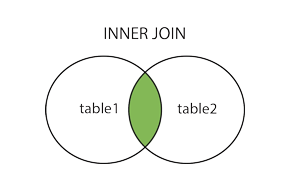
INNER JOIN returns only rows that match on both sides.
SELECT o.order_id, c.name, o.product
FROM orders o
INNER JOIN customers c
    ON o.customer_id = c.customer_id;
Result:
| order_id | name | product |
|---|---|---|
| 101 | Tom | Apples |
| 102 | Bob | Bananas |
| 103 | Alice | Grapes |
Use INNER JOIN when unmatched rows should be excluded.
LEFT JOIN
LEFT JOIN returns every row from the left table plus matching rows from the right table. If there is no match, the right-side columns become NULL.
SELECT c.customer_id, c.name, o.order_id, o.product
FROM customers c
LEFT JOIN orders o
    ON c.customer_id = o.customer_id
ORDER BY c.customer_id;
Result:
| customer_id | name | order_id | product |
|---|---|---|---|
| 1 | Bob | 102 | Bananas |
| 2 | Alice | 103 | Grapes |
| 3 | Tom | 101 | Apples |
| 4 | Dina | NULL | NULL |
This is the most common reporting join because it preserves the main entity even when the related row is missing.
CROSS JOIN
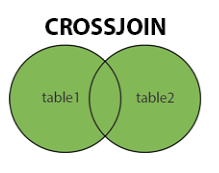
CROSS JOIN returns the Cartesian product: every row on the left joined to every row on the right.
SELECT c.name, o.product
FROM customers c
CROSS JOIN orders o;
Use it carefully. A 1,000-row table crossed with another 1,000-row table already produces 1,000,000 rows.
RIGHT JOIN and FULL OUTER JOIN in SQLite
This is where many older tutorials are outdated.
Modern SQLite support
SQLite added support for RIGHT JOIN and FULL OUTER JOIN in version 3.39.0+. Check your version first:
SELECT sqlite_version();
RIGHT JOIN example
SELECT c.name, o.order_id, o.product
FROM customers c
RIGHT JOIN orders o
    ON c.customer_id = o.customer_id;
This preserves all rows from orders, including order 104, even though it has no matching customer.
FULL OUTER JOIN example
SELECT c.name, o.order_id, o.product
FROM customers c
FULL OUTER JOIN orders o
    ON c.customer_id = o.customer_id;
This preserves:
- matched rows
- customers without orders
- orders without customers
What if your SQLite version is older?
On older SQLite versions:
- simulate
RIGHT JOINby swapping table order and usingLEFT JOIN - simulate
FULL OUTER JOINwithLEFT JOINplusUNION ALL
SELECT c.name, o.order_id, o.product
FROM customers c
LEFT JOIN orders o
    ON c.customer_id = o.customer_id

UNION ALL

SELECT c.name, o.order_id, o.product
FROM orders o
LEFT JOIN customers c
    ON c.customer_id = o.customer_id
WHERE c.customer_id IS NULL;
If you want a deeper refresher on UNION, see SQLite UNION.
SQLite vs PostgreSQL join comparison
The core INNER JOIN and LEFT JOIN syntax is very similar between SQLite and PostgreSQL. The biggest difference is version expectations.
| Topic | SQLite | PostgreSQL |
|---|---|---|
INNER JOIN | supported | supported |
LEFT JOIN | supported | supported |
RIGHT JOIN | supported in 3.39.0+ | supported |
FULL OUTER JOIN | supported in 3.39.0+ | supported |
| Older-version compatibility | often requires rewrites | rarely an issue |
| Version check needed? | yes, in many embedded environments | usually less critical |
If you port SQL between engines, the logic is mostly the same, but SQLite users should verify the bundled version in Python, mobile apps, and embedded products before relying on RIGHT or FULL.
Join performance and index guidance
JOINs become slow when SQLite has to scan large tables without help.
Index the join columns
If you frequently join orders.customer_id to customers.customer_id, index the child-side join column:
CREATE INDEX idx_orders_customer_id ON orders(customer_id);
Check the execution plan
Use:
EXPLAIN QUERY PLAN
SELECT o.order_id, c.name
FROM orders o
JOIN customers c
    ON o.customer_id = c.customer_id;
Then continue with SQLite EXPLAIN PLAN and SQLite Indexes if you need to tune the query.
Select only the columns you need
SELECT * is convenient for demos but wasteful in production joins, especially when tables are wide.
Add filtering early
Restrict rows with WHERE, targeted joins, and good indexes to reduce work before sorting or aggregating.
Run JOINs in sqlite3, Python, and DbSchema
sqlite3 CLI
sqlite3 sales.db
Helpful shell settings:
.mode table
.headers on
Python
import sqlite3

with sqlite3.connect("sales.db") as connection:
    rows = connection.execute("""
        SELECT o.order_id, c.name, o.product
        FROM orders o
        LEFT JOIN customers c
            ON o.customer_id = c.customer_id
        WHERE o.product <> ?
    """, ("Oranges",)).fetchall()
DbSchema
DbSchema is useful when the query is only part of the job and you also need to understand the relationships visually.
- Open the SQLite file in DbSchema.
- Add related tables to the diagram.
- Review or create the foreign key relationship.
- Use Relational Data Explorer or the SQL Editor to build the JOIN.
- Inspect the generated SQL and adjust the join type if needed.
Helpful docs:
DbSchema makes JOINs easier to validate because you can see the schema, the relationship lines, and the query result in the same workflow.
FAQ
Does SQLite support FULL OUTER JOIN?
Yes, on SQLite 3.39.0 and newer. On older versions, simulate it with LEFT JOIN plus UNION ALL.
Why do NULL values appear in a LEFT JOIN result?
Because LEFT JOIN preserves the left-side row even when no matching row exists on the right side.
Should I use ON or USING?
Use ON when you want the most explicit syntax or the column names differ. Use USING(column_name) when both tables share the same join column name and you want shorter SQL.
What is the first performance fix for slow SQLite JOINs?
Index the join columns and inspect the query with EXPLAIN QUERY PLAN.
Conclusion
SQLite JOINs are straightforward for INNER, LEFT, and CROSS queries, and modern SQLite versions also support RIGHT JOIN and FULL OUTER JOIN. The key is knowing your SQLite version, indexing the right columns, and using the join type that matches the reporting question.
For day-to-day query writing, the sqlite3 shell and Python are enough. For schema-aware query building, relationship review, and easier debugging, DbSchema gives you a more visual and maintainable workflow.






