Drop All Tables in PostgreSQL – Safe Methods, CASCADE, and TRUNCATE | DbSchema
Dropping all tables in PostgreSQL is common during development, testing, tenant resets, and rebuilds of staging environments. PostgreSQL does not have a single DROP ALL TABLES command, but there are several safe ways to reach the same result.
Table of Contents
- Before you start
- Version notes
- Method 1: DROP SCHEMA CASCADE
- Method 2: Generate DROP statements and review them
- Method 3: Dynamic SQL with PL/pgSQL
- Method 4: TRUNCATE all tables and keep the structure
- Drop all tables in a specific schema
- Drop tables visually in DbSchema
- FAQ
- Conclusion
Before you start
Before running any destructive command, check these basics:
- confirm you are connected to the correct database with
\cand\conninfo - decide whether you want to remove tables only or the entire schema with views, sequences, and functions
- make a backup if there is any chance you need the data later
- review foreign keys and dependent objects before using
CASCADE - prefer a generated script or an explicit transaction in production-like environments
If you only need to empty tables and keep the structure, skip to the TRUNCATE method instead of dropping anything.
Version notes
- The methods below work on all modern supported PostgreSQL versions, and the core
DROP SCHEMA,DROP TABLE, andTRUNCATEsyntax has been stable for years. - PostgreSQL DDL is transactional, so reviewed
DROP TABLEstatements can be tested insideBEGINandROLLBACK. CASCADEremoves dependent objects automatically. That solves foreign key errors, but it can also remove more objects than expected.
Method 1: DROP SCHEMA CASCADE
The fastest way to remove everything from the public schema is to drop the schema and recreate it:
DROP SCHEMA public CASCADE;
CREATE SCHEMA public;
After recreating the schema, restore the default grants:
GRANT ALL ON SCHEMA public TO postgres;
GRANT ALL ON SCHEMA public TO PUBLIC;
Use this method when you truly want a clean slate. It is fast, but it removes more than tables.
Warning: DROP SCHEMA ... CASCADE also removes views, sequences, types, functions, materialized views, and other objects in the schema.
Method 2: Generate DROP statements and review them
If you want to drop only tables and review the SQL before executing it, generate the statements first:
SELECT string_agg(
         format('DROP TABLE IF EXISTS %I.%I CASCADE;', schemaname, tablename),
         E'\n'
         ORDER BY tablename
       ) AS drop_sql
FROM pg_tables
WHERE schemaname = 'public';
This approach is slower than dropping the schema, but much safer because you can inspect every statement before running it.
If you want a rehearsal, paste the generated SQL inside a transaction:
BEGIN;

DROP TABLE IF EXISTS public.customers CASCADE;
DROP TABLE IF EXISTS public.orders CASCADE;

ROLLBACK;
Change ROLLBACK to COMMIT only when you are sure.
Method 3: Dynamic SQL with PL/pgSQL
If you want to automate the drop while still targeting only tables, use a PL/pgSQL anonymous block:
DO $$
DECLARE
  r RECORD;
BEGIN
  FOR r IN (
    SELECT schemaname, tablename
    FROM pg_tables
    WHERE schemaname = current_schema()
  ) LOOP
    EXECUTE format(
      'DROP TABLE IF EXISTS %I.%I CASCADE',
      r.schemaname,
      r.tablename
    );
  END LOOP;
END $$;
This method keeps views, types, and other non-table objects intact because it only loops through pg_tables.
Method 4: TRUNCATE all tables and keep the structure
If you want to remove all rows but keep the tables, indexes, constraints, and permissions, use TRUNCATE instead of DROP:
DO $$
DECLARE
  tables_to_truncate TEXT;
BEGIN
  SELECT string_agg(format('%I.%I', schemaname, tablename), ', ' ORDER BY tablename)
  INTO tables_to_truncate
  FROM pg_tables
  WHERE schemaname = current_schema();

  IF tables_to_truncate IS NOT NULL THEN
    EXECUTE 'TRUNCATE TABLE ' || tables_to_truncate || ' RESTART IDENTITY CASCADE';
  END IF;
END $$;
TRUNCATE is usually much faster than deleting rows one by one, and RESTART IDENTITY resets sequences owned by the truncated tables.
Drop all tables in a specific schema
To target a schema explicitly, replace current_schema() with the schema name:
DO $$
DECLARE
  r RECORD;
BEGIN
  FOR r IN (
    SELECT schemaname, tablename
    FROM pg_tables
    WHERE schemaname = 'analytics'
  ) LOOP
    EXECUTE format(
      'DROP TABLE IF EXISTS %I.%I CASCADE',
      r.schemaname,
      r.tablename
    );
  END LOOP;
END $$;
Before running a schema-wide cleanup, it helps to list objects with Show Tables in PostgreSQL and List All Schemas in PostgreSQL.
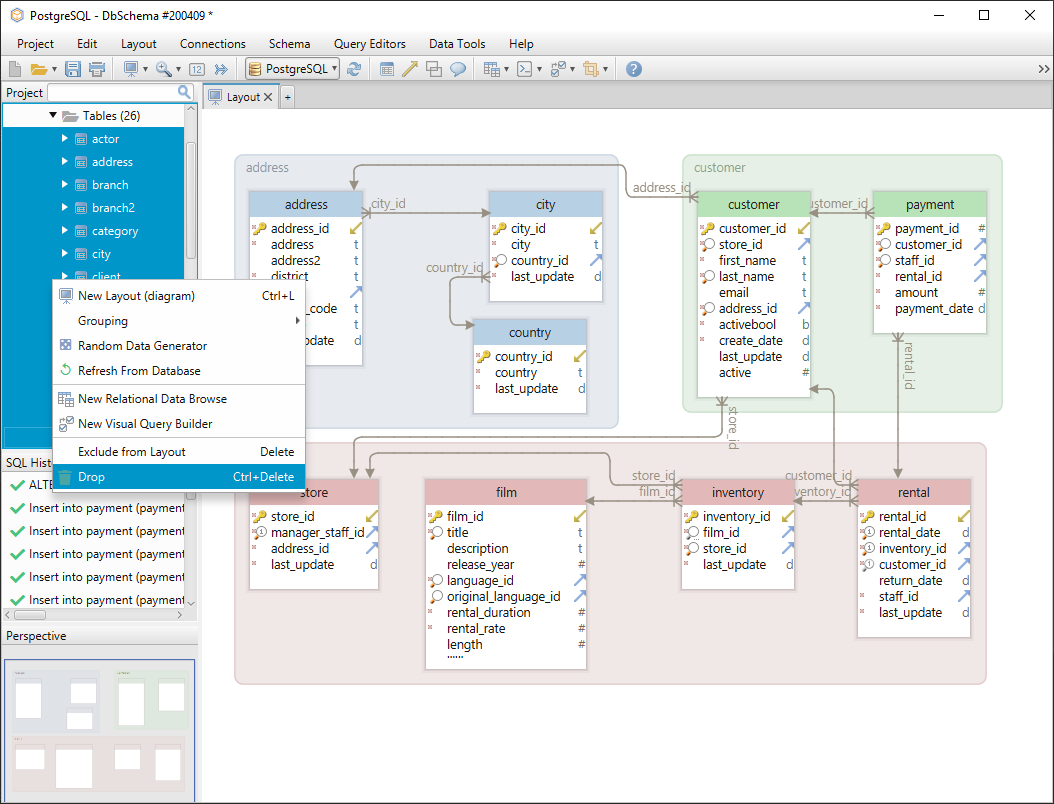
Drop tables visually in DbSchema
DbSchema gives you a safer visual workflow when you want to inspect dependencies before running destructive SQL. Connect using the PostgreSQL JDBC driver, reverse-engineer the schema, and verify which tables are linked by foreign keys before you remove anything.
In DbSchema you can:
- browse the schema diagram and select the tables you want to remove
- review generated SQL in the SQL Editor
- compare the model with the database before execution using schema synchronization
- reconnect and refresh the diagram after the cleanup
This workflow is helpful when a drop involves several schemas or when you want a second visual check before using CASCADE. See also connect to database.
FAQ
What is the fastest way to drop all tables in PostgreSQL?
DROP SCHEMA public CASCADE; CREATE SCHEMA public; is usually the fastest. It removes all objects in the schema, not just tables.
How do I drop all tables without dropping views or sequences?
Use the PL/pgSQL loop that reads from pg_tables. It targets only tables and leaves other object types alone.
What is the difference between DROP TABLE and TRUNCATE?
DROP TABLE removes the table definitions and data. TRUNCATE removes rows but keeps the table structure, indexes, and constraints.
Can I roll back dropping tables in PostgreSQL?
Yes, if you run the reviewed statements inside an explicit transaction and have not committed yet. That makes PostgreSQL much safer than databases where DDL auto-commits by default.
Do I need CASCADE when dropping all tables?
Usually yes, especially when foreign keys exist between tables. Without CASCADE, PostgreSQL may stop with dependency errors.
Conclusion
To drop all tables in PostgreSQL, choose the method that matches your goal: DROP SCHEMA ... CASCADE for a full reset, generated DROP TABLE statements for safer review, PL/pgSQL for automation, or TRUNCATE when you only want to clear data.
When the database is important enough to review visually first, DbSchema helps you inspect dependencies, compare schemas, and run PostgreSQL cleanup scripts through a JDBC connection instead of relying on guesswork.






